Useful ASP.NET Core 2.2 Features

Earlier this week I talked about how I upgraded my podcast site to ASP.NET Core 2.2 and added Health Check features fairly easily. There’s a ton of new features and so far it’s been great running on my site with no issues. Upgrading from 2.1 is straightforward.

I wanted to look at just a few of these that I found particularly interesting.

You can get a very significant performance boost by moving ASP.NET Core in process with IIS.

Using in-process hosting, an ASP.NET Core app runs in the same process as its IIS worker process. This removes the performance penalty of proxying requests over the loopback adapter when using the out-of-process hosting model.

After the IIS HTTP Server processes the request, the request is pushed into the ASP.NET Core middleware pipeline. The middleware pipeline handles the request and passes it on as an HttpContext instance to the app’s logic. The app’s response is passed back to IIS, which pushes it back out to the client that initiated the request.

HTTP Client performance improvements are quite significant as well.

Some significant performance improvements have been made to SocketsHttpHandler by improving the connection pool locking contention. For applications making many outgoing HTTP requests, such as some Microservices architectures, throughput should be significantly improved. Our internal benchmarks show that under load HttpClient throughput has improved by 60% on Linux and 20% on Windows. At the same time the 90th percentile latency was cut down by two on Linux. See Github #32568 for the actual code change that made this improvement.

HTTP/2 is enabled by default. HTTP/2 may be sneaking up on you as for the most part “it just works.” In ASP.NET Core’s Kestral web server HTTP/2 is enabled by default over HTTPS. You can see here at both the command line and in Chrome I’m using HTTP/2 locally.
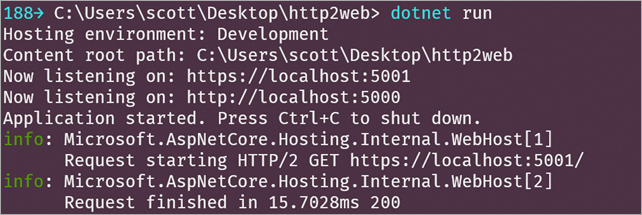
HTTP/2 locally

Here’s Chrome. Note the “h2.”

HTTP/2 in Chrome

Note that you’ll only be able to get HTTP/2 when ALPN (Application-Layer Protocol Negotiation) is available. That means ALPN is supported on:

All in all, it’s a solid release. Go check out the announcement post on ASP.NET Core 2.2 for even more detail!


Sponsor: Preview the latest JetBrains Rider with its Assembly Explorer, Git Submodules, SQL language injections, integrated performance profiler and more advanced Unity support.


© 2018 Scott Hanselman. All rights reserved.


from Scott Hanselman’s Blog http://feeds.hanselman.com/~/587735136/0/scotthanselman~Useful-ASPNET-Core-Features.aspx

Innovative Tools You Should Consider for Your Business

We’re living in a golden age of innovation. Every day, more and more products are introduced to the market that can help streamline and improve your business’ workflow. The internet is loaded with resources that can help you and your team communicate better, share information with each other, and improve your visibility with prospective clients.

However, the sheer size of the internet can make it difficult to weed out good products from the bad. Companies are fighting for the attention of consumers, and often it’s the loudest and most bold advertising scheme that grabs people’s attention—but when has the loudest ever equated with the best?

Innovative Tools You Should Consider for Your Business 1

Despite all the white noise, there are certain products and programs that stand out. Smart businesses have discovered them, and they use them to boost their productivity, drive their operations, and improve their performance.

Upwork

Even though many businesses retain salaried staff, there are always occasional projects that require skills that aren’t possessed by internal employees. In these cases, it’s common for businesses to turn to freelancers. However, vetting freelancers can be tricky. They arrive from word-of-mouth sources, or are found on websites like Craiglist with suspect resumes.

Upwork removes all of these sketchy variables from the freelance hiring process. Their workers are heavily vetted, and their reference system ensures that potential hires are credible, proven, and capable.

Quora

Sometimes no one around the office can answer a technical question, or you and your team are struggling to plan your business’ next step. In these cases, Quora—a crowd sourced Q&A forum—can often provide you with answers. People who sign up and use Quora to both answer and ask questions are vetted in ways that other crowd sourced forums haven’t been in the past. It’s a great place to ask questions about the latest cloud storage hard drive, or how other businesses have dealt with personnel issues.

Slack

Gone are the days when teams need to physically seek each other out for every little question that they might have about a project. If someone in the office needs to send a large batch of files, or to ask a quick question, Slack provides a condensed and closed-off space only accessible by members of your business.

Slack is used by businesses of all sizes, and in many workspaces it’s become mandatory. It can streamline projects, help organize teams and information, while at the same time guaranteeing a level of security that prevents outsiders from accessing your business information.

Innovative Tools You Should Consider for Your Business 2

Squarespace

Even in the internet age when face-to-face interaction has been drastically reduced, first impressions are still important. With so much content on the internet, having a sleek website can help your company stand out from the rest. Enter Squarespace.

Squarespace is a website builder that is easy to use and offers premade templates that will fit any business. Their websites are elegant, minimal, and very easy to manage. If you ever have trouble on the backend, a dedicated support team is there to clear up questions that you may have and to help with any and all development issues. Squarespace is the full package, and should be the first step for any company who wants to present themselves online in a respectable way.

Things

If you’re tired of losing track of information or you’re having difficulty digging up files that you need to transfer, Things offers a streamlined personal task management system that is award-winning and increasingly popular among companies. It helps you manage all of the tasks that might otherwise overwhelm a busy company, and keep everything organized so that employees can easily refer to their designated assignments.

Not only is Things incredibly useful, it’s also easy to use. Other task managers get bogged down by poorly designed user interfaces and an overwhelming number of options, but Things was built with a sleek design that was intended to make navigation simple.

No matter the size of your business or how successful it might be, there’s always room for improvement. It’s worth investing in tools that can take your productivity to the next level. Beginning with the products on this list, you can get your efficiency soaring and will have clients knocking on your door in no time.

The post Innovative Tools You Should Consider for Your Business appeared first on The Crazy Programmer.

from The Crazy Programmer https://www.thecrazyprogrammer.com/2018/12/innovative-tools-you-should-consider-for-your-business.html

How to set up ASP.NET Core 2.2 Health Checks with BeatPulse’s AspNetCore.Diagnostics.HealthChecks

Availability TestsASP.NET Core 2.2 is out and released and upgrading my podcast site was very easy. Once I had it updated I wanted to take advantage of some of the new features.

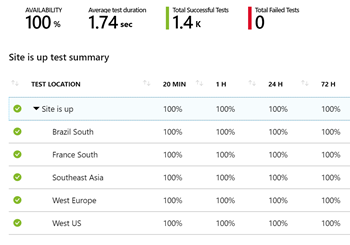
For example, I have used a number of “health check” services like elmah.io, pingdom.com, or Azure’s Availability Tests. I have tests that ping my website from all over the world and alert me if the site is down or unavailable.

I’ve wanted to make my Health Endpoint Monitoring more formal. You likely have a service that does an occasional GET request to a page and looks at the HTML, or maybe just looks for an HTTP 200 Response. For the longest time most site availability tests are just basic pings. Recently folks have been formalizing their health checks.

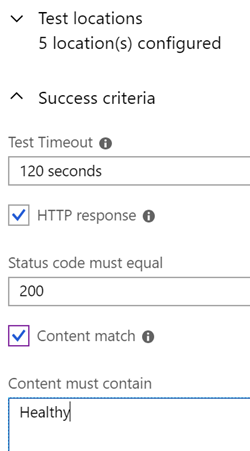
You can make these tests more robust by actually having the health check endpoint check deeper and then return something meaningful. That could be as simple as “Healthy” or “Unhealthy” or it could be a whole JSON payload that tells you what’s working and what’s not. It’s up to you!

image

Is your database up? Maybe it’s up but in read-only mode? Are your dependent services up? If one is down, can you recover? For example, I use some 3rd party back-end services that might be down. If one is down I could used cached data but my site is less than “Healthy,” and I’d like to know. Is my disk full? Is my CPU hot? You get the idea.

You also need to distinguish between a “liveness” test and a “readiness” test. Liveness failures mean the site is down, dead, and needs fixing. Readiness tests mean it’s there but perhaps isn’t ready to serve traffic. Waking up, or busy, for example.

If you just want your app to report it’s liveness, just use the most basic ASP.NET Core 2.2 health check in your Startup.cs. It’ll take you minutes to setup.

// Startup.cs

public void ConfigureServices(IServiceCollection services)
{
services.AddHealthChecks(); // Registers health check services
}

public void Configure(IApplicationBuilder app)
{
app.UseHealthChecks("/healthcheck");
}

Now you can add a content check in your Azure or Pingdom, or tell Docker or Kubenetes if you’re alive or not. Docker has a HEALTHCHECK directive for example:

# Dockerfile

...
HEALTHCHECK CMD curl --fail http://localhost:5000/healthcheck || exit

If you’re using Kubernetes you could hook up the Healthcheck to a K8s “readinessProbe” to help it make decisions about your app at scale.

Now, since determining “health” is up to you, you can go as deep as you’d like! The BeatPulse open source project has integrated with the ASP.NET Core Health Check API and set up a repository at https://github.com/Xabaril/AspNetCore.Diagnostics.HealthChecks that you should absolutely check out!

Using these add on methods you can check the health of everything – SQL Server, PostgreSQL, Redis, ElasticSearch, any URI, and on and on. Just add the package you need and then add the extension you want.

You don’t usually want your health checks to be heavy but as I said, you could take the results of the “HealthReport” list and dump it out as JSON. If this is too much code going on (anonymous types, all on one line, etc) then just break it up. Hat tip to Dejan.

app.UseHealthChecks("/hc",

new HealthCheckOptions {
ResponseWriter = async (context, report) =>
{
var result = JsonConvert.SerializeObject(
new {
status = report.Status.ToString(),
errors = report.Entries.Select(e => new { key = e.Key, value = Enum.GetName(typeof(HealthStatus), e.Value.Status) })
});
context.Response.ContentType = MediaTypeNames.Application.Json;
await context.Response.WriteAsync(result);
}
});

At this point my endpoint doesn’t just say “Healthy,” it looks like this nice JSON response.

{

status: "Healthy",
errors: [ ]
}

I could add a Url check for my back end API. If it’s down (or in this case, unauthorized) I’ll get this a nice explanation. I can decide if this means my site is unhealthy or degraded.  I’m also pushing the results into Application Insights which I can then query on and make charts against.

services.AddHealthChecks()

.AddApplicationInsightsPublisher()
.AddUrlGroup(new Uri("https://api.simplecast.com/v1/podcasts.json"),"Simplecast API",HealthStatus.Degraded)
.AddUrlGroup(new Uri("https://rss.simplecast.com/podcasts/4669/rss"), "Simplecast RSS", HealthStatus.Degraded);

Here is the response, cool, eh?

{

status: "Degraded",
errors: [
{
key: "Simplecast API",
value: "Degraded"
},
{
key: "Simplecast RSS",
value: "Healthy"
}
]
}

This JSON is custom, but perhaps I could use the a built in writer for a free reasonable default and then hook up a free default UI?

app.UseHealthChecks("/hc", new HealthCheckOptions()

{
Predicate = _ => true,
ResponseWriter = UIResponseWriter.WriteHealthCheckUIResponse
});

app.UseHealthChecksUI(setup => { setup.ApiPath = "/hc"; setup.UiPath = "/healthcheckui";);

Then I can hit /healthcheckui and it’ll call the API endpoint and I get a nice little bootstrappy client-side front end for my health check. A mini dashboard if you will. I’ll be using Application Insights and the API endpoint but it’s nice to know this is also an option!

If I had a database I could check one or more of those for health well. The possibilities are endless and up to you.

public void ConfigureServices(IServiceCollection services)

{
services.AddHealthChecks()
.AddSqlServer(
connectionString: Configuration["Data:ConnectionStrings:Sql"],
healthQuery: "SELECT 1;",
name: "sql",
failureStatus: HealthStatus.Degraded,
tags: new string[] { "db", "sql", "sqlserver" });
}

It’s super flexible. You can even set up ASP.NET Core Health Checks to have a webhook that sends a Slack or Teams message that lets the team know the health of the site.

Check it out. It’ll take less than an hour or so to set up the basics of ASP.NET Core 2.2 Health Checks.


Sponsor: Preview the latest JetBrains Rider with its Assembly Explorer, Git Submodules, SQL language injections, integrated performance profiler and more advanced Unity support.


© 2018 Scott Hanselman. All rights reserved.


from Scott Hanselman’s Blog http://feeds.hanselman.com/~/585313356/0/scotthanselman~How-to-set-up-ASPNET-Core-Health-Checks-with-BeatPulses-AspNetCoreDiagnosticsHealthChecks.aspx

4 Data Security Mistakes Most Businesses Make

Being competitive in the 21st century requires a business to stay on the cutting edge of technology. For years, companies all over the world have used customer data to make important decisions about the direction they should take.

The main thing you need to be concerned with when collecting and storing data is keeping it out of the hands of cyber-criminals. A recent poll shows that 60 percent of business owners realize that cyber-attacks are getting more sophisticated and complex with each passing year.

Combating these attacks will require you to implement the use of tools like database activity monitoring and auditing software.

The following are some of the most common data security mistakes you need to work hard to avoid.

Data Security Mistakes Most Businesses Make 1

1. Don’t Try to Chase Technology Trends 

While being on the cutting edge of technology is important, you need to avoid letting this desire to stay “in the know” get in the way of sound data security practices. The most effective security tools on the market today such as encryption or key management have not changed much over the years. Anytime you are presented with a sales pitch about how a program will be the “silver bullet” to end your security woes, be wary.

Often times, these claims will be based on fiction. Instead of trying to reinvent the wheel when it comes to data security, you need to think about sticking with what works.

2. Be Mindful of How You Are Storing Data

In order for your security infrastructure to work properly, all of the information that you collect will need to be able to communicate with the various parts of your system. The biggest mistake most businesses make when it comes to storing is having a standalone container for each IT component they have. While this may seem like a great way to avoid breaches, it can actually create more problems for your infrastructure in the long run.

Creating a top-down network security system that takes into account all of your data is a much better option. Not only will this keep your system more secure, but it will also allow you to see the big picture when it comes to the data you have collected.

3. Bare Minimum Data Security Can Be Highly Ineffective

Saving money is something most business owners are extremely passionate about. In some instances, the desire you have to save money may actually get in the way of sound data security practices. Some business owners try to do the bare minimum when it comes to data security, which usually leads to breaches.

Instead of trying to skimp on the quality and scope of your data security to save money, you need to be more concerned with putting a system in place that works. If you are unsure about what type of data security tools you need, you can consult with an IT security professional to get a bit of guidance.

Data Security Mistakes Most Businesses Make 2

4. Failing to Test the Security Measures You Have in Place

Another mistake that most businesses make when it comes to data security is thinking they can set and forget the software they use. In reality, the security measures you have put in place to protect your data will need to be tested on a regular basis. This is the only way you can know if these measures are effective. If vulnerabilities are found during these tests, you need to work on getting them fixed immediately.

Establishing effective data security is an ongoing process. Getting professional help with this process can help you avoid making mistakes with your data.

The post 4 Data Security Mistakes Most Businesses Make appeared first on The Crazy Programmer.

from The Crazy Programmer https://www.thecrazyprogrammer.com/2018/12/4-data-security-mistakes-most-businesses-make.html

How to remove words from the Windows Autocorrect Spell Check Dictionary

Well crap. I was typing really fast and got a squiggly, so I right-clicked on it and rather than selecting the correct word from the autocorrect dictionary, I clicked Add To Dictionary.

I added the MISSPELLED WORD to the Dictionary! Now Windows is suggesting that I spell this word (and others) wrong in all apps.

At this point I also realized that I had no idea how to REMOVE a word from the Windows Spell Check Dictionary. However, I do know that Windows isn’t a black box so there must be a dictionary somewhere. It’s gotta be a file or a registry key or something, right?

It’s even easier than I thought it would be. The Windows 10 custom dictionaries are at %AppData%\Microsoft\Spelling\

The Windows 10 custom dictionaries are at %AppData%\Microsoft\Spelling\

I just opened the default.dic file in Notepad and removed the misspelled word.

Opening default.dic in Notepad

Whew. I can’t tell you how many wrong words have found there way in there over the years. Hope this helps you in some small way.


Sponsor: Preview the latest JetBrains Rider with its Assembly Explorer, Git Submodules, SQL language injections, integrated performance profiler and more advanced Unity support.


© 2018 Scott Hanselman. All rights reserved.


from Scott Hanselman’s Blog http://feeds.hanselman.com/~/584291634/0/scotthanselman~How-to-remove-words-from-the-Windows-Autocorrect-Spell-Check-Dictionary.aspx

Advantages and Disadvantages of DBMS

In this article you will know about advantages and disadvantages of DBMS.

Database management system is an efficient way to create, manage and update databases and also is a prolific replacement of the old file systems which were earlier used to store and retrieve records. The DBMS facilitates the users to work with large amount of databases with much ease and efficiency but it is very important to know the advantages and disadvantages of the same before we start working with it. So, let have a look on it.

Also Read: Difference between File System and DBMS

Advantages of DBMS

1. Data Abstraction

This is one of the most required characteristics of any software system and DBMS works quite efficiently in this field too. It hides the unnecessary details from the end user and just shows what is useful to him for completion of his task. Thus, it also reduces the overhead of hidden complexities and makes it an easy system to work with.

2. Data Redundancy Control

Database Management System also removes the redundancy in the record system efficiently by using the ACID  (Atomicity, Consistency, Isolation and Durability) and normalization properties.

3. Minimization of Data Inconsistency

Since the Database Management System reduces the redundancy of the system it also easily makes the system consistent by removing all the inconsistencies.

4. Ease in Data Manipulation

The DBMS uses database manipulative languages such as SQL with commands like SELECT (used for selection of records from one or more tables), INSERT (for insertion of a record into tables), UPDATE (updates the existing information of records) and DELETE (for removing one or more records from a table) to manipulate the information of the database so that it is always easily updated.

5. Data Security

The Database Management System, unlike the former file system comes with a secured login password (separate for admin and the user), through which the user and admin (also for changes) access can be secured up to a large extent.

6. Concurrent Access of Database

Multiple users can access the same database and thus data sharing is made possible easily. Users don’t have to worry about being only at a particular place for using the database; they may use it according to their ease and as per the basic software and hardware requirements of the database.

7. Improved Data Access

The data is stored in a sorted manner which makes the data access very efficient and easy. The user can directly retrieve what he wants to without bothering about the excess and redundant records other than what is required by him. This also saves a lot of time.

8. Data Independence

The data stored in a particular database is totally independent of any other data. We can look for the data of our choice without considering any other data.

Disadvantages of DBMS

1. Increased Cost

In order to have a Database Management System, we need to have a high speed processor along with a large memory size which requires an expensive hardware and hence correspondingly expensive software too.

Also, in order to convert our data into a Database Management System we need to spend a lot which adds on to the cost of the Database Management System.

In order to work with a Database Management System we also require a trained and educated staff and this also requires a good amount.

So, Database Management System results in a costlier system altogether.

2. Management Complexity

Once you have equipped Database Management System it is not a child’s game to manage the same. You need to have good staff with management capabilities; at times it becomes quite complicated to decide from where to pick data and where to save that data.

3. Maintenance Cost

Database Management System also calls for a high maintenance cost which includes the cost to maintain the Database Management System once it is made.

4. Frequency Upgrade/Replacement Cycle

There need to be frequent upgrades and changes in the Database Management System in order to stay up-to-date and in accordance with the latest technological trends and developments in the markets. Sometimes these changes and updating are so fast that the users don’t feel easy working with the systems and even the admin may find it a bit difficult to keep up with the system’s changes (learning new commands and understanding them every time a new update is made).

DBMS is a wide area and before working in this field it is very important how it can be useful to us as per our needs. The above points give a great idea around that prospect.

The post Advantages and Disadvantages of DBMS appeared first on The Crazy Programmer.

from The Crazy Programmer https://www.thecrazyprogrammer.com/2018/12/advantages-and-disadvantages-of-dbms.html

Announcing WPF, WinForms, and WinUI are going Open Source

Buckle up friends! Microsoft is open sourcing WPF, Windows Forms (winforms), and WinUI, so the three major Windows UX technologies are going open source! All this is happening on the same day as .NET Core 3.0 Preview 1 is announced. Madness! 😉

.NET Core 3 is a major update which adds support for building Windows desktop applications using Windows Presentation Foundation (WPF), Windows Forms, and Entity Framework 6 (EF6). Note that .NET Core 3 continues to be open source and runs on Windows, Linux, Mac, in containers, and in the cloud. In the case of WPF/WinForms/etc you’ll be able to create apps for Windows that include (if you like) their own copy of the .NET Framework for a clean side-by-side install and even faster apps at run time. The Windows UI XAML Library (WinUI) is also being open sourced AND you can use these controls in any Windows UI framework.

That means your (or my!) WPF/WinForms/WinUI apps can all use the same controls if you like, using XAML Islands. I could take the now 10 year old BabySmash WPF app and add support for pens, improved touch, or whatever makes me happy!

WPF and Windows Forms projects are run under the .NET Foundation which also announced changes today and the community will guide foundation operations. The .NET Foundation is also changing its governance model by increasing the number of board members to 7, with just 1 appointed by Microsoft. The other board members will be voted on by the community! Anyone who has contributed to a .NET Foundation project can run, similar to how the Gnome Foundation works! Learn more about the .NET Foundation here.

On the runtime and versioning side, here’s a really important point from the .NET blog that’s worth emphasizing IMHO:

Know that if you have existing .NET Framework apps that there is not pressure to port them to .NET Core. We will be adding features to .NET Framework 4.8 to support new desktop scenarios. While we do recommend that new desktop apps should consider targeting .NET Core, the .NET Framework will keep the high compatibility bar and will provide support for your apps for a very long time to come.

I think of it this way. The .NET Framework on Windows is slowing down. It’s not going anywhere but it’s rock solid and stable. But if you’ve got a desktop app and you want the latest and greatest features, new controls, new C#, etc language features, then use .NET Core as it’s going to be updated more often. The new hotness is going to come in .NET Core first and that’s the fresh tech train going forward, but .NET Framework 4.8 is still a fundamental part of Windows itself. Target the .NET that is right for your project and/or business.

I don’t want to hear any of this “this is dead, only use that” nonsense. We just open sourced WinForms and have already taken Pull Requests. WinForms has been updated for 4k+ displays! WPF is open source, y’all! Think about the .NET Standard and how you can run standard libraries on .NET Framework, .NET Core, and Mono – or any “.NET” that’s out there. Mono is enabling running .NET Standard libraries via WebAssembly. To be clear – your browser is now .NET Standard capable! There are open source projects like https://platform.uno/ and Avalonia and Ooui taking .NET in new and interesting places. Blazor makes Web UIs in .NET with (preview/experimental) client support with Web Assembly and server support included in .NET 3.0 with Razor Components. Only good things are coming, my friends!

.NET ALL THE THINGS

.NET Core runs on Raspberry Pi and ARM processors! .NET Core supports serial points, IoT devices, and there’s even a System.Device.GPIO (General Purpose I/O) package! Go explore https://github.com/dotnet/iot to really get your head around how much cool stuff is happening in the .NET space.

I want to encourage you to go check out Matt Warren’s extremely well-researched post “Open Source .NET – 4 years later” to get a real visceral sense of how far we’ve come as a community. You’ll be amazed!

Now, go play!

Enjoy.


Sponsor: Preview the latest JetBrains Rider with its Assembly Explorer, Git Submodules, SQL language injections, integrated performance profiler and more advanced Unity support.


© 2018 Scott Hanselman. All rights reserved.


from Scott Hanselman’s Blog http://feeds.hanselman.com/~/583683412/0/scotthanselman~Announcing-WPF-WinForms-and-WinUI-are-going-Open-Source.aspx

2Captcha – Human-Powered Image and CAPTCHA Recognition Service

With due technical advancement and increasing demand of software for various tasks (of our individual, personal as well as commercial needs), the authenticity of using these software has become as crucial as they themselves are. Captchas are one of the most commonly used methods for maintaining the authenticity of these software platforms.  Often, we face problems while solving these captchas because of the time they take specially if we need to work on them on a large scale, they can take away most of our precious work time.

About 2Captcha

2Captcha

2Captcha.com is a platform wherein we can get the accurate solutions of our captcha without bothering about the time problems. The prolific platform can recognize both text and graphical captchas, has a simple API, comes with a universal support for all softwares and most importantly, saves a lot of time of the users. The users just have to upload their captchas on 2captcha.com/in.php.

When the Captcha gets uploaded, the server stores the captcha for further processing and immediately provides you with an ID for your request. The server then altos your captcha to a worker for solving it and thereafter sends the solution back to you. As a cherry on the cake, it also provides you with quite reasonable rates ($0.0005 per captcha).

2Captcha.com also entertains the workers and gives them an easy environment for working. All they have to do is register them with 2Captcha.com and thereafter they can get along with the site just by clicking on “start work”. Before the workers may start working, they also train them for 5-10 minutes. Just by having a computer, keyboard and an internet connection, the workers can easily get along with them.

Conclusively, the 2Captcha.com provides for a 24*7 running, and accurate service which is a time saving blessing for its customers.

The post 2Captcha – Human-Powered Image and CAPTCHA Recognition Service appeared first on The Crazy Programmer.

from The Crazy Programmer https://www.thecrazyprogrammer.com/2018/12/2captcha.html

On Developer Advocacy

TeamworkNaming things is hard. I’ve talked before about the term “evangelism” and my dislike for it. Evangelism, Advocacy, Developer Relations, PR, Marketing, and on and on. More and more I’m just trying to educate and maybe entertain a little. So I like Edutainment, myself, hat tip to KRS-One.

I’m getting on a plane tomorrow to go to the Microsoft Azure + AI Conference @DevIntersection and the Free Microsoft Connect 2018 Event (you can watch online all day!) and as I was packing I was struck with a few thoughts I wanted to share here.

What a privilege it is to speak about products that so many people have worked on and (hopefully) so many people will enjoy. Especially ones as large as Azure or Visual Studio – thousands of people work so hard! Engineers, Program Managers, Testers, Community Members…people from all over working on each release so a select few of us get on stage to share it with you! And who am I to have this privilege?

Don’t think for a second that when you’re giving a technical talk that it’s about you. You’re sitting on a stack of software you had a small part in writing and standing on the shoulders of giants of generators of engineers and creators who came before you. When I do talks where I’m representing a huge group I reflect on this with gratitude.

If you work on any of the products I’m showing, know this; I may be one of the talking heads or a visible grand marshal but we work for you and we never forget it. My job at events like this is to make the product – your work – shine. I take that job very seriously, and if it looks like it’s effortless, that’s because of the massive amount of work we put into the presentation. Hours of practice, story arcs, literally blocking movement as if it were a play or stage show, camera work, and transitions. Deeping understanding what we’re presenting and why it’s awesome and why you’re proud of it.

I’m writing this note for all the other advocates and visible community members.

What a joy and privilege it is to stand up and represent our co-workers and follow engineers and to tell the stories of the things they build!

Let that privilege both put motivation in you and propel you forward to present their work – your teams’ work.

I appreciate you all, both inside and out, and I’ll will do my best to represent your team and the larger community to the best of my ability.


Sponsor: Looking for a new challenge? Hired is the leading job marketplace that connects engineers to their next challenge. Let Hired connect you to your next challenge. Sign up now.


© 2018 Scott Hanselman. All rights reserved.


from Scott Hanselman’s Blog http://feeds.hanselman.com/~/583308900/0/scotthanselman~On-Developer-Advocacy.aspx

The 2018 Christmas List of Best STEM Toys for Kids

Hey friends! This is my FIFTH year doing a list of Great STEM Christmas Toys for Kids! Can you believe it? In case you missed them, here’s the previous years’ lists! Be aware I use Amazon referral links so I get a little kickback (and you support this blog!) when you use these links. I’ll be using the pocket money to…wait for it…buy STEM toys for kids! So thanks in advance!

OK, let’s do it!

littleBits

I’ve always liked littleBits but when they first came out I thought they were expensive and didn’t include enough stuff. Fast forward and littleBits have dropped in price and built a whole ecosystem of littleBits that work together. This year the most fun is the littleBits Marvel Avengers Inventor Kit. At the time of this writing, this kit is 33% off at Amazon. You can built your own Iron Man (or Ironheart!) gauntlet and load it up with littleBits that can do whatever you’d like. One particularly cool thing included is an LED Matrix that you can address directly by writing code with the iOS or Android app.

littleBits Marvel Avengers Inventor Kit

Kano – Computer Kit and Wand

Both my kids love the Kano Computer Kit, now updated for 2018. It’s a complete Raspberry Pi 3 kit that includes the keyboard, mouse, case, LED lights, and everything you’d need to build a Pi. This year they’ve branched out to the Kano Happy Potter Coding Kit that you can use to build a wand and learn to code. The “wand” is a custom PCB with codeable LEDs, buttons, and batteries that the kids put inside a wand. The wand is Bluetooth and includes lots of tech like an accelerometer, gyroscope, magnetometer, and a vibrating rumble pack. All of this tech is controllable with laptops or smart devices and code with JavaScript.

Harry Potter Kano Coding Kit and Wand

UbTech JIMU Robot – Unicornbot Kit

UbTech has a whole series of Technics-style Robot kits. There’s the usual tanks and cars, but there’s also some more creative and “out there” ones like this 400-piece Unicorn Robot. It includes color sensors, server motors, a DC motor, and a light up horn. It’s also codeable/controllable via an iOS or Android app. Very cool!

I’d really like their Lynx Alexa controllable walking robot but it’s way out of my price range. Still fun to check out though!

Unicornbot

Erector by Meccano Kits

We’ve found these Erector by Meccano Kits to be inexpensive and well-built. The 25-in-1 kit is great and includes a container and over 600 pieces. I like these metal kits because they feel like the ones I had in my childhood. Kids learn how to use motors, pulleys, and other explore functional motion.

Erector Set

Osmo Genius Kit for iPad

The Osmo Genius is quite clever and based on one deceptively simple idea – what if the iPad camera faced downward and could see the table in front of the child? It came with a base and a reflector that directs the front-facing camera downwards. Then the educational games are written to see what’s happening on the table and provide near-instant feedback. You can start with the base kit and later optionally add kits and games.

Osmo Genius Kit for iPad

Elenco 130-in-1 Electronic Playground and Learning Center

I like classic toys and while toys with bluetooth and fancy features are cool, I want to balance it out with the classics that let you explore the physical world. These also tend to be more affordable as well.

I really like this classic electronic trainer with 130 experiments like an AM broadcast station, Electronic Organ, LED strobe light, Timer, Logic Circuits and much, much more. The 50-in-One version is just $16! Frankly all the Elenco products are fantastic.

image

Piper Computer Kit (2018 Edition)

I had this on the list last year but my kids still love it. We have the 2016 kit and it’s been updated for 2018.

The Piper is a little spendy at first glance, but it’s EXTREMELY complete and very thoughtfully created. Sure, you can just get a Raspberry Pi and hack on it – but the Piper is not just a Pi. It’s a complete kit where your little one builds their own wooden “laptop” box (more of a luggable), and then starting with just a single button, builds up the computer. The Minecraft content isn’t just vanilla Microsoft. It’s custom episodic content! Custom voice overs, episodes, and challenges.

What’s genius about Piper, though, is how the software world interacts with the hardware. For example, at one point you’re looking for treasure on a Minecraft beach. The Piper suggests you need a treasure detector, so you learn about wiring and LEDs and wire up a treasure detector LED while it’s running. Then you run your Minecraft person around while the LED blinks faster to detect treasure. It’s absolute genius. Definitely a favorite in our house for the 8-12 year old set.

Piper Raspberry Pi Kit

I hope you have a great holiday season!

FYI: These Amazon links are referral links. When you use them I get a tiny percentage. It adds up to taco money for me and the kids! I appreciate you – and you appreciate me-  when you use these links to buy stuff.


Sponsor: Let top companies apply to you. Create a free profile on Hired and unlock the ability to let companies apply to you, not the other way around. Create a free profile.


© 2018 Scott Hanselman. All rights reserved.


from Scott Hanselman’s Blog http://feeds.hanselman.com/~/582817310/0/scotthanselman~The-Christmas-List-of-Best-STEM-Toys-for-Kids.aspx

Design a site like this with WordPress.com
Get started