5 Best Django Books for Beginners

Here you will find list of best django books for beginners to learn.

If you’re eager to learn Django as it is so popular nowadays for its simplicity, then you can follow our articles that made Django more easy to learn.

But Sometimes we prefer reading offline rather than online as we’re habitual of it or maybe you think that reading online brings distraction ( for example – ads, pop-ups ). If you’re one of them who prefer reading books offline more than reading stuff online then this article is for you.

So here is the list of 5 best books for Django.

  1. Django for beginners (by William S. Vincent)
  2. Build your first website with Django 2.1 (by Nigel George)
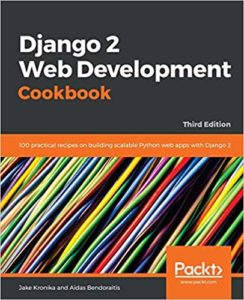
  3. Django 2 Web Development Cookbook (by Jake Kronika)
  4. Django 2 by Example (by Antonio Mele)
  5. Django 2.1 Tutorial (by Hojun Lee and Suwon Choi)

Yes, you may heard a lot of other books to learn Django, they’re also good but these are the latest books available and also easy to understand. Let’s see each book in detail.

5 Best Django Books

Django for Beginners: Build websites with Python and Django

Django for Beginners: Build websites with Python and Django

Author: William S. Vincent

Amazon: https://amzn.to/2HvPXlx

As mentioned in the name, this book is for beginners. The topics, covered in this book are:

  • Basics of Django 2.1 and Python 3.7
  • Using virtual environments for Django projects ( pipenv )
  • Templates and URLs
  • Class-based views
  • User models ( Custom )
  • User authentication
  • Authorization
  • Permissions
  • Deployment and Testing
  • Projects-
    • A simple hello world app
    • Message Board app
    • A blogging app with multiple user accounts
    • A newspaper app with reader comments and completer user registration

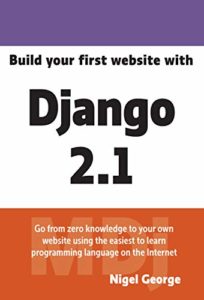
Build your first website with Django 2.1

Build your first website with Django 2.1

Author: Nigel George

Amazon: https://amzn.to/2QWyeCR 

Again this book is based on the latest version of Django and the topics, covered in this books are:

  • Why Django?
  • Introduction to Python
  • Structure of Django
  • Models in Django
  • Views in Django
  • Templates in Django
  • Working with admin
  • Generic views
  • Working with simple forms
  • Working with complex forms and model forms
  • Handling users
  • Restricted content
  • Uploading files
  • How to send emails in Django?
  • How to deploy?

Django 2 Web Development Cookbook

 Django 2 Web Development Cookbook     

Author: Jake Kronika

Amazon: https://amzn.to/2Cw7l3J

The topics, covered in this book are:

  • Basics of Django 2.1
  • Structuring Database structure and modeling
  • Working with forms and views
  • Templates
  • Working with javascript in Django
  • working with Admin interface
  • Security and Performance
  • Django CMS
  • Testing and Deployment

Django 2 by Example

Django 2 by Example

Author: Antonio Mele

Amazon: https://amzn.to/2CwuHGg

In this book, you’ll learn Django basics as well as learn how to build professional web applications with the help of 4 project examples. Antonio mele also has this course on Udemy if you ever face any problem related to this book or any topic.

Topics, covered in this book are:

  • Django basics
  • Working with views and templates
  • Integration with other technologies such as Redis and Celery
  • Develop pluggable Django applications
  • using cache frameworks
  • adding internationalization to your Django projects
  • using JavaScript and AJAX in Django projects
  • adding social features into Django projects
  • Build RESTful APIs for your application
  • Projects:
    • Blog application
    • a social image book marking website
    • an online shop
    • an e-learning platform

Django 2.1 Tutorial

Django 2.1 Tutorial

Author: Hojun Lee and Suwon Choi

Amazon: https://amzn.to/2VYa3rA

This ebook will  help you to learn the basics of Django while working on a simple travel blog. So in this book, you’ll not learn Django in too much detail, but the basic stuff that is required to build a simple blog. It is a Tutorial Project.

So this was the list of books that we recommend to every beginner. Comment down below if you know about any other best book to learn django framework.

The post 5 Best Django Books for Beginners appeared first on The Crazy Programmer.

from The Crazy Programmer https://www.thecrazyprogrammer.com/2019/01/best-django-books.html

Installing the .NET Core 2.x SDK on a Raspberry Pi and Blinking an LED with System.Device.Gpio

The CrowPi from Elecrow is an amazing STEM KitI’ve written about running .NET Core on Raspberry Pis before, although support was initially limited. Now that Linux ARM32 is a supported distro, what else can we do?

We can certainly quickly and easily install Docker on a Raspberry Pi and be running C# and .NET Core programs in minutes. We can run .NET Core in a stack of Raspberry Pis as a Kubernetes Cluster, making our own tiny cloud and install a serverless platform in it like OpenFaas!

If you have a Raspberry Pi 3 with Raspbian on it like I do, check out https://dotnet.microsoft.com/download/dotnet-core/2.2 and note that last part of the URL. You can ask for /2.1, /2.0, etc, just in case you’re reading this post in the future, like tomorrow. 😉 Everything is always at https://dotnet.microsoft.com/download/archives so you can tell what’s Current and what’s not.

For example, if I end up here https://dotnet.microsoft.com/download/thank-you/dotnet-sdk-2.2.102-linux-arm32-binaries I can grab the exact blob URL from the “try again” link and then wget it on my Raspberry Pi. You’ll want to get a few prerequisites first. Note these blob links change when new stuff comes out, so you’ll want to double check to get latest.

sudo apt-get install curl libunwind8 gettext

wget https://download.visualstudio.microsoft.com/download/pr/9650e3a6-0399-4330-a363-1add761127f9/14d80726c16d0e3d36db2ee5c11928e4/dotnet-sdk-2.2.102-linux-arm.tar.gz
wget https://download.visualstudio.microsoft.com/download/pr/9d049226-1f28-4d3d-a4ff-314e56b223c5/f67ab05a3d70b2bff46ff25e2b3acd2a/aspnetcore-runtime-2.2.1-linux-arm.tar.gz

I got the Linux ARM 32-bit SDK as well as the ASP.NET Runtime so I have those packages available for any web apps I choose to make.

Then we’ll extract. You can set it up as a user off of $HOME or in /opt/dotnet and then link to /usr/local/bin.

mkdir -p $HOME/dotnet && tar zxf dotnet-sdk-2.2.102-linux-arm.tar.gz -C $HOME/dotnet

export DOTNET_ROOT=$HOME/dotnet
export PATH=$PATH:$HOME/dotnet

Don’t forget to untar the ASP.NET Runtime as well.

tar zxf aspnetcore-runtime-2.2.1-linux-arm.tar.gz -C $HOME/dotnet

Cool. You will want to add the PATH to your profile if you want it to survive restarts. Then run “dotnet –info” to see if it works.

pi@crowpi:~ $ dotnet --info

.NET Core SDK (reflecting any global.json):
Version: 2.2.102

Runtime Environment:
OS Name: raspbian
OS Version: 9
OS Platform: Linux
RID: linux-arm
Base Path: /home/pi/dotnet/sdk/2.2.102/

Host (useful for support):
Version: 2.2.1

.NET Core SDKs installed:
2.2.102 [/home/pi/dotnet/sdk]

.NET Core runtimes installed:
Microsoft.AspNetCore.All 2.2.1 [/home/pi/dotnet/shared/Microsoft.AspNetCore.All]
Microsoft.AspNetCore.App 2.2.1 [/home/pi/dotnet/shared/Microsoft.AspNetCore.App]
Microsoft.NETCore.App 2.2.1 [/home/pi/dotnet/shared/Microsoft.NETCore.App]

Looks good.

At this point I have BOTH the .NET Core runtime (for running stuff) as well as all the ASP.NET runtime for web apps or little microservices AND the .NET SDK which means I can actually compile code (slowly) on the Pi itself. It’s up to me/you. If you aren’t ever going to develop (compile code) on the Raspberry Pi, you can just install the runtime, but I think it’s nice to be prepared.

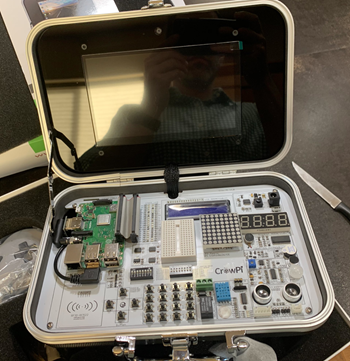
I am installing all this on a wonderful Raspberry Pi kit called a “CrowPi.” They had a successful KickStarter and are now selling a Raspberry Pi Educational Kit with an attached custom board with dozens of components. Rather than having to connect motion sensors, soud sensors, touch sensors, switches, buttons, and carry around a bunch of wires, you can experiment and play with stuff in a very organized case that also has a 7inch HDMI touch screen. They also have 21 great Python Video Courses on their YouTube Channel on how to get started with hardware. It’s a joy of a device. More on that later.

NOTE: I talked to the #CrowPi people and they gave me an Amazon COUPON that’s ~$70 off! The coupon is 8EMCVI56, add it during checkout. The Advanced Kit is at https://amzn.to/2SVtXl2 #ref and includes everything, touchscreen, keyboard, mouse, power, SNES controllers, motors, etc. I will be doing a full review soon. Short review is, it’s amazing.

Now that .NET Core is installed, I can start exploring the fun happening over at https://github.com/dotnet/iot. It’s filled with lots of new functionality inside of System.Device.Gpio. Remember that GPIO means “General Purpose Input/Output” which, on a Raspberry Pi, is connected to a ribbon cable on the CrowPi with lots of cool sensors ready to go!

I could build my Raspberry Pi apps on my Windows/Mac/Linux machine and I’ll find it much faster to compile. Then I can “scp” (secure copy) it over to the Pi. It’s nice to point out that Windows 10 includes scp.exe now by default!

In this example, by adding -r linux-arm I’m copying a complete self-contained app over the Pi, so don’t actually need to install .NET Core like I did above. If instead, I didn’t use -r (to declare a specific runtime) then I would need to make sure I’ve got the right versions on my dev box vs my RPi, so consider what’s best for you.

Here I am in my Windows machine that also has the same version of the .NET Core SDK installed. I’m in .\rpitest with a console app I made with “dotnet new console.” Now I want to build and copy it over to the Pi.

dotnet publish -r linux-arm

cd bin\Debug\netcore2.1\linux-arm\publish
scp -r . pi@crowpi:/home/pi/Desktop/rpitest

From the Pi, I’ll need to “sudo chmod +x” the rpitest application to make sure it is executable.

There’s a brilliant video from Cam Soper that shows you in great detail how to run .NET Core 2.x on a Raspberry Pi and I recommend you check it out as well.

IoT devices expose much more than serial ports. They typically expose multiple kinds of pins that can be programmatically used to read sensors, drive LED/LCD/eInk displays and communicate with our devices. .NET Core now has APIs for GPIO, PWM, SPI, and I²C pin types.

These APIs are available via the System.Device.GPIO NuGet package. It will be supported for .NET Core 2.1 and later releases. There’s some basic samples here https://github.com/dotnet/iot/blob/master/samples/README.md to start with.

From Microsoft:

Most of our effort has been spent on supporting these APIs in Raspberry Pi 3. We plan to support other devices, like the Hummingboard. Please tell us which boards are important to you. We are in the process of testing Mono on the Raspberry Pi Zero.

For now System.Device.Gpio is a prelease so you’ll want to add a nuget.config to your project with the path to the dailies:

<?xml version="1.0" encoding="utf-8"?>

<configuration>
<packageSources>
<clear />
<add key="myget.org" value="https://dotnet.myget.org/F/dotnet-core/api/v3/index.json" />
<add key="nuget.org" value="https://api.nuget.org/v3/index.json" />
</packageSources>
</configuration>

Add a reference to System.Device.Gpio or (at the time of this writing) version 0.1.0-prerelease.19065.1. Now let’s do something!

Here I’m just blinking this LED!

Console.WriteLine("Hello World!");

GpioController controller = new GpioController(PinNumberingScheme.Board);
var pin = 37;
var lightTime = 300;

controller.OpenPin(pin, PinMode.Output);
try {
while (true) {
controller.Write(pin, PinValue.High);
Thread.Sleep(lightTime);
controller.Write(pin, PinValue.Low);
Thread.Sleep(lightTime);
}
}
finally {
controller.ClosePin(pin);
}

Yay! Step zero works! Every cool IoT projects starts with a blinking LED!

Blinking LEDs ZOMG

Do be aware that System.Device.Gpio is moving VERY fast and some of this code and the samples may not work if namespaces or class names change. It’ll settle down soon.

Great stuff though! Go get involved over at https://github.com/dotnet/iot as they are actively working on drivers/abstractions for Windows, Linux, etc and you could even submit a PR for a device like an LCD or simple sensor! I’ve only been playing for an hour but I will report back as I try new experiments with my kids.


Sponsor: Preview the latest JetBrains Rider with its Assembly Explorer, Git Submodules, SQL language injections, integrated performance profiler and more advanced Unity support.


© 2018 Scott Hanselman. All rights reserved.


from Scott Hanselman’s Blog http://feeds.hanselman.com/~/592545468/0/scotthanselman~Installing-the-NET-Core-x-SDK-on-a-Raspberry-Pi-and-Blinking-an-LED-with-SystemDeviceGpio.aspx

How to update the firmware on your Zune, without Microsoft, dammit.

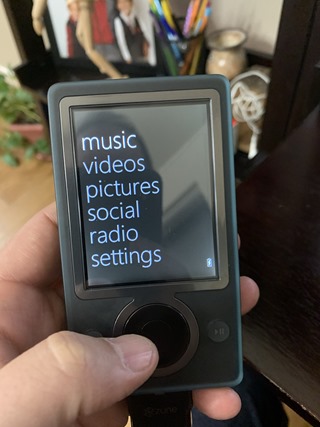
A glorious little ZuneAs I said on social media today, it’s 2019 and I’m updating the Firmware on a Zune, fight me. 😉 There’s even an article on Vice about the Zune diehards. The Zune is a deeply under-respected piece of history and its UI marked the start of Microsoft’s fluent design.

Seriously, though, I got this Zune and it’s going to be used by my 11 year old because I don’t want him to have a phone yet. He’s got a little cheap no-name brand MP3 player and he’s filled it up and basically outgrown it. I could get him an iPod Touch or something but he digs retro things (GBC, GBA, etc) so my buddy gave me a Zune in the box. Hasn’t been touched…but it has a super old non-metro UI firmware.

Can a Zune be updated in 2019? Surely it can. Isn’t Zune dead? I hooked up a 3D0 to my 4k flatscreen last week, so it’s dead when I say it’s dead.

IMPORTANT UPDATE: After I spent time doing this out I found out on Twitter that there’s a small but active Zune community on Reddit! Props for them to doing this in several ways as well. The simplest way to update today is to point resources.zune.net to zuneupdate.com’s IP address in your hosts file. The way I did it does use the files directly from Microsoft and gives you full control, but it’s overly complex for regular folks for as long as the zuneupdate.com server exists as a mirror. Use the method that works easier for you and that you trust and understand!

  • First, GET ZUNE: the Zune Software version 4.8 is up at the Microsoft Download Center and it installs just fun on Windows 10. I’ve also made a copy in my Dropbox if this ever disappears. You should too!
  • Second, GET FIRMWARE: the Zune Firmware is still on the Microsoft sites as well. This is an x86 MSI so don’t bother trying to install it, we’re going to open it up like an archive instead. Save this file forever.
    • There’s a half dozen ways to crack open an MSI. Since not everyone who will read this blog is a programmer, the easiest ways is
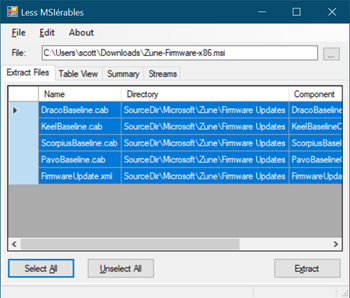
    • Download lessmsi and use it to to the open and extract the firmware MSI. It’s just an MSI specific extractor but it’s nicer than 7zip because it extracts the files with the correct names. If you use Chocolatey, it’s just “choco install lessmsi” then run “lessmsi-gui.” LessMSI will put the files in a deep folder structure. You’ll want to move them and have all your files right at the top of c:\users\YOURNAME\downloads\zunestuff. We will make some other small changes a little later on here.

      LessMSI

    • If you really want to, you could install 7zip and extract the contents of the Zune Firmware MSI into a new folder but I don’t recommend it as you’ll need to rename the files and give them the correct extensions.
    • NERDS: you can also use msiexec from the command line, but I’m trying to keep this super simple.
  • Third, FAKE THE ZUNE UPDATE SERVER: Since the Zune servers are gone, you need to pretend to be the old Zune Server. The Zune Software will “phone home” to Microsoft at resources.zune.net (which is gone) to look for firmware. Since the Zune software was made in a simpler time (a decade ago) it doesn’t use SSL or do any checking for the cert to confirm the identity of the Zune server. This would be sad in 2019, but it’s super useful to us when bringing this old hardware back to life. Again, there’s as half dozen ways to do this. Feel feel to do whatever makes you happy as an HTTP GET is an HTTP GET, isn’t it?
    • NERDS: If you use Fiddler or any HTTP sniffer you can launch the Zune software and see it phone home for resources.zune.net/firmware/v4_5/zuneprod.xml and get a 404. It if had found this, it’d look at your Zune model and then figure out which cab (cabinet) archive to get the firmware from. We can easily spoof this HTTP GET.
    • NERDS^2: Why didn’t I use the Fiddler Autoresponder to record and replay the HTTP GETS? I tried. However, there’s a number of different files that the Zune software could request and I only have the one Zune and I couldn’t figure out how to model it in Fiddler. If I could do this, we could just install Fidder and avoid editing the hosts file AND using a tiny web server.
    • From an admin command prompt, run notepad \windows\system32\drivers\etc\hosts and add this line:

      127.0.0.1 resources.zune.net
    • This says “if you ever want stuff from resources.zune.net, I’ll handle it myself.” Who is “myself?” It’s our computer! It’ll be a little web server you (or I) will run on our own, on localhost AKA 127.0.0.1.
    • Now download dot.net core, it’s small and fast to install programming environment. Don’t worry, we aren’t coding, we are just using the tools it includes. It won’t mess up your machine or install anything at startup.
    • Grab any 2.x .NET SDK from https://dot.net and install it from an MSI. Then go to a command prompt and run these commands. first we’ll run dotnet once to warm it up, then get the server and run it from our zunestuff folder. We’ll install a tiny static webserver called dotnet serve. See below:

      dotnet

      dotnet tool install --global dotnet-serve

      cd c:\users\YOURNAME\downloads\zunestuff

      dotnet serve -p 80
    • If you get any errors that dotnet serve can’t be found, just close the command prompt and open it again to update your PATH. If you get errors that port 80 is open, be sure to stop IIS or Skype Desktop or anything that might be listening on port 80.
    • Now, remember where I said you’d extract all those cabs and files out of the Firmware MSI? BUT when we load the Zune software and watch network traffic, we see it’s asking for resources.zune.net/firmware/v4_5/zuneprod.xml. We need to answer (since Zune is gone, it’s on us now)
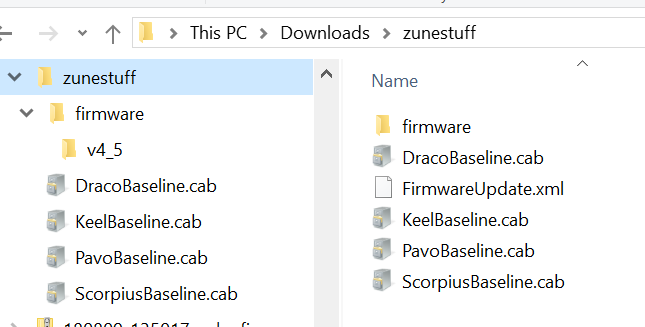
    • You’ll want to make folders like this: C:\users\YOURNAME\downloads\zunestuff\firmware\v4_5 copy/rename copy FirmwareUpdate.xml to zuneprod.xml and have it live in that directory. It’ll look like this:

      A file heirarchy under zunestuff
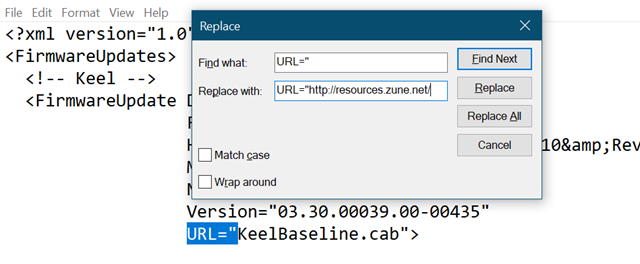
    • The zuneprod.xml file has relative URls inside like this, one for each model of the Zune that maps from USB hardware id to cab file. Open zuneprod.xml in a text editor and add http://resources.zune.net/ before each of the firmware file cabinets. For example if you’re using notepad, your find and replace will look like this.

      Replace URL=" with URL="http://resources.zune.net/
    • <FirmwareUpdate DeviceClass=”1″

      FamilyID=”3″

      HardwareID=”USB\Vid_045e&amp;Pid_0710&amp;Rev_0300″

      Manufacturer=”Microsoft”

      Name=”Zune”

      Version=”03.30.00039.00-01620″

      URL=”DracoBaseline.cab”>

    • UPDATE: As mentioned above, I did all this work (about an hour of traffic sniffing) and spoofed the server locally then found out that someone made http://zuneupdate.com as an online static spoof! It also doesn’t use HTTPS, and if you’d like, you can skip the local spoof and point your your \windows\system32\drivers\etc\hosts with an entry pointing resources.zune.net to its IP address – which at the time of this writing was 66.115.133.19. Your hosts file would look like this, in that case. If this useful resource ever goes away, use the localhost hack above.

      66.115.133.19 resources.zune.net

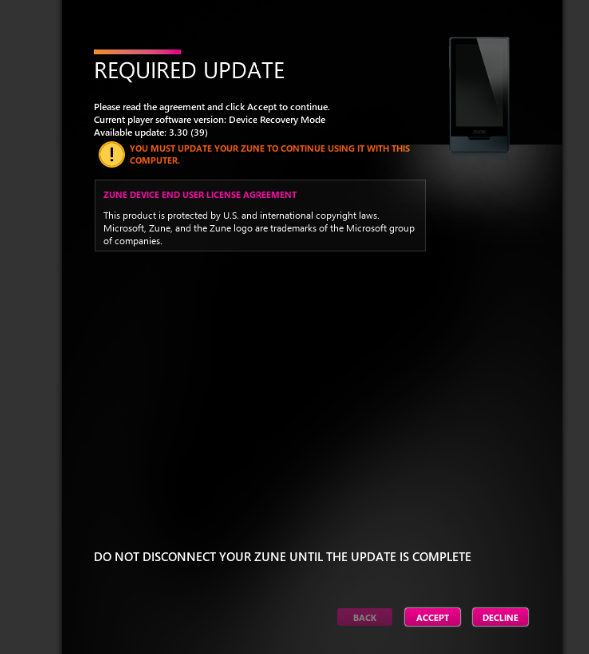
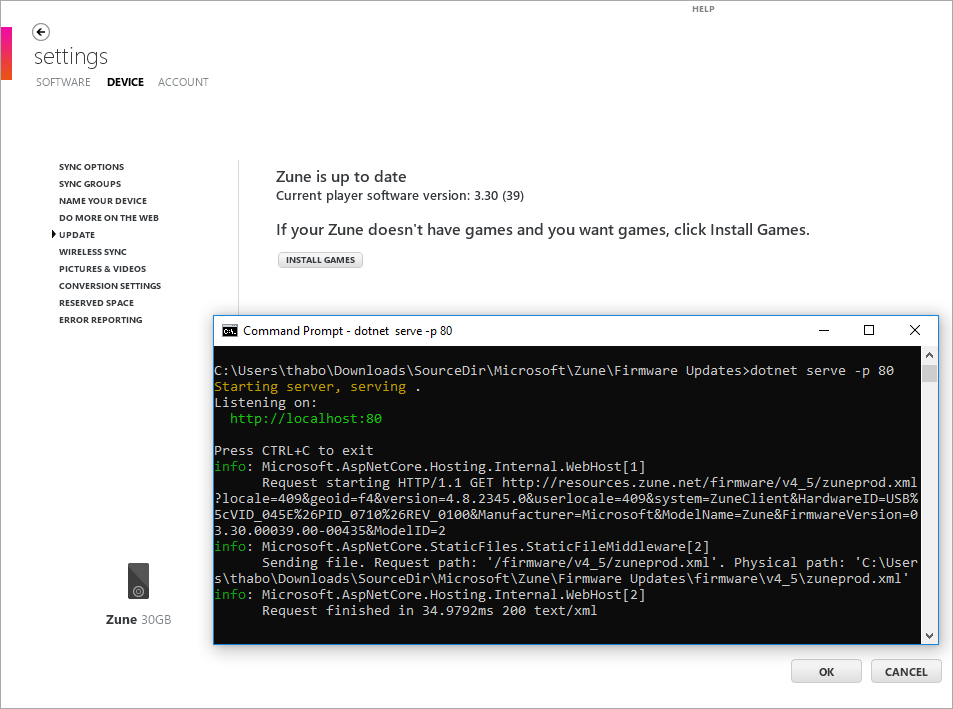
    • Now run the Zune software, connect your Zune. Notice here that I know it’s working because I launch the Zune app and go to Settings | Device then Update and I can see dotnet serve in my other window serving the zuneprod.xml in response.

Required Update

It’s worth pointing out that the original Zune server was somewhat smart and would only return firmware if we NEEDED a firmware update. Since we are faking it, we always return the same response. You may be prompted to install new firmware if you manually ask for an update. But you only need to get on the latest (3.30 for my brown Zune 30) and then you’re good…forever.

image

Enjoy!

Your iPod SucksZune is the way

Guardians 2 Zune


Sponsor: Preview the latest JetBrains Rider with its Assembly Explorer, Git Submodules, SQL language injections, integrated performance profiler and more advanced Unity support.


© 2018 Scott Hanselman. All rights reserved.

     

from Scott Hanselman’s Blog http://feeds.hanselman.com/~/591766064/0/scotthanselman~How-to-update-the-firmware-on-your-Zune-without-Microsoft-dammit.aspx

Difference Between MySQL and ORACLE

Here you will get to know about difference between mysql and oracle database.

Both MySQL and Oracle are popular relational database management software developed by Oracle Corporation.

MySQL: Its name is combination of words “My” and “SQL”, where “My” is name of daughter of co-founder Michael Widenius. And SQL full form is Structured Query Language. It is most popular free and Open Source database management system Developed and maintained by Oracle Corporation.

ORACLE: It commonly known as Oracle RDBMS, is a multi-model database management system produced and marketed by Oracle Corporation. Oracle database commonly used for running Data ware housing (DW), online transaction processing (OLTP) and mixing of these two (DW & OLTP)

Difference between MySQL and Oracle

MySQL Oracle
MySQL is free open source Database. Oracle is a commercial database.
It is light, simple RDBMS, very well for web. Oracle is very powerful than MySQL, allows to write any complex system like in Banking, ERP, Insurance, finance companies.
MySQL doesn’t support distributed databases. Oracle supports distributed databases.
Mysqlhotcopy and mysqldump are backup utilities for MySQL. Oracle has different type of backups like cloud backup, hot backup, export, import data dump. It offers most popular backup utility called Recovery Manager (RMAN)
Temporary tables will be displayed only to particular session. Those tables will be dropped automatically as soon as session ends. But in oracle, tables should be dropped explicitly. Those are visible to all sessions.
MySQL doesn’t support any extra features. Oracle supports several extensions and programs on its database server for instance, Active Data Guard, Audit vault, Partitioning, and Data Mining etc.
MySQL doesn’t have Tablespace, Role management, sanapshots and automatic storage management. On other hand Oracle has all of these features.
MySQL written in C and C++ Oracle written in Assembly Language, C and C++
Some most popular companies which use MySQL database are: YouTube, PayPal, Google, Facebook, Twitter, GitHub, eBay, LinkedIn etc. Some most popular companies which use Oracle databases are: CAIRN India, TVS Motor Company, Vilene, National foods Australia, ENEL etc.
Official website: www.mysql.com Official website: www.oracle.com/­database

The post Difference Between MySQL and ORACLE appeared first on The Crazy Programmer.

from The Crazy Programmer https://www.thecrazyprogrammer.com/2019/01/difference-between-mysql-and-oracle.html

How to Protect Your Small Business from a Hacker Attack

Data breaches and compromised websites frequently used to spread malware can be risky for your business; including small businesses. In fact, small or medium-sized businesses are likely to suffer more consequences of cyber-attacks than large enterprises. Large enterprises have the benefit of huge financial reliance as well as organizational resources to combat any attacks.

How to Protect Your Small Business from a Hacker Attack

Image Source

Why are Small Businesses a Target?

Every security breach has circumstances. However, there are a few reasons why small enterprises often fall prey of cybercriminals. Small businesses often lack sufficient technology as well as defence systems, so it would take less effort and know-how for a cyber-criminal to breach their systems.

Small businesses serve as middlemen for a hacker to get what he or she really wants. They provide goods and services directly to consumers and/or as contractors, which gives cybercriminals access to large enterprises.

Can your business operate with your website offline for weeks? What will you do if your email service isn’t working for several days? How will you salvage the reputational fallout of client data being compromised? You don’t want to imagine this let alone wasting time trying to identify and resolve the problem.

Unfortunately, there’s no guarantee that your business will be 100% hack-free no matter how many layers of security you set up on your system. However, below are a few tips to make life a little bit harder for the hacker.

Set Up a Password Management System

Passwords make to the top of the list of a majority of security policies, but also make up a huge chunk of successful site compromises. Large businesses purchase costly password management systems to manage their operations. At the same time, consumers are now turning to password vaults to generate, store, and access them. Neither of these are recommended solutions for small businesses, being too costly and simplistic respectively.

Alternatives are there such as the business version of the LastPass that is affordable and is designed with enterprise-oriented features, which include setting minimum password standards and applying tailor-made policies that restrict access to selected devices.

2-Factor Authentication

No matter how elaborate passwords are, they are still vulnerable to compromise. For instance: if a hacker gets into your business email or social media account, by use of password resets, he or she is likely to get access to some info that will enable them to hack your system. Put simply, passwords alone are not sufficient and 2-Step verification should be used.

With a 2-Step verification, if someone tries to access your company service from an unauthorized device, he or she will be required to provide an authorization code in addition to the username and password. The authorization code is either generated by an SMS text message on a registered phone or by an authorized code generating an application.

Why Don’t you Try a VPN?

Think of a VPN when it comes to protecting your business privacy online. A VPN implements encryption technologies such as Secure Sockets Layer, Layer 2 Tunneling Protocol, IP security, and Transport Layer Security to form a virtual encrypted tunnel between a VPN server and your device. Provided your traffic is in the tunnel created between your PC and the VPN server, no hacker can see what you’re doing or where you’re headed.

We recommend trying Private Internet Access services. Read a review of it here: https://vpnpro.com/vpn-reviews/private-internet-access-review/

Policy Matters

A majority of small enterprises tend to assume that they don’t really need a formal security policy. However, these documents aren’t just for enterprises. Even small or medium-sized businesses can benefit from employing such a plan. It is easier to create a formal security policy than you could imagine.

Surprisingly, if done right, this could form the backbone of your entire security structure. The secret here is to understand that this not just a formal document in your file; you should see this as a dynamic structure to enable you to understand what data security is in relation to your business. A good data policy should not only entail how to protect your business data but should also entail how to react in case things get awry.

Lock your Network

If you use Wi-Fi in your business, then it’s time you made sure that it meets the current WPA2 standards. This version comes with a stronger encryption key than the previous versions. This makes your network more secure and difficult for someone to break into. Don’t forget to have a very strong password for your network. Try a password with an average of 13 characters and a combination of lower and upper case letters, and if possible, special characters.

Look into Cyber Insurance

There is such a thing a cyber-insurance. In the event that a cyber-attack happens, you’ll run out of options on what to do. This is why it’s important to have someone who’ll be ready to bear the cost and cover the following:

  • Cost of informing your clients about the breach
  • Liability cover for any confidential information exposed
  • Reimbursement for expenses as a result of business operation interruption the cyber-attack caused

You should always be ready for a data breach and the steps you take to reinstate your operations will depend on the structures you had in place to protect your firm from cyber-attacks. Secure your network and systems with a strong password, and if that’s not enough, try a 2-factor authentication.

The post How to Protect Your Small Business from a Hacker Attack appeared first on The Crazy Programmer.

from The Crazy Programmer https://www.thecrazyprogrammer.com/2019/01/how-to-protect-your-small-business-from-a-hacker-attack.html

Types of Queues in Data Structure

Queue is an important structure for storing and retrieving data and hence is used extensively among all the data structures. Queue, just like any queue (queues for bus or tickets etc.) follows a FIFO mechanism for data retrieval which means the data which gets into the queue first will be the first one to be taken out from it, the second one would be the second to be retrieved and so on.

Types of Queues in Data Structure

Simple Queue

simple queue

Image Source

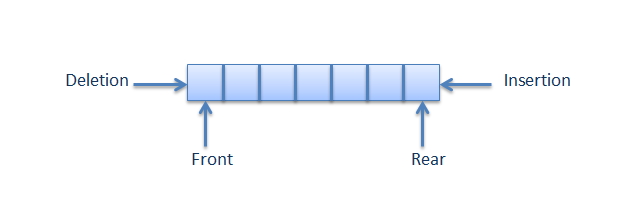
As is clear from the name itself, simple queue lets us perform the operations simply. i.e., the insertion and deletions are performed likewise. Insertion occurs at the rear (end) of the queue and deletions are performed at the front (beginning) of the queue list.

All nodes are connected to each other in a sequential manner. The pointer of the first node points to the value of the second and so on.

The first node has no pointer pointing towards it whereas the last node has no pointer pointing out from it.

Circular Queue

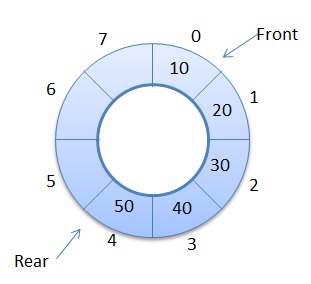
Circular Queue

Image Source

Unlike the simple queues, in a circular queue each node is connected to the next node in sequence but the last node’s pointer is also connected to the first node’s address. Hence, the last node and the first node also gets connected making a circular link overall.

Priority Queue

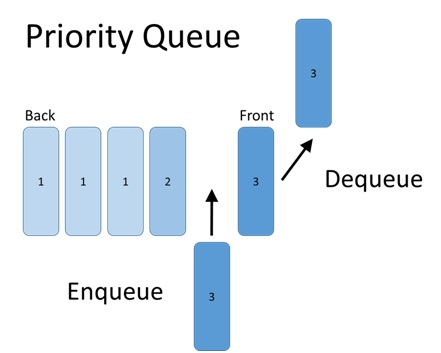
Priority Queue

Image Source

Priority queue makes data retrieval possible only through a pre determined priority number assigned to the data items.

While the deletion is performed in accordance to priority number (the data item with highest priority is removed first), insertion is performed only in the order.

Doubly Ended Queue (Dequeue)

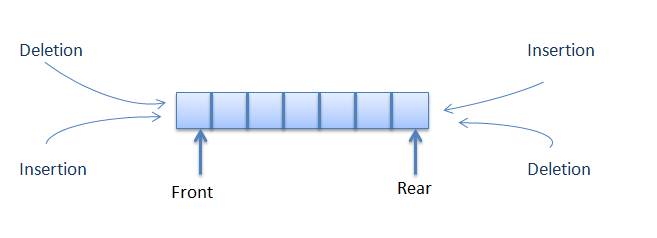
Doubly Ended Queue

Image Source

The doubly ended queue or dequeue allows the insert and delete operations from both ends (front and rear) of the queue.

Queues are an important concept of the data structures and understanding their types is very necessary for working appropriately with them.

The post Types of Queues in Data Structure appeared first on The Crazy Programmer.

from The Crazy Programmer https://www.thecrazyprogrammer.com/2019/01/types-of-queues-in-data-structure.html

Relationship Hacks: Playing video games and having hobbies while avoiding resentment

Super Nintendo Controller from PexelsI’m going to try to finished my Relationship Hacks book in 2019. I’ve been sitting on it too long. I’m going to try to use blog posts to spur myself into action.

A number of people asked me what projects, what code, what open source I did over the long holiday. ZERO. I did squat. I played video games, in fact. A bunch of them. I felt a little guilty then I got over it.

The Fun of Finishing – Exploring old games with Xbox Backwards Compatibility

I’m not a big gamer but I like a good story. I do single player with a plot. I consider a well-written video game to be up there with a good book or a great movie. I like a narrative and a beginning and end. Since it was the holidays, it did require some thought to play games.

When you’re in a mixed relationship (a geek/techie and a non-techie) you need to be respectful of your partner’s expectations. The idea of burning 4-6 hours playing games likely doesn’t match up with your partner’s idea of a good time. That’s where communication comes in. We’ve found this simple system useful. It’s non-gendered and should work for all types of relationships.

My spouse and I sat down at the beginning of our holiday vacation and asked each other “What do you hope to get out of this time?” Setting expectations up front avoids quiet resentment building later. She had a list of to-dos and projects, I wanted to veg.

Sitting around all day (staycation) is valid, as is using the time to take care of business (TCB). We set expectations up front to avoid conflict. We effectively scheduled my veg time so it was planned and accepted and it was *ok and guilt-free*

We’ve all seen the trope of the gamer hyper-focused on their video game while the resentful partner looks on. My spouse and I want to avoid that – so we do. If she knows I want to immerse myself in a game, a simple heads up goes a LONG way. We sit together, she reads, I play.

It’s important to not sneak these times up on your partner. “I was planning on playing all night” can butt up against “I was hoping we’d spend time together.” Boom, conflict and quiet resentment can start. Instead, a modicum of planning. A simple headsup and balance helps.

I ended up playing about 2-3 days a week, from around 8-9pm to 2am (so a REAL significant amount of time) while we hung out on the other 4-5 days. My time was after the kids were down. My wife was happy to see me get to play (and finish!) games I’d had for years.

Also, the recognition from my spouse that while she doesn’t personal value my gaming time – she values that *I* value it. Avoid belittling or diminishing your partner’s hobby. If you do, you’ll find yourself pushing (or being pushed) away.

One day perhaps I’ll get her hooked on a great game and one day I’ll enjoy a Hallmark movie. Or not. 😉 But for now, we enjoy knowing and respecting that we each enjoy (and sometimes share) our hobbies. End of thread.

If you enjoy my wife’s thinking, check her out on my podcast The Return of Mo. My wife and I also did a full podcast with audio over our Cancer Year 

Hope you find this helpful.


Sponsor: Preview the latest JetBrains Rider with its Assembly Explorer, Git Submodules, SQL language injections, integrated performance profiler and more advanced Unity support.


© 2018 Scott Hanselman. All rights reserved.
     

from Scott Hanselman’s Blog http://feeds.hanselman.com/~/591001392/0/scotthanselman~Relationship-Hacks-Playing-video-games-and-having-hobbies-while-avoiding-resentment.aspx

Difference between Function and Procedure

Procedure: In computer programming a specific set of instructions together called a procedure. Depending on the programming language it can be called as subroutine, subprogram or a function.

Function: It is one of the basic concept in programming of computer. As it name says, it performs a function (work). It can be either user defined or system defined. More technically it is a block of code in program which performs specific task.

Difference between Function and Procedure

Procedure Function
It is set of instructions in a program. It also a set of instructions, but we can say it’s a variant of a procedure.
May or may not return a value to the code called by. It just executes commands. Functions are very similar to procedures except that they also return a value to the calling sub program.
Procedure can contain return statement. Function should contain return statement.
Procedure is set of commands executed in order Function is used to calculate something from given input to it. So its name came from math.
Procedure cannot be called from a function. Function can be called from a procedure.
In SQL, inside procedure we can use DML (Insert, Delete, Update) Commands. In SQL, inside functions we can’t use DML commands.
Pascal, Ada, PL/SQL are some programming languages which uses procedure. C, C++, Java are some programming languages which uses functions.

The post Difference between Function and Procedure appeared first on The Crazy Programmer.

from The Crazy Programmer https://www.thecrazyprogrammer.com/2019/01/difference-between-function-and-procedure.html

Django Admin Interface

Here you will learn about working with django admin interface. 

Prerequiests: It is necessary to learn about models first before working with Django admin panel. You can learn about models here.

What is admin.py File in Django?

We’ve created an app and a model in previous articles. But we haven’t stored anything yet to our database. Django’s admin interface will help us to add, edit and delete the data from the database using the models. As we know models are the structure of our database tables, we can add a new object, edit it and delete objects from database in two ways either by coding or by using a graphical user interface. That graphical user interface to store, edit and delete data from database is Django admin interface.

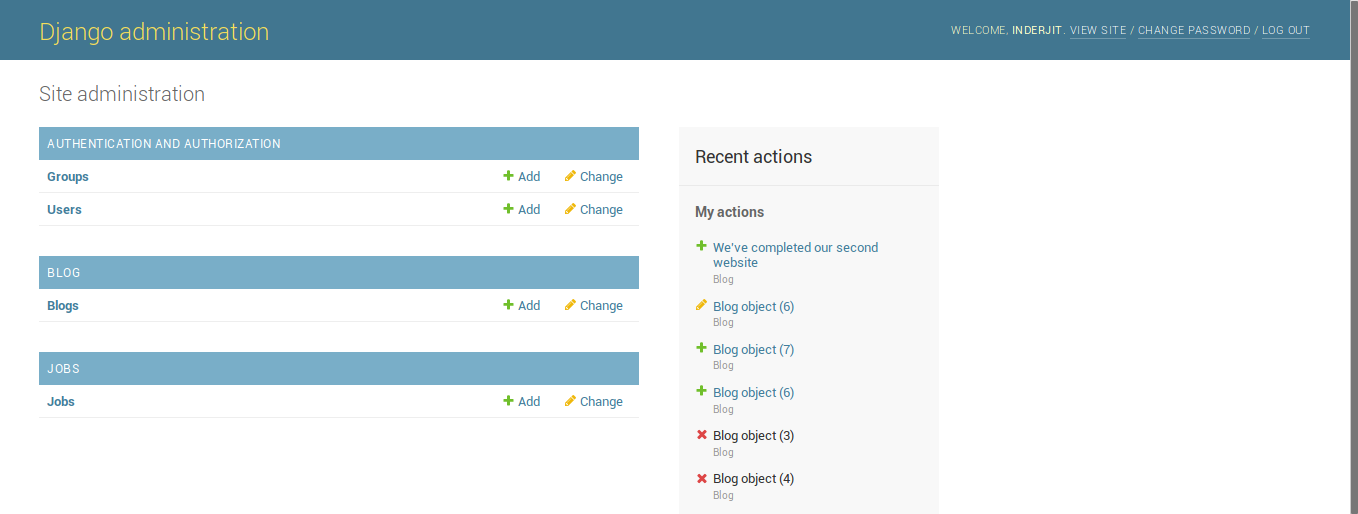
Django Admin Interface 1 Django Admin Interface 2

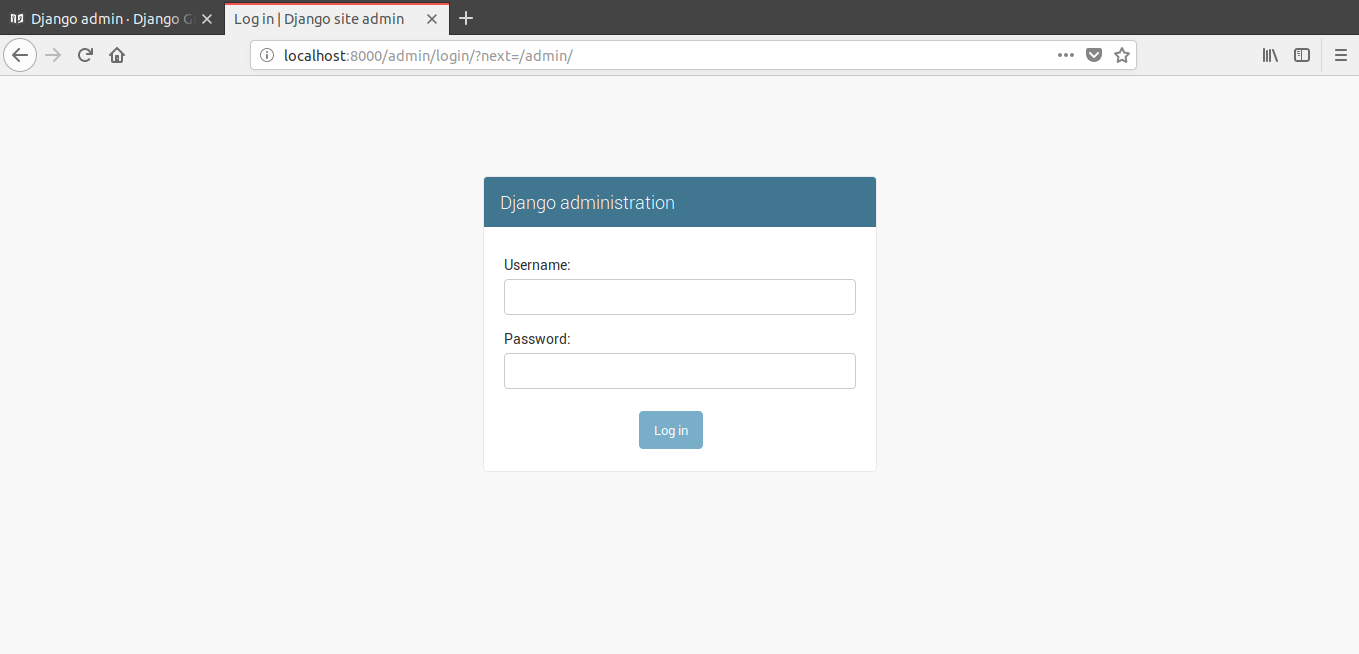
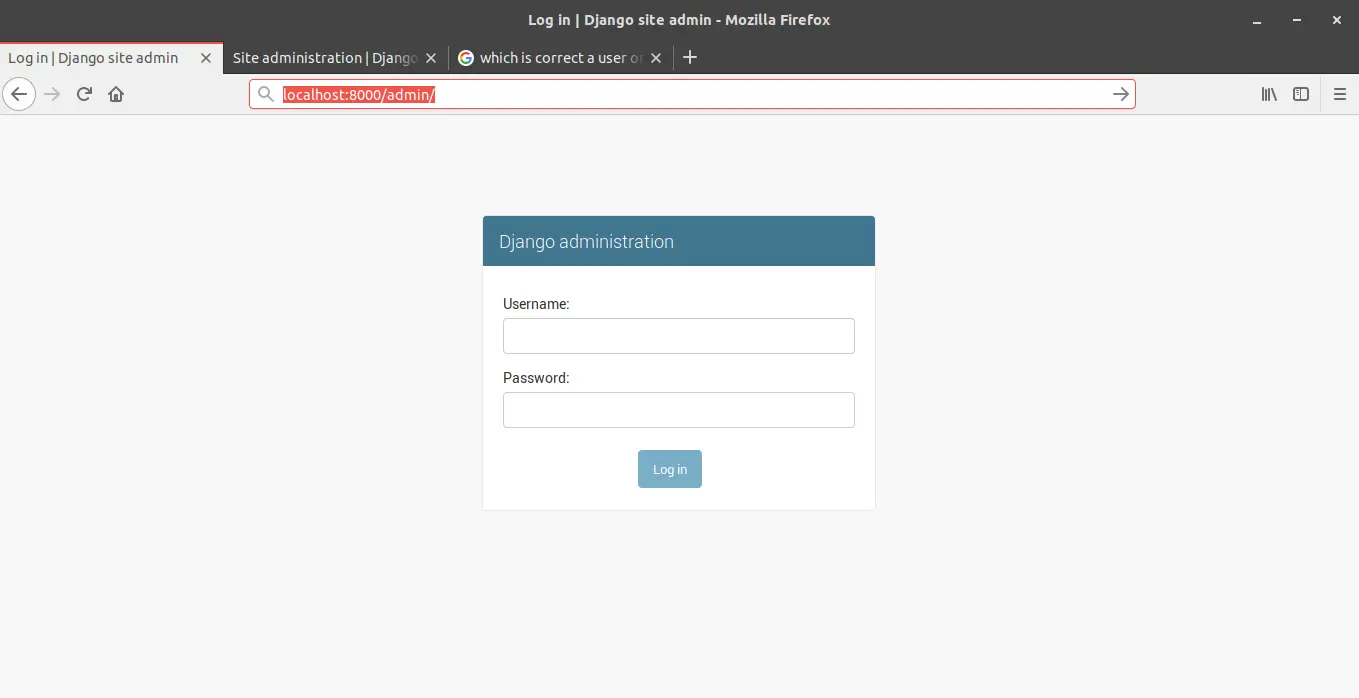
In above screenshots, first is a screenshot of admin page which requires the login to do any changes in database, that’s why it is secured way to work with database and in second image you can see some Models that we have added to admin interface.

Working with Django Admin Panel

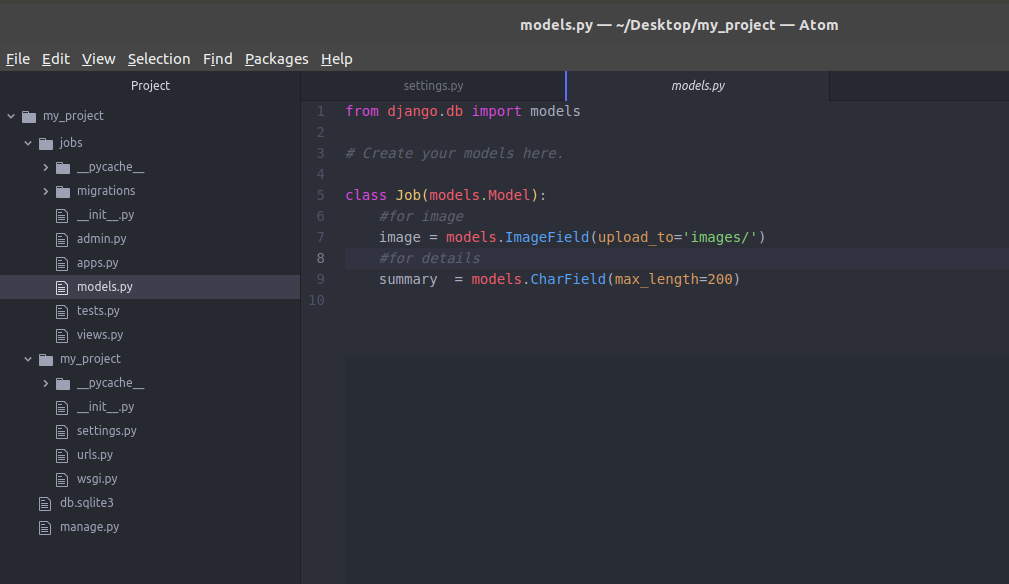
As mentioned above, before working with database first you should have created a model. As in previous article we created a model (having ImageField and CharField) named as Job. Now we’ll add this model to admin interface so we can store data in ImageField and CharField using Django’s admin.

Django Admin Interface 3

So let’s start.

Step 1: Create a User Account

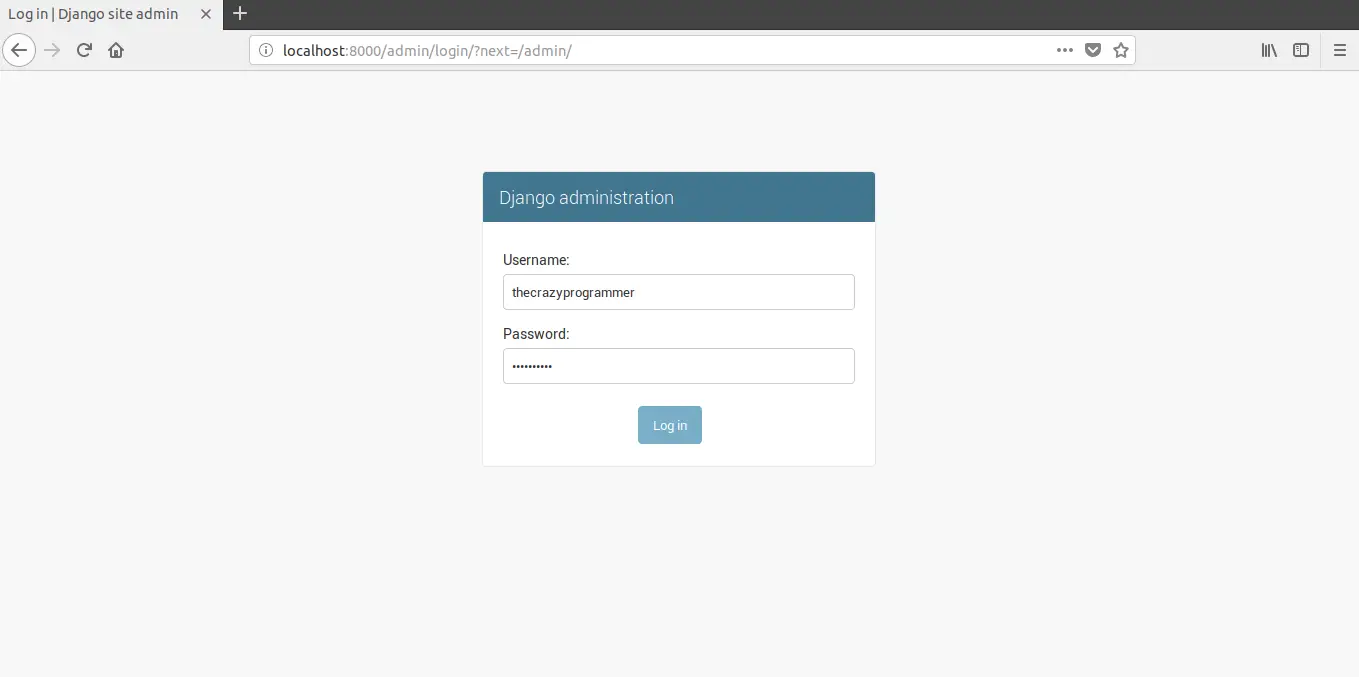
Run your project and open admin page (for example – http://127.0.0.1:8000/admin or localhost:8000/admin/).

Django Admin Interface 4

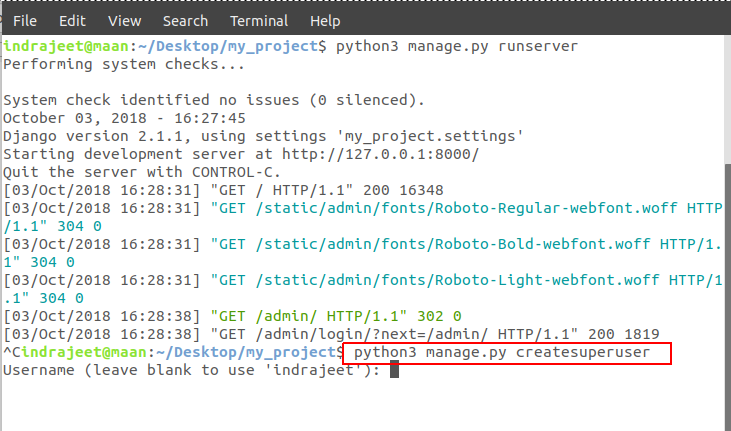
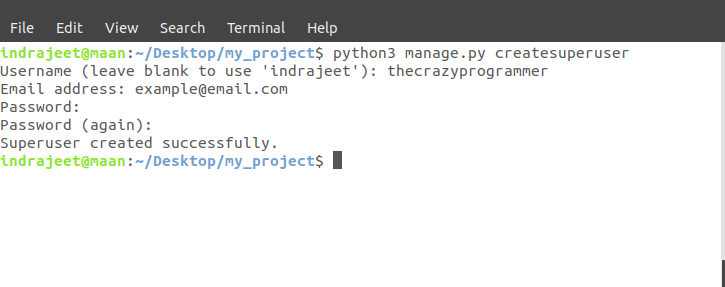
So a username and password is required to move forward,  means we need to create an account. To create it open your terminal and stop the server then type this command –

python manage.py createsuperuser

Django Admin Interface 5

After hitting enter it will ask you for an username, you can type any username but if don’t enter anything and just hit enter then it will take your computer name as username. Let’s say we have created username as thecrazyprogrammer.

Django Admin Interface 6

After username, it will ask  your email address and a password. So after creating a username let’s run your server again and open localhost:8000/admin again, then login with your username and password you’ve entered above.

Note: If you forgot your password later, then there is no need to worry. As long as you have access to your server you can change it.

Django Admin Interface 7

Django Admin Interface 8

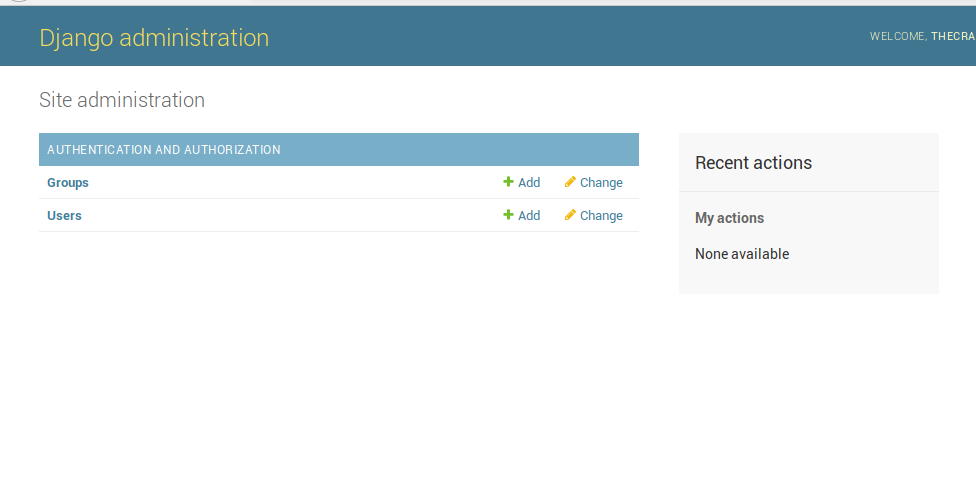
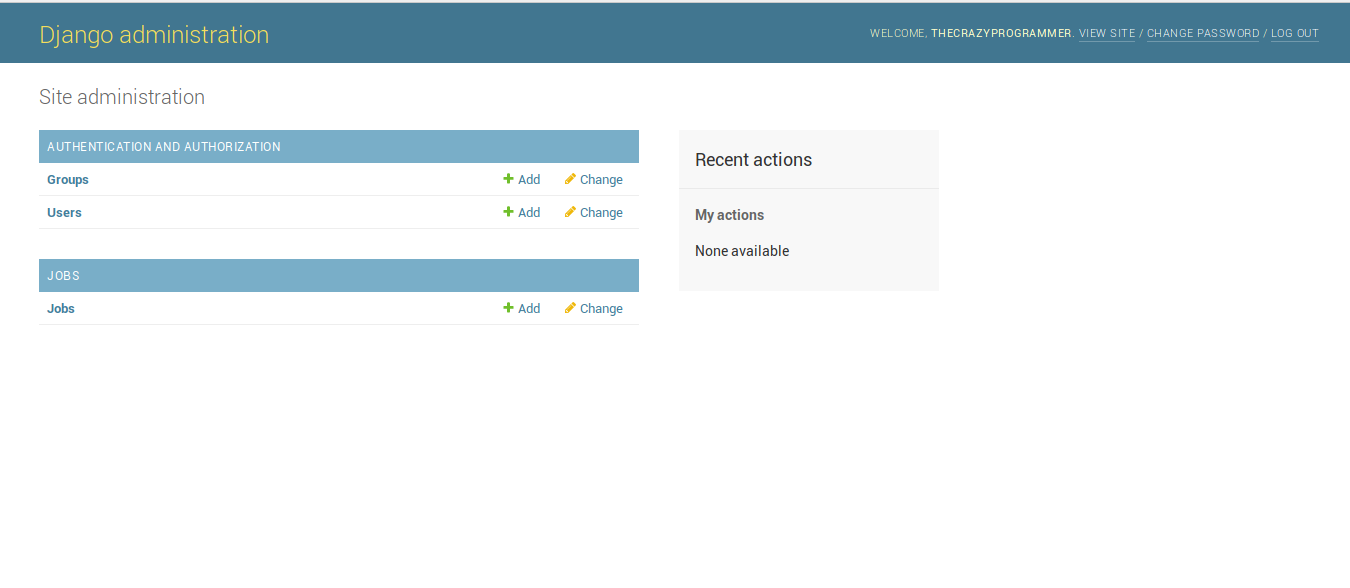
So now you’ve access to the Django admin page. At present there is only options are showing which can be used to add or see the new username and groups. But our created model Job is still not shown up.

Step 2: Register Your Model in admin.py

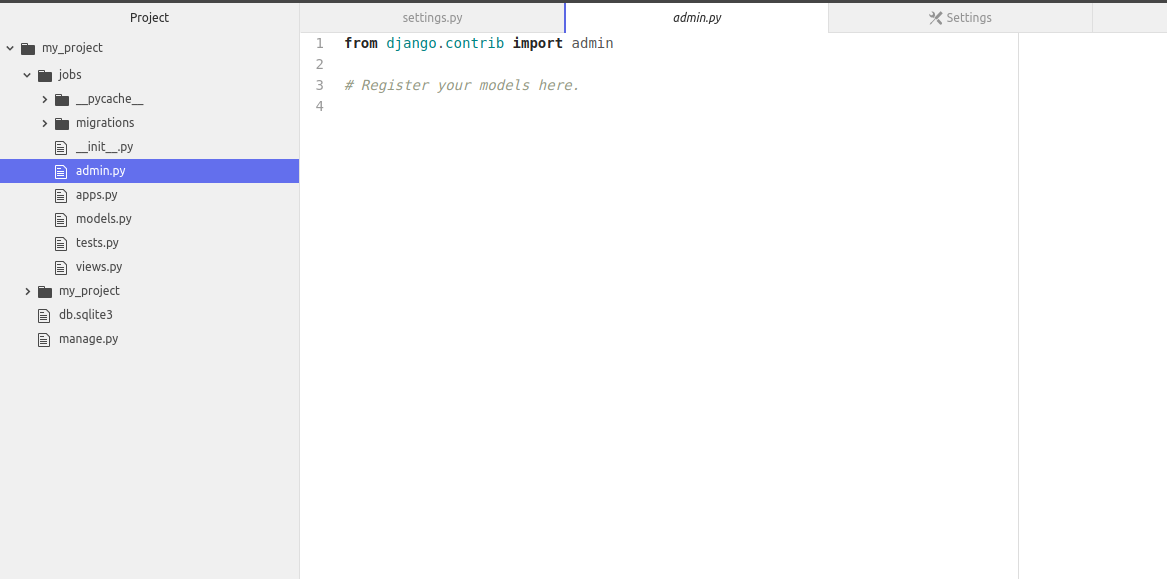
To register your model in admin.py, open the admin.py inside the same app directory where is your models.py (model to be added) is present.

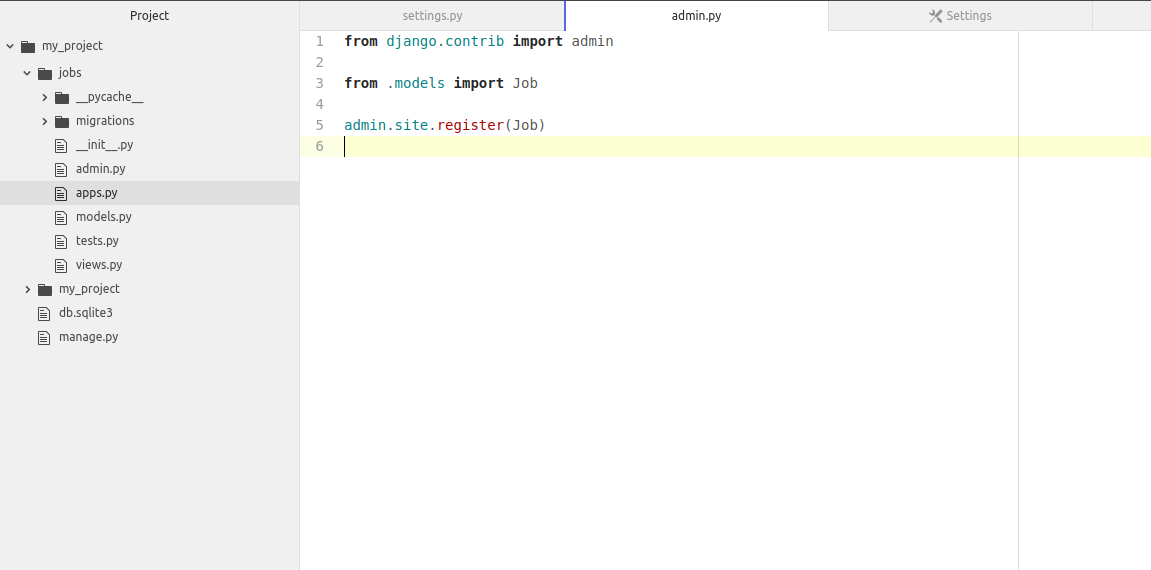
Django Admin Interface 9

Now inside this file write the code as shown below .

from django.contrib import admin

from .models import Job

admin.site.register(Job)

Django Admin Interface 10

Here Job is the name of our model that we want to register. Now save that file and reload the admin page in browser and you’ll get Job model in the Django’s admin.

Django Admin Interface 11

Step 3: Add, Edit and Delete Data (Objects) from Database

Django Admin Interface 12

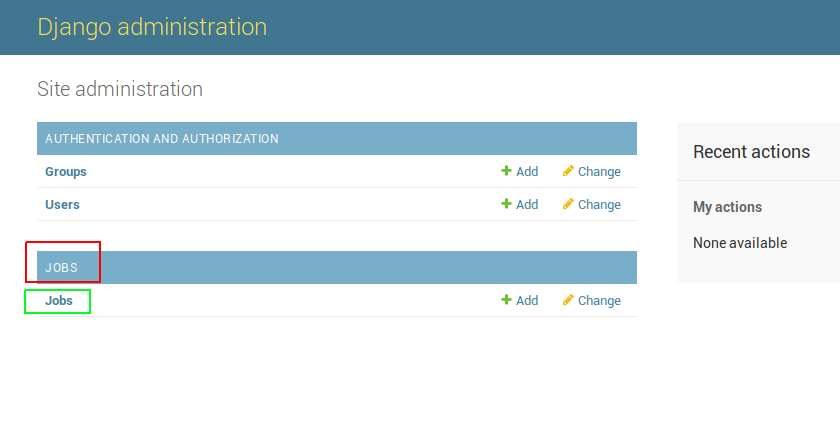
Here JOBS in red square is name of the APP and Job in green square is the model. As we can add more than one model in an app it will be shown under the JOBS app.

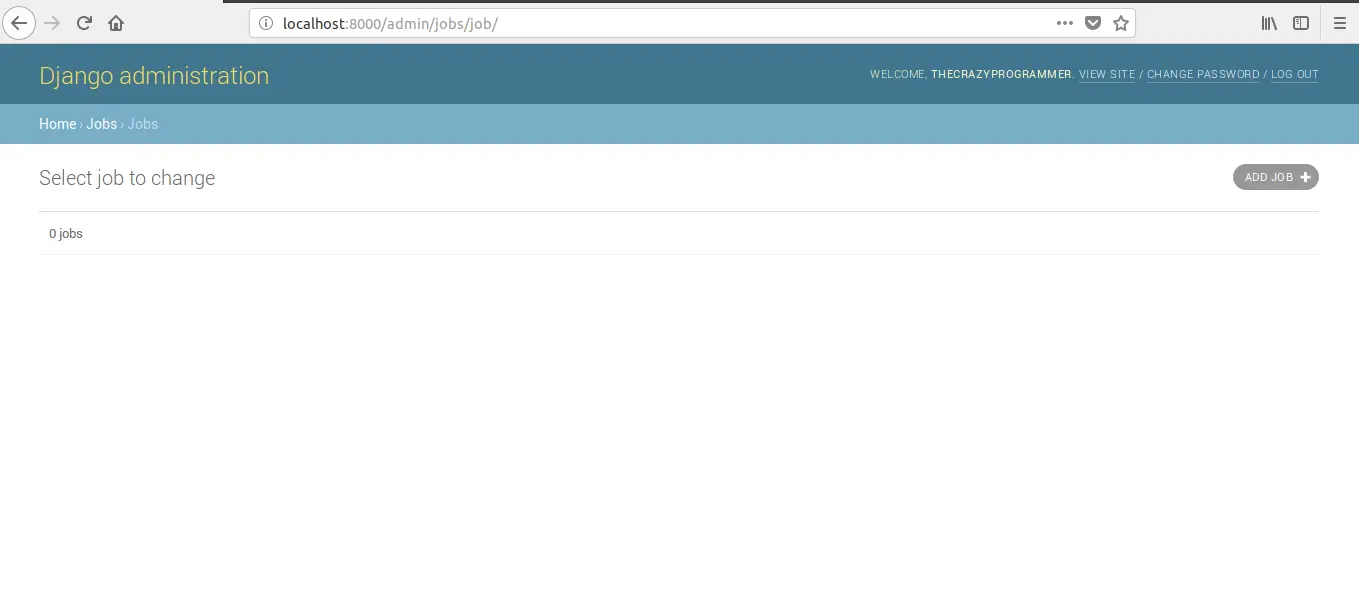
Now open the Jobs model.

Django Admin Interface 13

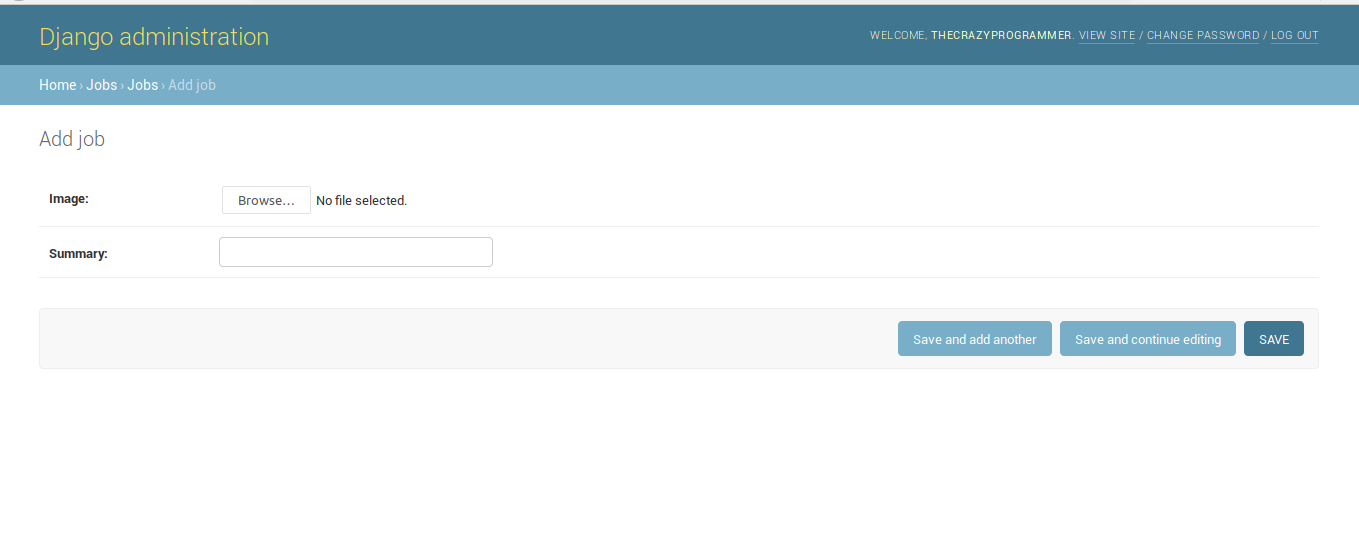
Currently there is nothing in the database. To add it click on Add Job button at right of the screen. Then you will see that the fields we’ve specified in the Model will be shown up here.

Django Admin Interface 14

Add data and save it.

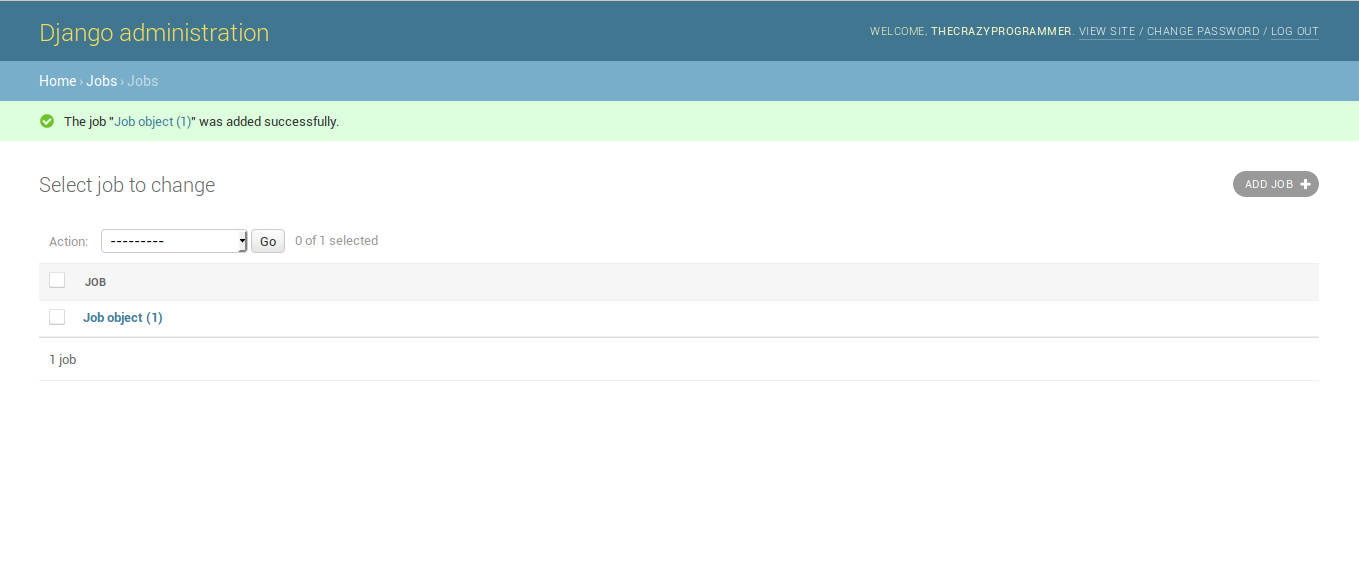
Django Admin Interface 15

And our data is stored into database. Now you may have got the idea that how easy is working with Django. We didn’t need to specify the queries to store the data into database. It will be very helpful, let’s say you have a website running on server. You want to change/delete/add some data. All you have to do is login to your admin interface and update it using Django admin and your site will be up to date.

That’s all

I hope you’ve understood the basic idea of storing data into database using Django’s admin interface. We’ll also see how to fetch data from database in other articles. If you’ve any problem related to this article then please let us know in comment box, We’ll reply as soon as possible.

The post Django Admin Interface appeared first on The Crazy Programmer.

from The Crazy Programmer https://www.thecrazyprogrammer.com/2019/01/django-admin-interface.html

Django Models

In this tutorial, we’re going to learn about models in django.

Models are connected to our database. We can also say that a model contains the fields and behaviors of the data that we want to store into database. Normally each model is connected to a single table of our database.

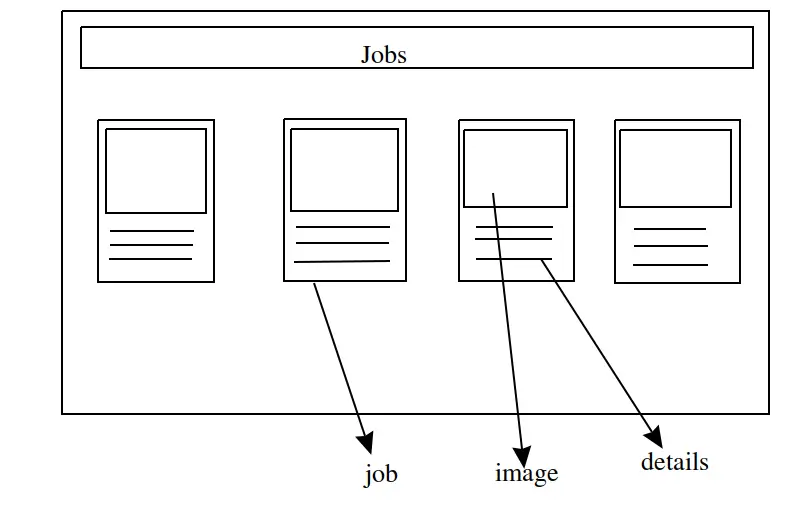
To understand models and upcoming topics more easily. Let’s create a new project. Where we’ll make a website like this:

Django Models 1

In above picture, we have a web page (homepage) where we’re going to show some jobs that one have done in the past. Normally each of job block will contain a picture and some details. Where the pictures and details will be picked from database, which will make our website dynamic.

To start, create a new project  (I’m creating as my_project).

First we’ll create an app for all the jobs so if you want to show that jobs in any other project, then you can move that app into other project (as we’ve seen in previous article) .

Let’s say we have created an app named as jobs by using the command below. Open command prompt and navigate to your project folder, then type:

python manage.py startapp jobs

And don’t forget to add the path of our newly created app in settings.py file of our project folder. (follow the article working with apps to do that).

Note: Use python3 for python 3 in linux

I hope you’ve created project and an app named as jobs.

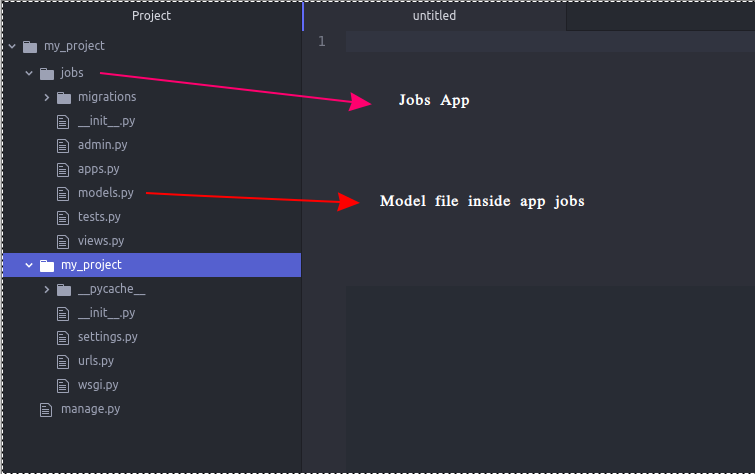
Here is how our project folder look like.

Django Models 2

You can see, after creating app we’ve a auto created file named as models.py. Each app will have separate model file. So we can work with our database from that model file.

Create a Model in Django

To create a Model for storing or retrieving information from database, create a new class with any name you want and inherit the class Model. Now open that model file and edit as below:

from django.db import models

# Create your models here.

class Job(models.Model):
    #for image
    image = models.ImageField(upload_to='images/')
    #for details
    summary  = models.CharField(max_length=200)

Here we’re creating a class inside our models.py file. Where we’re using ImageField to store image for a job and CharField to store the summary or details of that particular job. Inside ImageField the attribute upload_to=’images/’  denotes the directory where our images will be stored and the attribute max_length=200 is denoting that we can store maximum 200 inside our CharField named as summary.

Tell Django Project That We’ve Added a New Model

After creating any model we have to change something in our project, so our project will get to know that we have a new model to use.

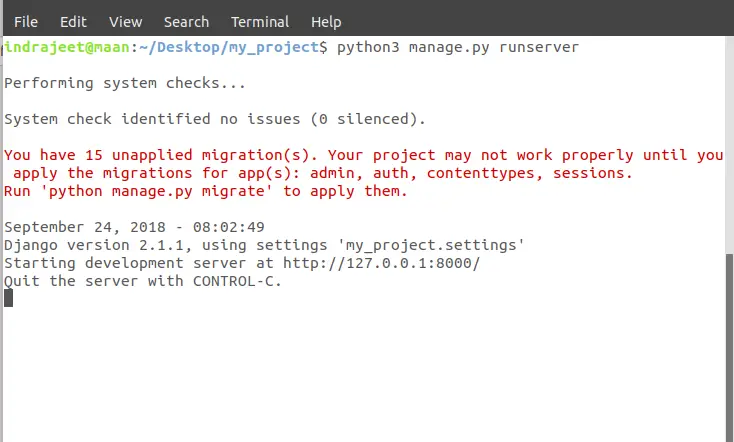
Before doing this you may have noticed some warnings while running the server, as shown below:

Django Models 3

It is showing that we have 15 unapplied migrations for app(s). In warning, it is also showing that how to apply those migrations.

So stop your server and type the command below and restart the server.

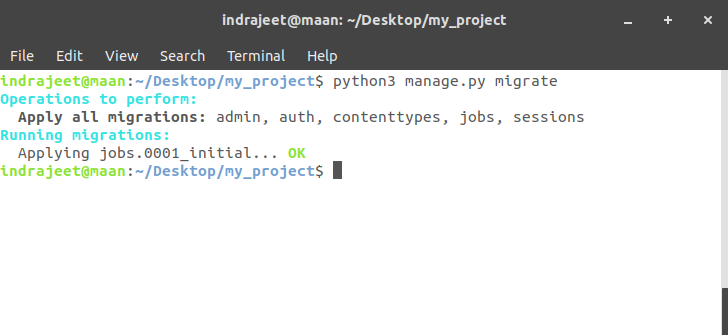
python manage.py migrate

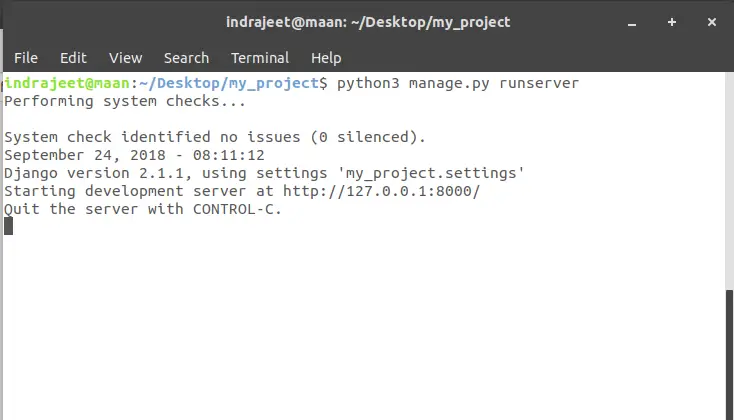
And after restart you can see there is now warning now.

Django Models 4 

Migration done.

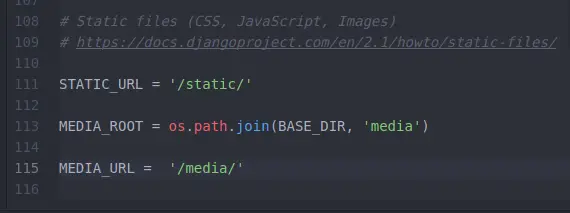
And another thing to do before adding our model is to add something in our settings.py file in our project folder.

Django Models 5

We’ve added MEDIA_ROOT and MEDIA_URL.

Here MEDIA_ROOT is showing that if someone wants to save some sort of information (image, video etc.) it should happen inside the folder media.

And MEDIA_URL showing that if someone is trying to get the access to the image where they are going to get that.

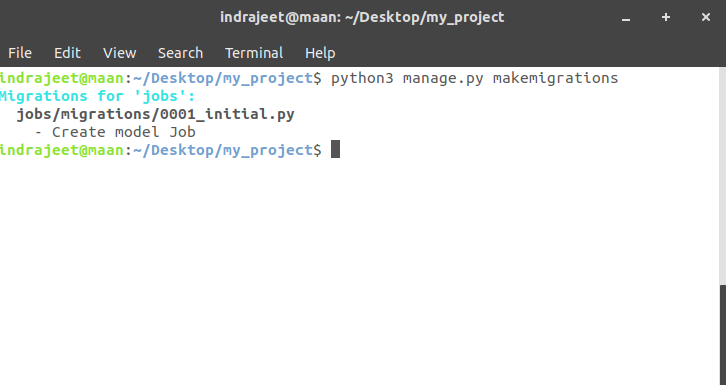
But it still doesn’t have the idea that we have added a new model called Job. To get it known, open terminal and type:

python manage.py makemigrations

Django Models 6

Then type another command given below:

python manage.py migrate

Django Models 7

Now we’re upto date, there is nothing to migrate.

That’s all about the model. We’re all set to working with the database. By default sqlite3 database will be used. The advantage of using models is that if we want to change the database later, we can easily change it without changing our models.py file. It will remain the same for all the database.

In next tutorial we’ll learn about how to upload images and summary (text) in database using this module.

The post Django Models appeared first on The Crazy Programmer.

from The Crazy Programmer https://www.thecrazyprogrammer.com/2019/01/django-models.html

Design a site like this with WordPress.com
Get started