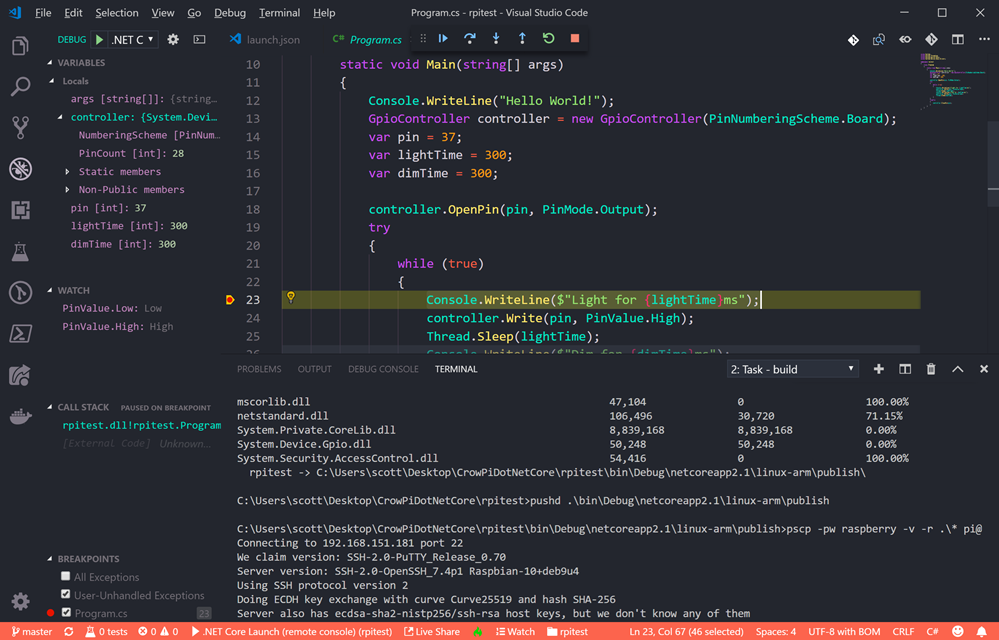
Thrashing in Operating System (OS)

When a program need space larger than RAM or it need space when RAM is full, Operating System will try to allocate space from secondary memory and behaves like it has that much amount of memory by serving to that program. This concept is called virtual memory. To know about thrashing we first need to know what is page fault and swapping.

Page fault and swapping: We know every program divided into some pages. When a program need a page which is not in RAM that is called page fault. Whenever a page fault happens, operating system will try to fetch that page from secondary memory and try to swap it with one of the page in RAM. This is called swapping.

What is Thrashing  in OS?

If this page fault and then swapping happening very frequently at higher rate, then operating system has to spend more time to swap these pages. This state is called thrashing. Because of this, CPU utilization is going to be reduced.

Thrashing in Operating System (OS)

Effect of Thrashing

Whenever thrashing starts, operating system tries to apply either Global page replacement Algorithm or Local page replacement algorithm.

Global Page Replacement

Since global page replacement can access to bring any page, it tries to bring more pages whenever thrashing found. But what actually will happen is, due to this, no process gets enough frames and by result thrashing will be increase more and more. So global page replacement algorithm is not suitable when thrashing happens.

Local Page Replacement

Unlike global page replacement algorithm, local page replacement will select pages which only belongs to that process. So there is a chance to reduce the thrashing. But it is proven that there are many disadvantages if we use local page replacement. So local page replacement is just alternative than global page replacement in thrashing scenario.

Techniques to Handle Thrashing

We already seen Local replacement is better than Global replacement to avoid thrashing. But it also has disadvantages and not suggestable. Some more techniques are

Working Set Model

This model is based on locality. What locality is saying, the page used recently can be used again and also the pages which are nearby this page will also be used. Working set means set of pages in the most recent D time. The page which completed its D amount of time in working set automatically dropped from it. So accuracy of working set depends on D we have chosen. This working set model avoid thrashing while keeping the degree of multiprogramming as high as possible.

Page Fault Frequency

Page Fault Frequency

It is some direct approach than working set model. When thrashing occurring we know that it has few number of frames. And if it is not thrashing that means it has too many frames. Based on this property we assign an upper and lower bound for the desired page fault rate. According to page fault rate we allocate or remove pages. If the page fault rate become less than the lower limit, frames can be removed from the process. Similarly, if the page fault rate become more than the upper limit, more number of frames can be allocated to the process. And if no frames available due to high page fault rate, we will just suspend the processes and will restart them again when frames available.

Source: https://www.geeksforgeeks.org/operating-system-techniques-handle-thrashing/

The post Thrashing in Operating System (OS) appeared first on The Crazy Programmer.

from The Crazy Programmer https://www.thecrazyprogrammer.com/2019/02/thrashing-in-operating-system-os.html

Visiting The National Museum of Computing inside Bletchley Park – Can we crack Engima with Raspberry Pis?

image“The National Museum of Computing is a museum in the United Kingdom dedicated to collecting and restoring historic computer systems. The museum is based in rented premises at Bletchley Park in Milton Keynes, Buckinghamshire and opened in 2007” and I was able to visit it today with my buddies Damian and David. It was absolutely brilliant.

I’d encourage you to have a listen to my 2015 podcast with Dr. Sue Black who used social media to raise awareness of the state of Bletchley Park and help return the site to solvency.

The National Museum of Computing is a must-see if you are ever in the UK. It was a short 30ish minute train ride up from London. We spent the whole afternoon there.

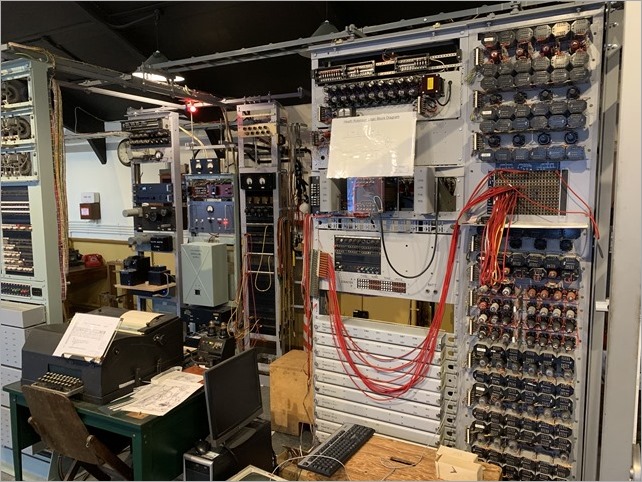
There is a rebuild of the Colossus, the the world’s first electronic computer. It had a single purpose: to help decipher the Lorenz-encrypted (Tunny) messages between Hitler and his generals during World War II. The Colossus Gallery housing the rebuild of Colossus tells that remarkable story.

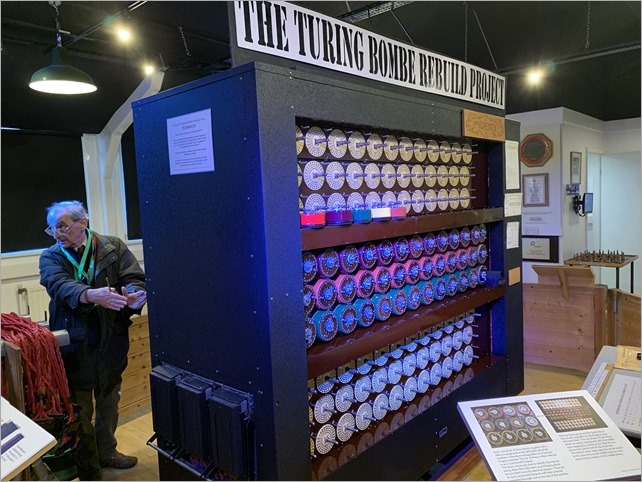
A working Bombe machine

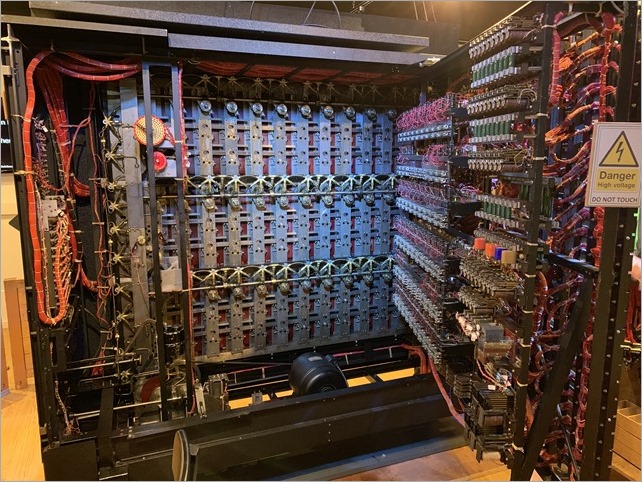
The backside of the Bombe

National Computing Museum

Cipher Machine

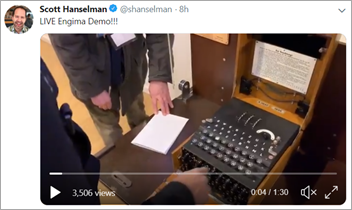
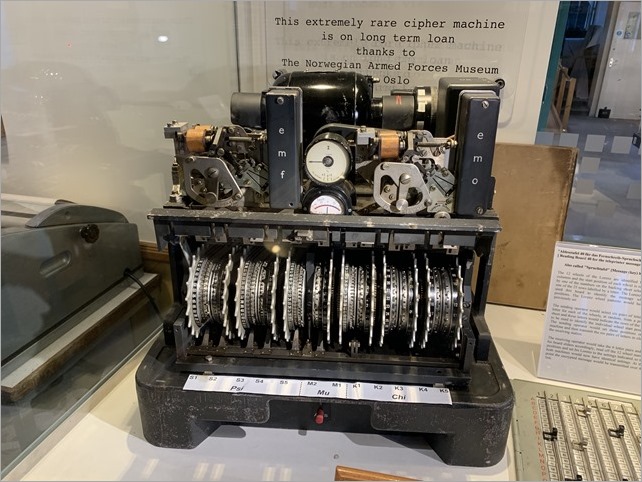
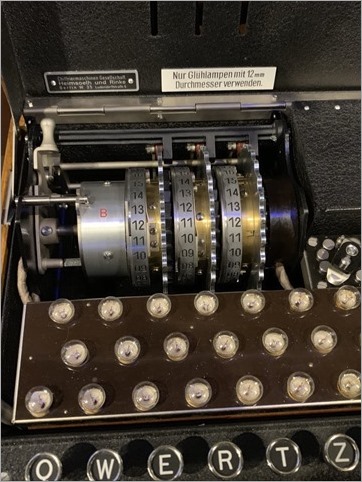
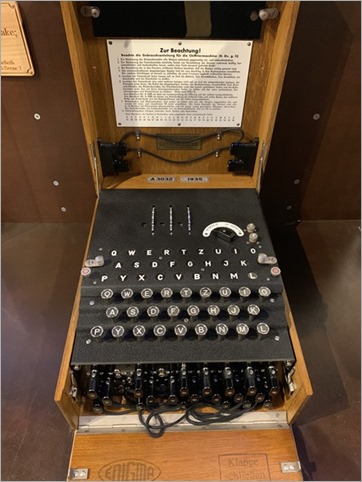
We saw the Turing-Welchman Bombe machine, an electro-mechanical device used to break Enigma-enciphered messages about enemy military operations during the Second World War. They offer guided tours (recommended as the volunteers have encyclopedic knowledge) and we were able to encrypt a message with the German Enigma (there’s a 90 second video I made, here) and decrypt it with the Bombe, which is effectively 12 Engimas working in parallel, backwards.

Inside the top lid of a working EngimaA working Engima

It’s worth noting – this from their website – that the first Bombe, named Victory, started code-breaking on Bletchley Park on 14 March 1940 and by the end of the war almost 1676 female WRNS and 263 male RAF personnel were involved in the deployment of 211 Bombe machines. The museum has a working reconstructed Bombe.


I wanted to understand the computing power these systems had then, and now. Check out the website where you can learn about the OctaPi – a Raspberry Pi array of eight Pis working together to brute-force Engima. You can make your own here!

I hope you enjoy these pics and videos and I hope you one day get to enjoy the history and technology in and around Bletchley Park.


Sponsor: Check out Seq 5 for real-time diagnostics from ASP.NET Core and Serilog, now with faster queries, support for Docker on Linux, and beautiful new dark and light themes.


© 2018 Scott Hanselman. All rights reserved.


from Scott Hanselman’s Blog http://feeds.hanselman.com/~/595017966/0/scotthanselman~Visiting-The-National-Museum-of-Computing-inside-Bletchley-Park-Can-we-crack-Engima-with-Raspberry-Pis.aspx

Did you know that the bug search tools in Java code have bugs too?

The PVS-Studio development doesn’t stand still – the team is always monitoring new trends in programming and working hard on further analyzer development. The biggest feature that appeared in the analyzer is support for Java. It is a widely used one today, and it was one of the candidates when we were considering which language to choose next. The team made available the most popular ways of the analyzer integration in the build system for the users: plugins for Maven, Gradle, and IntelliJ IDEA. However, this is just the beginning – there are a lot of ideas on further improvements in this area.

In 2018, the team was also actively working on C++ and C# analyzer development and had released a new version of the PVS-Studio. C++ (and C#) analyzer warnings were classified according to the Common Weakness Enumeration (CWE). A PVS-Studio static code analyzer has become able to classify its warnings according to MISRA C and MISRA C++ standards. It has become relevant in relation to the development of support for various embedded systems. Documentation has also undergone big changes: all improvements have been focused on writing more common and easy-to-understand instructions for working on different systems.

Of course, the developers couldn’t help testing the new version of the analyzer and have checked open projects such as IntelliJ IDEA, SpotBugs, SonarQube, и SonarJava. Here are some of the examples.

private static boolean checkSentenceCapitalization(@NotNull String value) {
  List<String> words = StringUtil.split(value, " ");
  ....
  int capitalized = 1;
  ....
  return capitalized / words.size() < 0.2; // allow reasonable amount of
                                           // capitalized words
}

The point was that the function should return true if less than 20% of the words begin with a capital letter. Actually, the check is not working, because integer division occurs. As a result of division, we can obtain only two values: 0 or 1.

The function will return false, only if all words begin with a capital letter. In all other cases, division operation will result in 0 and the function will return true.

Here is another interesting example:

public synchronized boolean isIdentifier(@NotNull String name,
                                         final Project project) {
  if (!StringUtil.startsWithChar(name,'\'') &&
      !StringUtil.startsWithChar(name,'\"')) {
    name = "\"" + name;
  }
  if (!StringUtil.endsWithChar(name,'"') &&
      !StringUtil.endsWithChar(name,'\"')) {
    name += "\"";
  }
 ....
}

This code fragment checks that the name is enclosed in either single or double quotation marks. If it’s not so, double quotation marks are added automatically.

Due to a typo, the end of the name is checked only for the presence of double quotation marks. As a result, the name in single quotation marks will be processed incorrectly.

The name

‘Abcd’

due to adding extra double quotes will turn into:

‘Abcd’”

Read more about other errors in Java code here: https://www.viva64.com/en/b/0603/

Beyond all this, the PVS-Studio team made a nice New Year’s gift for those who develops open source projects. All the contributors of such projects hosted on GitHub or Bitbucket are given free usage of the static code analyzer.

The post Did you know that the bug search tools in Java code have bugs too? appeared first on The Crazy Programmer.

from The Crazy Programmer https://www.thecrazyprogrammer.com/2019/01/did-you-know-that-the-bug-search-tools-in-java-code-have-bugs-too.html

Django PostgreSQL Installation and Setup

We’ll know that SQLite is very powerful, embedded relational database management system and it offers a really amazing set of tools to manage approximately all sorts of data. But when it comes Multi-user applications (where multiple users want to use the same databases),  It fails. So It is recommended to choose a fully featured relational database management system rather than SQLite.

Some examples of Fully featured RDBMS are MySQL, PostgreSQL, Oracle databases.

Django is very flexible in terms of changing databases.

So in this article, we’ll see how we can change the database from SQLite to PostgreSQL.

Prerequisites

Instead of creating everything from scratch, we’re taking the example of our previous article, in which we’re using SQLite database.

If you haven’t read our previous article yet, then here it is https://www.thecrazyprogrammer.com/2019/01/django-models.html

Let’s start.

Step 1: Install PostgreSQL

To Install PostgreSQL for Django in Ubuntu:

Open terminal and type these two commands.

sudo apt-get update

sudo apt-get install python-pip python-dev libpq-dev postgresql       postgresql-         contrib

To Install PostgreSQL for Django in Windows:

Download the installer from its official site: https://www.postgresql.org/download/windows/

And follow the instructions mentioned in the link. While installing you have to enter a password and a port number. Note it down.

To Install PostgreSQL for Django in Mac OS:

Like windows, you need to download the installer from its official site: https://www.postgresql.org/download/macosx/

While installing you have to enter a password and a port number. Note it down.

Step 2: Setup User and Database

Login using your password.

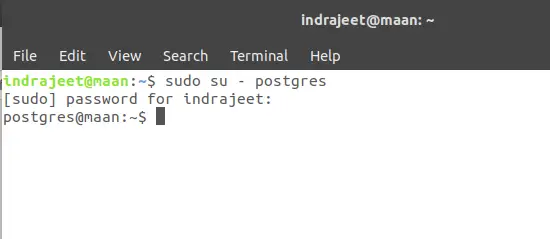
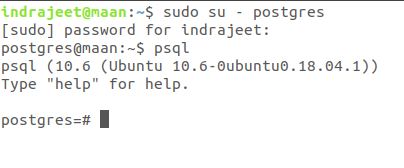
Here I am using a Ubuntu 18.04 and I am accessing the PostgreSQL from the terminal, So I have to switch to the user postgres that was created while installing PostgreSQL.

To switch the user to postgres, open terminal and type

sudo su – postgres

Django PostgreSQL 1

Now you’re ready to enter the shell session for the postgres user. Log into a Postgres session by typing:

psqlDjango PostgreSQL 2

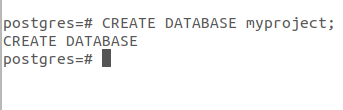
Now create a database by typing:

CREATE DATABASE myproject;

Django PostgreSQL 3

Choose the database name that is more relevant to your project. As it is just an example so I am using here myproject.

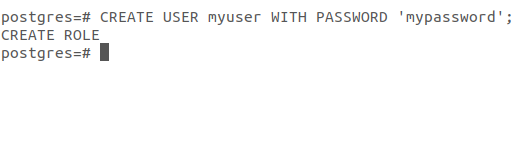
Now create a user to use the database that we’ve just created. To create a user type:

CREATE USER myuser WITH PASSWORD ‘mypassword’;

Django PostgreSQL 4

So our user and database are created.

Now, at last, give the rights to the user to access the database type:

GRANT ALL PRIVILEGES ON DATABASE myproject TO myuser;

Django PostgreSQL 5

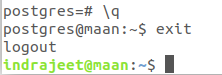
Now just type \q to get back to the postgres user’s shell session then type exit.

Django PostgreSQL 6

That’s all about database setup.

Step 4 : Install psycopg2

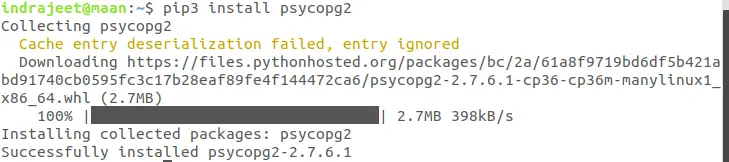
psycopg2 is a most popular PostgreSQL database adapter to work with Python. To install pycopg2 type:

pip install django psycopg2

Django PostgreSQL 7

Note: I am using pip3 instead of pip because I have both the versions installed in my Ubuntu Linux.

 Step 5: Edit Your Project’s Settings File

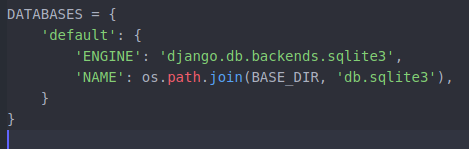
Open your project’s setting file in write mode and go to the DATABASES section.

Django PostgreSQL 8

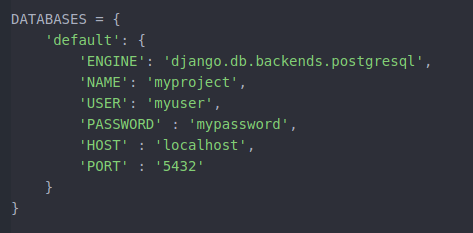
Here you can see that sqlite3 is connected with our project. To change it to PostgreSQL just change these lines as:

DATABASES = {

    ‘default’: {

        ‘ENGINE’: ‘django.db.backends.postgresql’,

        ‘NAME’: ‘myproject’,

        ‘USER’: ‘myuser,

        ‘PASSWORD’ : ‘mypassword’,

        ‘HOST’ : ‘localhost’,

        ‘PORT’ : ‘5432’

    }

}

Django PostgreSQL 9

In the above code, NAME, USER, PASSWORD are name of database, name of your user and password that we’ve created while creating the user.

And PORT is same number that I recommended to note down while installing the PostgreSQL.

Step 6: Migrate Your Project

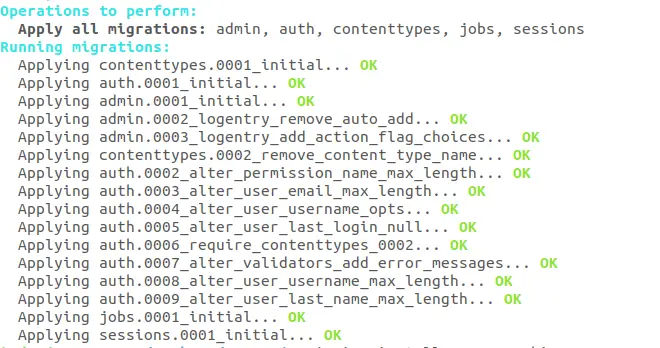
So we’ve installed PostgreSQL and configured the settings.py file. Now last step is to migrate your project.

Open your project directory in terminal and type:

python manage.py runserver

Django PostgreSQL 10

All set, test and run your project.

That’s all about changing database from SQLite to PostgreSQL.

Note: While migrating, if you’re facing a warning like:

UserWarning: The psycopg2 wheel package will be renamed from release 2.8; in order to keep installing from binary please use “pip install psycopg2-binary” instead. For details see: <http://initd.org/psycopg/docs/install.html#binary-install-from-pypi&gt;.

  “””)

You can solve this issue with installing psycopg2-binary  by using following command:

pip install psycopg2-binary

If you’ve any query related to Django PostgreSQL installation and setup, please let us know in the comment box.

The post Django PostgreSQL Installation and Setup appeared first on The Crazy Programmer.

from The Crazy Programmer https://www.thecrazyprogrammer.com/2019/01/django-postgresql-installation-and-setup.html

NuGet’s fancy older sibling FuGet gives you a whole new view of the .NET packaging ecosystem

FuGet diffsI remember when we announced NuGet (almost 10 years ago). Today you can get your NuGet packages (that contain .NET libraries) from Nuget.exe, from within Visual Studio, from the .NET CLI (command line interface), and from Paket. Choice is good!

Most folks are familiar with NuGet.org but have you used FuGet?

FuGet is “pro nuget package browsing!” Creating by the amazing Frank A. Krueger – of whom I am an immense fan – FuGet offers a different view on the NuGet package library. NuGet is a repository of nearly 150,000 open source libraries and the NuGet Gallery does a decent job of letting one browse around. However, https://github.com/praeclarum/FuGetGallery is an alternative web UI with a lot more depth.

FuGet is “advanced mode” for NuGet. It’s a package browser combined with an API browser that helps you explore the XML documentation and metadata of a package’s assemblies to help you explore and learn. And it’s a JOY.

For example, if I look at https://www.fuget.org/packages/Newtonsoft.Json I can also see who depends on the package! https://www.fuget.org/packages/Newtonsoft.Json/dependents Who has taken a public dependency on your package? I can see supported frameworks, namepsaces, as well as internal types. For example, I can explore JToken within Newtonsoft.Json and its embedded docs!

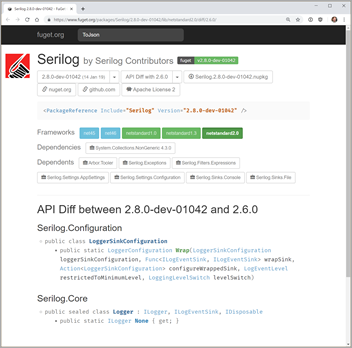
You can even do API diffs across versions! Check out https://www.fuget.org/packages/Serilog/2.8.0-dev-01042/lib/netstandard2.0/diff/2.6.0/ for example. This is an API Diff between 2.8.0-dev-01042 and 2.6.0 for Serilog. This could be useful for users or package maintainers when deciding how big a version bumb is required depending on how much of the API has changed. It also gives you a view (as the downstream consumer) of what’s coming at you in pre-release versions!

From Frank’s blog:

Have you ever wondered if the library your using has been customized for a certain platform? Have you wondered if it will work on your platform at all?

This doubt is removed by displaying – in full technicolor – all the frameworks that the library supports.

 Supported Frameworks

They’re color coded so you can see at a glance:

  • Green libraries are .NET Standard and will work everywhere
  • Dark blue libraries are platform specific
  • Light blue libraries are for full .NET and Mono only
  • Yellow libraries are old PCLs that we’re all trying to forget

FuGet.org is a fanstatic addition to the .NET ecosystem and I”d encourage you to bookmark it, use it, support it, and get involved!

If you’re interesting in stuff like this (and the code that runs stuff like this) also check out Stephen Cleary’s useful http://dotnetapis.com/ and it’s associated code on GitHub https://github.com/StephenClearyApps/DotNetApis.


Sponsor: Your code is bad, but that’s ok thanks to Sentry’s full stack error monitoring that enables you to track and fix application errors in real time. Stop garbage code from becoming garbage fires.


© 2018 Scott Hanselman. All rights reserved.


from Scott Hanselman’s Blog http://feeds.hanselman.com/~/594263954/0/scotthanselman~NuGets-fancy-older-sibling-FuGet-gives-you-a-whole-new-view-of-the-NET-packaging-ecosystem.aspx

Difference between Class and Structure

Here you will learn about difference between class and structure.

A class and a structure, both are user defined data types and understanding the difference between both of them might be confusing at times. In order to understand this, the following table shows clear differences between the two.

Class Structure
It is a reference data type and uses the keyword “class”. It is a value data type and uses the keyword “struct”.
Object for a class is created in the heap memory. Object for a structure is created in the stack memory.
We can always inherit another class. i.e., the concept of inheritance is applied . Structures can never be inherited.
Object is created using the “new” keyword. We may or may not use the keyword “new” while creating objects.
It occupies more space. A structure occupies less space.
Class allows both the parameterized and the non parameterized constructors. It only allows for the parameterized constructors, even the default constructors cannot be used.
Example:

class fruits

{

Fruit F1;

F1.apple= “red”;

F1.mango=”yellow”;

}

Example:

public struct fruit

{

public string apple;

public string mango;

}

The post Difference between Class and Structure appeared first on The Crazy Programmer.

from The Crazy Programmer https://www.thecrazyprogrammer.com/2019/01/difference-between-class-and-structure.html

How to use Windows 10’s built-in OpenSSH to automatically SSH into a remote Linux machine

In working on getting Remote debugging with VS Code on Windows to a Raspberry Pi using .NET Core on ARM in my last post, I was looking for optimizations and realized that I was using plink/putty for my SSH tunnel. Putty is one of those tools that we (as developers) often take for granted, but ideally I could do stuff like this without installing yet another tool. Being able to use out of the box tools has a lot of value.

A friend pointed out this part where I’m using plink.exe to ssh into the remote Linux machine to launch the VS Debugger:

"pipeTransport": {

"pipeCwd": "${workspaceFolder}",
"pipeProgram": "${env:ChocolateyInstall}\\bin\\PLINK.EXE",
"pipeArgs": [
"-pw",
"raspberry",
"root@crowpi.lan"
],
"debuggerPath": "/home/pi/vsdbg/vsdbg"
}

I could use Linux/bash that’s built into Windows 10 for years now. As you may know, Windows 10 can run many Linuxes out of the box. If I have a Linux distro configured, I can call Linux commands locally from CMD or PowerShell. For example, here you see I have three Linuxes and one is the default. I can call “wsl” and any command line is passed in.

C:\Users\scott> wslconfig /l

Windows Subsystem for Linux Distributions:
Ubuntu-18.04 (Default)
WLinux
Debian
C:\Users\scott> wsl ls ~/
forablog forablog.2 forablog.2.save forablog.pub myopenaps notreal notreal.pub test.txt

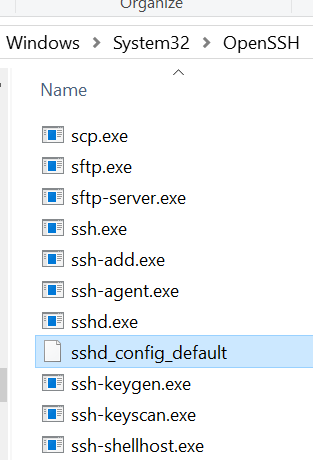
So theoretically I could “wsl ssh” and use that Linux’s ssh, but again, requires setup and it’s a little silly. Windows 10 now supports OpenSSL already!

Open an admin PowerShell to see if you have it installed. Here I have the client software installed but not the server.

C:\> Get-WindowsCapability -Online | ? Name -like 'OpenSSH*'


Name : OpenSSH.Client~~~~0.0.1.0
State : Installed

Name : OpenSSH.Server~~~~0.0.1.0
State : NotPresent

You can then add the client (or server) with this one-time command:

Add-WindowsCapability -Online -Name OpenSSH.Client~~~~0.0.1.0

You’ll get all the standard OpenSSH stuff that one would want.

OpenSSL tools on Windows

Let’s say now that I want to be able to ssh (shoosh!) into a remote Linux machine using PGP keys rather than with a password. It’s much more convenient and secure. I’ll be ssh’ing with my Windows SSH into a remote Linux machine. You can see where ssh is installed:

C:\Users\scott>where ssh

C:\Windows\System32\OpenSSH\ssh.exe

Level set – What are we doing and what are we trying to accomplish?

I want to be able to type “ssh pi@crowpi” from my Windows machine and automatically be logged in.

I will

  • Make a key on my Window machine. The FROM. I want to ssh FROM here TO the Linux machine.
  • Tell the Linux machine (by transferring it over) about the public piece of my key and add it to a specific user’s allowed_keys.
  • PROFIT

Here’s what I did. Note you can do this is several ways. You can gen the key on the Linux side and scp it over, you can use a custom key and give it a filename, you can use a password as you like. Just get the essence right.

Below, note that when the command line is C:\ I’m on Windows and when it’s $ I’m on the remote Linux machine/Raspberry Pi.

  • gen the key on Windows with ssh-keygen
  • I ssh’ed over to Linux and note I’m prompted for a password, as expected.
  • I “ls” to see that I have a .ssh/ folder. Cool. You can see authorized_keys is in there, you may or may no have this file or folder. Make the ~/.ssh folder if you don’t.
  • Exit out. I’m in Windows now.
  • Look closely here. I’m “scott” on Windows so my public key is in c:\users\scott\.ssh\id_rsa.pub. Yours could be in a file you named earlier, be conscious.
    • I’m type’ing (cat on Linux is type on Windows) that text file out and piping it into SSH where I login that remote machine with the user pi and I then cat (on the Linux side now) and append >> that text to the .ssh/authorized_keys folder. The ~ folder is implied but could be added if you like.
  • Now when I ssh pi@crowpi I should NOT be prompted for a password.

Here’s the whole thing.

C:\Users\scott\Desktop> ssh-keygen

Generating public/private rsa key pair.
Enter file in which to save the key (C:\Users\scott/.ssh/id_rsa):
Enter passphrase (empty for no passphrase):
Enter same passphrase again:
Your identification has been saved in C:\Users\scott/.ssh/id_rsa.
Your public key has been saved in C:\Users\scott/.ssh/id_rsa.pub.
The key fingerprint is:
SHA256:x2vJHHXwosSSzLHQWziyx4II+scott@IRONHEART
The key's randomart image is:
+---[RSA 2048]----+
| . .... . |
|..+. .=+=. o |
| .. |
+----[SHA256]-----+
C:\Users\scott\Desktop> ssh pi@crowpi
pi@crowpi's password:
Linux crowpi 2018 armv7l

pi@crowpi:~ $ ls .ssh/
authorized_keys id_rsa id_rsa.pub known_hosts
pi@crowpi:~ $ exit
logout
Connection to crowpi closed.
C:\Users\scott\Desktop> type C:\Users\scott\.ssh\id_rsa.pub | ssh pi@crowpi 'cat >> .ssh/authorized_keys'
pi@crowpi's password:
C:\Users\scott\Desktop> ssh pi@crowpi
pi@crowpi: ~ $

Fab. At this point I could go BACK to my Windows’ Visual Studio Code launch.json and simplify it to NOT use Plink/Putty and just use ssh and the ssh key management that’s included with Windows.

"pipeTransport": {

"pipeCwd": "${workspaceFolder}",
"pipeProgram": "ssh",
"pipeArgs": [
"pi@crowpi.lan"
],
"debuggerPath": "/home/pi/vsdbg/vsdbg"
}

Cool!

NOTE: In my previous blog post some folks noted I am logging in as “root.” That’s an artifact of the way that .NET Core is accessing the GPIO pins. That won’t be like that forever.

Thoughts? I hope this helps someone.


Sponsor: Your code is bad, but that’s ok thanks to Sentry’s full stack error monitoring that enables you to track and fix application errors in real time. Stop garbage code from becoming garbage fires.


© 2018 Scott Hanselman. All rights reserved.


from Scott Hanselman’s Blog http://feeds.hanselman.com/~/593978298/0/scotthanselman~How-to-use-Windows-s-builtin-OpenSSH-to-automatically-SSH-into-a-remote-Linux-machine.aspx

Why Alert Fatigue Remains a Database Performance Threat

Unlike a decade ago, databases have become more complex than before, but so have the means to spot performance issues evolved. For their businesses to remain at par with the ever-changing IT landscapes, most IT professionals have been forced to invest in monitoring tools to help them comb through the system and identify threats. However, a slight problem lies in how these professionals handle database threat alerts.

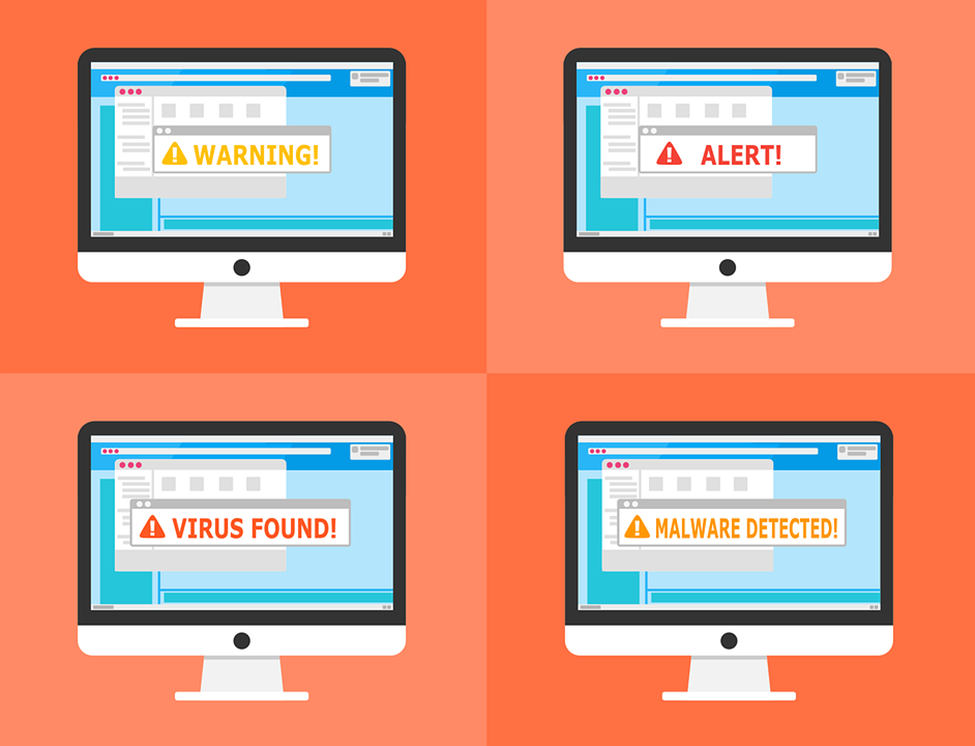
Why Alert Fatigue Remains a Database Performance Threat

Image Source

More than 50% of these professionals end up ignoring the alerts that they get from the tools that they invested in, according to the Dark Reading website. While most professionals get away with this trend, it can be damaging to the IT environment were they to ignore a high priority threat alert. A good example would be the 2013 Target cyber breach which resulted from alert fatigue. Although this behavior can be changed, it requires you to understand what really causes alert fatigue.

So, why are alert fatigues still a threat to performance?

Alerts Might Lack Context

Sometimes the alerts that reach your security team might lack enough context to use in remediating the situation. This means that the IT professional in charge of that part of the database will have to fly blind to resolve these issues. While the time required to resolve the issue of a single alert under these circumstances might be insignificant, it will quickly turn into an inconvenience if multiple similar alerts reach the same person.

This will mean that they will take more time to resolve the issues, and might end up ignoring some of the alerts. A good database activity monitoring tools should offer enough context on the reason behind the alert. It should provide information about the machine that was affected, the time the problem occurred and offer a little insight on how to remedy the situation.

Alert Redundancy

In some cases, no single security solution might provide all the security you need, which makes layering solutions a wise choice. The issue comes in when multiple solutions aren’t integrated enough. When two solutions notice an issue with your database, they will both send alerts which will turn out to be redundant to the security professional in charge of that specific area.

The trick is to fine-tune the tolerance levels of these solutions. You can start by consolidating and correlating the threat data. The best option, however, would be to switch to a more integrated solution that is platform based – this will also help save cost and improve vendor relationships.

Alert Delivery Issues

In some instances, alerts might be delivered to the wrong person in the organization. Seeing that these alerts do not concern them, chances are that they will ignore them. On the other hand, both high and low priority alerts might be sent out at the same time of the day.

For instance, delivering both types of alerts at 2.00am will increase the chances of a DevOps team member ignoring a high priority alert with the mindset that it might be nothing but minor. In both instances, evaluating your alert protocol is vital.

Excessive False Positives

False positives might be inevitable. The monitoring tools that you use might pick up an anomaly that shouldn’t raise any red flags. While a single false positive shouldn’t be too much to deal with, receiving them in high number can be a recipe for danger.

Excessive False Positives

Image Source

Since humans tend to get inured to redundancy, your team is likely to ignore all alerts with the mindset that they are all false positives. In case there is a high priority true positive alert in this sea of false positives, ignoring it will only lead to trouble. The trick is to fine tune your monitoring tools to reduce the occurrence of false positives.

Conclusion

Investing in the best database monitoring tools will only take you so far. The next step should be to tweak the tools to fit your IT environment. Consider the tips above to make every alert you get from such tools worthwhile.

The post Why Alert Fatigue Remains a Database Performance Threat appeared first on The Crazy Programmer.

from The Crazy Programmer https://www.thecrazyprogrammer.com/2019/01/why-alert-fatigue-remains-a-database-performance-threat.html

Data Encryption Standard (DES) Algorithm

Data Encryption Standard is a symmetric-key algorithm for the encrypting the data. It comes under block cipher algorithm which follows Feistel structure. Here is the block diagram of Data Encryption Standard.
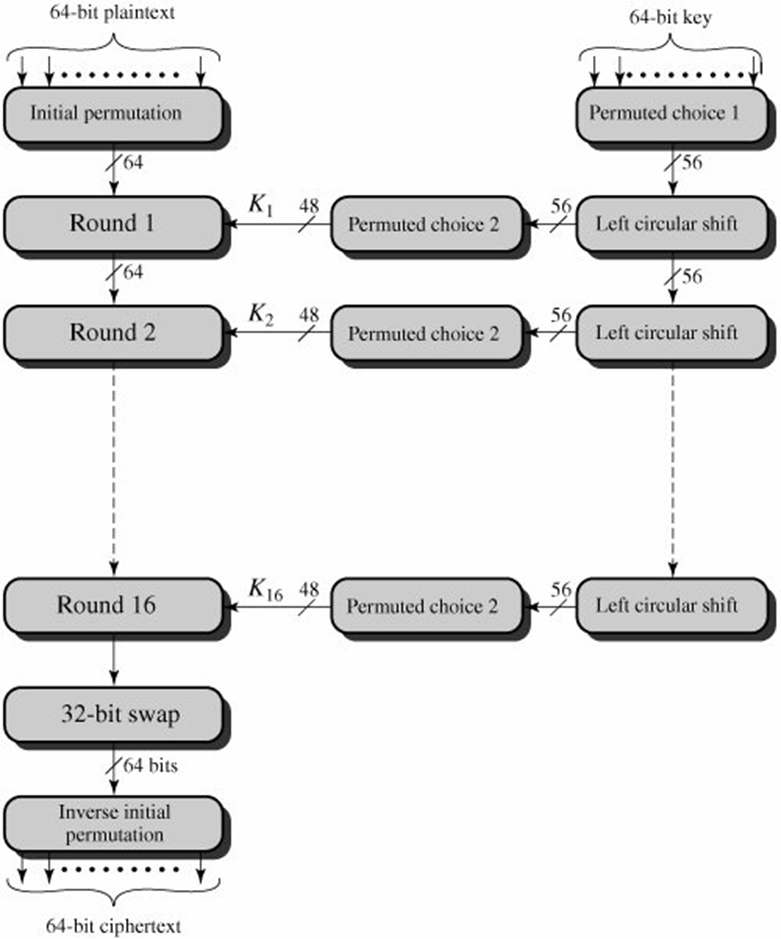
DES Algorithm Block Diagram

Fig1: DES Algorithm Block Diagram [Image Source: Cryptography and Network Security Principles and Practices 4th Ed by William Stallings]

Explanation for above diagram: Each character of plain text converted into binary format. Every time we take 64 bits from that and give as input to DES algorithm, then it processed through 16 rounds and then converted to cipher text.

Initial Permutation: 64 bit plain text goes under initial permutation and then given to round 1. Since initial permutation step receiving 64 bits, it contains an 1×64 matrix which contains numbers from 1 to 64 but in shuffled order. After that, we arrange our original 64 bit text in the order mentioned in that matrix. [You can see the matrix in below code]

After initial permutation, 64 bit text passed through 16 rounds. In each round it processed with 48 bit key. That means we need total 16 sub keys, one for each round. See below diagram, it will show what happening in each round of algorithm.
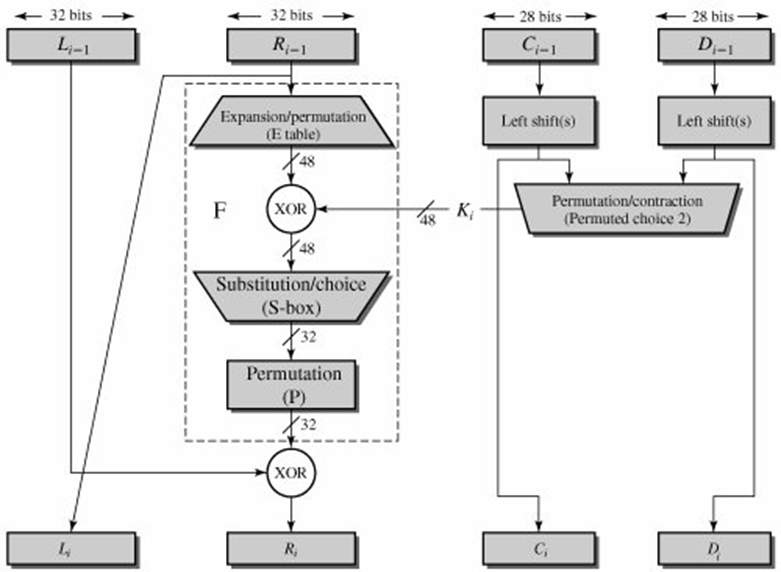
Single Round of DES Algorithm

Fig2: Single Round of DES Algorithm. [Image Source: Cryptography and Network Security Principles and Practices 4th Ed by William Stallings]

Round i: In each round 64bit text divided into two 32bit parts. Left and Right. You can see in diagram Li-1 and Ri-1. As algorithm says, Right 32bits goes under Expansion Permutation.

Expansion Permutation: Right side 32bit part of text given to expansion permutation. It will produce a 48bit text as output. i.e. 16bits added in this step. Some bits below 32 are repeated and arranged in an 1×48 matrix form. We rearrange 32bit text by following the order of that matrix. [See the matrix in below code]

After expansion permutation we have to XOR the output 48bit with a 48bit sub key. Let see how that 48bit sub key generating from 64bit original key.

Permutated Choice 1: Initially we take a 64 bit key and then apply to permutated choice 1. It contains a 1×56 matrix but with shuffled 1 to 64 numbers except multiples of number 8. i.e. 8, 16, 24, 32, 40, 48, 56, 64 will be discarded. Remaining 64-8 = 56 number will be there in 1×56 matrix. We rearrange key in matrix specified order. [You can see the matrix in below code]

Left Circular Shift: 56bit key from permutated choice 1 given to left circular shift operation. Here that 56bit key divided into two equal halves of each 28bit. These 28bits shifted depends upon the round number. We already have the data that in each round how many bits circularly we have to shift. You can see this data in shifts array in code.

Permutated Choice 2: Result of Left circular shift 56bit key given to permutated choice 2. This step will produce 48bit sub key. For this it has an 1×48 matrix, in which out of 56, some random 8 bits will be discarded. And remaining 48 will be there. According to this bit positions we have to rearrange the key. You can see this matrix in below code.

Now output of permutated choice 2 will be Xor with output of expansion permutation, which results a 48bit one. This 48bit again reduced to 32bit using Substitution boxes [called S box].

Substitution boxes [S box]: In DES algorithm we have 8 S boxes. Input for S box is 48bit. And output from S box is 32 bit. The input 48 bit will be divided equally to 8 s boxes from s1, s2, … s8. So each s box will get 48/8= 6 bits as input. This Each S box reduce 6 bits to 4 bits. i.e input for each S box is 6 bits and output is 4 bits. Finally, 8*4 = 32 bit. Which is final output of S box operation.

Let see how 6bits converted to 4 bits from S box. S box is an 4×16 matrix containing numbers in range 0 to 15. Take example, assume input 6 bits for S box are 011011. In this first and last bit together represents row number. Since maximum number with two bits is 3, S box also contains 0 to 3 rows total of 4. And middle 4 numbers together represent column number. Since maximum number with 4 bits is 15, S box also contains columns 0 to 15 total of 16. So here first and last bit = 01 i.e. row number 1 and middle 4 bits 1101= 13 i.e. column number 13. So for this input the number positioned at row 1 and column 13 will be picked. As mentioned earlier S box only contains number in range 0 to 15. All can be represented in 4 bits. So picked number 4 bits are output for the S box. See the code for all S boxes.

Permutation: After getting output from all S boxes, we are applying again permutation. Here also a matrix with different arrangements will be there, we have to arrange according to that.

Final XOR: After this permutation, take the left half which initially divided 64bit text to two halves. Do XOR with this permutation output to left 32bit part. This result is new Right part. And Right 32bit part which passed through all permutation will be come as new Left Part. These 2 parts will be the inputs for the second round. Same as keys also, the parts before left shift are next round input keys.

All this explanation for a single round for a 62bit plain text. Like this, it passes through total 16 rounds.

32 bit swap: After completion of 16 rounds, final 64 bits divided into two 32 bit parts and they swap each other.

Inverse Initial Permutation: Here also a matrix will be there, in which bits are just shuffled. No adding or subtracting bits. See the code for this matrix.

Program for DES Algorithm in C

#include <stdio.h>

int Original_key [64] = { // you can change key if required
	0, 0, 0, 1, 0, 0, 1, 1, 0, 0, 1, 1, 0, 1, 0, 0,
	0, 1, 0, 1, 0, 1, 1, 1, 0, 1, 1, 1, 1, 0, 0, 1,
	1, 0, 0, 1, 1, 0, 1, 1, 1, 0, 1, 1, 1, 1, 0, 0,
	1, 1, 0, 1, 1, 1, 1, 1, 1, 1, 1, 1, 0, 0, 0, 1
};

int Permutated_Choice1[56] = {
	  57, 49, 41, 33, 25, 17,  9,
	   1, 58, 50, 42, 34, 26, 18,
	  10,  2, 59, 51, 43, 35, 27,
	  19, 11,  3, 60, 52, 44, 36,
	  63, 55, 47, 39, 31, 23, 15,
	   7, 62, 54, 46, 38, 30, 22,
	  14,  6, 61, 53, 45, 37, 29,
	  21, 13,  5, 28, 20, 12,  4
};

int Permutated_Choice2[48] = {
	  14, 17, 11, 24,  1,  5,
	   3, 28, 15,  6, 21, 10,
	  23, 19, 12,  4, 26,  8,
	  16,  7, 27, 20, 13,  2,
	  41, 52, 31, 37, 47, 55,
	  30, 40, 51, 45, 33, 48,
	  44, 49, 39, 56, 34, 53,
	  46, 42, 50, 36, 29, 32
};

int Iintial_Permutation [64] = {
	  58, 50, 42, 34, 26, 18, 10, 2,
	  60, 52, 44, 36, 28, 20, 12, 4,
	  62, 54, 46, 38, 30, 22, 14, 6,
	  64, 56, 48, 40, 32, 24, 16, 8,
	  57, 49, 41, 33, 25, 17,  9, 1,
	  59, 51, 43, 35, 27, 19, 11, 3,
	  61, 53, 45, 37, 29, 21, 13, 5,
	  63, 55, 47, 39, 31, 23, 15, 7
};

int Final_Permutation[] = 
{
	  40, 8, 48, 16, 56, 24, 64, 32,
	  39, 7, 47, 15, 55, 23, 63, 31,
	  38, 6, 46, 14, 54, 22, 62, 30,
	  37, 5, 45, 13, 53, 21, 61, 29,
	  36, 4, 44, 12, 52, 20, 60, 28,
	  35, 3, 43, 11, 51, 19, 59, 27,
	  34, 2, 42, 10, 50, 18, 58, 26,
	  33, 1, 41,  9, 49, 17, 57, 25
};

int P[] = 
{
	  16,  7, 20, 21,
	  29, 12, 28, 17,
	   1, 15, 23, 26,
	   5, 18, 31, 10,
	   2,  8, 24, 14,
	  32, 27,  3,  9,
	  19, 13, 30,  6,
	  22, 11,  4, 25
};

int E[] = 
{
	  32,  1,  2,  3,  4,  5,
	   4,  5,  6,  7,  8,  9,
	   8,  9, 10, 11, 12, 13,
	  12, 13, 14, 15, 16, 17,
	  16, 17, 18, 19, 20, 21,
	  20, 21, 22, 23, 24, 25,
	  24, 25, 26, 27, 28, 29,
	  28, 29, 30, 31, 32,  1
};

int S1[4][16] = 
{
		14,  4, 13,  1,  2, 15, 11,  8,  3, 10,  6, 12,  5,  9,  0,  7,
		0, 15,  7,  4, 14,  2, 13,  1, 10,  6, 12, 11,  9,  5,  3,  8,
		4,  1, 14,  8, 13,  6,  2, 11, 15, 12,  9,  7,  3, 10,  5,  0,
		15, 12,  8,  2,  4,  9,  1,  7,  5, 11,  3, 14, 10,  0,  6, 13
};

int S2[4][16] = 
{
	15,  1,  8, 14,  6, 11,  3,  4,  9,  7,  2, 13, 12,  0,  5, 10,
	 3, 13,  4,  7, 15,  2,  8, 14, 12,  0,  1, 10,  6,  9, 11,  5,
	 0, 14,  7, 11, 10,  4, 13,  1,  5,  8, 12,  6,  9,  3,  2, 15,
	13,  8, 10,  1,  3, 15,  4,  2, 11,  6,  7, 12,  0,  5, 14,  9
};

int S3[4][16] = 
{
	10,  0,  9, 14,  6,  3, 15,  5,  1, 13, 12,  7, 11,  4,  2,  8,
	13,  7,  0,  9,  3,  4,  6, 10,  2,  8,  5, 14, 12, 11, 15,  1,
	13,  6,  4,  9,  8, 15,  3,  0, 11,  1,  2, 12,  5, 10, 14,  7,
	 1, 10, 13,  0,  6,  9,  8,  7,  4, 15, 14,  3, 11,  5,  2, 12
};

int S4[4][16] = 
{
	 7, 13, 14,  3,  0,  6,  9, 10,  1,  2,  8,  5, 11, 12,  4, 15,
	13,  8, 11,  5,  6, 15,  0,  3,  4,  7,  2, 12,  1, 10, 14,  9,
	10,  6,  9,  0, 12, 11,  7, 13, 15,  1,  3, 14,  5,  2,  8,  4,
	 3, 15,  0,  6, 10,  1, 13,  8,  9,  4,  5, 11, 12,  7,  2, 14
};

int S5[4][16] = 
{
	 2, 12,  4,  1,  7, 10, 11,  6,  8,  5,  3, 15, 13,  0, 14,  9,
	14, 11,  2, 12,  4,  7, 13,  1,  5,  0, 15, 10,  3,  9,  8,  6,
	 4,  2,  1, 11, 10, 13,  7,  8, 15,  9, 12,  5,  6,  3,  0, 14,
	11,  8, 12,  7,  1, 14,  2, 13,  6, 15,  0,  9, 10,  4,  5,  3
};

int S6[4][16] = 
{
	12,  1, 10, 15,  9,  2,  6,  8,  0, 13,  3,  4, 14,  7,  5, 11,
	10, 15,  4,  2,  7, 12,  9,  5,  6,  1, 13, 14,  0, 11,  3,  8,
	 9, 14, 15,  5,  2,  8, 12,  3,  7,  0,  4, 10,  1, 13, 11,  6,
	 4,  3,  2, 12,  9,  5, 15, 10, 11, 14,  1,  7,  6,  0,  8, 13
};

int S7[4][16]= 
{
	 4, 11,  2, 14, 15,  0,  8, 13,  3, 12,  9,  7,  5, 10,  6,  1,
	13,  0, 11,  7,  4,  9,  1, 10, 14,  3,  5, 12,  2, 15,  8,  6,
	 1,  4, 11, 13, 12,  3,  7, 14, 10, 15,  6,  8,  0,  5,  9,  2,
	 6, 11, 13,  8,  1,  4, 10,  7,  9,  5,  0, 15, 14,  2,  3, 12
};

int S8[4][16]= 
{
	13,  2,  8,  4,  6, 15, 11,  1, 10,  9,  3, 14,  5,  0, 12,  7,
	 1, 15, 13,  8, 10,  3,  7,  4, 12,  5,  6, 11,  0, 14,  9,  2,
	 7, 11,  4,  1,  9, 12, 14,  2,  0,  6, 10, 13, 15,  3,  5,  8,
	 2,  1, 14,  7,  4, 10,  8, 13, 15, 12,  9,  0,  3,  5,  6, 11
};

int shifts_for_each_round[16] = { 1, 1, 2, 2, 2, 2, 2, 2, 1, 2, 2, 2, 2, 2, 2, 1 };
int _56bit_key[56];
int _48bit_key[17][48];
int text_to_bits[99999], bits_size=0;
int Left32[17][32], Right32[17][32];
int EXPtext[48];
int XORtext[48];
int X[8][6];
int X2[32];
int R[32];
int chiper_text[64];
int encrypted_text[64];

int XOR(int a, int b) {
	return (a ^ b);
}

void Dec_to_Binary(int n) 
{ 
    int binaryNum[1000]; 
    int i = 0; 
    while (n > 0) { 
        binaryNum[i] = n % 2; 
        n = n / 2; 
        i++; 
    } 
    for (int j = i - 1; j >= 0; j--) {
			text_to_bits[bits_size++] = binaryNum[j]; 
	}
} 

int F1(int i)
{
	int r, c, b[6];
	for (int j = 0; j < 6; j++)
		b[j] = X[i][j];

	r = b[0] * 2 + b[5];
	c = 8 * b[1] + 4 * b[2] + 2 * b[3] + b[4];
	if (i == 0)
		return S1[r][c];
	else if (i == 1)
		return S2[r][c];
	else if (i == 2)
		return S3[r][c];
	else if (i == 3)
		return S4[r][c];
	else if (i == 4)
		return S5[r][c];
	else if (i == 5)
		return S6[r][c];
	else if (i == 6)
		return S7[r][c];
	else if (i == 7)
		return S8[r][c];
}


int PBox(int pos, int bit)
{
	int i;
	for (i = 0; i < 32; i++)
		if (P[i] == pos + 1)
			break;
	R[i] = bit;
}

int ToBits(int value)
{
	int k, j, m;
	static int i;
	if (i % 32 == 0)
		i = 0;
	for (j = 3; j >= 0; j--) 
	{
		m = 1 << j;
		k = value & m;
		if (k == 0)
			X2[3 - j + i] = '0' - 48;
		else
			X2[3 - j + i] = '1' - 48;
	}
	i = i + 4;
}

int SBox(int XORtext[])
{
	int k = 0;
	for (int i = 0; i < 8; i++)
		for (int j = 0; j < 6; j++)
			X[i][j] = XORtext[k++];

	int value;
	for (int i = 0; i < 8; i++) 
	{
		value = F1(i);
		ToBits(value);
	}
}

void expansion_function(int pos, int bit)
{
	for (int i = 0; i < 48; i++)
		if (E[i] == pos + 1)
			EXPtext[i] = bit;
}

void cipher(int Round, int mode)
{
	for (int i = 0; i < 32; i++)
		expansion_function(i, Right32[Round - 1][i]);

	for (int i = 0; i < 48; i++) 
	{
		if (mode == 0)
			XORtext[i] = XOR(EXPtext[i], _48bit_key[Round][i]);
		else
			XORtext[i] = XOR(EXPtext[i], _48bit_key[17 - Round][i]);
	}

	SBox(XORtext);

	for (int i = 0; i < 32; i++)
		PBox(i, X2[i]);
	for (int i = 0; i < 32; i++)
		Right32[Round][i] = XOR(Left32[Round - 1][i], R[i]);
}

void finalPermutation(int pos, int bit)
{
	int i;
	for (i = 0; i < 64; i++)
		if (Final_Permutation[i] == pos + 1)
			break;
	encrypted_text[i] = bit;
}

void Encrypt_each_64_bit (int plain_bits [])
{
	int IP_result [64] , index=0;
	for (int i = 0; i < 64; i++) {
		IP_result [i] = plain_bits[ Iintial_Permutation[i] ];
	}
	for (int i = 0; i < 32; i++)
		Left32[0][i] = IP_result[i];
	for (int i = 32; i < 64; i++)
		Right32[0][i - 32] = IP_result[i];

	for (int k = 1; k < 17; k++) 
	{ // processing through all 16 rounds
		cipher(k, 0);

		for (int i = 0; i < 32; i++)
			Left32[k][i] = Right32[k - 1][i]; // right part comes as it is to next round left part
	}

	for (int i = 0; i < 64; i++) 
	{ // 32bit swap as well as Final Inverse Permutation
		if (i < 32)
			chiper_text[i] = Right32[16][i];
		else
			chiper_text[i] = Left32[16][i - 32];
		finalPermutation(i, chiper_text[i]);
	}

	for (int i = 0; i < 64; i++)
		printf("%d", encrypted_text[i]);
}


void convert_Text_to_bits(char *plain_text){
	for(int i=0;plain_text[i];i++){
		int asci = plain_text[i];
		Dec_to_Binary(asci);
	}
}

void key56to48(int round, int pos, int bit)
{
	int i;
	for (i = 0; i < 56; i++)
		if (Permutated_Choice2[i] == pos + 1)
			break;
	_48bit_key[round][i] = bit;
}

int key64to56(int pos, int bit)
{
	int i;
	for (i = 0; i < 56; i++)
		if (Permutated_Choice1[i] == pos + 1)
			break;
	_56bit_key[i] = bit;
}

void key64to48(int key[])
{
	int k, backup[17][2];
	int CD[17][56];
	int C[17][28], D[17][28];

	for (int i = 0; i < 64; i++)
		key64to56(i, key[i]);

	for (int i = 0; i < 56; i++)
		if (i < 28)
			C[0][i] = _56bit_key[i];
		else
			D[0][i - 28] = _56bit_key[i];

	for (int x = 1; x < 17; x++) 
	{
		int shift = shifts_for_each_round[x - 1];

		for (int i = 0; i < shift; i++)
			backup[x - 1][i] = C[x - 1][i];
		for (int i = 0; i < (28 - shift); i++)
			C[x][i] = C[x - 1][i + shift];
		k = 0;
		for (int i = 28 - shift; i < 28; i++)
			C[x][i] = backup[x - 1][k++];

		for (int i = 0; i < shift; i++)
			backup[x - 1][i] = D[x - 1][i];
		for (int i = 0; i < (28 - shift); i++)
			D[x][i] = D[x - 1][i + shift];
		k = 0;
		for (int i = 28 - shift; i < 28; i++)
			D[x][i] = backup[x - 1][k++];
	}

	for (int j = 0; j < 17; j++) 
	{
		for (int i = 0; i < 28; i++)
			CD[j][i] = C[j][i];
		for (int i = 28; i < 56; i++)
			CD[j][i] = D[j][i - 28];
	}

	for (int j = 1; j < 17; j++)
		for (int i = 0; i < 56; i++)
			key56to48(j, i, CD[j][i]);
}

int main(){
	char plain_text[] = "tomarrow we wiil be declaring war";
	convert_Text_to_bits(plain_text);
	key64to48(Original_key); // it creates all keys for all rounds
	int _64bit_sets = bits_size/64;
	printf("Decrypted output is\n");
	for(int i=0;i<= _64bit_sets ;i++) {
		Encrypt_each_64_bit (text_to_bits + 64*i);
	}
	return 0;
}

Output

Decrypted output is
0000111001101001001100011010111010010110111010111111111000010111001011111011111101010011011101011011000000111011100100000010110101000101011000011001000000101000001010011110101001011000111010011001110010110011011110110001101110000000001000001001000110111010

The post Data Encryption Standard (DES) Algorithm appeared first on The Crazy Programmer.

from The Crazy Programmer https://www.thecrazyprogrammer.com/2019/01/data-encryption-standard-des-algorithm.html

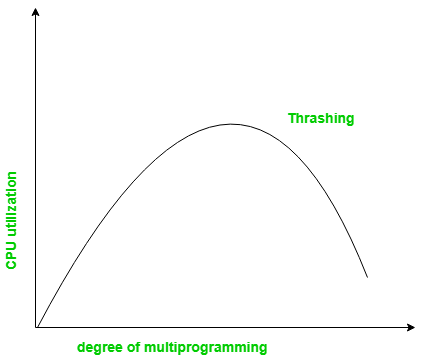
Remote debugging with VS Code on Windows to a Raspberry Pi using .NET Core on ARM

I’ve been playing with my new “CrowPi” from Elecrow. It’s a great Raspberrry Pi STEM kit that is entirely self-contained in a small case. It includes a touch screen and a TON of sensors, LCDs, matrix display, sensors, buzzers, breadboard, etc.

NOTE: I talked to the #CrowPi people and they gave me an Amazon COUPON that’s ~$70 off! The coupon is 8EMCVI56 and will work until Jan 31, add it during checkout. The Advanced Kit is at https://amzn.to/2SVtXl2 #ref and includes everything, touchscreen, keyboard, mouse, power, SNES controllers, motors, etc. I will be doing a full review soon. Short review is, it’s amazing.

I was checking out daily builds of the new open source .NET Core System.Device.Gpio that lets me use C# to talk to the General Purpose Input/Output pins (GPIO) on the Raspberry Pi. However, my “developer’s inner loop” was somewhat manual. The developer’s inner loop is that “write code, run code, change code” loop that we all do. If you find yourself typing repetitive commands that deploy or test your code but don’t write new code, you’ll want to try to optimize that inner loop and get it down to one keystroke (or zero in the case of automatic test).

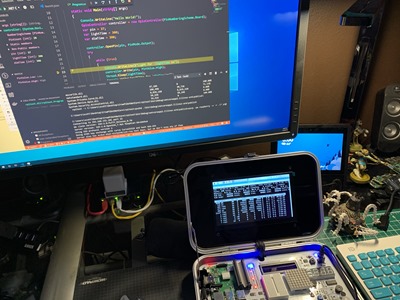
Rasbperry Pi Debugging with VS CodeIn my example, I was writing my code in Visual Studio Code on my Windows machine, building the code locally, then running a “publish.bat” that would scp (secure copy) the resulting binaries over to the Raspberry Pi. Then in another command prompt that was ssh’ed into the Pi, I would chmod the resulting binary and run it. This was tedious and annoying, however as programmers sometimes we stop noticing it and just put up with the repetitive motion.

A good (kind of a joke, but not really) programmer rule of thumb is – if you do something twice, automate it.

I wanted to be able not only to make the deployment automatic, but also ideally I’d be able to interactively debug my C#/.NET Core code remotely. That means I’m writing C# in Visual Studio Code on my Windows machine, I hit “F5” to start a debug session and my app is compiled, published, run, and I attached to a remote debugger running on the Raspberry Pi, AND I’m dropped into a debugging session with a breakpoint set. All with one keystroke. This is common practice with local apps, but for remote apps – and ones that span two CPU architectures – it can take a smidge of setup.

Starting with instructions here: https://github.com/OmniSharp/omnisharp-vscode/wiki/Attaching-to-remote-processes and here: https://github.com/OmniSharp/omnisharp-vscode/wiki/Remote-Debugging-On-Linux-Arm and a little help from Jose Perez Rodriguez at work, here’s what I came up with.

Setting up Remote Debugging from Visual Code on Windows to a Raspberry Pi running C# and .NET Core

First, I’m assuming you’ve got .NET Core on both your Windows machine and Raspberry Pi. You’ve also installed Visual Studio Code on you Windows machine and you’ve installed the C# extension.

On the Raspberry Pi

I’m ssh’ing into my Pi from Windows 10. Windows 10 includes ssh out of the box now, but you can also ssh from WSL (Windows Subsystem for Linux).

  1. Install the VS remote debugger on your Pi by running this command:

    curl -sSL https://aka.ms/getvsdbgsh | /bin/sh /dev/stdin -v latest -l ~/vsdbg

  2. ​To debug you will need to run the program as root, so we’ll need to be able to remote launch the program as root as well. For this, we need to first set a password for the root user in your pi, which you can do by running:

    sudo passwd root

  3. Then we need to enable ssh connections using root, by running :

    sudo nano /etc/ssh/sshd_config        

    and adding a line that reads:

    PermitRootLogin yes

  4. reboot the pi: sudo reboot

VSDbg looks like this getting installed:

pi@crowpi:~/Desktop/rpitest$ curl -sSL https://aka.ms/getvsdbgsh | /bin/sh /dev/stdin -v latest -l ~/vsdbg

Info: Creating install directory
Using arguments
Version : 'latest'
Location : '/home/pi/vsdbg'
SkipDownloads : 'false'
LaunchVsDbgAfter : 'false'
RemoveExistingOnUpgrade : 'false'
Info: Using vsdbg version '16.0.11220.2'
Info: Previous installation at '/home/pi/vsdbg' not found
Info: Using Runtime ID 'linux-arm'
Downloading https://vsdebugger.azureedge.net/vsdbg-16-0-11220-2/vsdbg-linux-arm.zip
Info: Successfully installed vsdbg at '/home/pi/vsdbg'

At this point I’ve got vsdbg installed. You can go read about the MI Debug Engine here. “The Visual Studio MI Debug Engine (“MIEngine”) provides an open-source Visual Studio Debugger extension that works with MI-enabled debuggers such as gdb, lldb, and clrdbg.”

On the Windows Machine

Note that there are a half dozen ways to do this. Since I had a publish.bat already that looked like this, after installing putty with “choco install putty” on my Windows machine. I’m a big fan of pushd and popd and I’ll tell you this, they aren’t used or known enough.

dotnet publish -r linux-arm /p:ShowLinkerSizeComparison=true 

pushd .\bin\Debug\netcoreapp2.1\linux-arm\publish
pscp -pw raspberry -v -r .\* pi@crowpi.lan:/home/pi/Desktop/rpitest
popd

On Windows, I want to add two things to my .vscode folder. I’ll need a launch.json that has my “Launch target” and I’ll need some tasks in my tasks.json to support that. I added the “publish” task myself. My publish task calls out to publish.bat. It could also do the stuff above if I wanted. Note that I made publish “dependsOn” build, and I removed/cleared problemMatcher. If you wanted, you could write a regEx that would detect if the publish failed.

{

"version": "2.0.0",
"tasks": [
{
"label": "build",
"command": "dotnet",
"type": "process",
"args": [
"build",
"${workspaceFolder}/rpitest.csproj"
],
"problemMatcher": "$msCompile"
},
{
"label": "publish",
"type": "shell",
"dependsOn": "build",
"presentation": {
"reveal": "always",
"panel": "new"
},
"options": {
"cwd": "${workspaceFolder}"
},
"windows": {
"command": "${cwd}\\publish.bat"
},
"problemMatcher": []
}
]
}

Then in my launch.json, I have this to launch the remote console. This can be a little confusing because it’s mixing paths that are local to Windows with paths that are local to the Raspberry Pi. For example, pipeProgram is using the Chocolatey installation of Putty’s Plink. But program and args and cwd are all remote (or local to) the Raspberry Pi.

"configurations": [

{
"name": ".NET Core Launch (remote console)",
"type": "coreclr",
"request": "launch",
"preLaunchTask": "build",
"program": "/home/pi/dotnet/dotnet",
"args": ["/home/pi/Desktop/rpitest/rpitest.dll"],
"cwd": "/home/pi/Desktop/rpitest",
"stopAtEntry": false,
"console": "internalConsole",
"pipeTransport": {
"pipeCwd": "${workspaceFolder}",
"pipeProgram": "${env:ChocolateyInstall}\\bin\\PLINK.EXE",
"pipeArgs": [
"-pw",
"raspberry",
"root@crowpi.lan"
],
"debuggerPath": "/home/pi/vsdbg/vsdbg"
}
}

Note the debugger path lines up with the location above that we installed vsdbg.

Remote debugging with VS Code on Windows to a Raspberry Pi using .NET Core

It’s worth pointing out that while I’m doing this for C# it’s not C# specific. You could setup remote debugging with VS Code using these building blocks with any environment.

The result here is that my developer’s inner loop is now just pressing F5! What improvements would YOU make?


Sponsor: Preview the latest JetBrains Rider with its Assembly Explorer, Git Submodules, SQL language injections, integrated performance profiler and more advanced Unity support.


© 2018 Scott Hanselman. All rights reserved.


from Scott Hanselman’s Blog http://feeds.hanselman.com/~/593231954/0/scotthanselman~Remote-debugging-with-VS-Code-on-Windows-to-a-Raspberry-Pi-using-NET-Core-on-ARM.aspx

Design a site like this with WordPress.com
Get started