Helpful Tips to Make Your New App More Secure

Up to 92 percent of all apps available today have security weaknesses or flaws that can be easily exploited by nefarious cyber-criminals. If you are creating an app or planning to launch one in the near future, then making sure it is secure is a must. After all, there’s no one who wants to use an insecure app.

While using the services of third party service providers, like https://thinkwgroup.com/, is a great start, there are other steps you need to take to achieve a level of true security. Keep reading to learn what you can do to safeguard all the hard work you have done.

Helpful Tips to Make Your New App More Secure

Image Source

Ground Up Protection

When it comes to any type of software project, including apps, you need to make sure that security is the main priority from the very first day you begin working on it. However, it is crucial to remember, a native app is extremely different from a web application.

If you have a web application, software and data are found exclusively on a service and the client-side is essentially just an interface. However, with a native app, the code that is found on the device after it has been downloaded makes it much more accessible to individuals who have any type of malicious intent.

There are quite a few vulnerabilities that are present in the source code of the app. However, that isn’t where the majority of businesses focus the security dollars. Data and network security components are both vital elements of the bigger security picture. While this is true, the security has to begin with your actual app.

There is a wide array of reasons that vulnerabilities may occur, ranging from your failure to test your code, a developer error, or that your app has become the target of a hacker.

Back End Security

Cloud servers and servers that your apps APIs are accessing (a third party’s or your own) need to have set security practices in place to provide adequate protection for data and to help and prevent any unauthorized access.

The APIs, along with those who are accessing them, need to be verified. This can help to prevent cases of eavesdropping on ay type of sensitive information that may be passing from the app’s database and server to the client.

Utilize a Smart Encryption Policy for Mobile Device Use

Although it was stated above, it is a good idea to mention it again – much more of an app’s data and code will have to be stored on your device than with a typical web app.

Why?

Because you are now accounting for the often-varying bandwidth, performance, and the quality of the devices being used. With more data being stored locally on devices (regardless of if it is temporarily or permanently), it’s going to be more vulnerable.

A “leaky” app may release your customer’s data without them being aware of the problem. This is done with mobile data points that have been collected or entered in the background, such as usage habits for the device, location, and age.

Security is a Must-Have for Any App

If you want a secure app, you have to take steps to ensure this happens. There are more than a few methods you can use to ensure security but be sure to keep the tips and information here in mind. While the professionals can offer some layer of help, it’s also important that you take your own security steps to minimize the possibility of problems when actual users begin accessing the app that you have created.

The post Helpful Tips to Make Your New App More Secure appeared first on The Crazy Programmer.

from The Crazy Programmer https://www.thecrazyprogrammer.com/2019/03/helpful-tips-to-make-your-new-app-more-secure.html

Programming Languages for Students

You do not have to enroll for a Computer Science degree to start doing some programming or coding. As a student, you can learn some programming languages that can help you achieve your dreams while still in school. Students can also make pocket money from coding. In this post, we will talk about the different programming languages that are fit for students.

There are various resources students can use to start their first steps in learning the programming languages of their choice. There is no need for spending more funds to learn coding and programming as a student. If children can learn to program, why not you? By making good use of the free programming courses and classes, you can begin your journey to becoming a sought-after programmer in the future.

However, if you feel that the free resources will not suffice your programming needs, you can go for a paid course. They are more extensive, and if you like, a one-on-one class will help you ask questions whenever you need. You may want to set apart time in the evening or on weekends to take advantage of the one-on-one classes. Regardless of the choice you make, you can learn any programming language you want.

Programming Languages for Students

Image Source

Here are some of the programming languages that students can learn:

1. PHP

If I said that PHP is an easy language to learn, people would say it is wrong. And I cannot say it is the best. The aim of learning any given programming language is to meet your needs and solve the problems at hand. As a student, learning PHP will help you in various ways. But as long as you understand simple English, you can easily get along with coding in PHP.

PHP is a robust programming language developers use in creating web apps and websites. As a student, learning PHP will enable you to create WordPress plugins and make money out of it. Freelance web developers also earn good money completing big projects for companies. You can as well tap into the global economy and become a developer once you learn PHP.

2. Python

As a high school or college student, you may want to create a program to help you in completing your homework. Python is relatively simple and fast to learn. It is, however robust enough to run numerous computations and calculations to give you the desired results in the shortest time possible.

If you want to become a future developer, python can also help you learn to create industry-standard websites. Many modern websites rely on frameworks to deliver high-quality content and create solutions for the needs of their visitors. Some of these frameworks (Django, Flask, etc) are built on Python.

You need the skills in Python to create such websites for your personal projects or as a motivation for your future developments. You can also sell your Python skills by developing websites for people and get paid.

3. Java

Java is considered to be difficult by some people. But it all depends on your goals. As a student, you have already started making choices of what you want to achieve in the near future. Learning Java can set you on good ground for you to become an app developer once you are through with high school.

While in school, you can start by creating simple mobile games (Java is compatible with Android). As you advance your skills, you can start developing apps that provide solutions to people who need them. I can still do Java development and write my academic essay without worrying about the time I spend learning the programming language. You can publish the apps on the Play Store and make cash from sales while still studying.

4. SQL

Arguably, SQL is not a programming language. But learning SQL is essential for students. The language is necessary for many goals a student may want to achieve. For instance, it makes searching for a string and storing data simpler and faster.

In college and high school statistics, you may want to use SQL when dealing with various types of data. Instead of keeping spreadsheets, SQL will help you to securely backup your data, structure, and queries in a database for easier retrieval.

SQL is also the backbone of many web apps built on PHP. When developing PHP apps, you may want to run a sequence of events or retrieve information when running the app. SQL will be vital, and without SQL skills, you will find it hard to implement your PHP skills into meaningful projects.

How to Learn the Programming Languages for Students

Students can learn programming languages basics online. Many free tools are available to help you kickstart your learning while in school. Codeacademy is one of the freely available learning resources students can use to learn the languages they need to become programmers. With the pro package, you get the tools to help you reach your goals faster.

About Author

William Stewart is a web developer, building in PHP and Python. He started learning his development skills while doing his high school diploma. Currently, William helps many students learn the beginner steps of becoming developers in the future.

The post Programming Languages for Students appeared first on The Crazy Programmer.

from The Crazy Programmer https://www.thecrazyprogrammer.com/2019/03/programming-languages-for-students.html

How to parse string dates with a two digit year and split on the right century in C#

So you’ve been asked to parse some dates, except the years are two digit years. For example, dates like “12 Jun 30” are ambiguous…or are they?

If “12 Jun 30” is intended to express a birthday, given it’s 2019 as the of writing of this post, we can assume it means 1930. But if the input is “12 Jun 18” is that last year, or is that a 101 year old person’s birthday?

Enter the Calendar.TwoDigitYearMax property.

For example, if this property is set to 2029, the 100-year range is from 1930 to 2029. Therefore, a 2-digit value of 30 is interpreted as 1930, while a 2-digit value of 29 is interpreted as 2029.

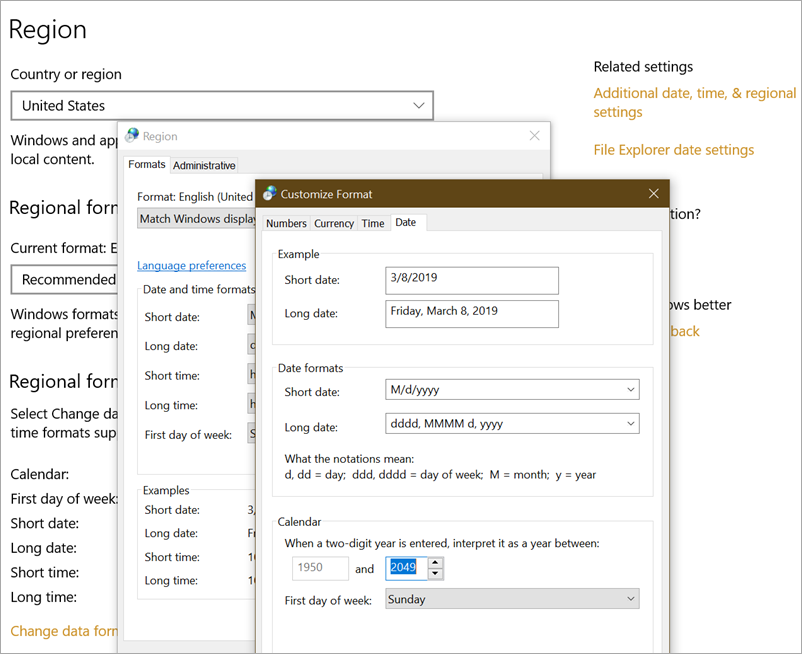
The initial value for this property comes out of the DEPTHS of the region and languages portion of the Control Panel. Note way down there in “additional date, time, & regional settings” in the “more settings” and “date” tab, there’s a setting that (currently) splits on 1950 and 2049.

Two Digit Year regional settings

If you’re writing a server-side app that parses two digit dates you’ll want to be conscious and explicit about what behavior you WANT so that you’re not surprised.

Setting TwoDigitYearMax sets a 100 year RANGE that your two digit years will be interpreted to be within. You can also just change it on the current thread’s current culture’s calendar. It’s up to you.

For example, this little app:

string dateString = "12 Jun 30"; //from user input

DateTime result;
CultureInfo culture = new CultureInfo("en-US");
DateTime.TryParse(dateString, culture, DateTimeStyles.None, out result);
Console.WriteLine(result.ToLongDateString());

culture.Calendar.TwoDigitYearMax = 2099;

DateTime.TryParse(dateString, culture, DateTimeStyles.None, out result);
Console.WriteLine(result.ToLongDateString());

gives this output:

Thursday, June 12, 1930

Wednesday, June 12, 2030

Note that I’ve changed TwoDigitYearMax from and moved it up to the 1999-2099 range so “30” is assumed to be 2030, within that 100 year range.

Hope this helps!


Sponsor: Stop wasting time trying to track down the cause of bugs. Sentry.io provides full stack error tracking that lets you monitor and fix problems in real time. If you can program it, we can make it far easier to fix any errors you encounter with it.


© 2018 Scott Hanselman. All rights reserved.


from Scott Hanselman’s Blog http://feeds.hanselman.com/~/599330886/0/scotthanselman~How-to-parse-string-dates-with-a-two-digit-year-and-split-on-the-right-century-in-C.aspx

Top 7 Alternative Solutions for iCloud Unlock 2019

iCloud Unlock tool is a very efficient and effective tool to bypass the iCloud activation lock of the iPhone. It is a software which can be installed on any phone and can be used to remove the iCloud lock from the screen of the device. So, if you don’t the real Apple ID with which the iPhone’s iCloud is registered then you can unlock your device easily using iCloud Unlock. It is the ultimate solution to recover the Apple ID as well. It has a simple interface and is widely used by iPhone or iPad users. However, you need to pay to use this software to bypass the iCloud activation screen. Here you can find the top 7 alternative solutions for iCloud Unlock. So, if you are facing any problem to use iCloud Unlock, then you can select any of these solutions as per your choice.

1. DoulCi Activator

DoulCi Activator is a tool used for bypass the iCloud lock. It has a simple set of instructions to be followed to unlock the iCloud lock. You can download it from the web easily. However, it requires some general level knowledge about technology and technological devices to use it. It’s working procedure is quite complex.

Pros:

  • It is compatible with all the iOS devices.
  • You can download this tool for free.
  • If you are not tech-savvy, you can watch its tutorial videos and use it easily.
  • It is capable to unlock the iPhone.

Cons:

  • You have to participate in a survey only then you can download this tool.
  • You may require to pay to use this software. Once you download it, you need to pay to use it.

2. Visit Apple website

When you will open the Apple website, go to the menu. There you will find an option of Support, open it. There you will find an article named as, ‘If you forgot your Apple ID password’. Read that article and find out the ways to reset and regain your Apple account and unlock your iPhone by recovering the password.

This is a completely official way to recover the password and through this article, you will find detailed information about the iCloud settings and the method to reset the Apple account. This article provides the best tips to set up the Apple ID in your iPhone. Moreover, you can also find out about the person if your account has been hacked.

3. Open My iCloud Tool

Open My iCloud tool has gained popularity has software to unlock the iCloud lock of iOS devices. It is a very simple tool which can be used to bypass the iCloud activation lock. Moreover, you can use it for all the latest model of iPhones of the present time.

Pros:

  • It renders a quick function to remove the iCloud activation lock. It is very user-friendly.
  • You can use this tool for all kinds of iOS devices. It has great compatibility.
  • You can also use your iPhone’s IMEI code to unlock your iPhone.

Cons:

  • Since there is no latest update of this tool, so you may find a problem in downloading this tool for your device.

4. Unlock iCloud

YouTube is a huge source for all types of videos and knowledge. If you have no clue about what to do for unlocking your iPhone, then switch to YouTube. There you will find many videos of technological hacks which you can use to bypass the iCloud activation lock. Moreover, you can also recover your iOS device by resetting the password from the video tutorials. You can find many solutions to this problem there from where you can select the best one.

5. LockWiper

LockWiper is a good and achievable solution to bypass the iCloud lock on your iOS devices. It is featured with many advanced functionalities which helps the user to recover the Apple ID password and unlock the iPhone. It allows the user to gain complete access to iPhone without any loss of iPhone features and its any technical defect in it.

Pros:

  • You can unlock your iPhone in a few clicks.
  • It sets your iPhone free from the previous Apple account.
  • It works without the IMEI code of the iPhone.

Cons:

  • It can only be used with activated iOS devices.
  • If ‘Find My iPhone’ is enabled on the iPhone, then it will only unlock the iPhone working on iOS 11.3 or earlier versions.

6. iCloudin

It is a free tool compatible with almost all iOS devices and can be used to unlock them bypassing the iCloud activation tool. However, it is very easy to use but you can watch its tutorial videos if you want to get the straight idea to use it.

Pros:

  • It has a user-friendly interface.
  • It’s video tutorials are available on the website.
  • It works well with all the latest iOS versions.

Cons:

  • It is an old way to remove the lock.
  • It does not provide efficient backup.

7. Bypass iCloud Activation Tool

This tool uses a different method to unlock the iPhone. It directly connects to Apple servers to reactivate the iCloud. It has a complex interface though. Buy, it is very helpful in unlocking the device with secure methods.

Pros:

  • It is very simple and safe to use.
  • You can use this tool to unlock your iOS device in a few simple steps.
  • The customer support of this website is also appreciable.

Cons:

  • It is not a preferred tool for non-technical users of iPhone.

Here you have seen many tools and other methods which you can use to recover your Apple ID password or can bypass the iCloud activation lock. These are the best alternatives for iCloud Unlock software. You can use any of these tools or ways to get your iPhone functioning as before. These methods are really effective and tested. If you have simply forgotten the password of your Apple ID, go for the Apple website support to reset the account. If you have any queries related to the unlocking of iPhone, please comment below.

Sponsor ads:

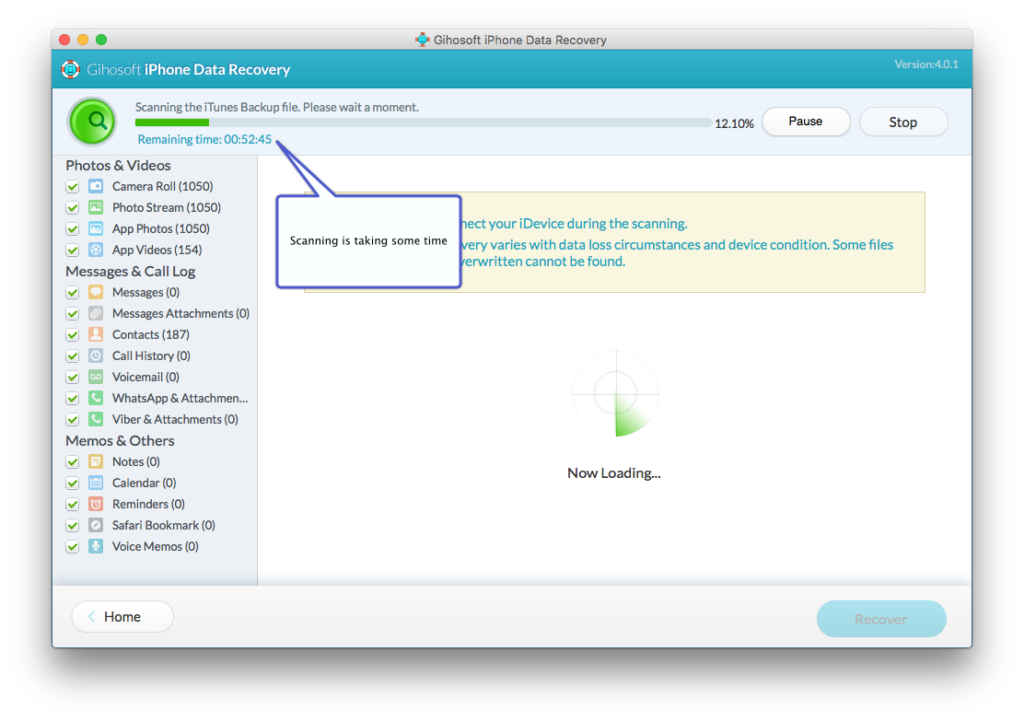
Gihosoft Free iPhone Data Recovery

Gihosoft Free iPhone Data Recovery: https://www.gihosoft.com/iphone-data-recovery-free.html

Gihosoft iPhone Data Recovery Free

  • Free iPhone Data Recovery Software for Windows/Mac
  • Recover up to 12+ types of files, including contacts, SMS, photos, WhatsApp, Viber, notes, etc.
  • Restore lost data from iOS devices directly or from iTunes and iCloud backup
  • Recover iPhone data lost due to iOS upgrade/jailbreak, accidental deletion, device lost or broken
  • Support all the latest iPhone, iPad and iPod Touch
  • Both Free and Pro version.

If you lost data after you updated to a new iPhone, you can always use Gihosoft iPhone Data Recovery to get the data back from the old iPhone or backup. You may also like: iphonerecovery.com

If you use android phones, please choose Gihosoft Android Data Recovery.

The post Top 7 Alternative Solutions for iCloud Unlock 2019 appeared first on The Crazy Programmer.

from The Crazy Programmer https://www.thecrazyprogrammer.com/2019/03/top-7-alternative-solutions-for-icloud-unlock-2019.html

Converting an Excel Worksheet into a JSON document with C# and .NET Core and ExcelDataReader

Excel isn't a database, except when it isI’ve been working on a little idea where I’d have an app (maybe a mobile app with Xamarin or maybe a SPA, I haven’t decided yet) for the easily accessing and searching across the 500+ videos from http://friday.azure.com.
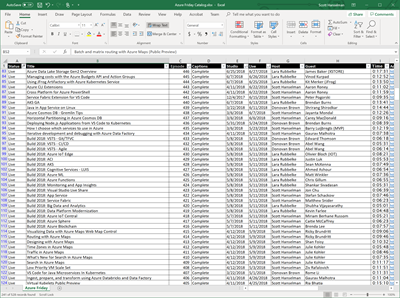
HOWEVER. I don’t have access to the database that hosts the metadata and while I’m trying to get at least read-only access to it (long story) the best I can do is a giant Excel spreadsheet dump that I was given that has all the video details.

This, of course, is sub-optimal, but regardless of how you feel about it, it’s a database. Or, a data source at the very least! Additionally, since it was always going to end up as JSON in a cached in-memory database regardless, it doesn’t matter much to me.

In real-world business scenarios, sometimes the authoritative source is an Excel sheet, sometimes it’s a SQL database, and sometimes it’s a flat file. Who knows?

What’s most important (after clean data) is that the process one builds around that authoritative source is reliable and repeatable. For example, if I want to build a little app or one page website, yes, ideally I’d have a direct connection to the SQL back end. Other alternative sources could be a JSON file sitting on a simple storage endpoint accessible with a single HTTP GET. If the Excel sheet is on OneDrive/SharePoint/DropBox/whatever, I could have a small serverless function run when the files changes (or on a daily schedule) that would convert the Excel sheet into a JSON file and drop that file onto storage. Hopefully you get the idea. The goal here is clean, reliable pragmatism. I’ll deal with the larger business process issue and/or system architecture and/or permissions issue later. For now the “interface” for my app is JSON.

So I need some JSON and I have this Excel sheet.

Turns out there’s a lovely open source project and NuGet package called ExcelDataReader. There’s been ways to get data out of Excel for decades. Literally decades. One of my first jobs was automating Microsoft Excel with Visual Basic 3.0 with COM Automation. I even blogged about getting data out of Excel into ASP.NET 16 years ago!

Today I’ll use ExcelDataReader. It’s really nice and it took less than an hour to get exactly what I wanted. I haven’t gone and made it super clean and generic, refactored out a bunch of helper functions, so I’m interested in your thoughts. After I get this tight and reliable I’ll drop it into an Azure Function and then focus on getting the JSON directly from the source.

A few gotchas that surprised me. I got a “System.NotSupportedException: No data is available for encoding 1252.” Windows-1252 or CP-1252 (code page) is an old school text encoding (it’s effectively ISO 8859-1). Turns out newer .NETs like .NET Core need the System.Text.Encoding.CodePages package as well as a call to System.Text.Encoding.RegisterProvider(System.Text.CodePagesEncodingProvider.Instance); to set it up for success. Also, that extra call to reader.Read at the start to skip over the Title row had me pause a moment.

using System;

using System.IO;
using ExcelDataReader;
using System.Text;
using Newtonsoft.Json;

namespace AzureFridayToJson
{
class Program
{
static void Main(string[] args)
{
Encoding.RegisterProvider(CodePagesEncodingProvider.Instance);

var inFilePath = args[0];
var outFilePath = args[1];

using (var inFile = File.Open(inFilePath, FileMode.Open, FileAccess.Read))
using (var outFile = File.CreateText(outFilePath))
{
using (var reader = ExcelReaderFactory.CreateReader(inFile, new ExcelReaderConfiguration()
{ FallbackEncoding = Encoding.GetEncoding(1252) }))
using (var writer = new JsonTextWriter(outFile))
{
writer.Formatting = Formatting.Indented; //I likes it tidy
writer.WriteStartArray();
reader.Read(); //SKIP FIRST ROW, it's TITLES.
do
{
while (reader.Read())
{
//peek ahead? Bail before we start anything so we don't get an empty object
var status = reader.GetString(0);
if (string.IsNullOrEmpty(status)) break;

writer.WriteStartObject();
writer.WritePropertyName("Status");
writer.WriteValue(status);

writer.WritePropertyName("Title");
writer.WriteValue(reader.GetString(1));

writer.WritePropertyName("Host");
writer.WriteValue(reader.GetString(6));

writer.WritePropertyName("Guest");
writer.WriteValue(reader.GetString(7));

writer.WritePropertyName("Episode");
writer.WriteValue(Convert.ToInt32(reader.GetDouble(2)));

writer.WritePropertyName("Live");
writer.WriteValue(reader.GetDateTime(5));

writer.WritePropertyName("Url");
writer.WriteValue(reader.GetString(11));

writer.WritePropertyName("EmbedUrl");
writer.WriteValue($"{reader.GetString(11)}player");
/*
https://channel9.msdn.com/Shows/Azure-Friday/Erich-Gamma-introduces-us-to-Visual-Studio-Online-integrated-with-the-Windows-Azure-Portal-Part-1/player
*/

writer.WriteEndObject();
}
} while (reader.NextResult());
writer.WriteEndArray();
}
}
}
}
}

The first pass is on GitHub at https://github.com/shanselman/AzureFridayToJson and the resulting JSON looks like this:

[

{
"Status": "Live",
"Title": "Introduction to Azure Integration Service Environment for Logic Apps",
"Host": "Scott Hanselman",
"Guest": "Kevin Lam",
"Episode": 528,
"Live": "2019-02-26T00:00:00",
"Url": "https://azure.microsoft.com/en-us/resources/videos/azure-friday-introduction-to-azure-integration-service-environment-for-logic-apps",
"embedUrl": "https://azure.microsoft.com/en-us/resources/videos/azure-friday-introduction-to-azure-integration-service-environment-for-logic-appsplayer"
},
{
"Status": "Live",
"Title": "An overview of Azure Integration Services",
"Host": "Lara Rubbelke",
"Guest": "Matthew Farmer",
"Episode": 527,
"Live": "2019-02-22T00:00:00",
"Url": "https://azure.microsoft.com/en-us/resources/videos/azure-friday-an-overview-of-azure-integration-services",
"embedUrl": "https://azure.microsoft.com/en-us/resources/videos/azure-friday-an-overview-of-azure-integration-servicesplayer"
},
...SNIP...

Thoughts? There’s a dozen ways to have done this. How would you do this? Dump it into a DataSet and serialize objects to JSON, make an array and do the same, automate Excel itself (please don’t do this), and on and on.

Certainly this would be easier if I could get a CSV file or something from the business person, but the issue is that I’m regularly getting new drops of this same sheet with new records added. Getting the suit to Save As | CSV reliably and regularly isn’t sustainable.


Sponsor: Stop wasting time trying to track down the cause of bugs. Sentry.io provides full stack error tracking that lets you monitor and fix problems in real time. If you can program it, we can make it far easier to fix any errors you encounter with it.


© 2018 Scott Hanselman. All rights reserved.


from Scott Hanselman’s Blog http://feeds.hanselman.com/~/599260678/0/scotthanselman~Converting-an-Excel-Worksheet-into-a-JSON-document-with-C-and-NET-Core-and-ExcelDataReader.aspx

Types of Operating System

An operating system is the basic mechanism behind the working of the computer systems and mobile devices and so, understanding the operating system becomes very important from a user’s perspective. The various types of Operating systems are as follows:

Types of Operating System

1. Batch Operating System

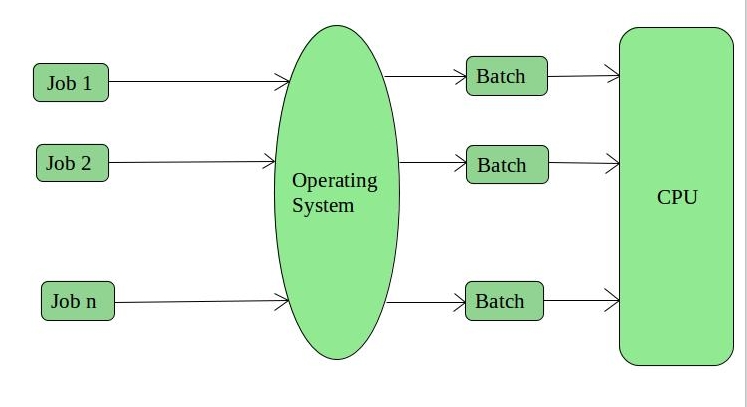
Batch Operating System

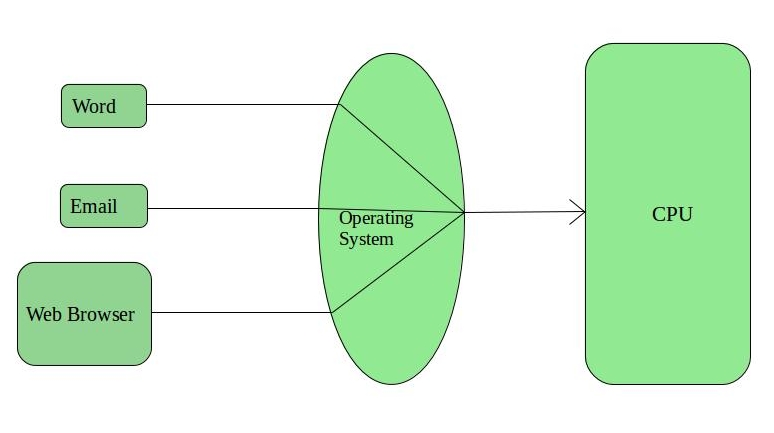
As, is very clear from the name itself, a batch operating system works by grouping the jobs into batches, hence the CPU does not directly interacts with the jobs, instead it interacts with the batches which are created by the operating system on the basis of similarities among them.

It supports multiple users and the idle time of the CPU is very less. Since, it works by grouping multiple jobs into lesser number of batches, managing a large amount of work becomes easy in a batch operating system. However, batch operating systems are costly and debugging is harder.

Example: Payroll systems, Bank statements etc.

2. Time-Sharing Operating System

Time-Sharing Operating System

In the time sharing operating systems, a certain time limit “quantum” is assigned to each one of the jobs. After the completion of one job, the other one is assigned the time. Hence, each job gets equal time in the CPU.

Often, these systems have a data communication problem, however.

Examples: Unix, Multics etc.

3. Network Operating System

Network Operating System

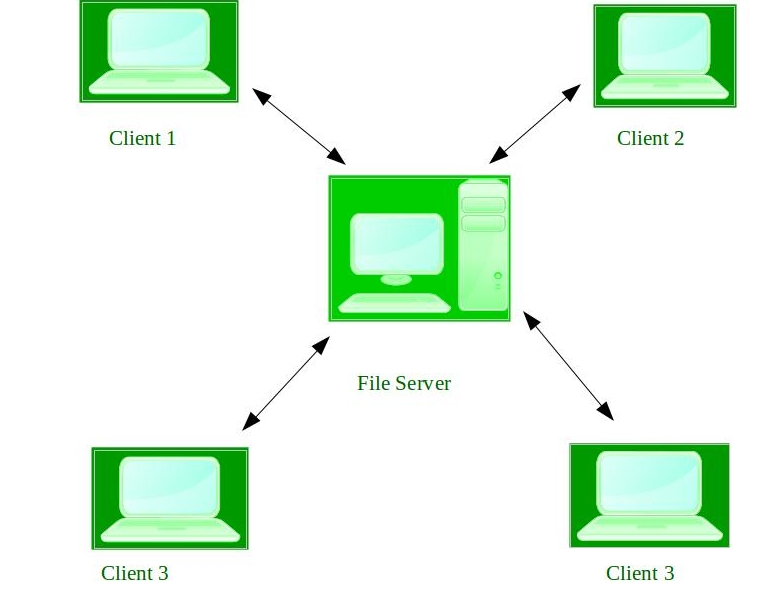
They too work on an interconnection model but this model comprises of a client-server like small private network.

Unlike the distributed systems which are loosely coupled, the network operating systems are tightly coupled systems. This means that all the computers connected to the centralized server know the configurations, connections etc. These connections and the network are quite stable and the different systems located at various locations can easily access the server and hence the sharing of files can be done easily. But the cost of the server and maintenance and other updates are considerably high.

Example: UNIX, Linux, Novell Netware, Microsoft Windows server 2003 etc.

4. Distributed Operating System

Distributed Operating System

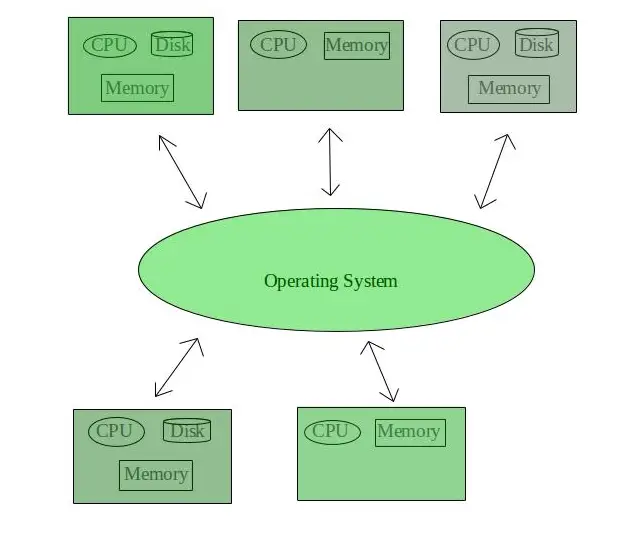
The distributed operating systems, allow the interconnection of various systems all over the world using a shared communication network. We can share documents anywhere on the network.

However, all the interconnected systems are independent and hence, the failure of one won’t affect any other system in the network. The computation tasks are also fast and the load on just one computer is reduced.

Example: LOCUS.

5. Real Time Operating System

Real Time Operating System

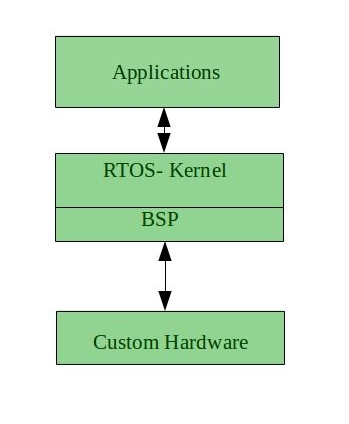
The real time operating systems are known for their quick processing of inputs and correspondence. These systems have to work quickly because even a small delay in the response results in failure. So, they work as if working in real time and absolutely no time is required for processing.

The real time operating systems are further divided into two categories:

  • Hard Real Time Operating System

In these systems, even a small delay in time period can lead to major destructions. Hence, the response time (the time required to respond to inputs) must not exceed more than the time which is safe.

These are used in missile launching systems, automatic parachutes, etc.

  • Soft Real Time Operating System

In these systems, the time constraint is not that severe and delays in response might not lead to destruction, however, the system still is considered to be failing. These are used in software application developments like games and other software where immediate user interaction is involved.

These real time operating systems are error free and memory is allocated excellently in them, also the current running application is in focus while the others in queue are not much considered. But, they use very complex algorithms and heavy system resources.

Source: https://www.geeksforgeeks.org/operating-system-types-operating-systems-awaiting-author/

The operating system is a program on which the other software runs, and a clear understanding of them can be made through the above points.

The post Types of Operating System appeared first on The Crazy Programmer.

from The Crazy Programmer https://www.thecrazyprogrammer.com/2019/03/types-of-operating-system.html

EditorConfig code formatting from the command line with .NET Core’s dotnet format global tool

EditorConfig helps maintain consistent coding styles for multiple developers working on the same project across various editors and IDEs.” Rather than you having to keep your code in whatever format the team has agreed on, you can check in an .editorconfig file and your editor of choice will keep things in line.

If you’re a .NET developer like myself, there’s a ton of great .NET EditorConfig options you can set to ensure the team uses consistent Language Conventions, Naming Conventions, and Formatting Rules.

  • Language Conventions are rules pertaining to the C# or Visual Basic language, for example, var/explicit type, use expression-bodied member.
  • Formatting Rules are rules regarding the layout and structure of your code in order to make it easier to read, for example, Allman braces, spaces in control blocks.
  • Naming Conventions are rules respecting the way objects are named, for example, async methods must end in “Async”.

If you’re using Visual Studios 2010, 2012, 2013, or 2015, fear not. There’s at least a basic EditorConfig free extension for you that enforces the basic rules. There is also an extension for Visual Studio Code to support EditorConfig files that takes just seconds to install.

ASIDE: If you are looking for a decent default for C#, take a look at the .editorconfig that the C# Roslyn compiler team uses. I don’t know about you, but my brain exploded when I saw that they used spaces vs tabs.

But! What if you want this coding formatting goodness at the dotnet command line? You can use “dotnet format” as a global tool! It’s one line to install, then it’s available everywhere for all your .NET Core apps.

D:\github\hanselminutes-core> dotnet tool install -g dotnet-format

You can invoke the tool using the following command: dotnet-format
Tool 'dotnet-format' (version '3.0.2') was successfully installed.
D:\github\hanselminutes-core> dotnet format
Formatting code files in workspace 'D:\github\hanselminutes-core\hanselminutes-core.sln'.
Found project reference without a matching metadata reference: D:\github\hanselminutes-core\hanselminutes.core\hanselminutes-core.csproj
Formatting code files in project 'hanselminutes-core'.
Formatting code files in project 'hanselminutes.core.tests'.
Format complete.

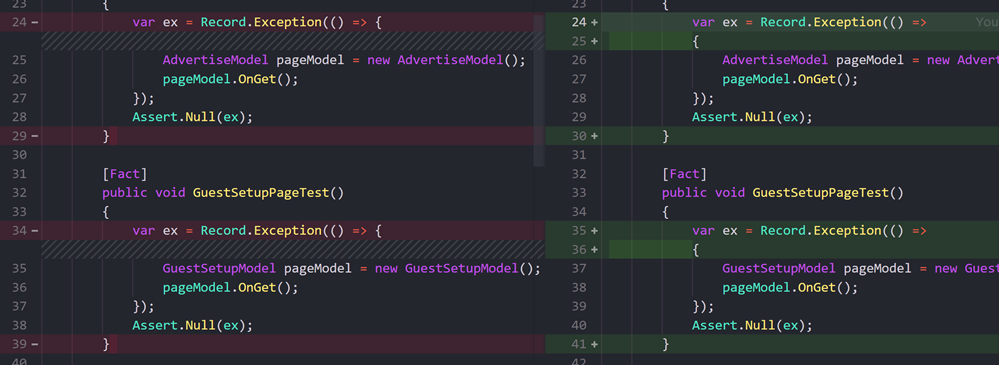
You can see in the screenshot below where dotnet format used its scandalous defaults to move my end of line { to its own line! Well, if that’s what the team wants! 😉

My code is automatically formatted by the dotnet format tool

Of course, dotnet format is all open source and up at https://github.com/dotnet/format. You can install the stable build OR a development build from myGet.


Sponsor: Manage GitHub Pull Requests right from the IDE with the latest JetBrains Rider. An integrated performance profiler on Windows comes to the rescue as well.


© 2018 Scott Hanselman. All rights reserved.


from Scott Hanselman’s Blog http://feeds.hanselman.com/~/599156310/0/scotthanselman~EditorConfig-code-formatting-from-the-command-line-with-NET-Cores-dotnet-format-global-tool.aspx

Hey Siri, what’s my blood sugar? Learning to Code with Apple’s iPhone Shortcuts

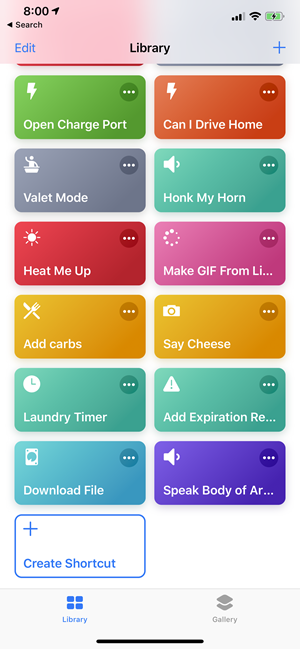
BA library of dozens of shortcuts on iOSear with me here. Apple Shortcuts (free on the App Store) is extraordinary and you shouldn’t sleep on it. In fact, you should use it and explore it as it’s amazing. I would go even further and say it could be a great place to learn to code!

Apple Shortcuts on iPhone is a lot like Microsoft Flow, except for your phone. Shortcuts let you string together Actions (ahem, functions) into multi-step tasks (ahem, functions that call functions). There’s a rich and growing gallery of shortcuts that you can copy into your local (to your phone) library. You can then name them and invoke your Shortcuts with Siri.

Here’s a few links to Shortcuts that (assuming you are reading this from your iPhone) you can add to your library with a click!

Once you have a shortcut you can invoke it as an item/icon on your springboard/home screen, you can have Siri run it with your voice, or invoke it via a “share sheet” that is available in all apps.

It would be reasonable to think this was a simple macro system with a few basic building blocks, but I don’t think Apple’s team gets enough credit. This is a complete development environment on your phone.

For example, here’s a incredibly intricate and powerful Shortcut if one is pulled over by the police.

It pauses any music that may be playing, turns down your brightness and volume, turns on Do Not Disturb, and sends a message to the contact of your choosing letting them know you’re being pulled over and what your current location is. It then opens your front camera and starts a video recording so you have a video record of being pulled over.

Once you stop the recording it sends a copy of the video to a contact you specify, puts volume and brightness back to where they were, turns off Do Not Disturb, and gives you the option to send to iCloud Drive or Dropbox!

You could then record a Siri shortcut and just say “Hey Siri, I’m being pulled over” and all this happens automatically, hands free.

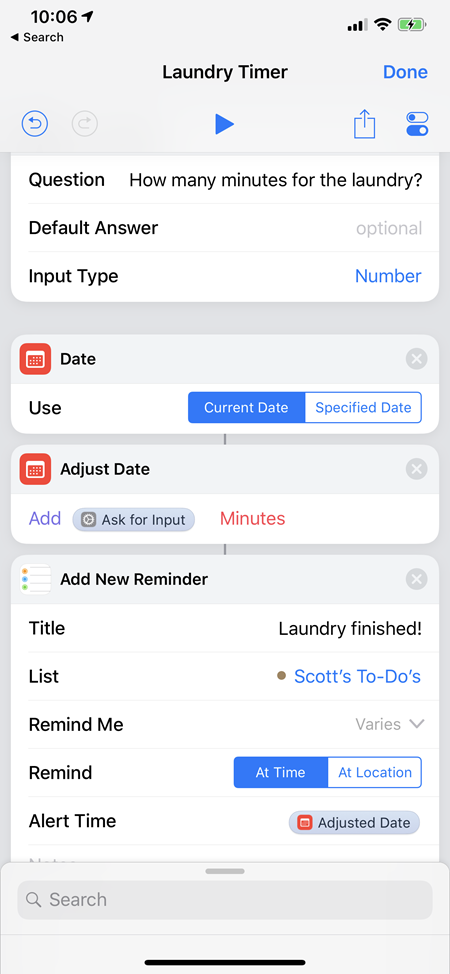
Take a look at the Laundry Timer app here. It’s a very classic “take input and do a thing” program. You can build and extend workflows like this and the data from one flows through to the next one.

A multiple step shortcut with many actions that flow data into the next, organized in a pipeline

Note the Shortcut above. The “Adjust Date” action pops up a Date and is used as a Diff(erence) against the “Current Date” action, then used again in the Add New Reminder as an input to “Add New Reminder.” These contextual variables flow through and are easily accessible in this genius UI. It really is near-perfect. Try it.

At this point you may be thinking, um, OK, that’s cute, but where’s the learn to code revolution here? It’s not that open-ended of a system, what can I really do?

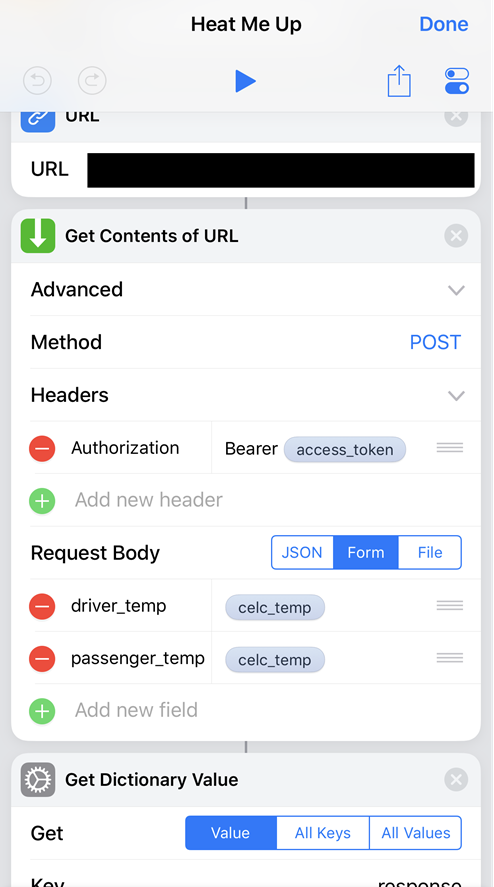
Like many connected cars, my car has a kind of REST API that its app uses to do things like heat up the climate system. Here I can literally POST (like Curl, but on your iPhone!) to an endpoint and pass in a FORM and parse the resulting JSON. Wow! Drink that in. You can write complex functions with iOS Shortcuts. Really.

calling a REST API with an iOS shortcut

Hang on. My body has a REST API. I use the open source Nightscout project to create a REST API on top of my Diabetes Continuous Glucose Meter then surface it in places like my lighted keyboard or even my Git Prompt.

How hard would it be to – right now as I make this blog post – write a method to have Siri retrieve my blood sugar and announce it to me when I say “Siri what’s my blood sugar?” Let’s see!

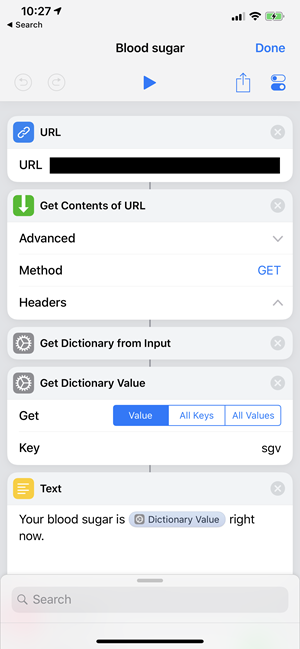
I make a URL object with my REST API that returns my sugar as JSON, it gets passed into Get Contents of URL. That makes a Dictionary from the Input, then gets the value of “sgv” (serum glucose value) and then the result of that is used to make a string with the Text action.

Preparing to make a shortcut

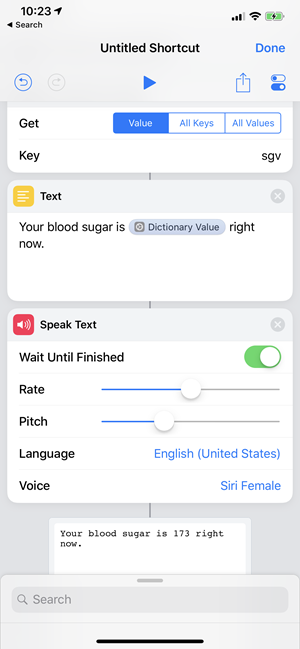
Now I have Siri SAY it. I can “debug” by running the Shortcut with the play button.

Building a shortcut

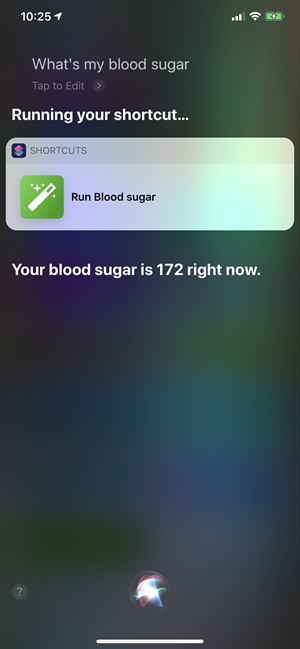
Then I can Add it to Siri and record my phrase. Here’s me saying “what’s my blood sugar” and she’s telling me. Yes, I know. I had a cookie. I deserved it.

Running your shortcut

This is just the start. It could also tell me my trend lines, text someone if it’s high, make a chart, I figure can do anything! I’m going to continue to explore Shortcuts but this little NightScout one can be downloaded to YOUR phone here. You’ll only need to put in YOUR own URL for your Nightscout instance.


Sponsor: Manage GitHub Pull Requests right from the IDE with the latest JetBrains Rider. An integrated performance profiler on Windows comes to the rescue as well.


© 2018 Scott Hanselman. All rights reserved.


from Scott Hanselman’s Blog http://feeds.hanselman.com/~/599070490/0/scotthanselman~Hey-Siri-whats-my-blood-sugar-Learning-to-Code-with-Apples-iPhone-Shortcuts.aspx

Learning about .NET Core futures by poking around at David Fowler’s GitHub

A picture of David silently judging my code, but with loveDavid Fowler is the ASP.NET Core Architect (and an amazing highly technical public speaker) and I’ve learned a lot from watching him code. However, what’s the best way for YOU to learn from folks like David if you can’t sit on their shoulder? Why, look at their GitHub!

Since .NET Core (and most of Microsoft) is not only open source but also developed in the open now on GitHub, we can actually watch folks in their day to day work as they commit code to projects like the C# compiler, .NET Core, and ASP.NET Core.

Even more interestingly, we can look at David’s github here https://github.com/davidfowl and then under Repositories see what he’s up to, filter by language and type, and explore!

You can have Private repositories on GitHub, as I do, and as I’m sure David does. But GitHub is a social network for code and it’s more fun and a better learning experience when we can see each others code and read it. Read with a critical eye, but without judgment as you may not have all the context that the author does. If you went to my GitHub, https://github.com/shanselman you might be disappointed but you also may be missing the big picture. Just consider that as you Follow people and explore their code.

David is an advanced .NET developer, while, for example, I am comparatively intermediate. So I realize that not all of David’s code is FOR me. It’s a scratchpad, it’s not educational how-to workshops. However, I can get pick up cool idioms, interesting directions the tech may be going, and more importantly – prototypes and spikes. Spikes are folks testing out technical ideas. They may not be complete. In fact, they may never be complete. But some my be harbingers of things to come.

Here’s a few things I learned today.

gRPC for .NET Core

For example, at https://github.com/davidfowl/grpc-dotnet I can see David has forked (copied) gRPC for dotnet and his game is working with the gRPC folks to make a fully supported version of gRPC for production workloads with .NET Core! Here are the stated goals:

  • We plan to implement a fully-managed version of gRPC for .NET that will be built on top of ASP.NET Core HTTP/2 server.
  • Good integration with the rest of ASP.NET Core ecosystem
  • High-performance (we plan to utilize some of the cutting edge performance features from ASP.NET Core and in .NET plaform itself)

That sounds cool! I can go learn that gRPC is a modern (google sponsored) Remote Procedure Call framework that can run anywhere. It’s used by Netflix and Square and supports basically any languaige and any environment. Nice for this microservice world we are entering and hopefully has learned from the sins of DCOM and CORBA and RMI, because I was there and it sucked.

Nothing to see here but moving to a new JSON serializer

This Web.Framework sounds fun, and I’ll be sure to take the description to heart.

says "Lame name, just a prototype, nothing to see here (move along)"

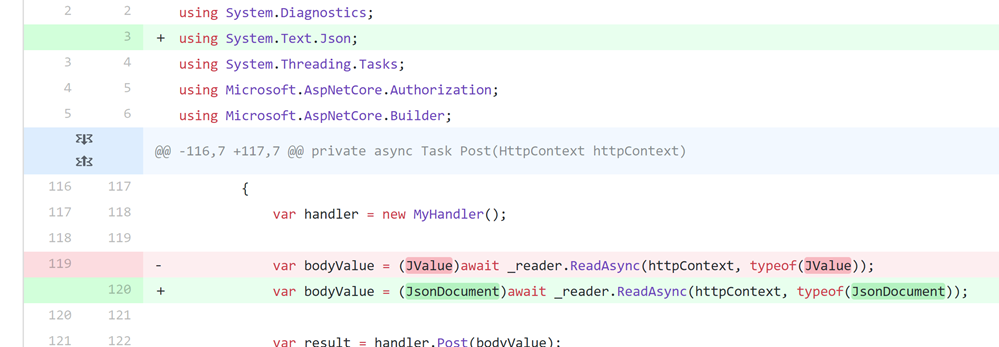
You can see David and James Newton-King kicking ideas around as you explore the commit log. However, the most interesting commit IMHO is when David moves this little spike from using JSON.NET (the ubiquitous 3rd party JSON serializer) to the new emerging official System.Text.Json. Here is the commit with unified differences.

It’s a small change but it also makes me feel good about the API underneath this new JSON API that’s coming. My takeway is that it’s not as scary as I’d assumed. Looks like a Good Thing(tm).

A diff of code shows that just one line is changed to move JSON serializers


Cool!

Multi-Protocol ASP.NET Core

This looks interesting.

“The following sample shows how you can host a TCP server and HTTP server in the same ASP.NET Core application. Under the covers, it’s the same server (Kestrel) running different protocols on different ports. The ConnectionHandler is a new primitive introduced in ASP.NET Core 2.1 to support non-HTTP protocols.”

I didn’t know you could do that! Looks like this sample hasn’t changed much since it was conceived of in 2018, but then in the last month it’s been updated twice and it appears to be part of a larger, slow-moving architectural issue called Bedrock that’s moving forward.

I learned that Kestral (the ASP.NET Core web server) has a “ListenLocalhost” option on its options object!

WebHost.CreateDefaultBuilder(args)

.ConfigureServices(services =>
{
// This shows how a custom framework could plug in an experience without using Kestrel APIs directly
services.AddFramework(new IPEndPoint(IPAddress.Loopback, 8009));
})
.UseKestrel(options =>
{
// TCP 8007
options.ListenLocalhost(8007, builder =>
{
builder.UseConnectionHandler<MyEchoConnectionHandler>();
});

// HTTP 5000
options.ListenLocalhost(5000);

// HTTPS 5001
options.ListenLocalhost(5001, builder =>
{
builder.UseHttps();
});
})
.UseStartup<Startup>();

I can see here that TCP port 8007 is customer and uses a custom ConnectionHandler which I also didn’t know existed! I can then look at the implementation of that handler and it’s cool how clean the API is. You can get the result cleanly off the Transport buffer. You’re doing low-level TCP but it doesn’t feel low level.

using System.Threading.Tasks;

using Microsoft.AspNetCore.Connections;
using Microsoft.Extensions.Logging;

namespace KestrelTcpDemo
{
public class MyEchoConnectionHandler : ConnectionHandler
{
private readonly ILogger<MyEchoConnectionHandler> _logger;

public MyEchoConnectionHandler(ILogger<MyEchoConnectionHandler> logger)
{
_logger = logger;
}

public override async Task OnConnectedAsync(ConnectionContext connection)
{
_logger.LogInformation(connection.ConnectionId + " connected");

while (true)
{
var result = await connection.Transport.Input.ReadAsync();
var buffer = result.Buffer;

foreach (var segment in buffer)
{
await connection.Transport.Output.WriteAsync(segment);
}

if (result.IsCompleted)
{
break;
}

connection.Transport.Input.AdvanceTo(buffer.End);
}

_logger.LogInformation(connection.ConnectionId + " disconnected");
}
}
}

Pretty slick. This just echos what is sent to that port but not only has it educated me about a thing I didn’t know about, it’s something I can mentally file away until I need it!

All of these things I learned in just 30 minutes of exploring someone’s public repository.

What kinds of code do you like to read and what have you learned from just poking around?


Sponsor: Get the latest JetBrains Rider for remote debugging via SSH, SQL injections, a new Search Everywhere popup, and improved Unity support.


© 2018 Scott Hanselman. All rights reserved.


from Scott Hanselman’s Blog http://feeds.hanselman.com/~/598983014/0/scotthanselman~Learning-about-NET-Core-futures-by-poking-around-at-David-Fowlers-GitHub.aspx

Right click publish quickly to Azure App Services with VS Code extensions and zipdeploy

I wanted to see what was the fastest way to get an ASP.NET Core web site up (for free) on Azure. First, I could use Visual Studio Community (which is free), and just right click Publish, sign into Azure, and make a free Web App and I’m cool. But I also wanted to see what it was like on Visual Studio Code (which would work on Linux, etc)

I downloaded these things. This is 10-15 min tops for download AND install. Likely less on a fast connection.

This also assumes you have a free Azure account https://azure.microsoft.com/free/

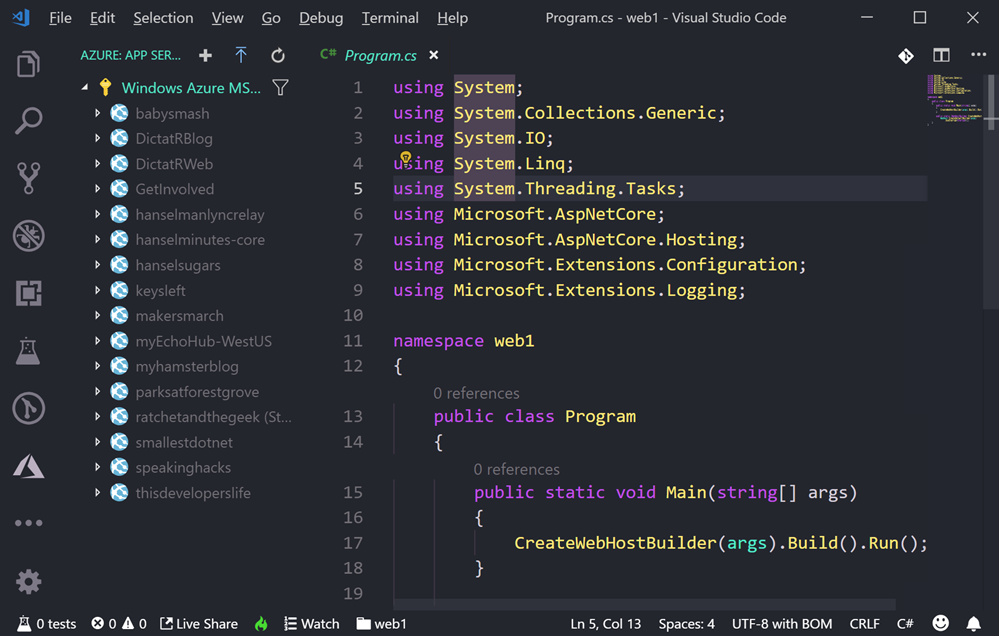
I made a new ASP.NET web site with “dotnet new razor” at the command line. The Azure App Service extension makes a new Azure icon appear on the left of VS Code. I can see my subscription(s) and any sites I’ve made before. I can right-click the top of the tree or just click the + plus sign.

image

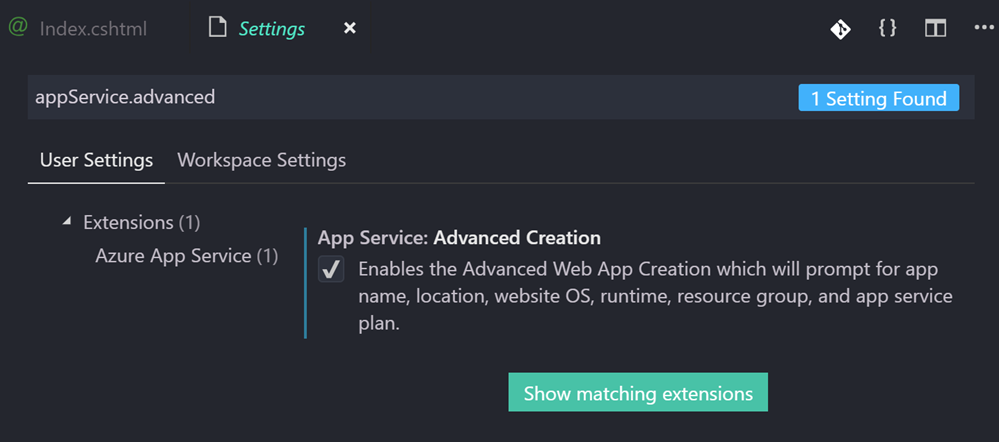
TRICK: The default mode of the Azure App Service extension is “basic” mode. This is fine for messing around, but it will assume a bunch of things. You don’t have control over the location (it’ll pick a nearby one) or really anything. Again, it’s fine. However, if you DO want explicit prompts for name, location, OS, runtime, etc you can turn on “appService.advanced” in File | Preferences | Settings (or Ctrl+,). Don’t feel you need to, but know it’s possible.

appService.advanced

Now, in my opinion, deploying apps (.NET Core, Node, or otherwise) directly from source can be a little confusing, and it doesn’t really scale for anything other than proofs of concept. There’s usually a “build” step, and ideally you’ll have a CI/CD (Continuous Integration/Continuous Deployment) pipeline for anything of any real size. It’s easier than you think – you can likely get a basic DevOps pipeline up in a hour or so. I commit to GitHub and it just deploys to Azure.

That said, a quickie deploy has value so I wanted to do it. You can do a “git deploy” to Azure where Azure is a git remote and you just “git push azure master” but…you’re pushing source and Azure “builds” it in Azure App Service using a thing called Kudu. That means it’ll run npm install, dotnet restore, etc, it’ll take some time. You could deploy a container to Azure and just push it to a Container Registry, then spin up the container.

However, Azure also has a little known but rather clever “zipdeploy” feature. Once you’ve configured your Azure App Service for zipdeployment as a source, you can just POST a new ZIP deployment with Curl!

curl -X POST -u <deployment_user> --data-binary @"<zip_file_path>" https://<app_name>.scm.azurewebsites.net/api/zipdeploy

You might find that weird, or you might find it elegant. If it’s the latter, use it. If it’s the former, don’t. You can even do it with minimal or no downtime by deploying to a staging slot and use Auto Swap.

I’m going to use the Azure App Service extension in VS Code and it’s going to hide all of this and it’ll just publish in one click.

Here’s the important part if you want it to just work and work easily. You’ll want to deploy from a folder that represents your published app. That means your app in a state that it’s ready to go.

With .NET Core, the easiest way is to dotnet publish. Then I’m right clicking on that publish folder as seen in this screenshot.

image

That will actually make a file .vscode/settings.json that will tell VS Code’s Azure App Service extension what folder to deploy from in the future, thereby simplifying things.

{

"appService.defaultWebAppToDeploy": "/subscriptions/GUID/resourceGroups/appsvc_rg_Windows_CentralUS/providers/Microsoft.Web/sites/fancyweb1",
"appService.deploySubpath": "bin\\Debug\\netcoreapp2.2\\publish"
}

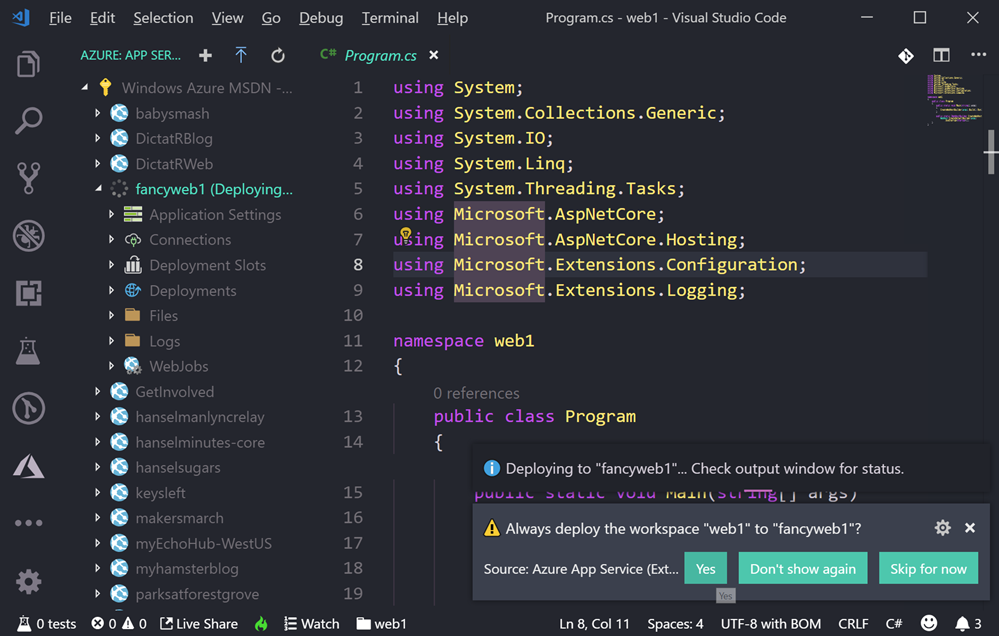
Below you can see the dialog that pops up “Always deploy the workspace ___ to ___” if you click Yes that will create the setting above specific to your application.

Always deploy the workspace web1 to fancyweb1

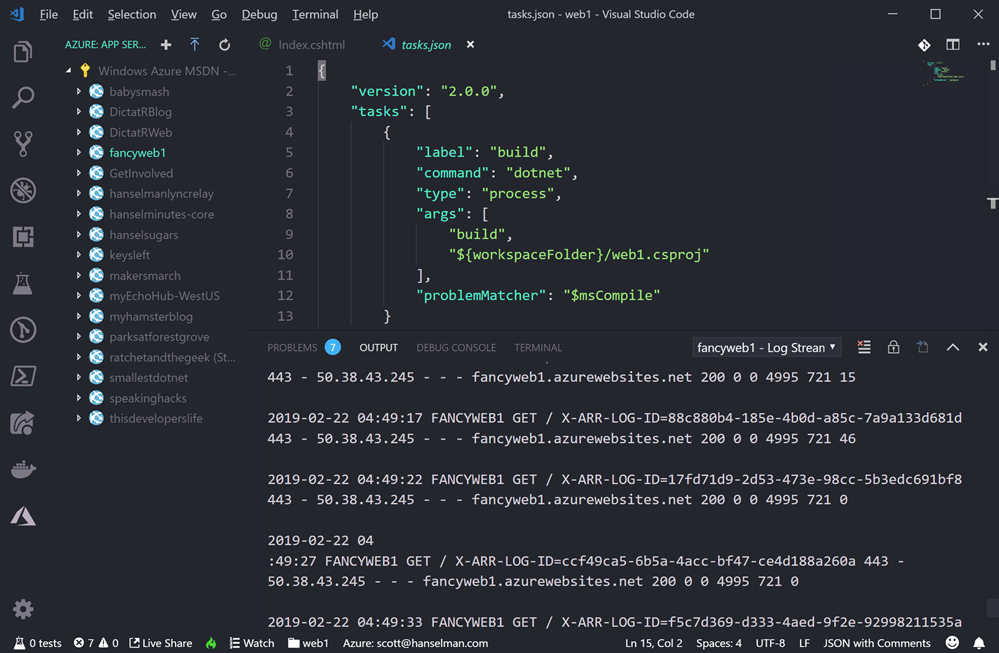
Now when I deploy, I can right click from anyway and it will zipdeploy right to my site. Note the log below.

image

With this extension I can even right click and “Start Streaming Logs” and get output of the logs of your Azure App Service as it runs, right in the output pane of VS Code.

Start Streaming Logs

This will make things pretty easy for my simplest sites and proofs of concept. Give it a try!


Sponsor: Get the latest JetBrains Rider for remote debugging via SSH, SQL injections, a new Search Everywhere popup, and improved Unity support.


© 2018 Scott Hanselman. All rights reserved.


from Scott Hanselman’s Blog http://feeds.hanselman.com/~/598592576/0/scotthanselman~Right-click-publish-quickly-to-Azure-App-Services-with-VS-Code-extensions-and-zipdeploy.aspx

Design a site like this with WordPress.com
Get started