Improvements on ASP.NET Core deployments on Zeit’s now.sh and making small container images

Back in March of 2017 I blogged about Zeit and their cool deployment system “now.” Zeit will take any folder and deploy it to the web easily. Better yet if you have a Dockerfile in that folder as Zeit will just use that for the deployment.
image

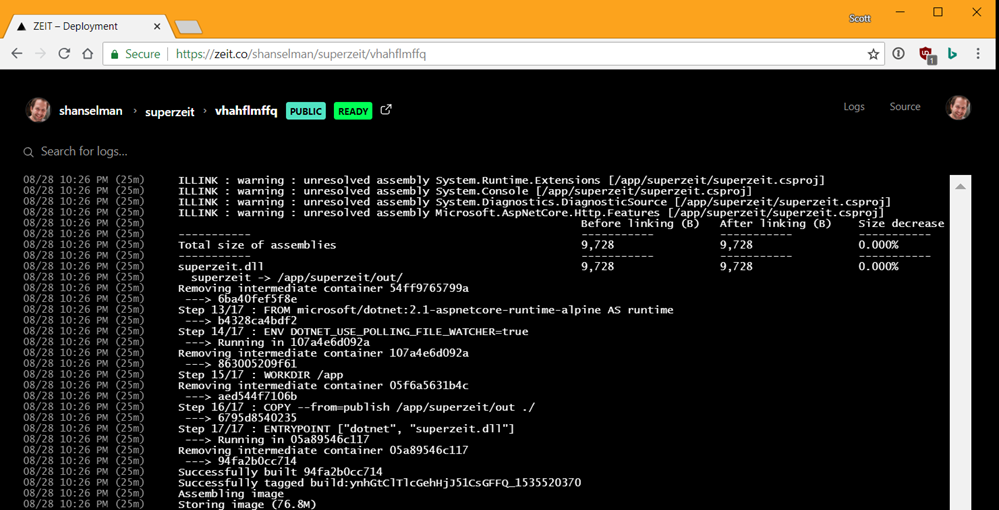
Zeit’s free Open Source account has a limit of 100 megs for the resulting image, and with the right Dockerfile started ASP.NET Core apps are less than 77 megs. You just need to be smart about a few things. Additionally, it’s running in a somewhat constrained environment so ASP.NET’s assumptions around FileWatchers can occasionally cause you to see errors like

at System.IO.FileSystemWatcher.StartRaisingEvents()

Unhandled Exception: System.IO.IOException:
The configured user limit (8192) on the number of inotify instances has been reached.
at System.IO.FileSystemWatcher.StartRaisingEventsIfNotDisposed(

While this environment variable is set by default for the “FROM microsoft/dotnet:2.1-sdk” Dockerfile, it’s not set at runtime. That’s dependent on your environment.

Here’s my Dockerfile for a simple project called SuperZeit. Note that the project is structured with a SLN file, which I recommend.

Let me call our a few things.

  • First, we’re doing a Multi-stage build here.
    • The SDK is large. You don’t want to deploy the compiler to your runtime image!
  • Second, the first copy commands just copy the sln and the csproj.
    • You don’t need the source code to do a dotnet restore! (Did you know that?)
    • Not deploying source means that your docker builds will be MUCH faster as Docker will cache the steps and only regenerate things that change. Docker will only run dotnet restore again if the solution or project files change. Not the source.
  • Third, we are using the aspnetcore-runtime image here. Not the dotnetcore one.
    • That means this image includes the binaries for .NET Core and ASP.NET Core. We don’t need or want to include them again.
    • If you were doing a publish with a the -r switch, you’d be doing a self-contained build/publish. You’d end up copying TWO .NET Core runtimes into a container! That’ll cost you another 50-60 megs and it’s just wasteful. If you want to do that
    • Go explore the very good examples on the .NET Docker Repro on GitHub https://github.com/dotnet/dotnet-docker/tree/master/samples
    • Optimizing Container Size
  • Finally, since some container systems like Zeit have modest settings for inotify instances (to avoid abuse, plus most folks don’t use them as often as .NET Core does) you’ll want to set ENV DOTNET_USE_POLLING_FILE_WATCHER=true which I do in the runtime image.

So starting from this Dockerfile:

FROM microsoft/dotnet:2.1-sdk-alpine AS build

WORKDIR /app

# copy csproj and restore as distinct layers
COPY *.sln .
COPY superzeit/*.csproj ./superzeit/
RUN dotnet restore

# copy everything else and build app
COPY . .
WORKDIR /app/superzeit
RUN dotnet build

FROM build AS publish
WORKDIR /app/superzeit
RUN dotnet publish -c Release -o out

FROM microsoft/dotnet:2.1-aspnetcore-runtime-alpine AS runtime
ENV DOTNET_USE_POLLING_FILE_WATCHER=true
WORKDIR /app
COPY --from=publish /app/superzeit/out ./
ENTRYPOINT ["dotnet", "superzeit.dll"]

Remember the layers of the Docker images, as if they were a call stack:

  • Your app’s files
  • ASP.NET Core Runtime
  • .NET Core Runtime
  • .NET Core native dependencies (OS specific)
  • OS image (Alpine, Ubuntu, etc)

For my little app I end up with a 76.8 meg image. If want I can add the experimental .NET IL Trimmer. It won’t make a difference with this app as it’s already pretty simple but it could with a larger one.

BUT! What if we changed the layering to this?

  • Your app’s files along with a self-contained copy of ASP.NET Core and .NET Core
  • .NET Core native dependencies (OS specific)
  • OS image (Alpine, Ubuntu, etc)

Then we could do a self-Contained deployment and then trim the result! Richard Lander has a great dockerfile example.

See how he’s doing the package addition with the dotnet CLI with “dotnet add package” and subsequent trim within the Dockerfile (as opposed to you adding it to your local development copy’s csproj).

FROM microsoft/dotnet:2.1-sdk-alpine AS build

WORKDIR /app

# copy csproj and restore as distinct layers
COPY *.sln .
COPY nuget.config .
COPY superzeit/*.csproj ./superzeit/
RUN dotnet restore

# copy everything else and build app
COPY . .
WORKDIR /app/superzeit
RUN dotnet build

FROM build AS publish
WORKDIR /app/superzeit
# add IL Linker package
RUN dotnet add package ILLink.Tasks -v 0.1.5-preview-1841731 -s https://dotnet.myget.org/F/dotnet-core/api/v3/index.json
RUN dotnet publish -c Release -o out -r linux-musl-x64 /p:ShowLinkerSizeComparison=true

FROM microsoft/dotnet:2.1-runtime-deps-alpine AS runtime
ENV DOTNET_USE_POLLING_FILE_WATCHER=true
WORKDIR /app
COPY --from=publish /app/superzeit/out ./
ENTRYPOINT ["dotnet", "superzeit.dll"]

Now at this point, I’d want to see how small the IL Linker made my ultimate project. The goal is to be less than 75 megs. However, I think I’ve hit this bug so I will have to head to bed and check on it in the morning.

The project is at https://github.com/shanselman/superzeit and you can just clone and “docker build” and see the bug.

However, if you check the comments in the Docker file and just use the a “FROM microsoft/dotnet:2.1-aspnetcore-runtime-alpine AS runtime” it works fine. I just think I can get it even smaller than 75 megs.

Talk so you soon, Dear Reader! (I’ll update this post when I find out about that bug…or perhaps my bug!)


Sponsor: Preview the latest JetBrains Rider with its built-in spell checking, initial Blazor support, partial C# 7.3 support, enhanced debugger, C# Interactive, and a redesigned Solution Explorer.


© 2018 Scott Hanselman. All rights reserved.


from Scott Hanselman’s Blog http://feeds.hanselman.com/~/566712676/0/scotthanselman~Improvements-on-ASPNET-Core-deployments-on-Zeits-nowsh-and-making-small-container-images.aspx

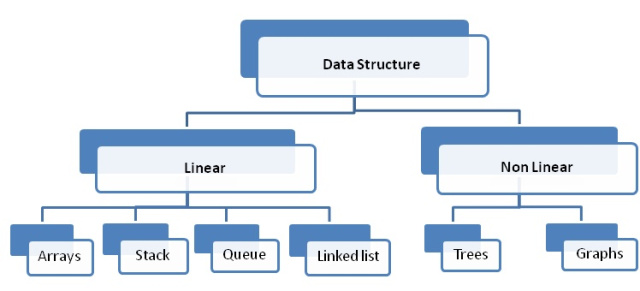
Difference between Linear and Non Linear Data Structure

Here you will learn about difference between linear and non linear data structure.

Data structures are basically a way of storing and logically implementing the data elements. These elements need to be stored in a way which makes them orderly and organized. Apart from the primitive data structures which include the int, char, float, double etc., the non primitive data structures are also important and definitely play a crucial role for storing and retrieving the data structures. The non primitive data structures can broadly be classified into two types:

  • Linear Data Structure
  • Non-Linear Data Structure

Although, both are non-primitive data types, yet they hold a majority of differences between them, these differences can better be understood by reading the following points.

Difference between Linear and Non Linear Data Structure

Image Source

Difference between Linear and Non Linear Data Structure

Linear Data Structure Non Linear Data Structure
The elements are inserted adjacent to each other and can also be retrieved similarly.


Elements which are stored in a non linear data structure have certain relationship among them while being stored or retrieved. There is a certain definite pattern which always govern the addition of a new element to the structure
Data elements are easy to be retrieved as they can be just accessed in one run. Data elements are not easy to be retrieved or stored as they follow a strict relationship among the various elements.
The Linear Data Structures are comparatively simpler and provide a certain ease of working with. The Non Linear Data Structures are complex data structures which can prove to be tricky to an extent.
These do not provide us with efficient memory utilization. Efficient memory utilization is experienced while working with the non linear data structures.
Examples: Linked List, Stack, Queue etc. Examples: Trees, graphs etc.

The post Difference between Linear and Non Linear Data Structure appeared first on The Crazy Programmer.

from The Crazy Programmer https://www.thecrazyprogrammer.com/2018/08/difference-between-linear-and-non-linear-data-structure.html

What is Web Hosting? And Why Do I Need it?

Some of the newbies think that buying a domain name is enough to get a website live. But  domain is just a name by which people will recognize your website! What makes a website active on the internet though is a website hosting.

A trustworthy web hosting partner is crucial to building a good website. No matter what’s your reason to enter into the World Wide Web, web hosting service is an important step in how your site is going to be viewed by your audience.

Web hosting is a service that lets you store your website’s data in web servers (high-powered computers). And these web servers store all the important information available on your website and serve them to your audience whenever your users type your domain name into their browsers.

It would not be wrong to say that web hosting offers you all the technologies required by your site to be seen on the internet.

We hope now you have a basic idea of what web hosting is. However, as you know one size doesn’t fit all, there are various types of web hosting services available in the market that you can choose as per your requirements and budget. Therefore, it is necessary that before you sign up for a web hosting service, you must think of your purpose to build a website, services your website need, and your budget.

Getting confused? Let’s shed some light on the types of web hosting services according to the different usages.

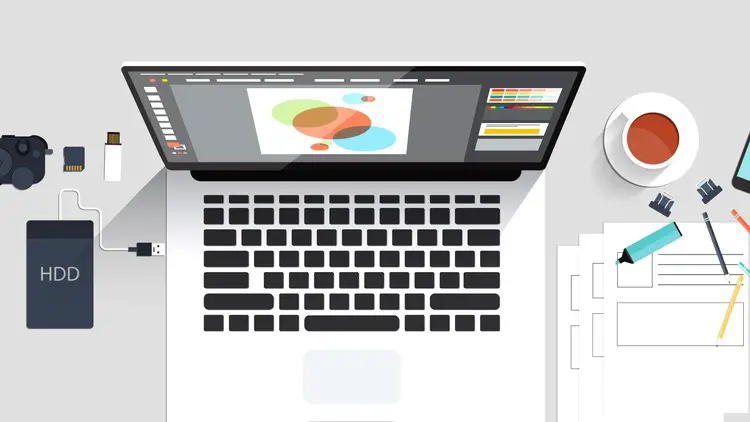
What is Web Hosting

Types of Web Hosting

Free Web Hosting

As you can judge by the name, it is a non-paid (free) hosting service. As it comes without any cost, it has limited features. Therefore, it might not be ideal for professional bloggers and website owners.

However, if you’re a programming learner who needs a website to test their codes, you can go for it cheerfully. Moreover, startups and individuals who don’t want to invest a huge amount of money in hosting can find this service best fit. Always chose a free web host like this that does not enforce website owners to place annoying ads on their websites.

Shared Web Hosting

This is the most common type of hosting service that is offered by almost every provider. In this type of hosting, your site is hosted on a server that is shared by multiple website owners. As you share server resources (disk space, bandwidth, etc.) you also share the cost. Anywhere you can buy shared hosting for as little as $3 to $10/mo. Shared hosting is capable of fulfilling the requirements of small websites and blogs.

Cloud Web Hosting

This is the new form of hosting service comparatively that allows a number of individual servers function together and act as one big server. In this hosting, cloud servers divide up the hardware resources with other cloud servers, however, they are listed in their own hosting category.

The primary advantage of cloud hosting is that if your website receives unexpected high traffic, your hosting plan will be able to accommodate the traffic surge. Anyone who is expecting good traffic out of their blog or website can go for cloud hosting.

VPS Hosting

VPS stands for Virtual Private Server. Although these servers share one physical server yet acts like multiple, isolated servers. It would not be wrong if we say this hosting is something between shared hosting and dedicated hosting. In spite of sharing the same hardware resources, they are given the environment of a dedicated server.

Talking about the price range, it should be between $50 and $200. Usually, pricing depends on the RAM and CPU power you receive.

Dedicated Hosting

In dedicated hosting, you get one entire physical server from your hosting partner that you take control over. With such hosting type, you don’t need to be worried about issues like slow website loading, poor server response, etc.

Companies and individuals that are expecting a huge website traffic may go for dedicated hosting. Speaking of cost, it is significantly higher than you pay in shared hosting or cloud hosting. You may expect to pay $80 and up.

Managed Hosting

Managed hosting is known as an extension of dedicated hosting in which everything from hardware and software configuration to hardware replacement to technical support is handled by hosting provider itself. While it is not as cheap as shared hosting but a great option for those who don’t want to take the pain of managing a web hosting. The cost of managed hosting is usually between $50 and $80.

So, these were a few popular hosting types that you can choose as per your requirements and budget. Now let’s take a look at the importance of web hosting.

Benefits of Choosing a Good Web Hosting Service

We have already talked a little bit about why we need a web hosting in the beginning, now we will come to know about a few benefits of choosing a good hosting provider. It will be an added advantage for sure.

Fast Page Loading

Investing in good web hosting becomes more important when it comes to page loading speed. Usually, we see bad web hosting providers often have poor quality hardware that slows down the loading speed of your site. So, never pick a poor web hosting.

Search Engine Rankings

Choosing a good web host is also very important from the search engine point of view. If your hosting provider does not offer an uptime of 99.5% or above, you may notice a significant drop in search engine ranking. Remember, search engines like Google, Yahoo, etc. penalize websites that go down frequently.

Enjoy Easy Installs

Nowadays, there are many good hosting providers available that help you getting popular scripts such as WordPress, Drupal, Joomla, Magento, etc. with a single click. It is a convenient method, especially for newbies to install scripts straight from their hosting control panel.

Get Good Storage Space

As we mentioned above a web hosting provider lets you store your website’s data on their server, you should know it in advance that how much space you’re going to get. There are many providers that offer unlimited storage, but with the conditions. So be clear with such things and make your decision accordingly. Go for a reliable web host that offers good storage space at an affordable price.

Final Words

Regardless of your purpose to launch a website, it is vital that you choose a good web hosting service. In this post, we talked about what is web hosting, why do we need it, different types of web hosting services and then the benefits of choosing a reliable host. Hopefully, the post will help you. If you have any query or suggestion let us know in the following comment section. We would be glad to hear from you.

The post What is Web Hosting? And Why Do I Need it? appeared first on The Crazy Programmer.

from The Crazy Programmer https://www.thecrazyprogrammer.com/2018/08/what-is-web-hosting.html

Decoding an SSH Key from PEM to BASE64 to HEX to ASN.1 to prime decimal numbers

I’m reading a new chapter of The Imposter’s Handbook: Season 2 that Rob and I are working on. He’s digging into the internals of what’s exactly in your SSH Key.

Decoding a certificate

I generated a key with no password:

ssh-keygen -t rsa -C scott@myemail.com

Inside the generated file is this text, that we’ve all seen before but few have cracked open.

-----BEGIN RSA PRIVATE KEY-----

MIIEpAIBAAKCAQEAtd8As85sOUjjkjV12ujMIZmhyegXkcmGaTWk319vQB3+cpIh
Wu0mBke8R28jRym9kLQj2RjaO1AdSxsLy4hR2HynY7l6BSbIUrAam/aC/eVzJmg7
qjVijPKRTj7bdG5dYNZYSEiL98t/+XVxoJcXXOEY83c5WcCnyoFv58MG4TGeHi/0
coXKpdGlAqtQUqbp2sG7WCrXIGJJdBvUDIQDQQ0Isn6MK4nKBA10ucJmV+ok7DEP
kyGk03KgAx+Vien9ELvo7P0AN75Nm1W9FiP6gfoNvUXDApKF7du1FTn4r3peLzzj
50y5GcifWYfoRYi7OPhxI4cFYOWleFm1pIS4PwIDAQABAoIBAQCBleuCMkqaZnz/
6GeZGtaX+kd0/ZINpnHG9RoMrosuPDDYoZZymxbE0sgsfdu9ENipCjGgtjyIloTI
xvSYiQEIJ4l9XOK8WO3TPPc4uWSMU7jAXPRmSrN1ikBOaCslwp12KkOs/UP9w1nj
/PKBYiabXyfQEdsjQEpN1/xMPoHgYa5bWHm5tw7aFn6bnUSm1ZPzMquvZEkdXoZx
c5h5P20BvcVz+OJkCLH3SRR6AF7TZYmBEsBB0XvVysOkrIvdudccVqUDrpjzUBc3
L8ktW3FzE+teP7vxi6x/nFuFh6kiCDyoLBhRlBJI/c/PzgTYwWhD/RRxkLuevzH7
TU8JFQ9BAoGBAOIrQKwiAHNw4wnmiinGTu8IW2k32LgI900oYu3ty8jLGL6q1IhE
qjVMjlbJhae58mAMx1Qr8IuHTPSmwedNjPCaVyvjs5QbrZyCVVjx2BAT+wd8pl10
NBXSFQTMbg6rVggKI3tHSE1NSdO8kLjITUiAAjxnnJwIEgPK+ljgmGETAoGBAM3c
ANd/1unn7oOtlfGAUHb642kNgXxH7U+gW3hytWMcYXTeqnZ56a3kNxTMjdVyThlO
qGXmBR845q5j3VlFJc4EubpkXEGDTTPBSmv21YyU0zf5xlSp6fYe+Ru5+hqlRO4n
rsluyMvztDXOiYO/VgVEUEnLGydBb1LwLB+MVR2lAoGAdH7s7/0PmGbUOzxJfF0O
OWdnllnSwnCz2UVtN7rd1c5vL37UvGAKACwvwRpKQuuvobPTVFLRszz88aOXiynR
5/jH3+6IiEh9c3lattbTgOyZx/B3zPlW/spYU0FtixbL2JZIUm6UGmUuGucs8FEU
Jbzx6eVAsMojZVq++tqtAosCgYB0KWHcOIoYQUTozuneda5yBQ6P+AwKCjhSB0W2
SNwryhcAMKl140NGWZHvTaH3QOHrC+SgY1Sekqgw3a9IsWkswKPhFsKsQSAuRTLu
i0Fja5NocaxFl/+qXz3oNGB56qpjzManabkqxSD6f8o/KpeqryqzCUYQN69O2LG9
N53L9QKBgQCZd0K6RFhhdJW+Eh7/aIk8m8Cho4Im5vFOFrn99e4HKYF5BJnoQp4p
1QTLMs2C3hQXdJ49LTLp0xr77zPxNWUpoN4XBwqDWL0t0MYkRZFoCAG7Jy2Pgegv
uOuIr6NHfdgGBgOTeucG+mPtADsLYurEQuUlfkl5hR7LgwF+3q8bHQ==
-----END RSA PRIVATE KEY-----

The private key is an ASN.1 (Abstract Syntax Notation One) encoded data structure. It’s a funky format but it’s basically a packed format with the ability for nested trees that can hold booleans, integers, etc.

However, ASN.1 is just the binary packed “payload.” It’s not the “container.” For example, there are envelopes and there are letters inside them. The envelope is the PEM (Privacy Enhanced Mail) format. Such things start with —– BEGIN SOMETHING —– and end with —– END SOMETHING ——. If you’re familiar with BASE64, your spidey sense may tell you that this is a BASE64 encoded file. Not everything that’s BASE64 turns into a friendly ASCII string. This turns into a bunch of bytes you can view in HEX.

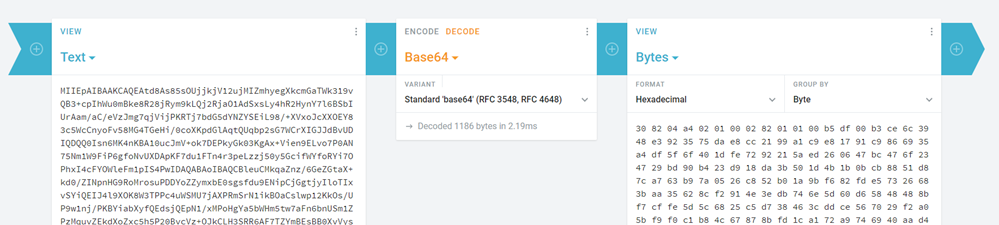
We can first decode the PEM file into HEX. Yes, I know there’s lots of ways to do this stuff at the command line, but I like showing and teaching using some of the many encoding/decoding websites and utilities there are out there. I also love using https://cryptii.com/ for these things as you can build a visual pipeline.

308204A40201000282010100B5DF00B3CE6C3948E3923575DAE8

CC2199A1C9E81791C9866935A4DF5F6F401DFE7292215AED2606
47BC476F234729BD90B423D918DA3B501D4B1B0BCB8851D87CA7
63B97A0526C852B01A9BF682FDE57326683BAA35628CF2914E3E
DB746E5D60D65848488BF7CB7FF97571A097175CE118F3773959
C0A7CA816FE7C306E1319E1E2FF47285CAA5D1A502AB5052A6E9
DAC1BB582AD7206249741BD40C8403410D08B27E8C2B89CA040D
74B9C26657EA24EC310F9321A4D372A0031F9589E9FD10BBE8EC
FD0037BE4D9B55BD1623FA81FA0DBD45C3029285EDDBB51539F8
AF7A5E2F3CE3E74CB919C89F5987E84588BB38F87123870560E5
snip

This ASN.1 JavaScript decoder can take the HEX and parse it for you. Or you can that ASN.1 packed format at the *nix command line and see that there’s nine big integers inside (I trimmed them for this blog).

openssl asn1parse -in notreal

0:d=0 hl=4 l=1188 cons: SEQUENCE
4:d=1 hl=2 l= 1 prim: INTEGER :00
7:d=1 hl=4 l= 257 prim: INTEGER :B5DF00B3CE6C3948E3923575DAE8CC2199A1C9E81791C9866935A4DF5F6F401DFE7292215
268:d=1 hl=2 l= 3 prim: INTEGER :010001
273:d=1 hl=4 l= 257 prim: INTEGER :8195EB82324A9A667CFFE867991AD697FA4774FD920DA671C6F51A0CAE8B2E3C30D8A1967
534:d=1 hl=3 l= 129 prim: INTEGER :E22B40AC22007370E309E68A29C64EEF085B6937D8B808F74D2862EDEDCBC8CB18BEAAD48
666:d=1 hl=3 l= 129 prim: INTEGER :CDDC00D77FD6E9E7EE83AD95F1805076FAE3690D817C47ED4FA05B7872B5631C6174DEAA7
798:d=1 hl=3 l= 128 prim: INTEGER :747EECEFFD0F9866D43B3C497C5D0E3967679659D2C270B3D9456D37BADDD5CE6F2F7ED4B
929:d=1 hl=3 l= 128 prim: INTEGER :742961DC388A184144E8CEE9DE75AE72050E8FF80C0A0A38520745B648DC2BCA170030A97
1060:d=1 hl=3 l= 129 prim: INTEGER :997742BA4458617495BE121EFF68893C9BC0A1A38226E6F14E16B9FDF5EE072981790499E

Per the spec the format is this:

   An RSA private key shall have ASN.1 type RSAPrivateKey:


RSAPrivateKey ::= SEQUENCE {
version Version,
modulus INTEGER, -- n
publicExponent INTEGER, -- e
privateExponent INTEGER, -- d
prime1 INTEGER, -- p
prime2 INTEGER, -- q
exponent1 INTEGER, -- d mod (p-1)
exponent2 INTEGER, -- d mod (q-1)
coefficient INTEGER -- (inverse of q) mod p }

I found the description for how RSA works in this blog post very helpful as it uses small numbers as examples. The variable names here like p, q, and n are agreed upon and standard.

The fields of type RSAPrivateKey have the following meanings:

o version is the version number, for compatibility
with future revisions of this document. It shall
be 0 for this version of the document.
o modulus is the modulus n.
o publicExponent is the public exponent e.
o privateExponent is the private exponent d.
o prime1 is the prime factor p of n.
o prime2 is the prime factor q of n.
o exponent1 is d mod (p-1).
o exponent2 is d mod (q-1).
o coefficient is the Chinese Remainder Theorem
coefficient q-1 mod p.

Let’s look at that first number q, the prime factor p of n. It’s super long in Hexadecimal.

747EECEFFD0F9866D43B3C497C5D0E3967679659D2C270B3D945

6D37BADDD5CE6F2F7ED4BC600A002C2FC11A4A42EBAFA1B3D354
52D1B33CFCF1A3978B29D1E7F8C7DFEE8888487D73795AB6D6D3
80EC99C7F077CCF956FECA5853416D8B16CBD89648526E941A65
2E1AE72CF0511425BCF1E9E540B0CA23655ABEFADAAD028B

That hexadecimal number converted to decimal is this long ass number. It’s 308 digits long!

22959099950256034890559187556292927784453557983859951626187028542267181746291385208056952622270636003785108992159340113537813968453561739504619062411001131648757071588488220532539782545200321908111599592636973146194058056564924259042296638315976224316360033845852318938823607436658351875086984433074463158236223344828240703648004620467488645622229309082546037826549150096614213390716798147672946512459617730148266423496997160777227482475009932013242738610000405747911162773880928277363924192388244705316312909258695267385559719781821111399096063487484121831441128099512811105145553708218511125708027791532622990325823

It’s hard work to prove this number is prime but there’s a great Integer Factorization Calculator that actually uses WebAssembly and your own local CPU to check such things. Expect to way a long time, sometimes until the sun death of the universe. 😉

Rob and I are finding it really cool to dig just below the surface of common things we look at all the time. I have often opened a key file in a text file but never drawn a straight and complete line through decoding, unpacking, decoding, all the way to a math mathematical formula. I feel I’m filling up some major gaps in my knowledge!


Sponsor: Preview the latest JetBrains Rider with its built-in spell checking, initial Blazor support, partial C# 7.3 support, enhanced debugger, C# Interactive, and a redesigned Solution Explorer.


© 2018 Scott Hanselman. All rights reserved.


from Scott Hanselman’s Blog http://feeds.hanselman.com/~/566255904/0/scotthanselman~Decoding-an-SSH-Key-from-PEM-to-BASE-to-HEX-to-ASN-to-prime-decimal-numbers.aspx

SkySilk – A Managed Cloud Services Provider

Managing data in a cloud is an important aspect to any developers journey through building their projects. With an advent in storage and managing solutions, it is becoming even more difficult for us to select the perfect provider for our cloud services; Including many aspects like security and integrity-which are also among the most crucial ones-need to be taken care of. SkySilk is setting benchmarks in this respect by providing a simplified solution to VPS hosting with a focus on developers. SkySilk maintains everything on the back-end which is desired out of a cloud service and offers a multitude of 1-click VPS hosting options to kickstart any production or testing environment. The various awe-inspiring features of this service are.

SkySilk - A Managed Cloud Services Provider

Simplified VPS Hosting Platform

The company encapsulates a range of well defined hardware and software resources to make your work easy, portable, and scalable. Users will be able to deploy machines from a list of over 40 Linux distros, apps & tools. These cloud resources are functional, up-to-date, and can be easily implemented at any layer of various models.

Some of the tools in which are more developer-focused include frameworks like Node.js, Django, and CakePHP. There are also multiple deployments for popular databases which include MongoDB, MySQL, and PostgreSQL. Furthermore, none of these need to be manually installed as they are prepackaged as a Turnkey Linux template. However, if you need to set up a clean OS cloud computing environment, users can choose from a variety of Linux distros like Ubuntu, CentOS, Debian, Fedora, and more.

Affordable Pricing

SkySilk offers a range of payment models which can be fit to suit any project requirement be it small or large. There are three pricing tiers offered: Basic, Standard, and Premium, each starting at $1, $2, and $5 a month, respectively. In addition to affordable pricing, SkySilk doesn’t compromise the amount of resources that are partitioned for each plan. In other words, you receive more resources for a significantly less cost than compared to other VPS platforms. Every server is SSD based and the premium plans boast NVMe Storage for lightning fast data transfer and command handling as well.

Furthermore, a feature that is particularly useful for developers is their VPS “Boost”. Think of it as a temporary measure for scaling your machine. While other platforms allow you to scale your server at any time, this is only a one-time procedure and is permanent. While SkySilk also allows you to permanently scale you machine, boosts are a simple, and extremely cost-effective way to scale a VPS for 24 hours at a time.

Open-Source Technology

On the back-end of its infrastructure, SkySilk utilizes a pool of well-maintained open-source software. Going through the list you can find on their website, Proxmox comes first which is a virtualization management solution based on QEMU/KVM and LXC. This provides “clustered, fault tolerant, and seamless virtualization management” of VPS. Additionally, SkySilk utilizes Ceph Storage which is an open-source and scalable distributed file storage system. Ceph is designed to provide a replicated storage solution within their cloud platform.

Reliability

SkySilk ensures consistent security for your crucial data, which is a prevalent concern with most developers in modern days; and for good reason nonetheless. Thus, reliability and data integrity are maintained by SkySilk throughout the service with built-in DDoS protection, AntiVirus, secure SSH access, and more security features.

If you are looking forward to a company which is offering cloud management services, SKYSILK is definitely a big yes. It not only caters to all your needs but also provides for an incredibly affordable price which will be a great comfort to your wallet.

Community

One last feature of SkySilk that is worth mentioning in brief is their sense of community. Not only is their support proven to respond almost instantaneously both on the website and through social media, they also encourage all of their users to post in their community forums and join their Discord server. For those that are unfamiliar, Discord is a voice and text chat software that serves purposes for gaming, but also server chat rooms that are used by SkySilk and other individuals/companies. There, users can share their feedback, ideas, and even their own personal projects and services while communicating with other platform users.

Conclusion

In conclusion, SkySilk serves as an incredibly flexible platform that will serve a range of users from individual to corporate-based. Additionally, since SkySilk has been testing over the last few years, they have been able to pinpoint a number of potential issues and features to provide fixes and updates for. As a user, having the ability to talk directly with the team behind your cloud service provider and suggest new features and fixes is invaluable and will provide a healthy platform for the future.

The post SkySilk – A Managed Cloud Services Provider appeared first on The Crazy Programmer.

from The Crazy Programmer https://www.thecrazyprogrammer.com/2018/08/skysilk.html

Understanding the Core Principles of Lean Development

The quest for perfection in the business world is a never-ending journey. While it might be impossible to achieve perfection in your workflow, it is possible to get closer to it every day with a well-structured system in place. This is what lean development has to offer companies that would love to perfect their craft.

An efficient business process not only means reduced losses but also increased customer satisfaction rates. To best reduce flaws, you ought to concentrate on eliminating waste while refining the intricate details that make your business tick. Having a firm grasp of how lean development works can easily make this possible.

Understanding the Core Principles of Lean Development

Here’s how to use the core principles of lean development to your advantage.

Understand Value

To what level does your customer value your product or services? Understanding your product’s value from the customer’s perspective is the initial step to determining how much they are willing to pay for your best products. You can then focus on eliminating the waste produced during the manufacturing process to meet the expected price.

Some of the few ways to reduce waste, include avoiding to produce products when they are least needed, eliminating unnecessary transport, and steering away from the cost of holding inventory whereas it adds no value to the customer. Additionally, factors such as over processing or using superior tools to create a product while a simpler way would suffice should also be avoided.

Map the Value Stream

The value stream is a set of activities that need to take place within the workflow to produce the product in the expected value. To make sense of the value stream, visualizing it using a Kanban task board can help identify any loophole. Once you have an elaborate value stream map, pay attention to the intricate details of the workflow processes.

Not only will the map help in identifying and eliminating waste, but it will also help in determining the effectiveness of an alternative measure that the business can take. Ensure that your value stream starts from the onset of production and ends once the required product value is produced for effective analysis.

Ensure That the Value Stream Flows

The aim of the value stream is to ensure that every aspect of the manufacturing process happens with little friction. While you might have employed a strong value stream, it is possible that there are a few setbacks within the workflow. According to Small Business insights, other than looking at the waste producing parts of your workflow processes, pay attention to anything that can act as a bottleneck.

The sooner you can eliminate production bottlenecks, the better the quality of your products will be. Once you identify a task that has a negative influence on the flow of the value stream, either directly or indirectly find a way to eliminate it from the process. What you want to achieve is a streamlined workflow delivery process with minimal implementation issues.

Pursue Continuous Improvement

As mentioned earlier, achieving a perfect business environment that is waste-free is almost impossible. By eliminating one wasteful part of the business, you will be exposing it to yet another one. Indulging in kaizen, the Japanese business practice of continuous improvement, will bring your business processes as close to perfection as they can get.

Once your staff gets a hang on recent changes you made, take a look into the existing business processes and refine them further. With time and the accumulation of these minor changes, your business will enjoy increased efficiency and reduced losses.

Conclusion

Delivering quality to your customers is a sure way to stay ahead of competitors. Since every other business understands this, then continuous improvement will further increase the competitive edge that you bring to the table. Follow the above steps to increase your customer satisfaction rates.

The post Understanding the Core Principles of Lean Development appeared first on The Crazy Programmer.

from The Crazy Programmer https://www.thecrazyprogrammer.com/2018/08/understanding-the-core-principles-of-lean-development.html

How do you even know this crap?

Imposter's HandbookThis post won’t be well organized so lower your expectations first. When Rob Conery first wrote “The Imposter’s Handbook” I was LOVING IT. It’s a fantastic book written for imposters by an imposter. Remember, I’m the original phony.

Now he’s working on The Imposter’s Handbook: Season 2 and I’m helping. The book is currently in Presale and we’re releasing PDFs every 2 to 3 weeks. Some of the ideas from the book will come from blog posts like or similar to this one. Since we are using Continuous Delivery and an Iterative Process to ship the book, some of the blog posts (like this one) won’t be fully baked until they show up in the book (or not). See how I equivocated there? 😉

The next “Season” of The Imposter’s Handbook is all about the flow of information. Information flowing through encoding, encryption, and transmission over a network. I’m also interested in the flow of information through one’s brain as they move through the various phases of being a developer. Bear with me (and help me in the comments!).

I was recently on a call with two other developers, and it would be fair that we were of varied skill levels. We were doing some HTML and CSS work that I would say I’m competent at, but by no means an expert. Since our skill levels didn’t fall on a single axis, we’d really we’d need some Dungeons & Dragon’s Cards to express our competencies.

D&D Cards from Battle Grip

I might be HTML 8, CSS 6, Computer Science 9, Obscure Trivia 11, for example.

We were asked to make a little banner with some text that could be later closed with some iconography that would represent close/dismiss/go away.

  • One engineer suggested “Here’s some text + ICON.PNG”
  • The next offered a more scalable option with “Here’s some text + ICON.SVG”

Both are fine ideas that would work, while perhaps later having DPI or maintenance issues, but truly, perfectly cromulent ideas.

I have never been given this task, I am not a designer, and I am a mediocre front-end person. I asked what they wanted it to look like and they said “maybe a square with an X or a circle with an X or a circle with a line.”

I offered, you know, there MUST be a Unicode Glyph for that. I mean, there’s one for poop.” Apparently I say poop in business meetings more than any other middle manager at the company, but that’s fodder for another blog post.

We searched and lo and behold we found ☒ and ⊝ and simply added them to the end of the string. They scale visibly, require no downloads or extra dependencies, and can be colored and styled nicely because they are text.

One of the engineers said “how do you even know this crap?” I smiled and shrugged and we moved on to the doing.

To be clear, this post isn’t self-congratulatory. Perhaps you had the same idea. This interaction was all of 10 minutes long. But I’m interested in the HOW did I know this? Note that I didn’t actually KNOW that these glyphs existed. I knew only that they SHOULD exist. They MUST.

How many times have you been coding and said “You know, there really must be a function/site/tool that does x/y/z?” All the time, right? You don’t know the answers but you know someone must have AND must have solved it in a specific way such that you could find it. A new developer doesn’t have this intuition – this sense of technical smell – yet.

How is technical gut and intuition and smell developed? Certainly by doing, by osmosis, by time, by sleeping, and waking, and doing it again.

I think it’s exposure. It’s exposure to a diverse set of technical problems that all build on a solid base of fundamentals.

Rob and I are going to try to expand on how this technical confidence gets developed in The Imposter’s Handbook: Season 2 as topics like Logic, Binary and Logical Circuits, Compression and Encoding, Encryption and Cryptanalysis, and Networking and Protocols are discussed. But I want to also understand how/if/when these topics and examples excite the reader…and most importantly do they provide the reader with that missing Tetris Piece of Knowledge that moves you from a journeyperson developer to someone who can more confidently wear the label Computer Science 9, Obscure Trivia 11.

https://giphy.com/embed/10xaifurdosDja

via GIPHY

What do you think? Sound off in the comments and help me and Rob understand!


Sponsor: Preview the latest JetBrains Rider with its built-in spell checking, initial Blazor support, partial C# 7.3 support, enhanced debugger, C# Interactive, and a redesigned Solution Explorer.


© 2018 Scott Hanselman. All rights reserved.


from Scott Hanselman’s Blog http://feeds.hanselman.com/~/565560418/0/scotthanselman~How-do-you-even-know-this-crap.aspx

C Program to Read File Line by Line

Here you will get C program to read file line by line.

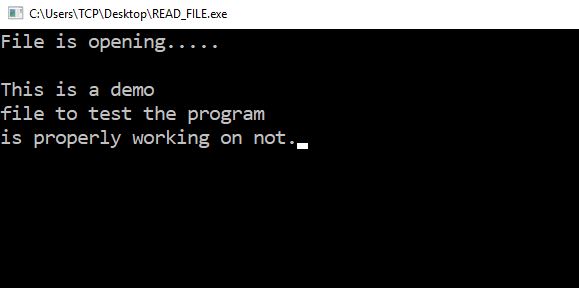
In below program we first open a demo file hello.txt with some text in read mode. Make sure the file is already present. Then we read the file character by character and display on screen.

Program

#include<stdio.h>
#include<conio.h>
#include<stdlib.h>

int main()
{
   FILE *fp;
   char ch;

   fp = fopen("hello.txt","r");

   if(fp ==  NULL)
   {
       printf("File not found. \n");
   }
   else
   {
       printf("File is opening..... \n\n");
       while((ch = fgetc(fp)) != EOF )
       {
           printf("%c", ch);
       }
    }

    fclose(fp);

    return 0;
}

Output

C Program to Read File Line by Line

The post C Program to Read File Line by Line appeared first on The Crazy Programmer.

from The Crazy Programmer https://www.thecrazyprogrammer.com/2018/08/c-program-to-read-file-line-by-line.html

How to Attract More Clients to Your Design Business

Learning design principles and programs are easy enough for anyone dedicated. The Web has given us unlimited resources from detail tutorials to communities helping us improve as designers. This love for design sparks a business idea — a way to monetize our design skills.

The problem: Getting clients.

This low-barrier to entry is also one of the freelance design challenges. If everyone can learn design principles, then everyone becomes your competitor. How can you land clients when so many are willing to work for free or rock-bottom prices?

Let’s explore that question and the ways you can attract (paying) clients.

How to Attract More Clients to Your Design Business

Image Source

Laying the Foundation: Mastering Your Tools and Principles

The end goal of this post is you having built a portfolio website, featuring design work you can be both proud of and that attracts clients. There are many tools that’ll get you there with no particular “best option.”

What are the design tools you should consider?

  • Adobe Suite: The full suite, but especially Photoshop, Audition, InDesign, and Lightroom, as these provide robust design and photo manipulation tools. These are the industry standard meaning mastering them now will place you in a perfect position if hired-on for gigs.
  • Online Visual Tools: Many small businesses need basic images for their social feeds. Tools like Canva, Vectr, and PicMonkey handle the work without high costs. These are very easy to learn and use to deliver top-notch work for your future clients.

Ask fellow designers which tools they use to get a good understanding of which direction to take.

Mastery is half about understanding your tools and the other half is about keeping up with design trends. Even if you don’t agree with trends, your clients probably will. Follow design influencers and tutorial blogs to keep challenging and growing your design skills.

Launching the Ideas: Creating a Lead Generating Portfolio Website

There are numerous ways to go about building online portfolio sites — this includes:

  • Online Frameworks — Provide online, visual site building tools featuring domain, hosting, and plugins. This is ideal for quickly launching your portfolio if you’re not inclined to code.
  •  Content Management Systems — Like WordPress, Joomla, or Drupal require extra work configuring the site but give you a lot of flexibility if you’re the type to frequently make changes.
  •  Done-For-You — As in sourcing freelancers and fellow designers to build the site. This has a higher cost but will be crafted to your specifications.

What should you have on the portfolio site?

  • A welcoming  homepage featuring who you are, what you do, and how to get in touch
  • A portfolio section showing off your best work and giving a behind-the-scenes look at how you work
  • A blog to share your expertise, build search traffic, and to give you something to share on social
  • A services page collecting what you offer and how people can inquire about your services.

Have a look at what fellow designers do for their sites and replicate common features. Then, make it unique through great pieces, content, and some personality of your own.

Being Everywhere: Spreading Your Name and Building a Funnel

Building the site is easy with the right tools. Your work shows value and confidence.

But… how do you actually get people to the site and reaching out to you for services?

Try these:

  • Create Targeted Content: Write industry-related topics, tutorials, round-ups, and guides to attract the type of client you want to attract. Provide something valuable and funnel the visitor to your services page.
  • Be Active on Social: Turn your existing social media accounts into lead generation machines. Rework the accounts giving them a professional tone and appearance. Share your portfolio’s content, build relationships, and pitch ideas or offer help to others to get on people’s radar.

You could also explore online advertising and marketing through these channels but your content and social media will be significant lead generators on their own. Master those two, like your design skills, and you’ll have clients coming through.

Final Thoughts and a Helpful Suggestion

Don’t let competition deter your business ideas and goals. There are many people out there who are willing to work for free or rock-bottom prices — let them have it. Place your sights on businesses willing to pay well for skills and quality work.

Try this: Quote double your typical asking price.

It’ll seem like you’re charging too much… but not really. Understand businesses spend thousands on advertising and marketing — they can surely afford a quality designer like yourself. Plus, you’re not selling yourself short and will have wiggle room to negotiate.

So: Master your tools, build that portfolio, and be everywhere! Go get ’em!

The post How to Attract More Clients to Your Design Business appeared first on The Crazy Programmer.

from The Crazy Programmer https://www.thecrazyprogrammer.com/2018/08/how-to-attract-more-clients-to-your-design-business.html

Upgrading an existing .NET project files to the lean new CSPROJ format from .NET Core

Evocative random source code photoIf you’ve looked at csproj (C# (csharp) projects) in the past in a text editor you probably looked away quickly. They are effectively MSBuild files that orchestrate the build process. Phrased differently, a csproj file is an instance of an MSBuild file.

In Visual Studio 2017 and .NET Core 2 (and beyond) the csproj format is MUCH MUCH leaner. There’s a lot of smart defaults, support for “globbing” like **/*.cs, etc and you don’t need to state a bunch of obvious stuff. Truly you can take earlier msbuild/csproj files and get them down to a dozen lines of XML, plus package references. PackageReferences (references to NuGet packages) should be moved out of packages.config and into the csproj.  This lets you manage all project dependencies in one place and gives you and uncluttered view of top-level dependencies.

However, upgrading isn’t as simple as “open the old project file and have VS automatically migrate you.”

You have some options when migrating to .NET Core and the .NET Standard.

First, and above all, run the .NET Portability Analyzer and find out how much of your code is portable. Then you have two choices.

  • Great a new project file with something like “dotnet new classlib” and then manually get your projects building from the top (most common ancestor) project down
  • Try to use an open source 3rd party migration tool

Damian on my team recommends option one – a fresh project – as you’ll learn more and avoid bringing cruft over. I agree, until there’s dozens of projects, then I recommend trying a migration tool AND then comparing it to a fresh project file to avoid adding cruft. Every project/solution is different, so expect to spend some time on this.

The best way to learn this might be by watching it happen for real. Wade from Salesforce was tasked with upgrading his 4+ year old .NET Framework (Windows) based SDK to portable and open source .NET Core. He had some experience building for older versions of Mono and was thoughtful about not calling Windows-specific APIs so he knows the code is portable. However he needs to migrate the project files and structure AND get the Unit Tests running with “dotnet test” and the command line.

I figured I’d give him a head start by actually doing part of the work. It’s useful to do this because, frankly, things go wrong and it’s not pretty!

I started with Hans van Bakel’s excellent CsProjToVS2017 global tool. It does an excellent job of getting your project 85% of the way there. To be clear, don’t assume anything and not every warning will apply to you. You WILL need to go over every line of your project files, but it is an extraordinarily useful tool. If you have .NET Core 2.1, install it globally like this:

dotnet tool install Project2015To2017.Cli --global

Then its called (unfortunately) with another command “csproj-to-2017” and you can pass in a solution or an individual csproj.

After you’ve done the administrivia of the actual project conversion, you’ll also want to make educated decisions about the 3rd party libraries you pull in. For example, if you want to make your project cross-platform BUT you depend on some library that is Windows only, why bother trying to port? Well, many of your favorite libraries DO have “netstandard” or “.NET Standard” versions. You’ll see in the video below how I pull Wade’s project’s reference forward with a new version of JSON.NET and a new NuUnit. By the end we are building and the command line and running tests as well with code coverage.

Please head over to my YouTube and check it out. Note this happened live and spontaneously plus I had a YouTube audience giving me helpful comments, so I’ll address them occasionally.

LIVE: Upgrading an older .NET SDK to .NET Core and .NET Standard

If you find things like this useful, let me know in the comments and maybe I’ll do more of them. Also, do you think things like this belong on the Visual Studio Twitch Channel? Go follow my favs on Twitch CSharpFritz and Noopkat for more live coding fun!


Friend of the Blog: Want to learn more about .NET for free? Join us at DotNetConf! It’s a free virtual online community conference September 12-14, 2018. Head over to https://www.dotnetconf.net to learn more and for a Save The Date Calendar Link.


© 2018 Scott Hanselman. All rights reserved.


from Scott Hanselman’s Blog http://feeds.hanselman.com/~/564724542/0/scotthanselman~Upgrading-an-existing-NET-project-files-to-the-lean-new-CSPROJ-format-from-NET-Core.aspx

Design a site like this with WordPress.com
Get started