What Is VPS Hosting And Why Do You Need It?

A VPS is a virtualized server that has the tendency to mimic the dedicated server within the environment of hosting. In simple words, it is technically a virtual shared hosting but has the characteristics of a dedicated hosting.

To have your website running at its full potential online, you need to have a good hosting environment. VPS hosting is one of the major three types of hosting that businesses these days preferred to opt for.    

The service is provided by several hosting companies and if you want to try one, go for Hostinger Virtual Private Server (VPS). They provide performance-based VPS plans at a competitive cost. Their live chat support helps you to troubleshoot just in case you have a query.

What Is VPS Hosting And Why Do You Need It

How Does VPS Platform Function?

As the name suggests, VPS hosting has a virtual aspect. It works on the Virtualization technology that divides one powerful service into multiple virtual servers. It’s like having your own virtual dedicated server (one of many) with regards to complete isolation.

Even though your VPS service is tethered to one physical server, it offers you the element of privacy in services. The virtual server is only reserved for you and only you can utilize all the resources provided to you by your VPS hosting provider.

Compartmentalization Analogy

The compartmentalization of multiple components (RAM, Virtual CPU specs, hard disk space) derives from the splitting of the physical server into several independent virtual servers. This compartmental methodology can be assumed for segmenting a hard drive into multiple drives.

This is also applicable to the isolated hosting environment provided by a VPS server. Speaking of which, the amendments and configurations made by you on your own VPS stay unaffected with regards to your neighbor’s VPS.

VPS Hosting Benefits

This type of hosting service offers you the best of a shared hosting whilst providing you the resourcefulness of a dedicated server. Following are the main benefits provided to you by a VPS server;

Privacy: Since there is no need to share your OS with your fellow VPS users, no other web application can potentially get access to your database.

Customization: The VPS server enables you to have your own OS. It simply indicates that you have the full access to your server applications like MySQL, PHP, and Apache. In order to customize any of these services, you can make the most suited changes.

Control: If it is the heavy application you are dealing with that requires a system restart once installed, you can do it with ease. Even though technically you are having a shared hosting (virtual in nature, so to speak), the system restart does not affect your fellow VPS users.

Dedicated Resources: A VPS server allows you to utilize a dedicated amount of CPU power, RAM, Disk Space, etc. Unlike shared hosting , no other user can utilize your hosting resources. In simple, you have the full access to your customized resources.

When Should You Go For A VPS Hosting?

As long as your website deals with a low traffic, you may feel content with the low budget shared hosting. However, soon as your website begins to catch up pace with the traffic, you may feel a sudden decrease in speed of your website.

The majority of the shared hosting solutions start giving up with the performance when you add more content to your website or when the viewer traffic begins to increase. At this point, you must move on to the VPS hosting.

Another indicator that points you in the direction of VPS hosting is slow page load. However, overload can also slow down your website, but it wouldn’t be much of a problem if you’ve opted a VPS plan.

If these signs are more significant and prominent in nature, you need an immediate assistance of a VPS hosting solution. Also, it’s a clear indication that your existing hosting plan can no longer satisfy the growing requirements of your website.

Reasons For Choosing A VPS Plan

Bandwidth consumption begins to stir up when the viewer traffic starts increasing. This is just one factor that makes a user to switch to a VPS plan. Check out the below mentioned additional reasons that strengthens the fact;

  1. If it is the android API you want to run with full control, VPS can be a good value for an investment.
  2. To maintain the performance and speed of the website to manage the coexisting heavy traffic.
  3. If it is the new startup venture you are investing in, starting with VPS can be your good option.
  4. VPS can be highly supportive if you are publishing an Android app on Google and it is the backend API storage in the server that is concerning you.
  5. VPS provide you better root access to run MySQL.

Facts You Must Know Before Selecting A VPS Plan

The companies that cannot afford dedicated hosting service, may opt for a VPS plan. Here are some of the important facts that you might want to check before choosing a VPS hosting package;

  1. It is highly cost-effective and affordable in nature as compared to the dedicated hosting. No question, it is costlier than its shared hosting counterpart, but it does provide you the necessary support.
  2. It comes with several essential features such as customization, control panel and so forth. It is one of the most reliable and flexible hosting solutions that you can opt for. Speaking of which, it is ideal for dealing with heavy traffic and data storage.
  3. It includes no maintenance cost and tackles the downtime problem almost instantaneously. Therefore, your website almost stays unaffected by any possible discrepancy that comes forth.
  4. The top-notch security keeps you safe from the malicious cyber attack and thus, your investment stays unharmed.

Conclusion

There are several other benefits that you can add to your bucket list by opting this hosting service. Nowadays, it becomes increasingly demanding among the growing businesses and people who deal with heavy traffic. To get a better feel for this hosting service, must try one.  

The post What Is VPS Hosting And Why Do You Need It? appeared first on The Crazy Programmer.

from The Crazy Programmer https://www.thecrazyprogrammer.com/2018/09/what-is-vps-hosting-and-why-do-you-need-it.html
A command-line REPL for RESTful HTTP Services

HTTP REPLMy that’s a lot of acronyms. REPL means “Read Evaluate Print Loop.” You know how you can run “python” and then just type 2+2 and get answer? That’s a type of REPL.

The ASP.NET Core team is building a REPL that lets you explore and interact with your RESTful services. Ideally your services will have Swagger/OpenAPI available that describes the service. Right now this Http-REPL is just being developed and they’re aiming to release it as a .NET Core Global Tool in .NET Core 2.2.

You can install global tools like this:

dotnet tool install -g nyancat

Then you can run “nyancat.” Get a list of installed tools like this:

C:\Users\scott> dotnet tool list -g
Package Id                 Version                   Commands
--------------------------------------------------------------------
altcover.global            3.5.560                   altcover
dotnet-depends             0.1.0                     dotnet-depends
dotnet-httprepl            2.2.0-preview3-35304      dotnet-httprepl
dotnet-outdated            2.0.0                     dotnet-outdated
dotnet-search              1.0.0                     dotnet-search
dotnet-serve               1.0.0                     dotnet-serve
git-status-cli             1.0.0                     git-status
github-issues-cli          1.0.0                     ghi
nukeeper                   0.7.2                     NuKeeper
nyancat                    1.0.0                     nyancat
project2015to2017.cli      1.8.1                     csproj-to-2017

For the HTTP-REPL, since it’s not yet released you have to point the Tool Feed to a daily build location, so do this:

dotnet tool install -g --version 2.2.0-* --add-source https://dotnet.myget.org/F/dotnet-core/api/v3/index.json dotnet-httprepl

Then run it with “dotnet httprepl.” I’d like another name? What do you think? RESTy? POSTr? API Test? API View?

Here’s an example run where I start up a Web API.

C:\SwaggerApp> dotnet httprepl
(Disconnected)~ set base http://localhost:65369
Using swagger metadata from http://localhost:65369/swagger/v1/swagger.json
http://localhost:65369/~ dir
.        []
People   [get|post]
Values   [get|post]
http://localhost:65369/~ cd People
/People    [get|post]
http://localhost:65369/People~ dir
.      [get|post]
..     []
{id}   [get]
http://localhost:65369/People~ get
HTTP/1.1 200 OK
Content-Type: application/json; charset=utf-8
Date: Wed, 26 Sep 2018 20:25:37 GMT
Server: Kestrel
Transfer-Encoding: chunked
[
  {
    "id": 1,
    "name": "Scott Hunter"
  },
  {
    "id": 0,
    "name": "Scott Hanselman"
  },
  {
    "id": 2,
    "name": "Scott Guthrie"
  }
]

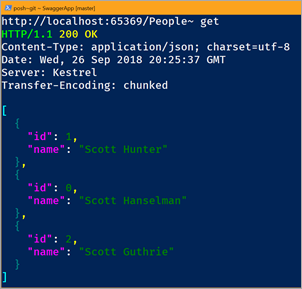
Take a moment and read that. It can be a little confusing. It’s not HTTPie, it’s not Curl, but it’s also not PostMan. it’s something that you run and stay running if you’re a command line person and enjoy that space. It’s as if you “cd (change directory)” and “mount” a disk into your Web API.

You can use all the HTTP Verbs, and when POSTing you can set a default text editor and it will launch the editor with the JSON written for you! Give it a try!

A few gotchas/known issues:

  • You’ll want to set a default Content-Type Header for your session. I think this should be default.
    • set header Content-Type application/json
  • If the HTTP REPL doesn’t automatically detect your Swagger/OpenAPI endpoint, you’ll need to set it manually:
  • I haven’t figure out how to get it to use VS Code as its default editor. Likely because “code.exe” isn’t a thing. (It uses a batch .cmd file, which the HTTP REPL would need to special case). For now, use an editor that’s an EXE and point the HTTP REPL like this:
    • pref set editor.command.default ‘c:\notepad2.exe’

I’m really enjoy this idea. I’m curious how you find it and how you’d see it being used. Sound off in the comments.


Sponsor: Rider 2018.2 is here! Publishing to IIS, Docker support in the debugger, built-in spell checking, MacBook Touch Bar support, full C# 7.3 support, advanced Unity support, and more.


© 2018 Scott Hanselman. All rights reserved.


from Scott Hanselman’s Blog http://feeds.hanselman.com/~/571584580/0/scotthanselman~A-commandline-REPL-for-RESTful-HTTP-Services.aspx

5 Essential Tips for Writing Computer Science Research Project

Working on computer science research projects can be a difficult task, partly because computer science projects are unlike research projects in any other discipline. Depending on the area of study, a research project can be defined differently. A general definition of a research project states that a research project aims to take old research (done by others) and either expand on it or create something new with the discovered research.

Often times with computer science classes, and in similar classes, professors will assign a research project as one of the final projects of the class. These projects can involve doing a wide array of things, from making a new computer program to using artificial intelligence in a new way. Writing a paper about the research project is a common aspect to a research project. The paper is usually used to explain the project and show the results and/or findings of the project.

5 Essential Tips for Writing a Computer Science Research Project

Image Source

Below are some of the best tips to help computer science students pick a research project and how to write about their chosen topic.

1. Pick the Project Topic

The first thing to do when working on a professional computer science research paper is picking the topic. In computer science, there are a variety of research areas to choose from. Below is a list of just a few examples of research project topics that students may want to consider.

  • Medical apps
  • Education apps
  • Entertainment apps
  • Information storage and retrieval
  • Communication tools
  • Social media research
  • Video/media creation and editing
  • Virus/malware protection

2. Research and Take Notes

Once students have picked have picked their research paper, it’s time to begin the actual research. Since the computer sciences are constantly changing as computers and other technological devices are also constantly changing, one of the best ways to research computer science is by using the Internet.

When working on research projects for other classes, like English or history, it is best to use book research. However, books on computer science can become outdated quickly, which is why it is some important to use Internet research, as it can update as quickly as the computer sciences can.

When researching online, students should make sure they are using reliable sources. One way to do this is to make sure that the articles or journals used are peer-reviewed. Peer-reviewed papers have been looked over by other professionals, so they are legitimate sources of true information.

Some great places to find peer-reviewed sources include the Journal of Computer Science, The International Journal of Computer Science, and The Journal of Computer and System Sciences.

Students should always take notes as they conduct their research. This way, they can save time as they will not need to reread entire articles as they work on their project or their research paper. It is not likely that anyone else will see a student’s notes; there is no specific way they need to be formatted.

If students do not have time to research, they can hire an academic writer to do the research for them. These writers can help to conduct the research, take notes, and even cite sources by writing a bibliography page. This can save a lot of time when it comes to the research project as a whole.

3. Conduct the Research Project

The next step in writing about a computer science research project is to actually conduct the project. While this may seem more like an obvious step than a tip, there is one important tip that goes along with it. Just like when a student researches and takes notes, a student should also take notes while they conduct their project. Also just like with researching, taking notes while conducting the project can also help to save time in the long-run.

4. Introduce the Project and Field

The very first thing that should be included in a research project writing, which is usually a long essay, is the introduction. There are two basic things that should be included in the introduction: the area of computer science the project is involved with and the actual topic/name of the research project.

According to the University of California, Irvine, there are about twenty research areas just within computer science. Each computer science research project will fall into one of these research areas. Below is a list of some of the most popular research areas in computer science. To learn more about any specific field, click on the link above.

  • Algorithms
  • Artificial intelligence
  • Graphic design
  • Databases
  • Embedded systems
  • Multimedia
  • Operating systems
  • Privacy
  • Programming
  • Software engineering

Once a student identifies the field they are working in, they should then go on to briefly summarize what it is their project topic is and/or what their hypothesis for their project was.

5. Writing about Research and Results

The body of the paper, which will take up the majority of the research project paper, should contain information that fully explains how the students went about making a hypothesis, testing their ideas, learning from their research, and more.

The beginning paragraph(s) of the body should explain the research that went into the paper. What sources did the student(s) use? What did they learn? What did they hope to expand on? These are some questions students should think about when writing their paper.

The middle of the body paragraph should focus on the research project itself. What steps did the student(s) take to conduct the project? Students should make this section of the paper as detailed as possible in order for the reader to have a good idea of what happened during the project.

The last body paragraph(s) should focus on the results of the project. Did the students achieve their goal? Did the project go as the student(s) expected? If the project did not produce the expected results, what did the actual results show? These questions and more should be answered to give the reader (most likely just the professor) a good idea of what the project actually accomplished.

If students follow these tips, then their computer science project and paper are sure to flow smoothly. Students should remember to take notes, remain focused, and write clearly. All of these things can help to make the project and its related paper a success.

The post 5 Essential Tips for Writing Computer Science Research Project appeared first on The Crazy Programmer.

from The Crazy Programmer https://www.thecrazyprogrammer.com/2018/09/tips-for-writing-a-computer-science-research-project.html

What is Python used for?

In this article you will get to know what is python used for or its applications.

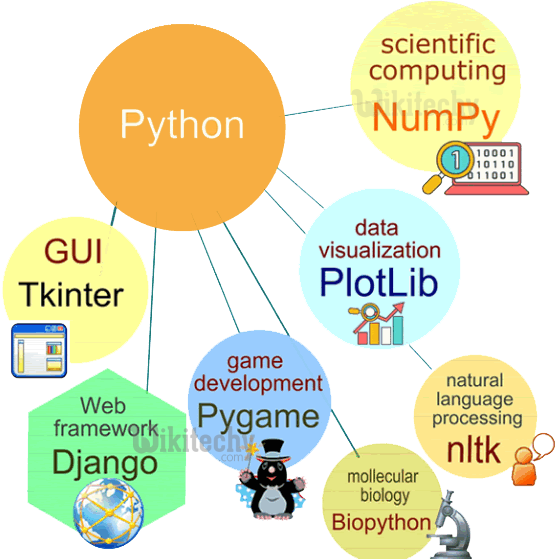
Python is an ubiquitous scripting language. Of course many of us might be aware of the magical things we can do with the help of python, that is another story all the way and we will talk about this sometimes later for sure. These days python has found its way to web development, app development, scientific and numeric field, business applications, GUI designing, automation, artificial intelligence, machine learning and what not.

So without investing much of our time let’s dive further and see what python has to offer to the world. We will go step by step further into this and try our best not to miss any point, but unfortunately if we do please let us know in the comment section as there are immense possibilities pertaining to python. Let us quickly start our journey with python and see some of the applications of python.

What is Python used for

What is Python used for? – Python Applications

Software Development and Testing

Though sometimes referred as a supporting language, the python can be used for the development of rigid software as a whole. This might be surprising to some people but true, that in this era, python is being widely used in professional software development at much larger scale. Companies like Google itself are using python programming language in the development and testing of it’s product. A lot of services being provided by google are deployed with the systems written in python and to surprise the YouTube’s homepage is too written in python (isn’t this cool?). Okay let us quickly now see some of the major softwares that we come across in our daily lives which are written in python.

  • Google: The google is among one of the prominent companies which uses python in its development and design. Python is proven to be efficiently handling the traffic deployed on google and its connected apps and is very well known for computing purposes.
  • YouTube: One of the most beloved apps these days which is very much in trend for leisure times is of course YouTube and to surprise is written in python.
  • Dropbox: Starting from storing documents at first, Dropbox has spread its wings now to store literally everything and the functionality of sharing and synchronising the stuffs saved has made it even more lovable to its audience and all this is powered by python.
  • Instagram: Instagram has become the most trending application for the purpose of sharing pictures and videos for its people. Apart from sharing, several other features are being provided by this application which is all powered by python and make it even more popular.
  • Quora: The next big giant after google which is proved good in providing solutions to all the queries posted in a most realistic way is none other than Quora. And all this thing is summed up to an application with the help of python.

Apart from the applications we have discussed above there exist lot more softwares that are powered by python. Some of them to name are Reddit, Spotify, Bitbucket, SurveyMonkey and Pinterest.

Also Read: Best Way to Learn Python

Web & Internet Development

Python is a scripting language used for the development of large scale web apps because of the features provided by it and not by other languages like .NET, PHP, etc. Also python provides several frameworks like Django and Pyramid and micro-frameworks like Flask and Bottle for easing the process of web development. Apart from these, python also come equipped with advanced content management systems such as Plone and Django CMS.

Talking about the internet, python consists of several libraries beforehand pertaining to different functionalities and features. The standard libraries of python provides support for different internet protocols:

  • E-mail processing
  • JSONHTML & XML
  • FTP, IMAP, and other Internet protocols support
  • Easy-to-use socket interface

Apart from these, python comes with a bunch of other libraries that facilitate its users to perform cool works. We will talk about these other libraries later in this post when required.

Development of Desktop GUIs

Python offers a bunch of alternatives for the development of GUI such as PyQt, Tkinter, Kivy, etc. But among these Tkinter is the mostly adopted option by the developers for the development of GUIs. Also, it is seen that python hasn’t gained that much of popularity in the field of GUI development professionally (although it was proven best in a survey done in 2014).

It is proven that there are better alternatives than Tkinter and PyQt or we can say python. Let us see what professionals has to offer when it comes to GUI development. It is advised to use .NET and C# while developing GUI for windows, Swift/Objective-C and Cocoa while on Mac and C++/Qt or Java/JavaFX while designing GUI for Linux platform.

While using python for the same, the Tkinter library is the most commonly used one for accomplishing the purpose as it is proven as the fastest and easier way to go with the development of the GUI. GUI creation with the help of Tkinter is much easier.

Kivy, which is the most recent among the modules is used for the purpose of writing multi-touch applications.

Business Applications and Finance

In recent years python has marked remarkable growth in the business, e-commerce, and trading sectors. It is also quite feasible to make ERPs with the help of modules provided by python. We can see nowadays python is primarily being used for the qualitative and quantitative analysis of stocks, cryptocurrencies etc. One of the prime application of python by the use of its modules like Numpy, Pandas, scipy, etc is prediction of stock prices and cryptos in business world. Being easier to maintain and comparatively lesser code density and its ability to be easily integrated with other languages and platforms, python is being one of the firsts choices.

The trading sector is the field which requires a lot of analysis which could be deployed easily using python. The trading experts make winning strategies and forecast the market trend using python and to your knowledge this application is accomplished by using Django framework using python.

Payment gateways can also be deployed via python using Django framework.

Scientific, Numeric and Automation

This is the most prominent and heated applications of python. Python nowadays is playing a vital role in the field of science, automation, artificial intelligence and machine learning and to some extent leaving R behind (based on individual preferences). Python offers a bunch of cool modules and libraries for scientific and numeric calculations, some of them are listed below as:

Pandas: Used for analysing the dataset (bunch of data).

SciPy: Used for science, engineering and math works.

IPython: Used for easy editing and recording of work sessions.

Python has remarkable work in field of automation, AI and machine learning. These days if we talk about machine learning models or about automating a vehicle or a spaceship, from Tesla to NASA, python is everywhere.

End Notes:

We have tried to cover the most prominent uses of this scripting languages and haven’t included the most obvious python applications as they are well-known. If there is any suggestion or query, please let us know in the comments below, we will be happy to help.

The post What is Python used for? appeared first on The Crazy Programmer.

from The Crazy Programmer https://www.thecrazyprogrammer.com/2018/09/what-is-python-used-for.html

Scripts to remove old .NET Core SDKs

That's a lot of .NET Core installations.NET Core is lovely. It’s usage is skyrocketing, it’s open source, and .NET Core 2.1 has some amazing performance improvements. Just upgrading from 2.0 to 2.1 gave Bing a 34% performance boost.
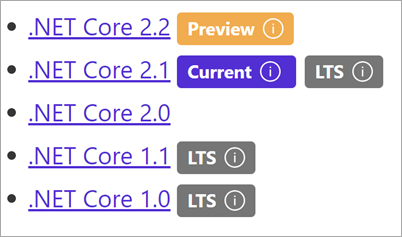
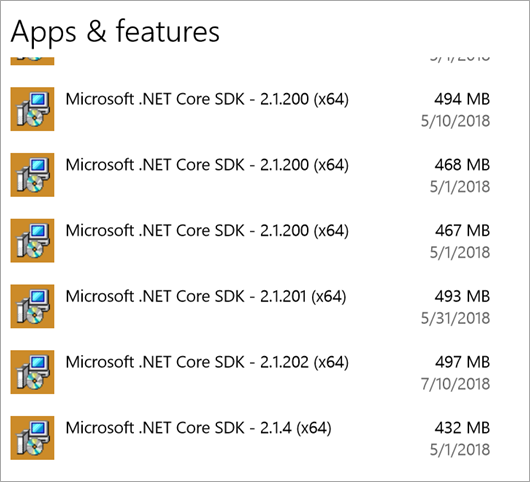
However, for those of us who are installing multiple .NET Core SDKs side by side have noticed that they add-up if you are installing daily builds or very often. As of 2.x, .NET Core doesn’t yet have an “uninstall all” or “uninstall all previews” option. There will be work done in .NET Core 3.0 that will mitigate this cumulative effect when you have lots of installers.

If you’re taking dailies and it’s time to tidy up, the short answer per Damian Edwards is “Delete them all, then nuke the dotnet folder in program files, then install the latest version.”

Here’s a PowerShell Script you can run on Windows as admin that will aggressively uninstall .NET Core SDKs.

Note the match at the top. Depending on your goals, you might want to change it to “Microsoft .NET Core SDK 2.1” or just “Microsoft .NET Core SDK 2.”

Once it’s all removed, then add the latest from https://www.microsoft.com/net/download/archives

A list of .NET Core SDKs

Here’s the script, which is an improvement on Andrew’s comment here. You can improve it as it’s on GitHub here https://github.com/shanselman/RemoveDotNetCoreSDKInstallers. This scripts currently requires you to hit YES as the MSIs elevate. It doesn’t work right then you try /passive as a switch. I’m interesting if you can get a “torch all Core SDK installers and install LTS and Current” script working.

$app = Get-WmiObject -Class Win32_Product | Where-Object { 
    $_.Name -match "Microsoft .NET Core SDK" 
}
Write-Host $app.Name 
Write-Host $app.IdentifyingNumber
pushd $env:SYSTEMROOT\System32
$app.identifyingnumber |% { Start-Process msiexec -wait -ArgumentList "/x $_" }
popd

This PowerShell is Windows-only, of course.

If you’re on RHEL, Ubuntu/Debian, there are scripts here to try out https://github.com/dotnet/cli/tree/master/scripts/obtain/uninstall

Let me know if this script works for you.


Sponsor: Copy: Rider 2018.2 is here! Publishing to IIS, Docker support in the debugger, built-in spell checking, MacBook Touch Bar support, full C# 7.3 support, advanced Unity support, and more.


© 2018 Scott Hanselman. All rights reserved.


from Scott Hanselman’s Blog http://feeds.hanselman.com/~/571134816/0/scotthanselman~Scripts-to-remove-old-NET-Core-SDKs.aspx

Online JSON Tools Review

If you’re a savvy web developer, you have definitely searched on Google for tools like “url decode json” or “convert json to text”. And what do you usually get? You get garbage websites filled with ads, popups, blinking download buttons and tools that don’t really work.

The same problem was faced by Peter K. Rumins from Browserling. He decided to solve this problem once and for all by building a network of tools websites. These sites consist of thousands of simple tools that help to work with JSON, XML, CSV, YAML, PNG, JPG, Strings and even Mathematics. These tools are ads free, there are no configuration options and no ads.

Online JSON Tools 1

OnlineJSONtools.com is one such website in the network and it helps developers to work with JSON data structures in the browser. The tools are so easy to use that all you have to do is enter JSON input and you instantly get the result you are looking for.

Currently Supported JSON Tools

Below is the list of all the tools that are currently available. Apart from that Browserling team is constantly working to add more tools such as JSON to BSON.

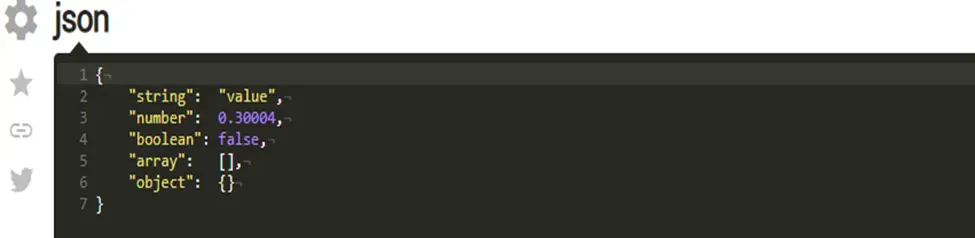
  • JSON Highlighter tool: JSON highlighter will give each token a different color. Values, keywords, brackets and also to special characters (like newlines, tabs, etc) get special colors. Let’s see a working version of JSON highlighter in an example:

Online JSON Tools 2

You can see strings, object values and keys are in yellow color, blue color for numerical values, white color for arrays and objects, and grey color for invisible special characters.

It has some additional features that let you control highlighting of JSON:

  • Shows special characters, as in above example new line is represented by a “downstairs symbol”.
  • It will care about your matching brackets, it also highlights matching brackets if the cursor is near one.
  • It also shows the active line in gray color so that you can see more easily on which line the cursor is.
  • It also tells user not only the line number where is the error but also what is the error by highlighting it as shown in below example.

Online JSON Tools 3

  • JSON Prettifier Tool: So here word “prettifier” itself describing this tool. This makes your JSON code well formatted with proper indentation. It will convert an ugly code to beautiful code.

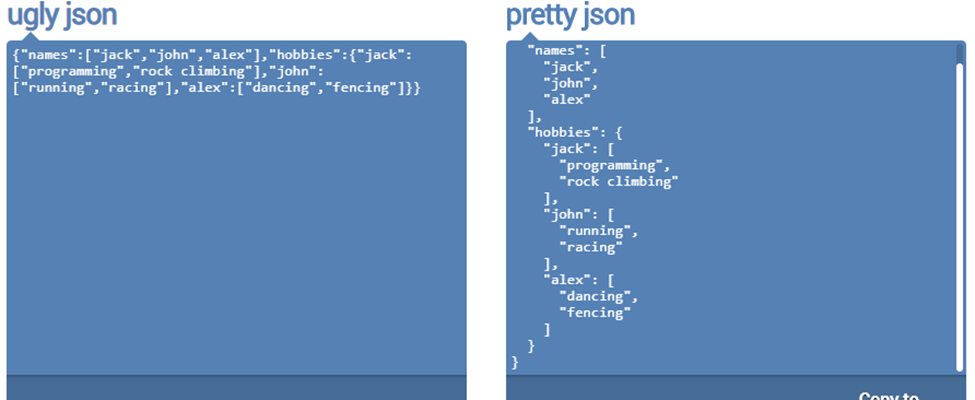
Let’s see the use of the tool on a given problem where you have minified JSON input:

Online JSON Tools 4

You can see from the above program the code in left block is not indented and not aligned but after using JSON prettifier it aligns the code in proper indentation and you can quickly understand it.

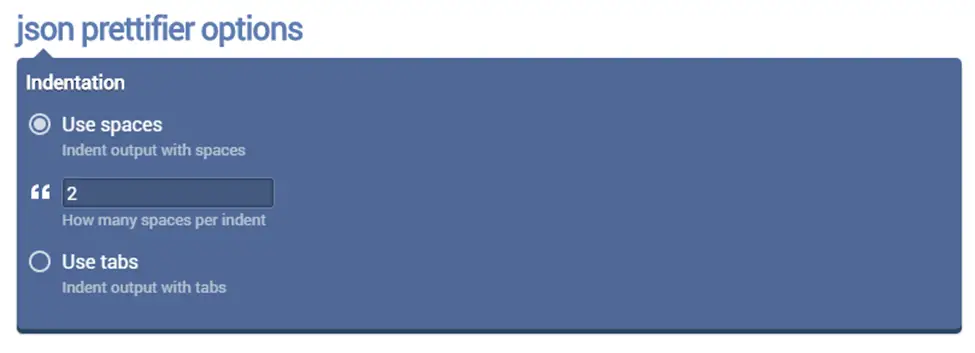
Online JSON Tools 5

We can also define by the “number of spaces” and “number of tabs” to indent output with spaces and with tabs as shown below.

  • JSON Minifier Tool: It is a tool which removes all whitespaces and gives a JSON code that takes least space. It’s effective for transmitting less data and making faster web page load time.
  • JSON Validator Tool: This is an important tool that let you write a valid JSON code. It will point out where is the error and tell the programmer what the error is.
  • JSON Escaper Tool: JSON escaper helps the programmer to embed JSON in a string as it escapes all special symbols. So now you don’t need to worry about if you forget escape sequence code of any special character, because JSON escaper is here to help you.
  • JSON Unescaper Tool: JSON unescaper just reverse of the JSON escaper. It will return you a valid JSON object from a string version of JSON object.
  • JSON to XML Convertor Tool: This tool helps you to easily convert your JSON data into an XML documents and also allow us to make change in indentation for easier reading.
  • XML to JSON Convertor Tool: This tool gives us a very easy solution of converting an XML data into JSON documents.
  • JSON to YAML Convertor Tool: It let us convert our JSON structure to its equivalent YAML config file.
  • YAML to JSON Convertor Tool: A reverse version of JSON to YAML that transpiles YAML data to JSON config.
  • JSON to TSV Convertor Tool: The main feature of this tool is that it quickly converts our JSON code into text in tab separated values format.
  • TSV to JSON Convertor Tool: This tool let us do reverse action of previous and convert TSV columns into JSON objects.
  • JSON to CSV Convertor Tool: JSON to CSV convertor is similar to JSON to TSV but here the output is column separated values.
  • CSV to JSON Convertor Tool: This tool helps us convert CSV back to JSON in a just one click without installing any application or following any instructions.
  • JSON to BSON Convertor Tool: This tool helps us to represent our JSON code in binary-encoded format. This increases the efficiency in binary applications.
  • BSON to JSON Convertor Tool: It allow us to convert BSON, which is binary encoded JSON back to JSON format.
  • JSON to Image Convertor Tool: It helps to transforms our JSON code into a JPEG, PNG, GIF, BMP image. It basically screenshots the JSON code and gives you back a downloadable image.
  • JSON to Base64 Tool: It not only allows us to encode our JSON data to base64 code that’s used in webapps.
  • Base64 to JSON Tool: Simple and easy tool that decodes base64 data back to JSON format.
  • URL-encode JSON Tool: This is a fantastic tool that encodes our JSON objects into URL-encoding format by escaping all URL characters to percent-number-number format.
  • URL-decode JSON Tool: This tool transform our data back to JSON format from URL-encoded data by unescaping all URL-encoded sequences to regular characters.
  • JSON to Plain Text: The main feature of this tool is that it extracts plain text data from JSON code by removing all special JSON symbols and operators.
  • JSON Editor Tool: It provides us a clear interface in the browser to edit JSON in syntax-highlighted editor.

Upcoming JSON Tools

Mr. Rumins and his team at Browserling is also working on more new JSON tools. Here is the list of tools that will be available soon on the site:

  • Display JSON Statistics: Provide statistics about JSON objects and their complexity.
  • Flatten JSON: Flatten deep JSON structures into flat single depth objects.
  • Obfuscate JSON: Convert JSON to unrecognizable but still valid data.
  • Convert JSON to a HTML: Create HTML webpage from a JSON code.
  • Convert JSON to a Bencode: Convert JSON objects to B-encoded data that’s used in bittorrent protocol.
  • Convert JSON to a Latex Table: Create a Latex table code from a JSON data structure.
  • Truncate JSON: Cut off excessively large JSON data and make JSON the required length.
  • Convert JSON to Data URI: Encode JSON so that it can be used in URLs.
  • Convert JSON To a PHP Array: Create PHP code from JSON code.
  • Compare Two JSON Files: Compare two JSON files in the browser and find their differences.

If you found JSON tools useful and you would like to have more tools and new JSON features then please tell us know by commenting below.

I would like to thank whole Browserling team for building such handy online tools that is making the work easier for programmers like me and many others. A million and one thanks!

The post Online JSON Tools Review appeared first on The Crazy Programmer.

from The Crazy Programmer https://www.thecrazyprogrammer.com/2018/09/online-json-tools-review.html

Django Project Tour

In this tutorial, we’re going to take a look on each file that exists in our django project folder.

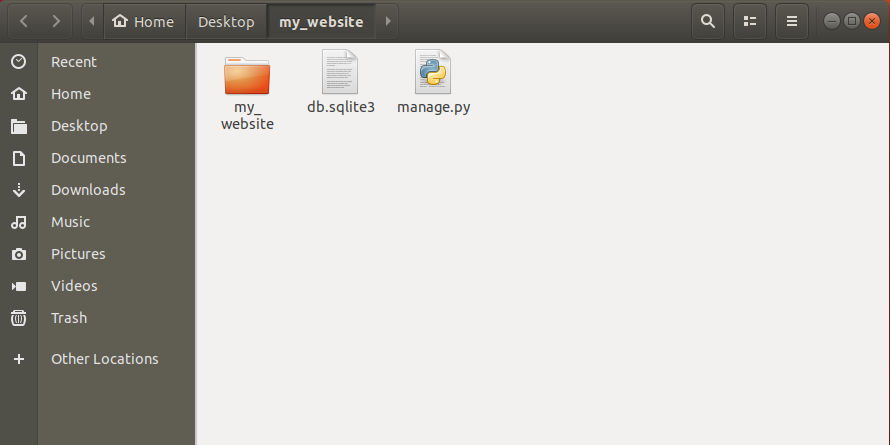
Let’s say, we’ve created a project named as my_website on our desktop. Now open that folder you can see another folder (directory) with the same name inside our project folder.

Django Project Tour 1

Along with this directory, we’ve other two files db.sqllite3 and manage.py.

Let’s understand these files.

manage.py

This is the file that we’ve used to run server. Basically that manage.py file help us to do some top level admin things. To see all the funtionality of that file other than running a server, just open terminal or command prompt and navigate to the directory where our manage.py file exists and run the command below.

python3 manage.py help

or

python manage.py help  (if you have only python3 installed in your system)

Now after running this command you can actually see all the things that our manage.py file can do like startapp, runserver, collectstatic. We’ll use many of these things later and we should never edit this file if you’re editing this file for specific reason, at that point you should be an expert django user before you go messing up with this file.

db.sqlite3

This file is a database that is generated for us whenever we make a new project and run the server. This is going to be a non-human readable file. It’s supposed to store data in a really efficient way.

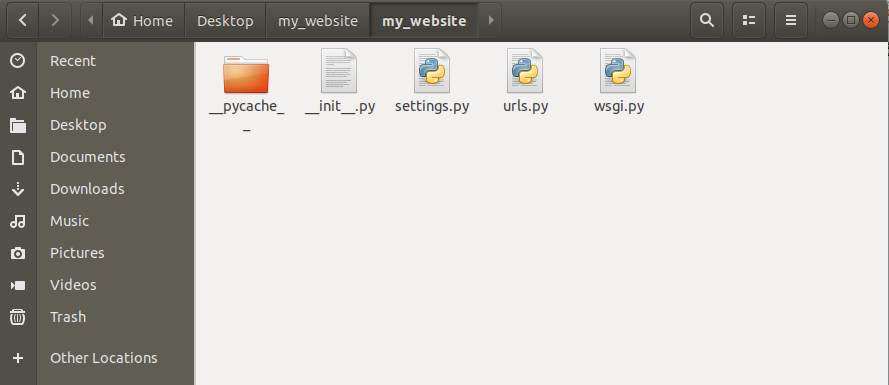
Now open my_website directory inside our project folder and you’ll see some other files and a directory as shown below.

Django Project Tour 2

__pycache_

This directory is going to be auto-generated everytime when we’re running the server. Inside __pycache_ there are some other files having extension .pyc. These are some internal files, we doesn’t need to worry about these at all.

__init__.py

This is also created automatically whenever we initially create a new project and we’ll never touch this file too because this file is not there for programmer’s use. It is there for some internal django working. We’re not going to worry about it too.

settings.py

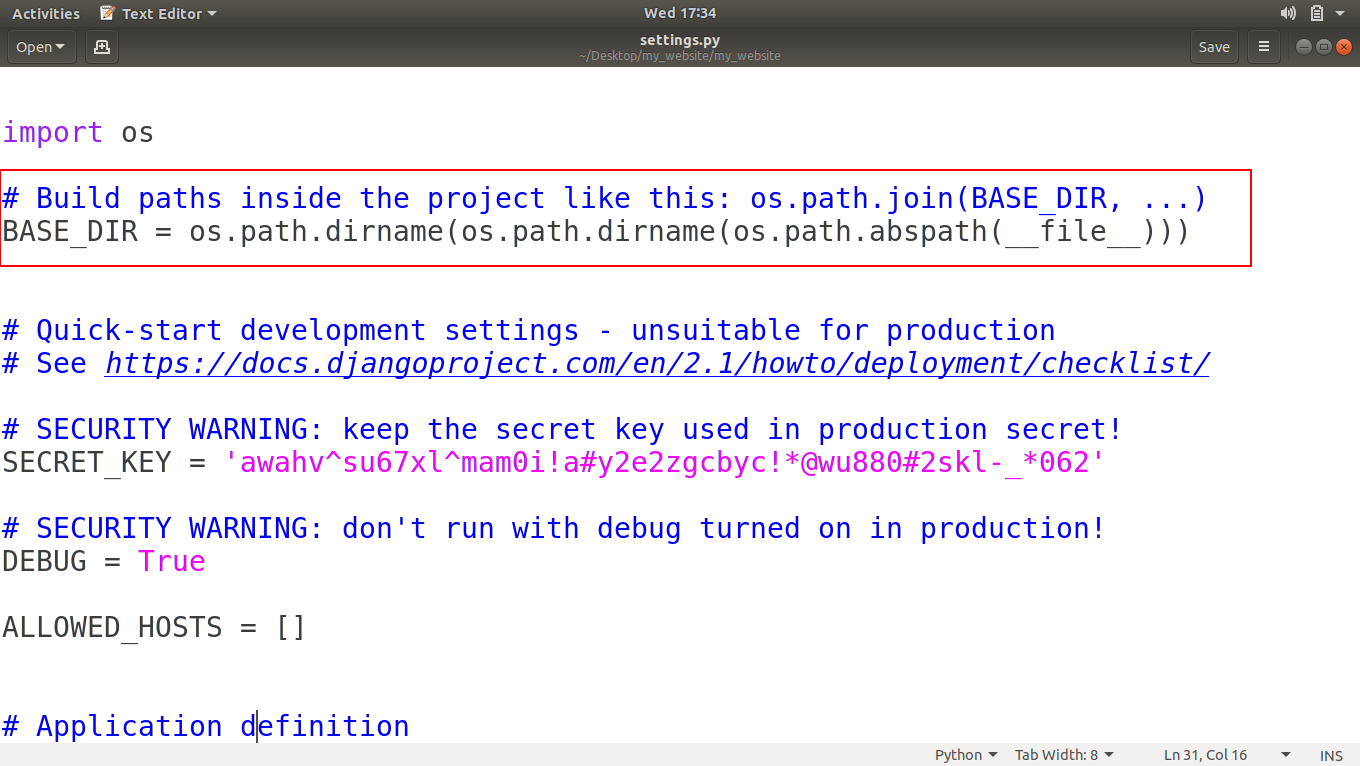
This is the file, that we’re going to use a lot. If we open this file using any text editor then you can see that there is a BASE_DIR variable that have the path of our base directory of our project.

Django Project Tour 3

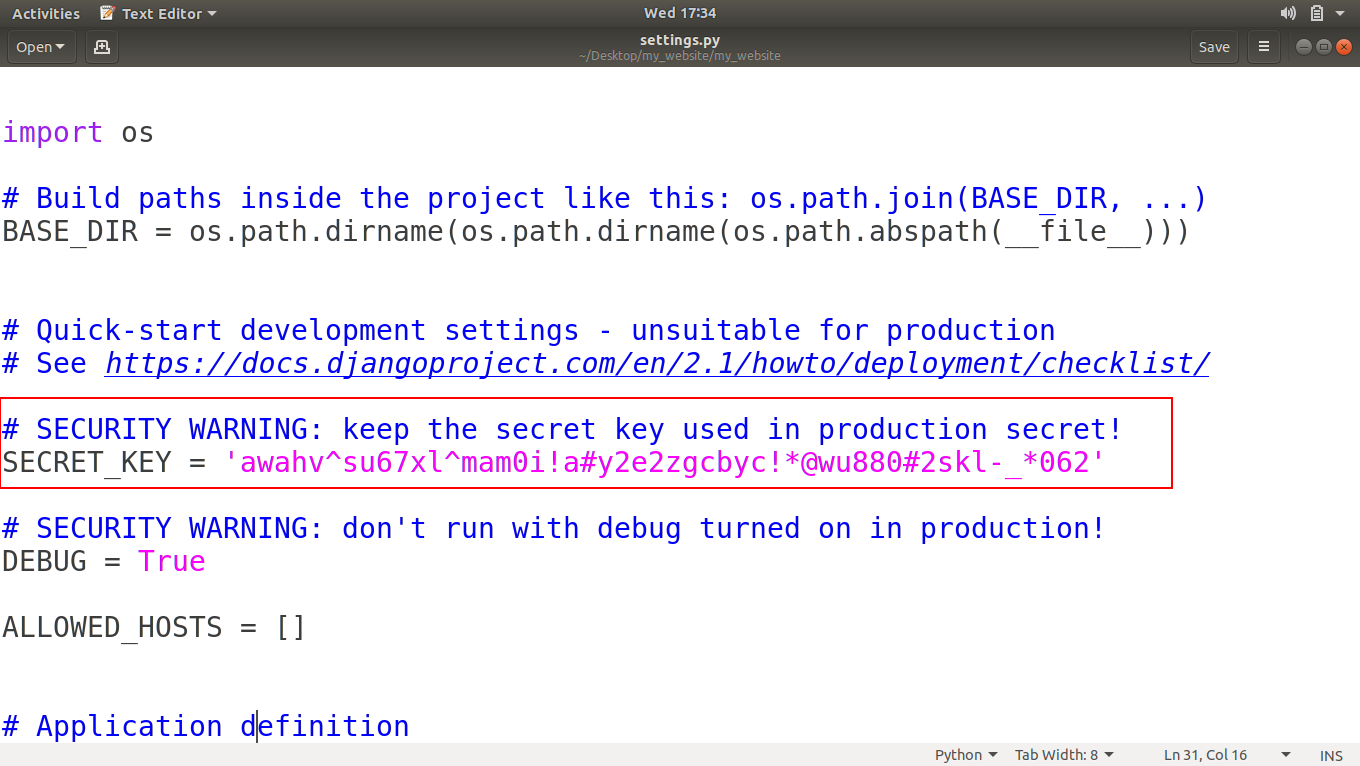
Next there is a SECRET_KEY that we should never show to anybody if we’re going to pushing up our project to internet. We can also change this key as we want to.

Django Project Tour 4

Next is DEBUG, that is set as True. This is basically saying that you are working in a development environment on your computer. This helps us to show errors while running our project. When our project will be live on the internet, we’ll set DEBUG as False.

Next two variables are ALLOWED_HOSTS and INSTALLED_APPS that we’ll see later when our project will be under production phase.

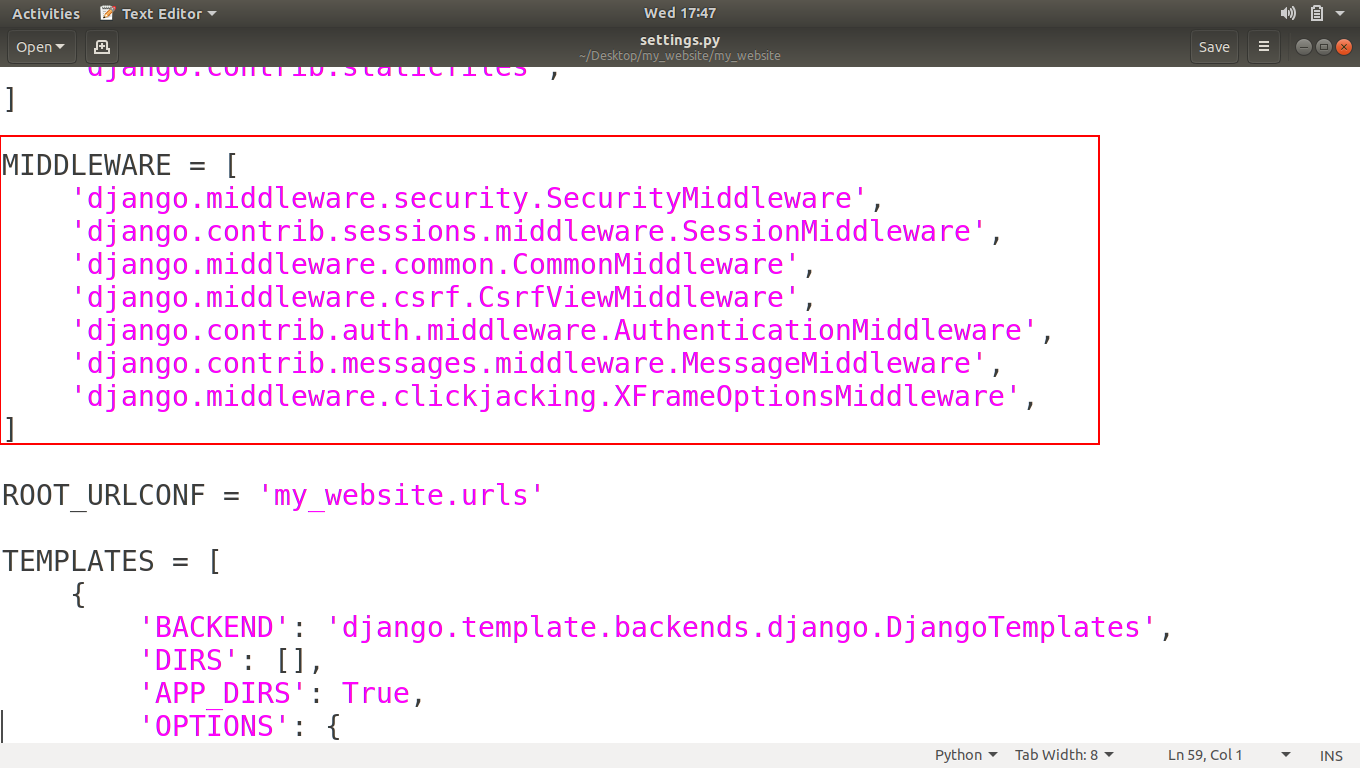
Next is MIDDLEWARE, This is also some advance stuff and auto-generated code by django.

Django Project Tour 5

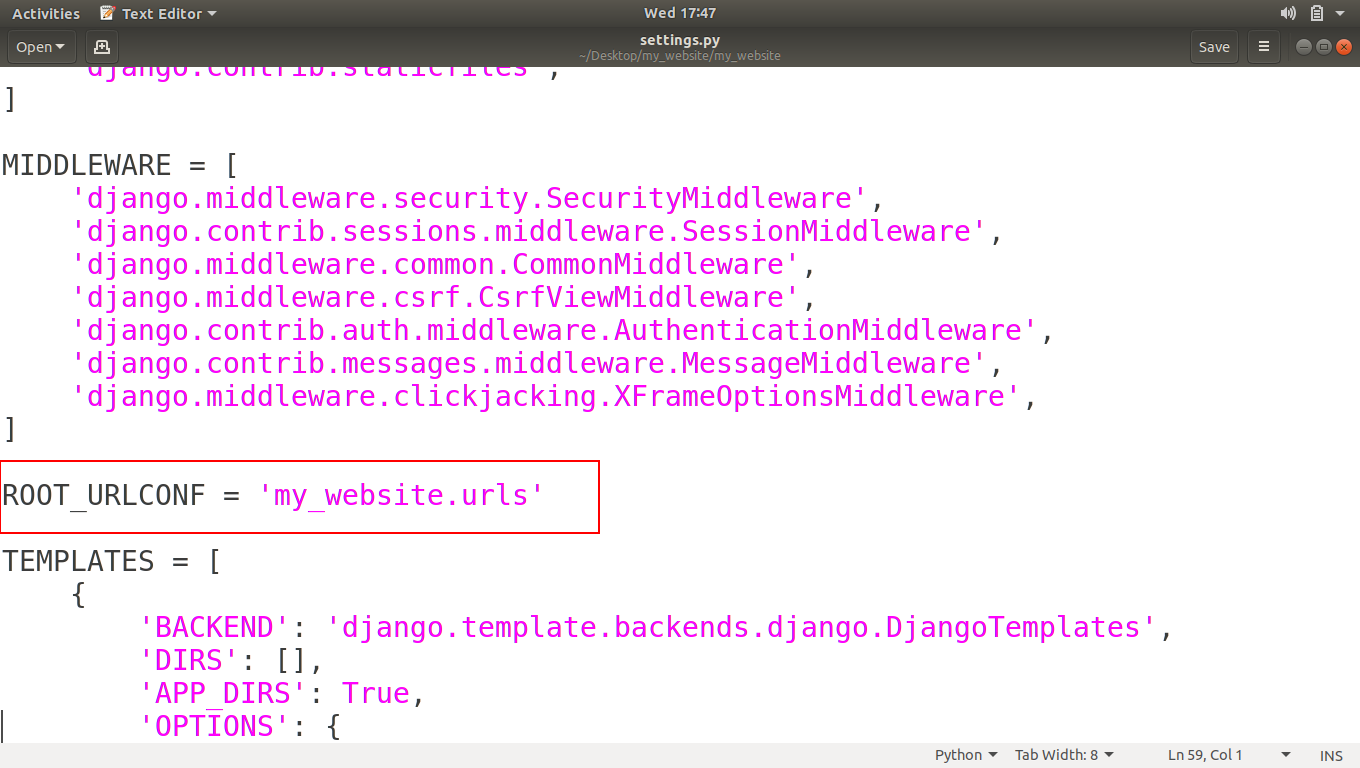
Then there is a ROOT_URLCONF variable that’s basically saying where your initial URL file is.

Django Project Tour 6

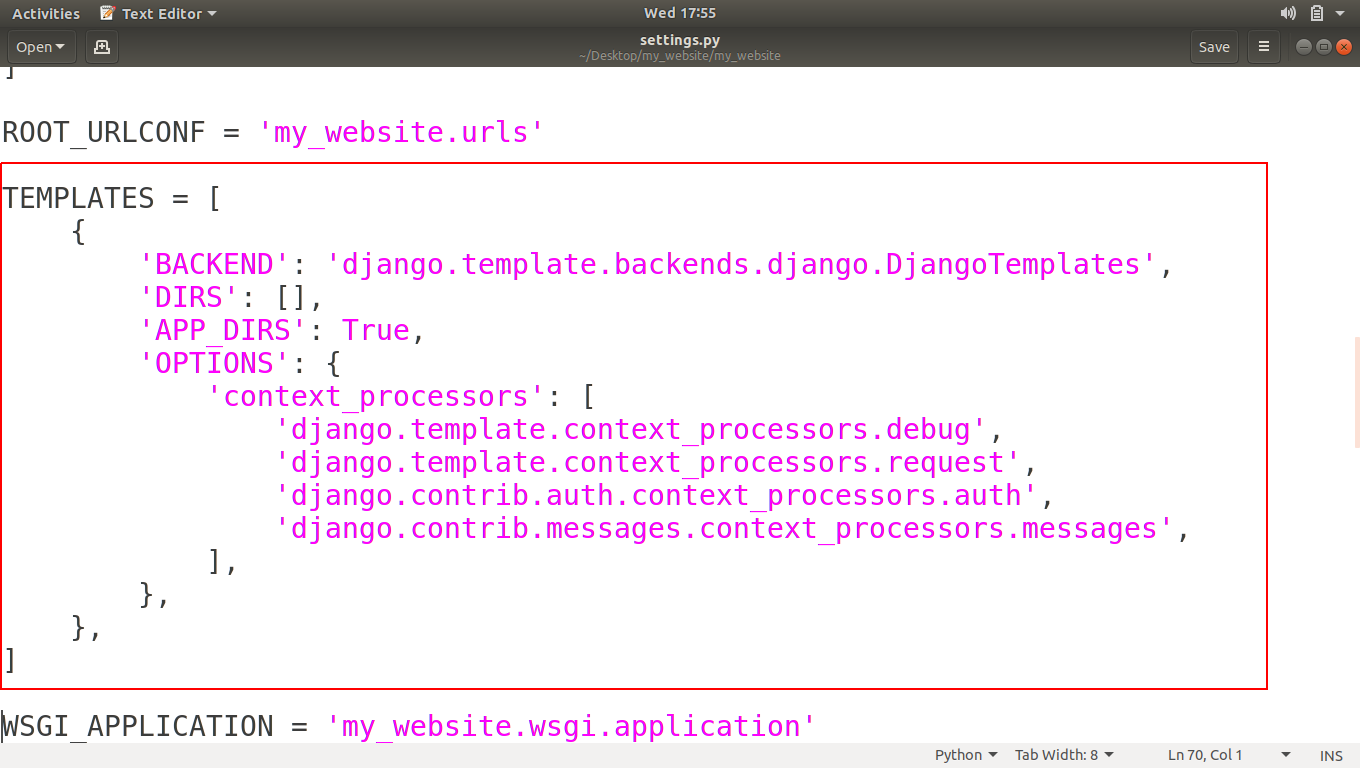
Next one is TEMPELATES, basically these tempelates helps to turning the python code into HTML, because when someone requests a website, it is going to give back HTML. As we can see when we open page source of any webpage, It gives us bunch of HTML Tags.

Django Project Tour 7

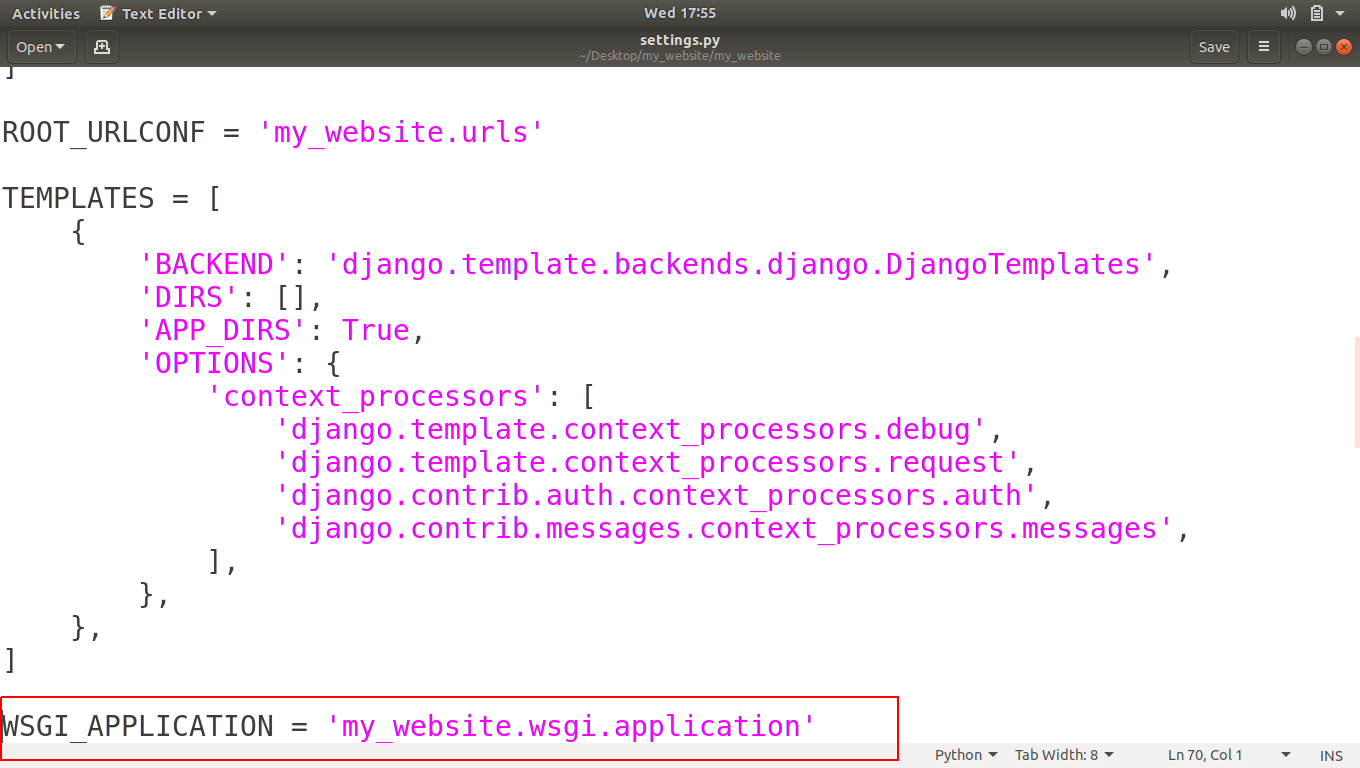
Next is WSGI_APPLICATION, This is used when we’re hosting our project live, how people connect with it. We’ll see more when we publish our project live to the internet.

Django Project Tour 8

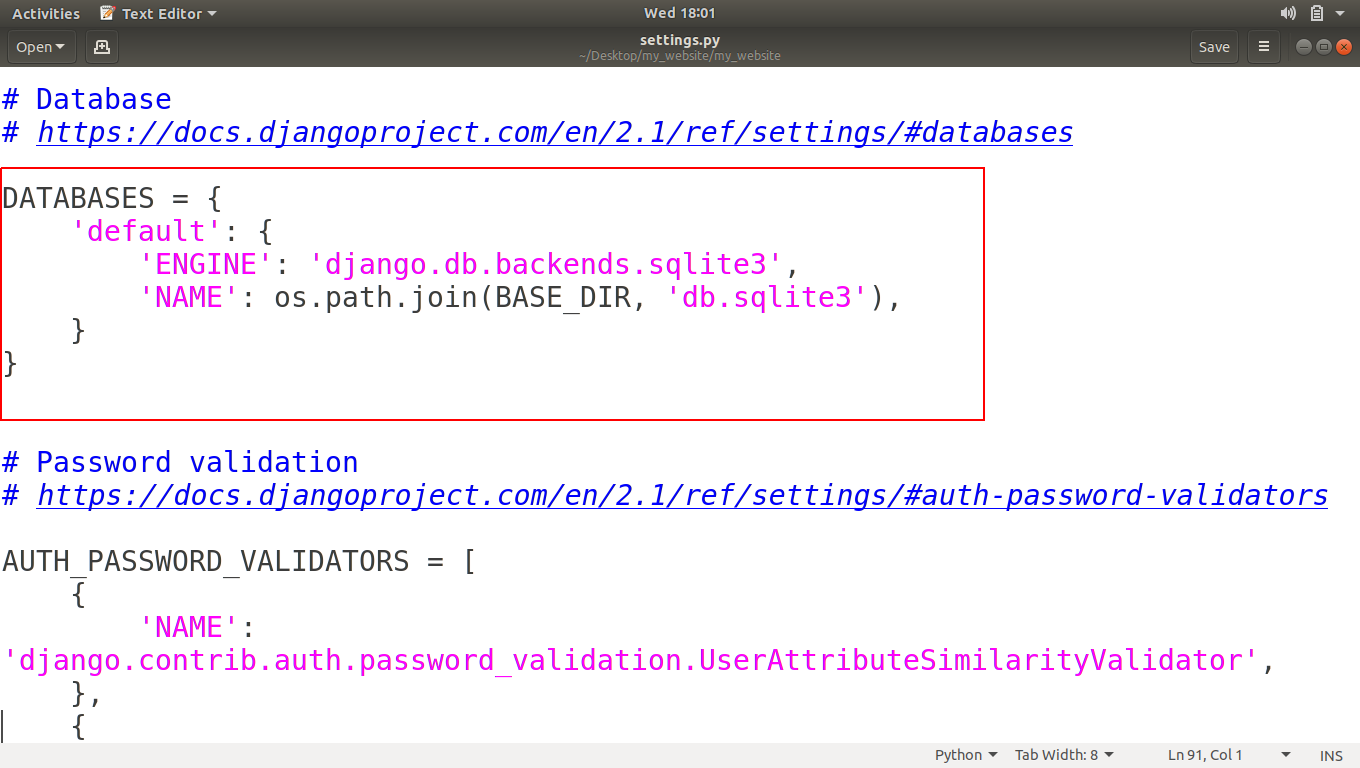
Next is DATABASES, This is the code that generated that file named as db.sqlite3 in our project directory. If we want to create another database file then we can also generate by editing this code.

Django Project Tour 9

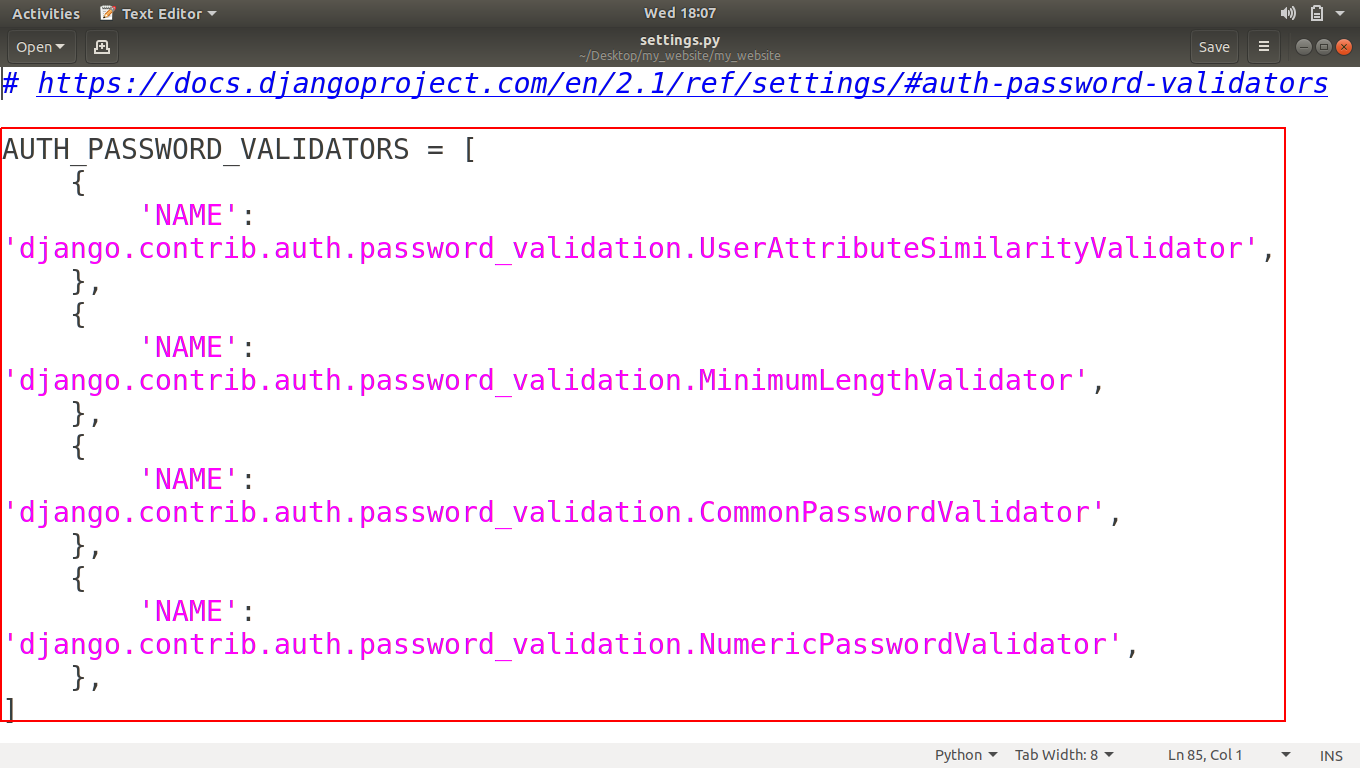
Next is AUTH_PASSWORD_VALIDATORS, This basically saying that whenever someone makes a new user account what sort of things do we want to require of to get their passwords we’ll see it later too.

Django Project Tour 10

Now other variables like LANGUAGE_CODE, TIME_ZONE are just there for making our website unique like what language code we want to use, by default it is US-English and what Time-zone we want to use.

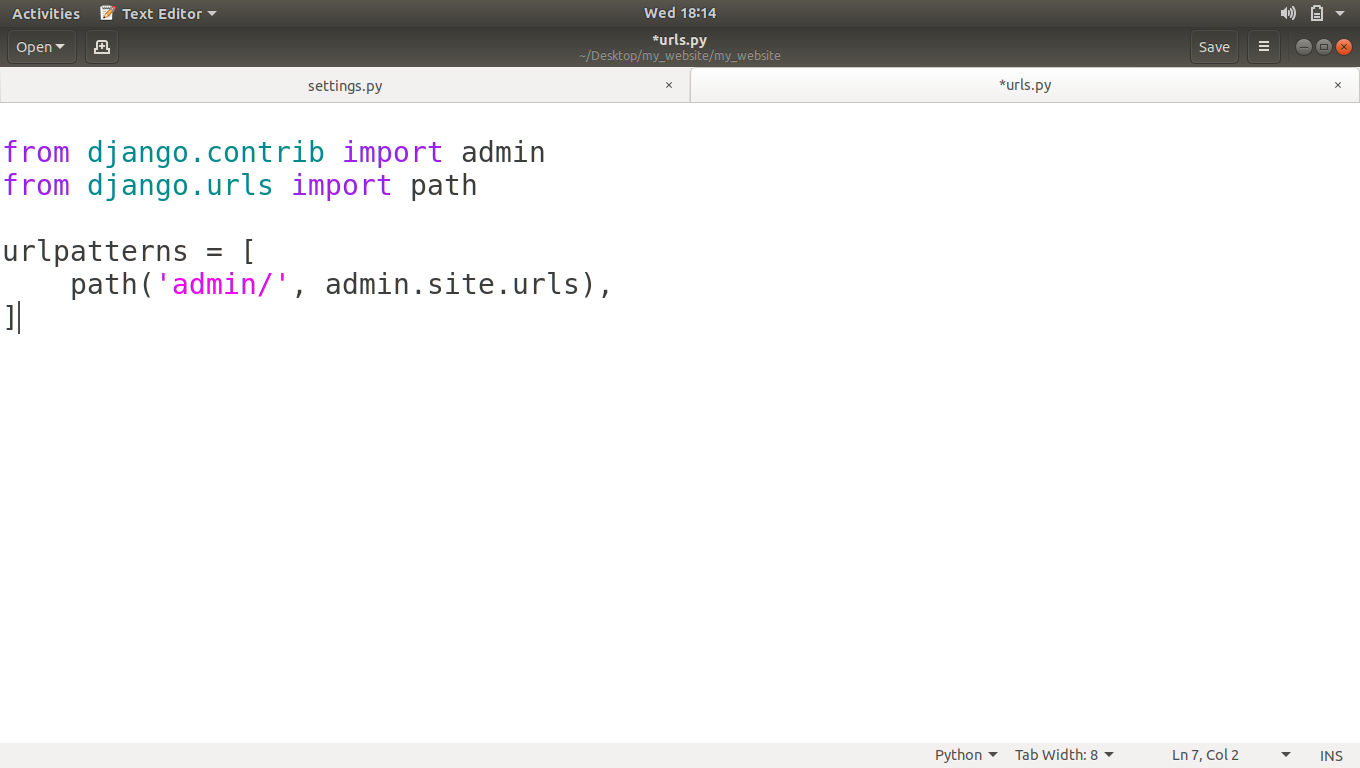
urls.py

Anytime someone visits our website that is s connected to our django project. It’s going to come into this file and this file decides where the user’s requests should go next and what HTML is to sent back to user.

Django Project Tour 11

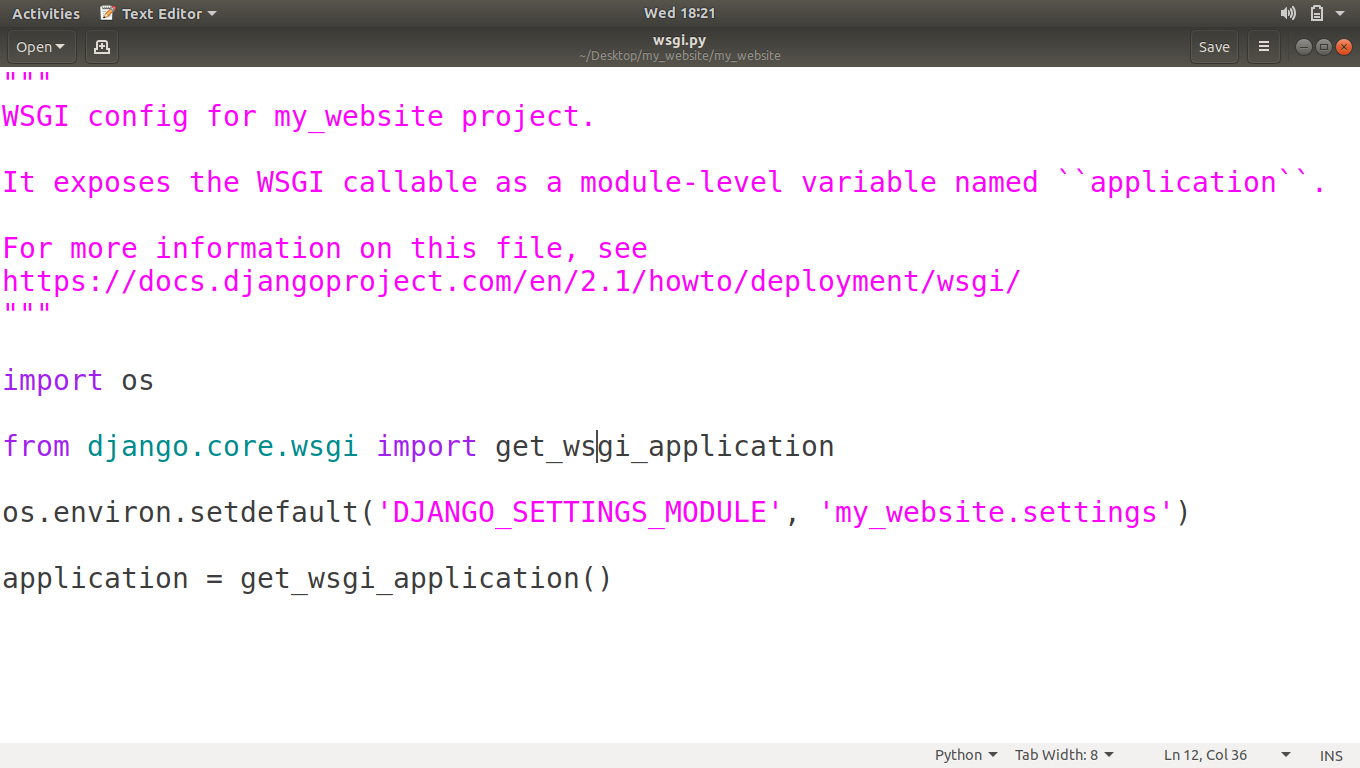
wsgi.py

This file is for hosting our website so other people can access it, we’ll see this file when we upload our project to a server.

Django Project Tour 12

So I hope you have understood that what the files inside our project folder are and what are the uses of those files.

If you have any confusion related to this tutorial, then please let us know in comments.

The post Django Project Tour appeared first on The Crazy Programmer.

from The Crazy Programmer https://www.thecrazyprogrammer.com/2018/09/django-project-tour.html

Azure DevOps Continuous Build/Deploy/Test with ASP.NET Core 2.2 Preview in One Hour

Hanselminutes WebsiteI’ve been doing Continuous Integration and Deployment for well over 13 years. We used a lot of custom scripts and a lovely tool called CruiseControl.NET to check out, build, test, and deploy our code.

However, it’s easy to get lulled into complacency. To get lazy. I don’t set up Automated Continuous Integration and Deployment for all my little projects. But I should.

I was manually deploying a change to my podcast website this evening via a git deploy to Azure App Service. Pushing to Azure this way via Git uses “Kudu” to actually build the site. However, earlier this week I was also trying to update my site to .NET Core 2.2 which is in preview. Plus I have Unit Tests that aren’t getting run during deploy.

So look at it this way. My simple little podcast website with a few tests and the desire to use a preview .NET Core SDK means I’ve outgrown a basic “git push to prod” for deploy.

I remembered that Azure DevOps (formerly VSTS) is out and offers free unlimited minutes for open source projects. I have no excuse for my sloppy builds and manual deploys. It also has unlimited free private repos, although I’m happy at GitHub and have no reason to move.

It usually takes me 5-10 minutes for a manual build/test/deploy, so I gave myself an hour to see if I could get this same process automated in Azure DevOps. I’ve never used this before and I wanted to see if I could do it quickly, and if it was intuitive.

Let’s review my goals.

  • My source is in GitHub
  • Build my ASP.NET Core 2.2 Web Site
    • I want to build with .NET Core 2.2 which is currently in Preview.
  • Run my xUnit Unit Tests
    • I have some Selenium Unit Tests that can’t run in the cloud (at least, I haven’t figured it out yet) so I need them skipped.
  • Deploy the resulting site to product in my Azure App Service

Cool. So I make a project and point Azure DevOps at my GitHub.

Azure DevOps: Source code in GitHub

They have a number of starter templates, so I was pleasantly surprised I didn’t need manually build my Build Configuration myself. I’ll pick ASP.NET app. I could pick Azure Web App for ASP.NET but I wanted a little more control.

Select a template

Now I’ve got a basic build pipeline. You can see it will use NuGet, get the packages, build the app, test the assemblies (if there are tests…more on that later) and the publish (zip) the build artifacts.

Build Pipeline

I then clicked Save & Queue…and it failed. Why? It says that I’m targeting .NET Core 2.2 and it doesn’t support anything over 2.1. Shoot.

Agent says it doesn't support .NET Core 2.2

Fortunately there’s a pipeline element that I can add called “.NET Core Tool Installer” that will get specific versions of the .NET Core SDK.

NOTE: I’ve emailed the team that “.NET Tool Installer” is the wrong name. A .NET Tool is a totally different thing. This task should be called the “.NET Core SDK Installer.” Because it wasn’t, it took me a minute to find it and figure out what it does.

I’m using the SDK Agent version 2.22.2.100-preview2-009404 so I put that string into the properties.

Install the .NET Core SDK custom version

At this point it builds, but I get a test error.

There’s two problems with the tests. When I look at the logs I can see that the “testadapter.dll” that comes with xunit is mistakenly being pulled into the test runner! Why? Because the “Test Files” spec includes a VERY greedy glob in the form of **\*test*.dll. Perhaps testadapter shouldn’t include the word test, but then it wouldn’t be well-named.

**\$(BuildConfiguration)\**\*test*.dll

!**\obj\**

My test DLLs are all named with “tests” in the filename so I’ll change the glob to “**\$(BuildConfiguration)\**\*tests*.dll” to cast a less-wide net.

Screenshot (45)

I have four Selenium Tests for my ASP.NET Core site but I don’t want them to run when the tests are run in a Docker Container or, in this case, in the Cloud. (Until I figure out how)

I use SkippableFacts from XUnit and do this:

public static class AreWe

{
public static bool InDockerOrBuildServer {
get {
string retVal = Environment.GetEnvironmentVariable("DOTNET_RUNNING_IN_CONTAINER");
string retVal2 = Environment.GetEnvironmentVariable("AGENT_NAME");
return (
(String.Compare(retVal, Boolean.TrueString, ignoreCase: true) == 0)
||
(String.IsNullOrWhiteSpace(retVal2) == false));
}
}
}

Don’t tease me. I like it. Now I can skip tests that I don’t want running.

if (AreWe.InDockerOrBuildServer) return;

Now my tests run and I get a nice series of charts to show that fact.

22 tests, 4 skipped

I have it building and tests running.

I could add the Deployment Step to the Build but Azure DevOps Pipelines includes a better way. I make a Release Pipeline that is separate. It takes Artifacts as input and runs n number of Stages.

Creating a new Release Pipeline

I take the Artifact from the Build (the zipped up binaries) and pass them through the pipeline into the Azure App Service Deploy step.

Screenshot (49)

Here’s the deployment in progress.

Manually Triggered Release

Cool! Now that it works and deploys, I can turn on Continuous Integration Build Triggers (via an automatic GitHub webhook) as well as Continuous Deployment triggers.

Continuous Deployment

Azure DevOps even includes badges that I can add to my readme.md so I always know by looking at GitHub if my site builds AND if it has successfully deployed.

4 releases, the final one succeeded

Now I can see each release as it happens and if it’s successful or not.

Build Succeeded, Never Deployed

To top it all off, now that I have all this data and these pipelines, I even put together a nice little dashboard in about a minute to show Deployment Status and Test Trends.

My build and deployment dashboard

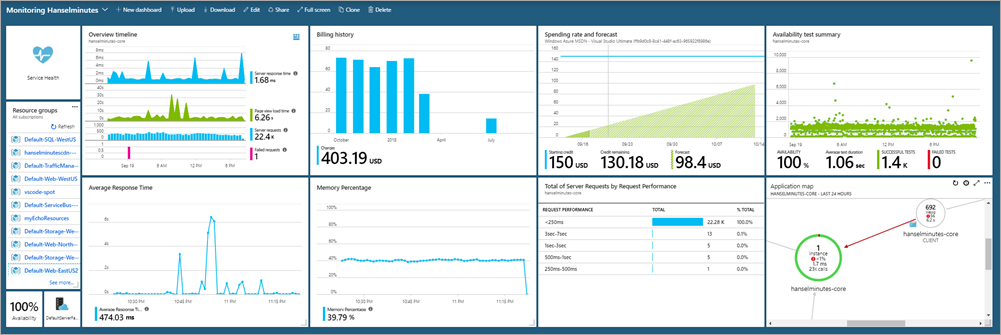
When I combine the DevOps Dashboard with my main Azure Dashboard I’m amazed at how much information I can get in so little effort. Consider that my podcast (my little business) is a one-person shop. And how I have a CI/CD pipeline with integrated testing gates that deploys worldwide. Many years ago this would have required a team and a lot of custom code.

Azure Dashboard

Today it took an hour. Awesome.


Sponsor: Copy: Rider 2018.2 is here! Publishing to IIS, Docker support in the debugger, built-in spell checking, MacBook Touch Bar support, full C# 7.3 support, advanced Unity support, and more.


© 2018 Scott Hanselman. All rights reserved.


from Scott Hanselman’s Blog http://feeds.hanselman.com/~/570548572/0/scotthanselman~Azure-DevOps-Continuous-BuildDeployTest-with-ASPNET-Core-Preview-in-One-Hour.aspx

A Guide to Effective Web Design for E-Commerce

As anyone who has ever bought anything on Amazon will know, there’s money to be had in ecommerce. In 2017 alone, global ecommerce sales amounted to over 2.3 trillion dollars, and that number is expected to more than double by 2021. It’s a giant pie, and one that everyone can have a piece of if they’re savvy enough and possess a certain know-how, and a certain eye. Like any physical, brick and mortar store, e-commerce websites have to be visually appealing and easy to navigate. They have to attract customers, keep them there, and make the process from item pick-up to checkout as swift and painless as possible. This requires intuitive and expert web design, specifically geared towards e-commerce stores, and below we’ll guide you through all the principles you need to be aware of.

How to Get the Most Out of Your eCommerce Experience

Make It Aesthetically Pleasing

According to a study conducted by Adobe, more than 66% of viewers would rather stay on a site that is aesthetically pleasing as opposed to one that isn’t. It’s a no-brainer; humans are generally attracted to the beautiful and ornate, and e-commerce is no different. While designing a website from scratch to achieve the ultimate aesthetic is certainly an option, for most people it’s simply too time consuming, especially with a multitude of other projects to juggle. And if aesthetics isn’t exactly your forte, there are web providers out there who can offer you premade templates for your online store to give you some inspiration. The best part is, you can usually customize these templates so suit your needs and preferences, so you don’t have to settle for a bland, cookie-cutter design.

Quality Images

If you’re selling a product or a service, words alone won’t cut it. Every e-commerce website worth its salt relies on high quality, professional images that adequately convey to the consumer either the specific details of the product they’re buying or give them a sense of the emotional value they will get from the product. This is crucial. The better the image, the higher the likelihood that the consumer is going to put that item into their basket.

Easy to Navigate

The user experience of every website is of the utmost importance. Shopping online should be as easy as possible. No one wants to navigate a labyrinth just to buy a pair of socks online. Items and products should be displayed simply and divided into easy-to-understand categories and the journey from home page to a specific item should be no more than a couple of clicks. As was mentioned earlier in this article, the process of getting item from cart to checkout should be extremely fast and easy. Nothing will scare a potential customer away faster than a site full of glitches and a hard-to-follow sales process. This means having effective search bars, easy-to-read menus, favoring simple and digestible text over complex explanations, and ensuring that your website loads as fast as possible.

Impeccable Customer Service

If someone has a problem, it should be as easy as possible for them to find help. Having a clear “contact” or “help” section is imperative in this regard. Customers should have detailed information – including email addresses and telephone numbers – about who they can get in touch with. Another option is to include a chat section on the site which allows customers to either get in touch with support staff or a chat bot which can answer basic questions, in real time.

The post A Guide to Effective Web Design for E-Commerce appeared first on The Crazy Programmer.

from The Crazy Programmer https://www.thecrazyprogrammer.com/2018/09/a-guide-to-effective-web-design-for-e-commerce.html

A complete containerized .NET Core Application microservice that is as small as possible

OK, maybe not technically a microservice, but that’s a hot buzzword these days, right? A few weeks ago I blogged about Improvements on ASP.NET Core deployments on Zeit’s now.sh and making small container images. By the end I was able to cut my container size in half.

The trimming I was using is experimental and very aggressive. If you app loads things at runtime – like ASP.NET Razor Pages sometimes does – you may end up getting weird errors at runtime when a Type is missing. Some types may have been trimmed away!

For example:

fail: Microsoft.AspNetCore.Server.Kestrel[13]

Connection id "0HLGQ1DIEF1KV", Request id "0HLGQ1DIEF1KV:00000001": An unhandled exception was thrown by the application.
System.TypeLoadException: Could not load type 'Microsoft.AspNetCore.Diagnostics.IExceptionHandlerPathFeature' from assembly 'Microsoft.Extensions.Primitives, Version=2.1.1.0, Culture=neutral, PublicKeyToken=adb9793829ddae60'.
at Microsoft.AspNetCore.Diagnostics.ExceptionHandlerMiddleware.Invoke(HttpContext context)
at System.Runtime.CompilerServices.AsyncMethodBuilderCore.Start[TStateMachine](TStateMachine& stateMachine)
at Microsoft.AspNetCore.Diagnostics.ExceptionHandlerMiddleware.Invoke(HttpContext context)
at Microsoft.AspNetCore.HostFiltering.HostFilteringMiddleware.Invoke(HttpContext context)
at Microsoft.AspNetCore.Hosting.Internal.HostingApplication.ProcessRequestAsync(Context context)
at Microsoft.AspNetCore.Server.Kestrel.Core.Internal.Http.HttpProtocol.ProcessRequests[TContext](IHttpApplication`1 application)

Yikes!

I’m doing a self-Contained deployment and then trim the result! Richard Lander has a great dockerfile example. Note how he’s doing the package addition with the dotnet CLI with “dotnet add package” and subsequent trim within the Dockerfile (as opposed to you adding it to your local development copy’s csproj).

I’m adding the Tree Trimming Linker in the Dockerfile, so the trimming happens when the container image is built. I’m using the dotnet command to “dotnet add package ILLink.Tasks. This means I don’t need to reference the linker package at development time – it’s all at container build time.

FROM microsoft/dotnet:2.1-sdk-alpine AS build

WORKDIR /app

# copy csproj and restore as distinct layers
COPY *.sln .
COPY nuget.config .
COPY superzeit/*.csproj ./superzeit/
RUN dotnet restore

# copy everything else and build app
COPY . .
WORKDIR /app/superzeit
RUN dotnet build

FROM build AS publish
WORKDIR /app/superzeit
# add IL Linker package
RUN dotnet add package ILLink.Tasks -v 0.1.5-preview-1841731 -s https://dotnet.myget.org/F/dotnet-core/api/v3/index.json
RUN dotnet publish -c Release -o out -r linux-musl-x64 /p:ShowLinkerSizeComparison=true

FROM microsoft/dotnet:2.1-runtime-deps-alpine AS runtime
ENV DOTNET_USE_POLLING_FILE_WATCHER=true
WORKDIR /app
COPY --from=publish /app/superzeit/out ./
ENTRYPOINT ["dotnet", "superzeit.dll"]

I did end up hitting this bug in the Linker (it’s not Released) but there’s an easy workaround. I just need to set the property CrossGenDuringPublish to false in the project file.

If you look at the Advanced Instructions for the Linker you can see that you can “root” types or assemblies. Root means “don’t mess with these or stuff that hangs off them.” So I just need to exercise my app at runtime and make sure that all the types that my app needs are available, but no unnecessary ones.

I added the Assemblies I wanted to keep (not remove) while trimming/linking to my project file:

<Project Sdk="Microsoft.NET.Sdk.Web">


<PropertyGroup>
<TargetFramework>netcoreapp2.1</TargetFramework>
<CrossGenDuringPublish>false</CrossGenDuringPublish>
</PropertyGroup>

<ItemGroup>
<LinkerRootAssemblies Include="Microsoft.AspNetCore.Mvc.Razor.Extensions;Microsoft.Extensions.FileProviders.Composite;Microsoft.Extensions.Primitives;Microsoft.AspNetCore.Diagnostics.Abstractions" />
</ItemGroup>

<ItemGroup>
<!-- this can be here, or can be done all at runtime in the Dockerfile -->
<!-- <PackageReference Include="ILLink.Tasks" Version="0.1.5-preview-1841731" /> -->
<PackageReference Include="Microsoft.AspNetCore.App" />
</ItemGroup>

</Project>

My strategy for figuring out which assemblies to “root” and exclude from trimming was literally to just iterate. Build, trim, test, add an assembly by reading the error message, and repeat.

This sample ASP.NET Core app will deploy cleanly on Zeit with the smallest image footprint as possible. https://github.com/shanselman/superzeit

Next I’ll try an actual Microservice (as opposed to a complete website, which is what this is) and see how small I can get that. Such fun!

UPDATE: This technique works with “dotnet new webapi” as well and is about 73 megs per “docker images” and it’s 34 megs when sent and squished through Zeit’s “now” CLI.

Small services!

Sponsor: Rider 2018.2 is here! Publishing to IIS, Docker support in the debugger, built-in spell checking, MacBook Touch Bar support, full C# 7.3 support, advanced Unity support, and more.


© 2018 Scott Hanselman. All rights reserved.


from Scott Hanselman’s Blog http://feeds.hanselman.com/~/569628958/0/scotthanselman~A-complete-containerized-NET-Core-Application-microservice-that-is-as-small-as-possible.aspx

Design a site like this with WordPress.com
Get started