Programming Language Techs: Which One Should You Use to Develop Your Business Website?

It is now easy for every business to have a website thanks to rapid advancements in web technologies. For a successful website strategy, you need to lay the right foundation which will be perfected by continuous maintenance and upkeep.

Unlike personal and informational websites, an e-commerce website requires more attention, skill and experience for it to be highly functional and visually attractive. This is why the way that you handle your website development process may have far-reaching consequences in terms of finances, personnel and public relations.

A poorly planned website that is developed hastily ends up being an orphan site that attracts no attention and completely lacks resources.

Defining and planning a business website starts with choosing the programming language that you are going to use. This is important because every language has its specific strengths and weaknesses and the best one to use highly depends on your project requirements. While your developer should help you decide on which programming language to use, it is necessary to have an idea of just what some of the commonly used languages have to offer.

Programming Language Techs Which One Should You Use to Develop Your Business Website

Java

This is a general-purpose programming language that has continued to gain popularity with many software developers, especially for client-server applications. Its latest version Java 10 was released on March 2018 with the promise of robust tools and high versatility.

It is object-oriented and class-based programming language with an easy, fast and efficient IDE. Its power is in debugging, and this is very crucial in helping programmers spend more time writing the code than debugging.

PHP

Created in 1994, PHP is a representative of the older web development generation that has stood the test of time. PHP has a deep code base and the most popular platforms for building websites like WordPress, Joomla and Drupal are written in it.

With open source platforms and plugins, everything is a template, and you only need your programmable logistical power to write your code in seconds. It is highly scalable, functional, object-oriented and makes debugging easy thanks to Monolog which is the standard logging library for PHP.

JavaScript

JavaScript is very great for building interactive e-commerce websites that work on almost all web browsers. It is known to be the language of modern browsers which allows websites to launch super-fast and takes the end-user experience to a whole new level.

Its array of libraries and modules are feature packed with capabilities for both back-end and front-end development. It is popular thanks to its dynamic nature and the ability to work well with CSS and HTML.

Python

Described by developers as the web framework for perfectionists with deadlines, this programming language is easy to read and simple to understand. With this, ideas are expressed with just simple lines of code, and it is compatible to host many systems with minimal restrictions. Its code is highly readable, and you can build tailor-made applications within a short time using its Django Framework.

CSS

If you want to get a visually attractive webpage for your e-commerce website, then CSS is the language to use. Its style sheet language separates presentation and formatting from content which not only improves content accessibility but also leads to lighter page loads and high performance.

A good e-commerce website should have fast load times, be easy to use, offer excellent end user experience, and have clear policies and accurate product descriptions. Each programming language has its own unique words that it understands as well as syntax that it uses to organize program instructions. While no single language can offer you everything, it is important to choose one that will fulfill the most of your business requirements.

The post Programming Language Techs: Which One Should You Use to Develop Your Business Website? appeared first on The Crazy Programmer.

from The Crazy Programmer https://www.thecrazyprogrammer.com/2018/11/programming-language-techs-which-one-should-you-use-to-develop-your-business-website.html
Updating my ASP.NET Website from .NET 2.2 Core Preview 2 to .NET 2.2 Core Preview 3

I’ve recently returned from a month in South Africa and I was looking to unwind while the jetlagged kids sleep. I noticed that .NET Core 2.2 Preview 3 came out while I wasn’t paying attention. My podcast site runs on .NET Core 2.2 Preview 2 so I thought it’d be interesting to update the site. That means I’d need to install the new SDK, update the project references, ensure it builds in Azure DevOps‘s CI/CD Pipeline, AND deploys and runs in Azure.

Let’s see how it goes. I’m a little out of it but I’m writing this blog post AS I DO THE WORK so you’ll see my train of thought with no editing.

Ok, what version of .NET Core does this machine have?

C:\Users\scott> dotnet --version

2.2.100-preview2-009404
C:\Users\scott> dotnet tool update --global dotnet-outdated
Tool 'dotnet-outdated' was successfully updated from version '2.0.0' to version '2.1.0'.

Looks like I’m on Preview 2 as I guessed. I’ll take a moment and upgrade one Global Tool I love – dotnet-outdated – in case it’s been updated since I’ve been out. Looks like it has a minor update. Dotnet Outdated is a great utility for checking references and you should absolutely be using it or another tool like NuKeeper or Dependabot.

I’ll head over to https://www.microsoft.com/net/download/dotnet-core/2.2 and get .NET Core 2.2 Preview 3. I’m building on Windows but I may want to update my Linux (WSL) install and Docker images later.

All right, installed. Check it with dotnet –version to confirm it’s correct:

C:\Users\scott> dotnet --version

2.2.100-preview3-009430

Let’s try to build my podcast website. Note that it consists of two projects, the main website on ASP.NET Core, and Unit Tests with XUnit and Selenium.

D:\github\hanselminutes-core [main ≡]> dotnet build

Microsoft (R) Build Engine version 15.9.8-preview+g0a5001fc4d for .NET Core
Copyright (C) Microsoft Corporation. All rights reserved.

Restoring packages for D:\github\hanselminutes-core\hanselminutes.core.tests\hanselminutes.core.tests.csproj...
Restore completed in 80.05 ms for D:\github\hanselminutes-core\hanselminutes.core.tests\hanselminutes.core.tests.csproj.
Restore completed in 25.4 ms for D:\github\hanselminutes-core\hanselminutes.core\hanselminutes-core.csproj.
D:\github\hanselminutes-core\hanselminutes.core.tests\hanselminutes.core.tests.csproj : error NU1605: Detected package downgrade: Microsoft.AspNetCore.App from 2.2.0-preview3-35497 to 2.2.0-preview2-35157. Reference the package directly from the project to select a different version. [D:\github\hanselminutes-core\hanselminutes-core.sln]

The dotnet build fails, which make sense, because it’s saying hey, you’re asking for 2.2 Preview 2 but I’ve got Preview 3 all ready for you!

Detected package downgrade: Microsoft.AspNetCore.App from 2.2.0-preview3-35497 to 2.2.0-preview2-35157

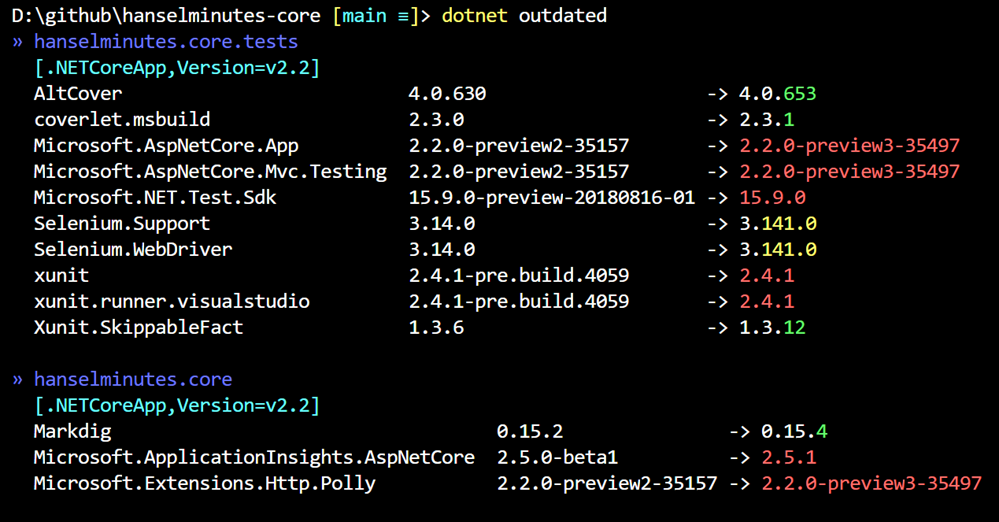
Let’s see what “dotnet outdated” says about this!

dotnet outdated says there's a few packages I need to update

Cool! I love these dependency tools and the community around them. You can see that it’s noticed the Preview 2 -> Preview 3 opportunity, as well as a few other smaller minor or patch version bumps.

I can run dotnet outdated -u to automatically update the references, but I’ll want to treat the “reference” of “Microsoft.AspNetCore.App” a little differently and use implicit versioning. You don’t want to include a specific version – as I did – for this package.

Per the docs for .NET Core 2.1 and up:

Remove the “Version” attribute on the package reference to Microsoft.AspNetCore.App. Projects which use <Project Sdk="Microsoft.NET.Sdk.Web"> do not need to set the version. The version will be implied by the target framework and selected to best match the way ASP.NET Core 2.1 works. (See below for more information.)

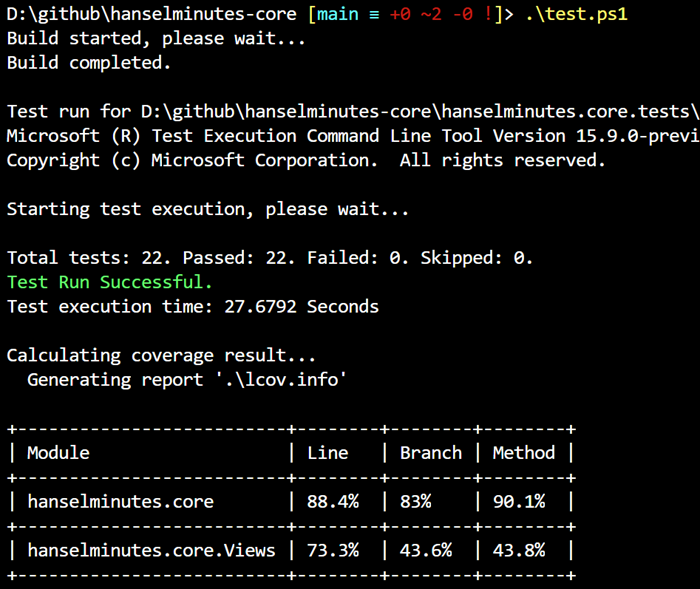
Doing this also fixes the build because it picks up the latest 2.2 SDK automatically! Now I’ll run my Unit Tests (with code coverage) and see how it works. Cool all tests pass (including Selenium).

88% Code Coverage

It builds locally, will it build in Azure DevOps when I check it in to GitHub?

Azure DevOps

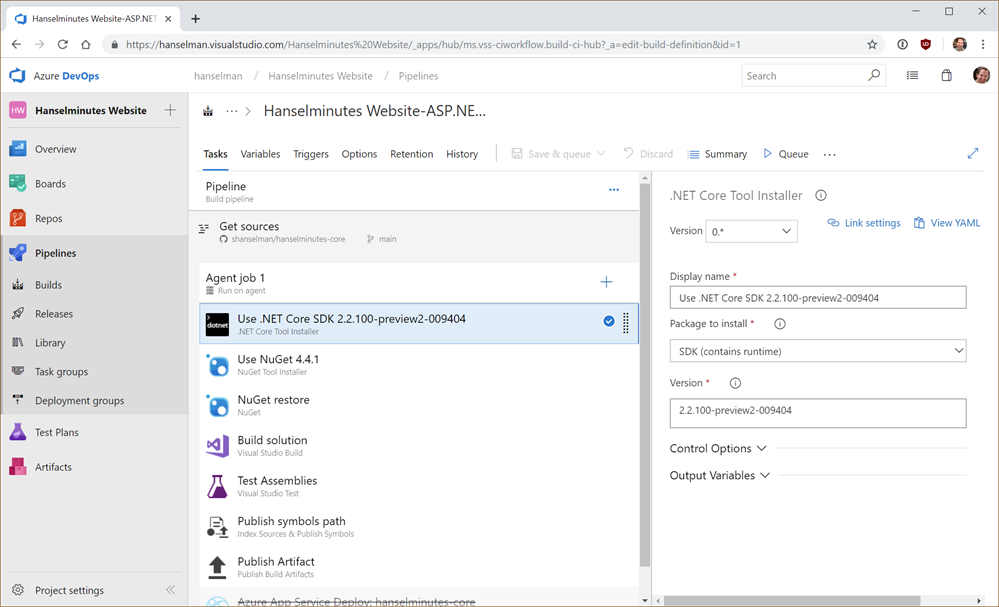
I added a .NET Core SDK installer step when I set up my Azure Dev Ops Pipeline. This is where I’m explicitly installing a Preview version of the .NET Core SDK.

While I’m in here I noticed the Azure DevOps pipeline was using NuGet 4.4.1. I run “nuget update -self” on my local machine and got 4.7.1, so I updated that version as well to make the CI/CD pipeline reflect my own machine.

Now I’ll git add, git commit (using verified/signed GitHub commits with my PGP Key and Yubikey):

D:\github\hanselminutes-core [main ≡ +0 ~2 -0 !]> git add .

D:\github\hanselminutes-core [main ≡ +0 ~2 -0 ~]> git commit -m "bump to 2.2 Preview 3"
[main 7a84bc7] bump to 2.2 Preview 3
2 files changed, 16 insertions(+), 13 deletions(-)

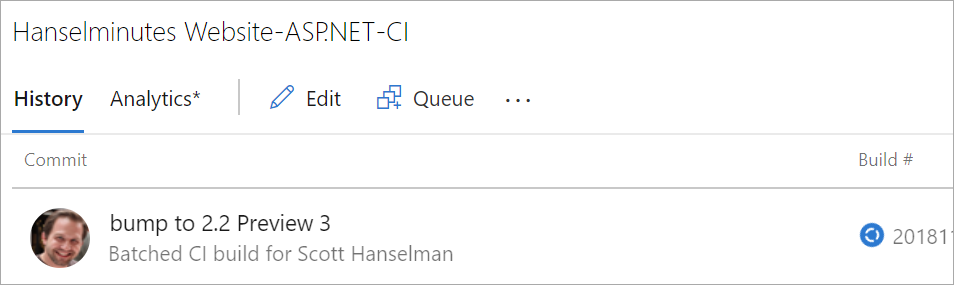
Add in a Git Push…and I can see the build start in Azure DevOps:

CI/CD pipeline build starting

Cool. While that’s building, I’ll make sure my existing Azure App Service (website) installation is ready to receive the deployment (assuming the build succeeds). Since I’m using an ASP.NET Core Preview build I’ll want to make sure I have the Preview Site Extension installed, per the docs.

If I visit the Site Extensions menu item in the Azure Portal I can see I’ve got .NET Core 2.2 Preview 2, but there’s an update available, as expected.

Update Available

I’ll click this extension and then click Update. This extension’s job is to make sure the App Service gets Preview versions of the .NET Core SDK. Only released (GA – general availability) SDKs are installed by default.

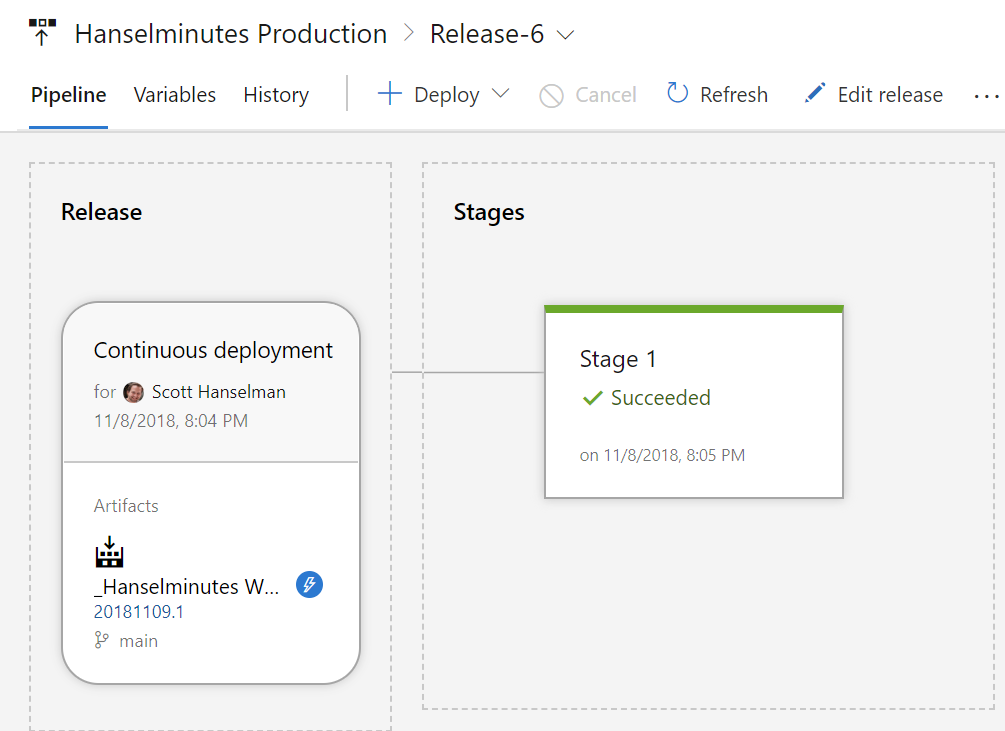
OK, .NET Core 2.2 is all updated in Azure, so I’ll confirm that it’s deployed as well in Azure DevOps. Yes, I’m deploying into Production without a net. Seriously, though, if there is an issue I’ll just rollback. If I was deeply serious about downtime I’d be doing all this in Staging.

image

Successful local test, successful CI/SD build and test, successful deployment, and the site is back up now running on ASP.NET Core 2.2 Preview 3. It took about 45 min to do the work while simultaneously taking these screenshots and writing this blog post during the slow parts.

Good night everyone!


Sponsor: Check out the latest JetBrains Rider with built-in spell checking, enhanced debugger, Docker support, full C# 7.3 support, publishing to IIS and more advanced Unity support.


© 2018 Scott Hanselman. All rights reserved.


from Scott Hanselman’s Blog http://feeds.hanselman.com/~/579240328/0/scotthanselman~Updating-my-ASPNET-Website-from-NET-Core-Preview-to-NET-Core-Preview.aspx

How to Add HTML Template in Django

In last tutorial we have seen, how we can return a HTML code through a string from views.py. It is not a good idea to pass whole HTML code through a string because if we have to design a complete webpage in HTML then we shouldn’t pass the whole code through the HttpResponse function because it will reduce the readibility of our code. So instead of passing the whole code through the HttpResponse function, we’ll create a separate HTML file.

In this tutorial we’ll see how we can add a seperate Template (HTML) in django project.

A Template is not only a way for you to separate the HTML from these Python (views.py) but it also gives you the option to plugin some Django code inside those templates so those are not just some simple HTML files, that’s why they have the name Templates. We’ll learn a alot of about Templates in upcoming Django articles.

Create Separate HTML File for Front End (Template)

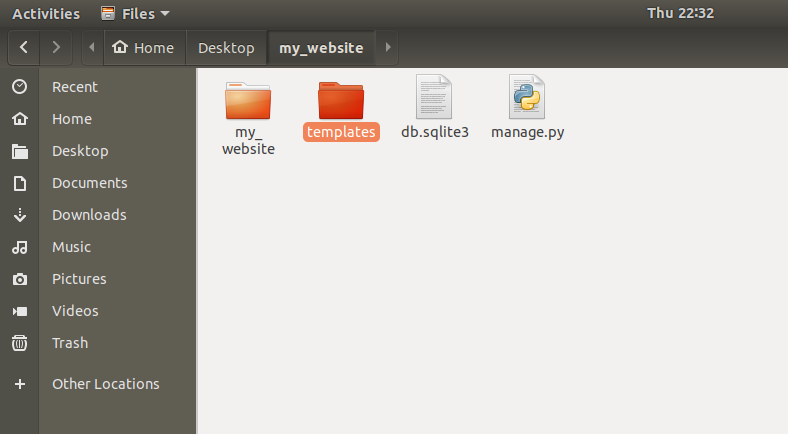
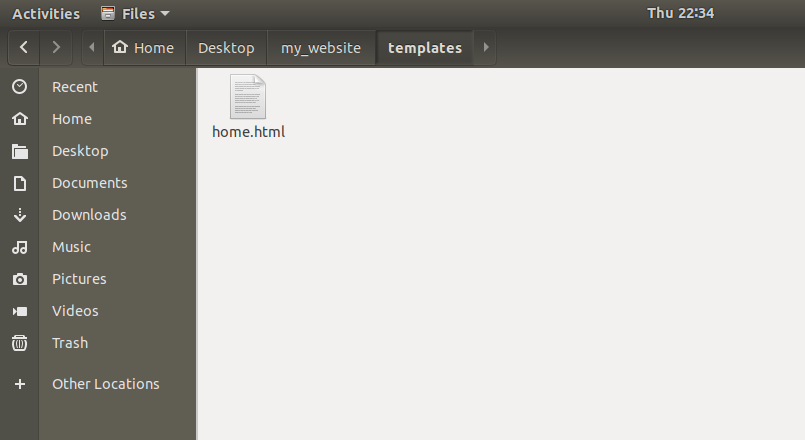
In our project we need to create a folder that will hold our templates. So go to the top most level of our project where our manage.py file exists, create a folder named as templates. It will be like this:

How to Add HTML Template in Django 1

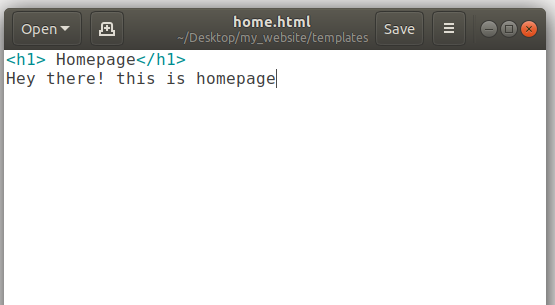
Now inside that templates folder let’s add our first HTML file. Let’s say we are going to make this file as homepage then just call it as home.html

How to Add HTML Template in Django 2

How to Add HTML Template in Django 3

So now our task is that when someone is requesting the homepage then how we can send them to home.html.

In order to do this follow the steps given below.

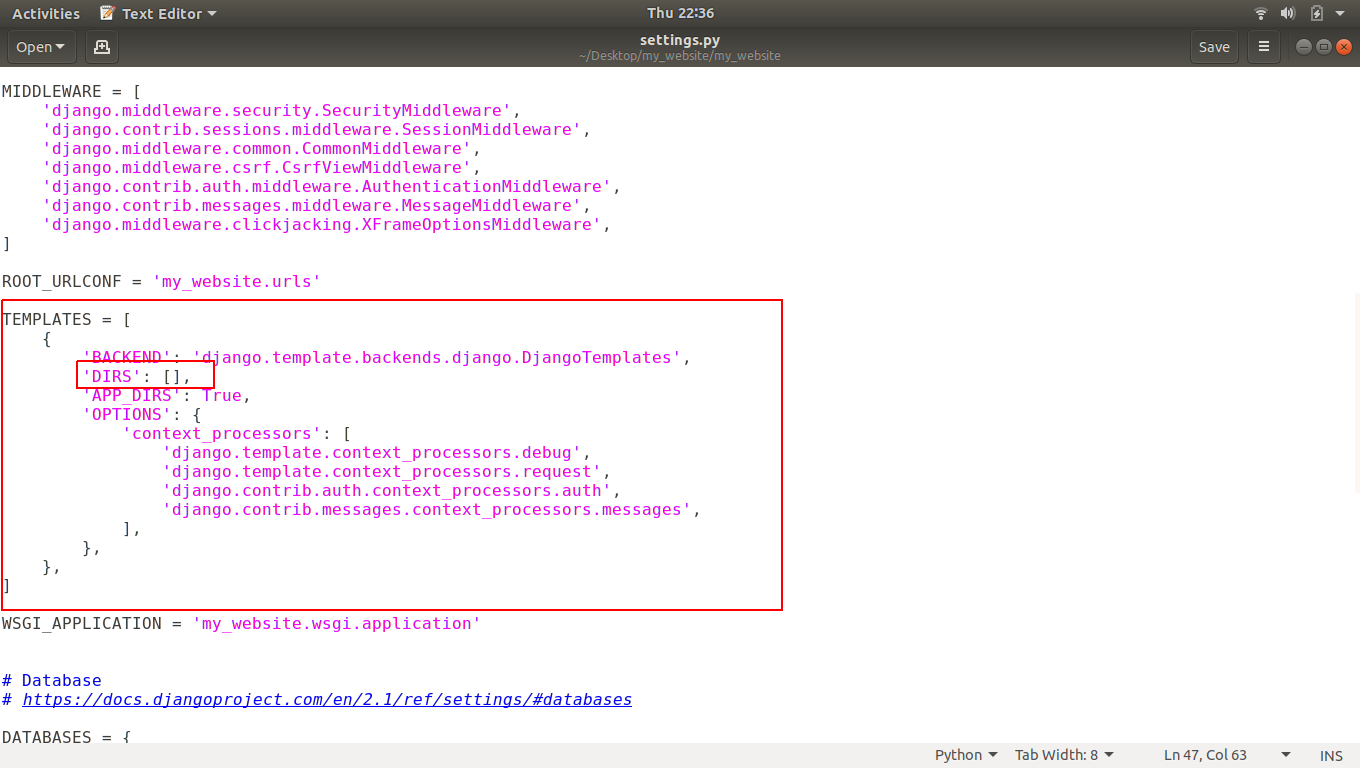
Step 1: First we’ve to modify settings.py to tell our server that we’ve added a new template. So open settings.py and go to a variable named as TEMPLATES. Inside we have DIRS. Now you can see square brackets infront of DIRS.

How to Add HTML Template in Django 4

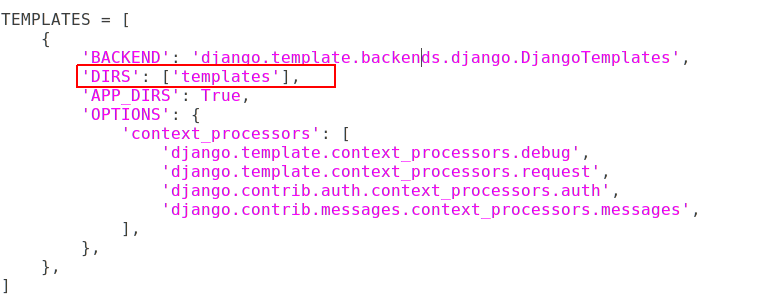
This little brackets is going to be a list of places where it should be looking for the templates. So let’s add the templates directory inside that brackets.

How to Add HTML Template in Django 5

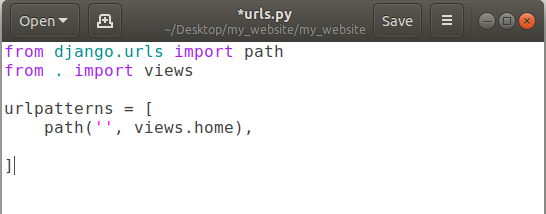
Step 2: As we know when someone is going to request your website, it will check into URLPATTERNS in urls.py file to check is there any path exists for requested URL or not? So we have to make a path for homepage.

How to Add HTML Template in Django 6How to Add HTML Template in Django 6

In above screenshot we’ve a set a path for homepage. If anyone requests our website then it will send that request to views.home function.

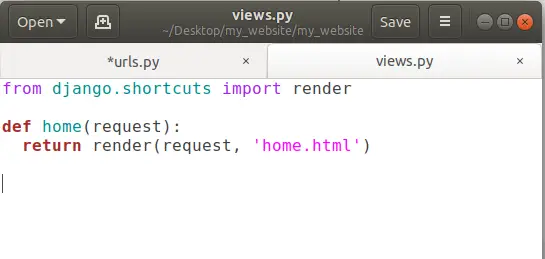
Step 3: As above step will send the request to views.home function so we should have a home function inside our views.py. We’ve already created it in our previous tutorial. If you doesn’t have views.py then please create it and add a home function into it like this:

How to Add HTML Template in Django 7

Now we have home function which is returning something.

To open that HTML file, we have to use render function and render function takes two parameters, first one is request object and second is the name of the HTML file to open. To use render function we have to import something that’s why we used:

from django.shortcuts import render

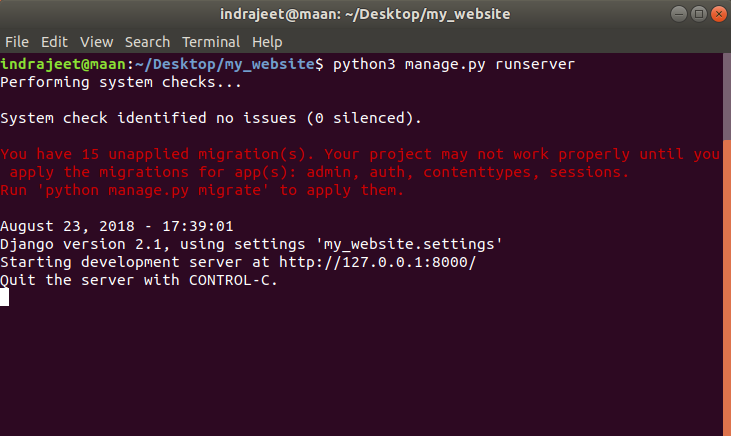
Now we’re all set to go and run our project. To do that we have to run the server first. So open terminal or command prompt and go to the root of your project directory and run this command.

python3 manage.py runserver 

(for who have both python 2 and python 3 installed in their system like Ubuntu 18.04)

or

python manage.py runserver

How to Add HTML Template in Django 8

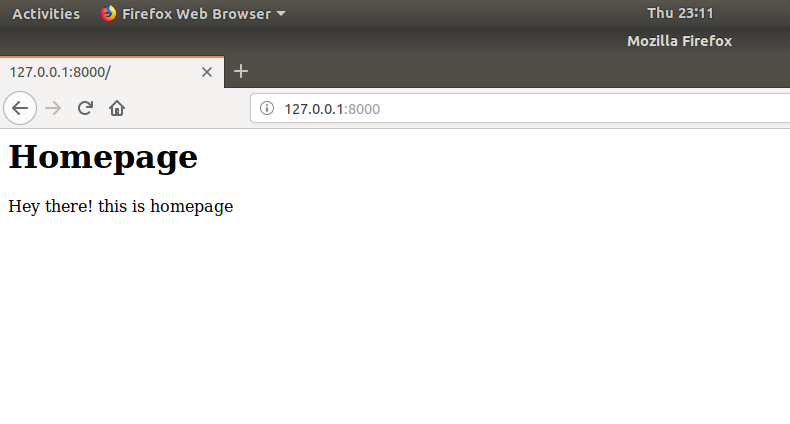
Now open our website using following link in the above image.

How to Add HTML Template in Django 9

Finally we have our HTML Template opened in browser.

As I mentioned earlier that this HTML file is not any regular HTML file, we can actually run some Python code inside this HTML.

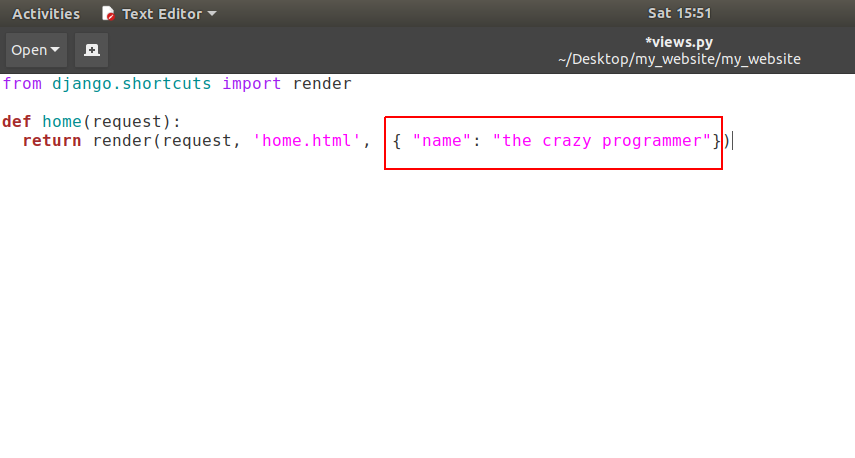
For example: Let’s say I want to send some special information from our views.py to home.html then we can pass a dictionary through the render function as show in image below.

How to Add HTML Template in Django 10

So we’re passing a dictionary here which have a key = name and a value associated with that key is  the crazy programmer.

 Now see how we can show this information in our HTML Template.

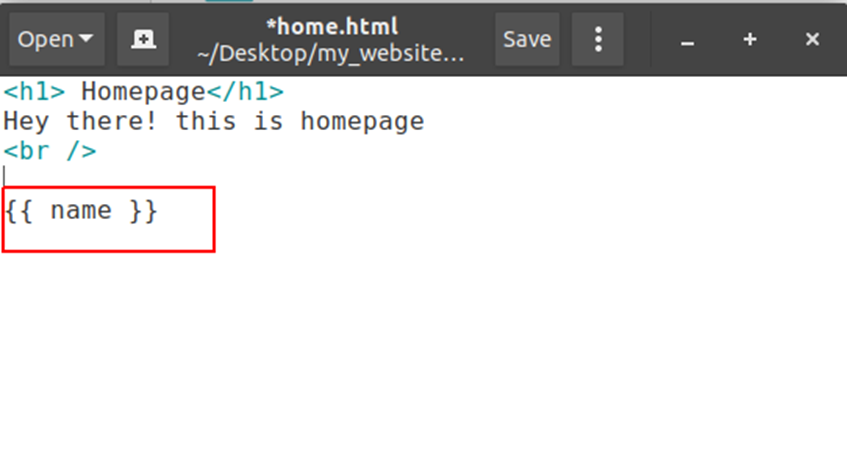
Open your home.html templateand edit it as shown in screenshot below:

How to Add HTML Template in Django 11

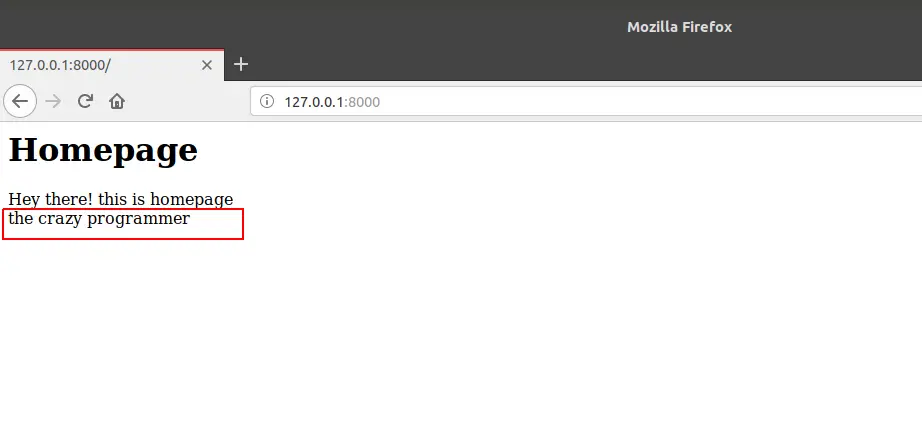
So here we are going to show our value assigned to that key name. If we pass any key inside two curly braces then it will give us the value of that key. So let’s run it in browser.

How to Add HTML Template in Django 12

Thats how we can pass some information from python function to the HTML template in django.

I am sure your queries like:

  1. How to create a custom HTML template page in django?
  2. How to pass information from Python function views to HTML template in django?

Have been solved.

If you’ve any query related to this tutorial then please let us know in comment box.

The post How to Add HTML Template in Django appeared first on The Crazy Programmer.

from The Crazy Programmer https://www.thecrazyprogrammer.com/2018/11/how-to-add-html-template-in-django.html

.NET Core and .NET Standard for IoT – The potential of the Meadow Kickstarter

I saw this Kickstarter today – Meadow: Full-stack .NET Standard IoT platform. It says that “It combines the best of all worlds; it has the power of RaspberryPi, the computing factor of an Arduino, and the manageability of a mobile app. And best part? It runs full .NET Standard on real IoT hardware.”

NOTE: I don’t have any relationship with the company/people behind this Kickstarter, but it seems interesting so I’m sharing it with you. As with all Kickstarters, it’s not a pre-order, it’s an investment that may not pan out, so always be prepared to lose your investment. I lost mine with the .NET “Agent” SmartWatch even though all signs pointed to success.

Meadow IoT KickstarterI’ve done IoT work on Raspberry Pis which is much easier lately with the emerging community support for ARM32, Raspberry Pis, and cool stuff happening on Windows 10 IoT. I’ve written on how easy it is to get running on Raspberry Pi. I was even able to get my own podcast website running on Raspberry Pi and in Docker.
This Meadow Kickstarter says it’s running on the Mono Runtime and will support the .NET Standard 2.0 API. That means that you likely already know how to program to it. Most libraries on NuGet are .NET Standard compliant so a ton of open source software should “Just Work” on any solution that supports .NET Standard.

One thing that seems interesting about Meadow is this sentence: “The power of Raspberry Pi in the computing factor of an Arduino, and the manageability of a mobile app.”

Raspberry Pis are full-on computers. Ardunios are small little (mostly) single-tasked devices. Microcomputer vs Microcontroller. It’s overkill to have Ubuntu on a computer just to turn on a device. You usually want IoT devices to have as small a surface area as possible.

Meadow says “Meadow has been designed to run on a variety of microcontrollers, and our first board is based on STMicroelectronics’ flagship STM32F7 MCU. The Meadow F7 Micro board is an embeddable module that’s based on Adafruit Feather form factor.” Remember, we are talking megs not gigs here. “We’ve paired the STM32F7 with 32MB of flash storage and 16MB of RAM, so you can run pretty much anything you can think of building.” This is just a 216MHz ARM board.

Be sure to scroll all the way down to the bottom of the page as they outline risks as well as what’s left to be done.

What do you think? While you are at it, check out (total coincidence) our sponsor this week is Intel IoT! They have some great developer kits.


Sponsor: Reduce time to market and simplify IOT development using developer kits built on Intel Atom®, Intel® Core™ and Intel® Xeon® processors and tools such as Intel® System Studio and Arduino Create*


© 2018 Scott Hanselman. All rights reserved.


from Scott Hanselman’s Blog http://feeds.hanselman.com/~/578236224/0/scotthanselman~NET-Core-and-NET-Standard-for-IoT-The-potential-of-the-Meadow-Kickstarter.aspx

Side by Side user scoped .NET Core installations on Linux with dotnet-install.sh

I can run .NET Core on Windows, Mac, or a dozen Linuxes. On my Ubuntu installation I can check what version I have installed and where it is like this:

$ dotnet --version
2.1.403
$ which dotnet
/usr/bin/dotnet

If we interrogate that dotnet file we see it’s a link to elsewhere:

$ ls -alogF /usr/bin/dotnet
lrwxrwxrwx 1 22 Sep 19 03:10 /usr/bin/dotnet -> ../share/dotnet/dotnet*

If we head over there we see similar stuff as we do on Windows.

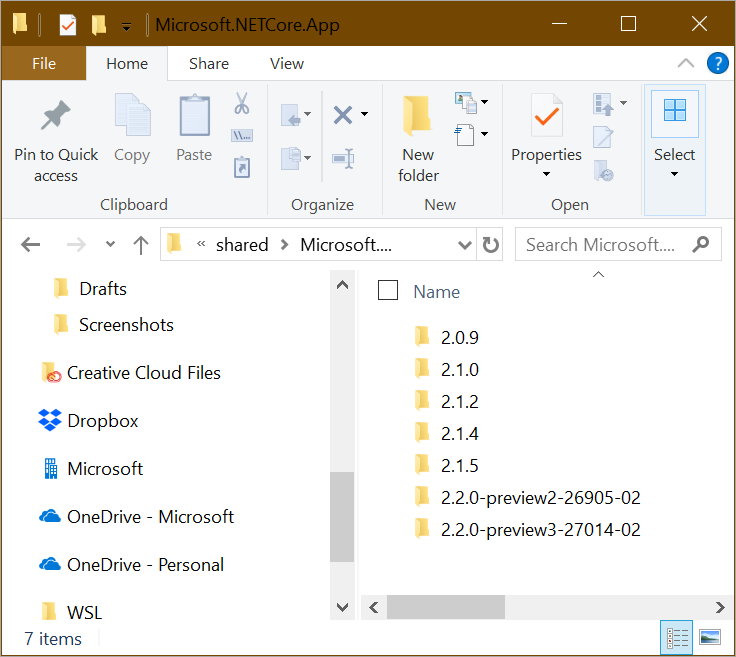
Side by side DotNet installs

Basically c:\program files\dotnet is the same as /share/dotnet.

$ cd ../share/dotnet
$ ll
total 136
drwxr-xr-x 1 root root   4096 Oct  5 19:47 ./
drwxr-xr-x 1 root root   4096 Aug  1 17:44 ../
drwxr-xr-x 1 root root   4096 Feb 13  2018 additionalDeps/
-rwxr-xr-x 1 root root 105704 Sep 19 03:10 dotnet*
drwxr-xr-x 1 root root   4096 Feb 13  2018 host/
-rw-r--r-- 1 root root   1083 Sep 19 03:10 LICENSE.txt
drwxr-xr-x 1 root root   4096 Oct  5 19:48 sdk/
drwxr-xr-x 1 root root   4096 Aug  1 18:07 shared/
drwxr-xr-x 1 root root   4096 Feb 13  2018 store/
-rw-r--r-- 1 root root  27700 Sep 19 03:10 ThirdPartyNotices.txt
$ ls sdk
2.1.4  2.1.403  NuGetFallbackFolder
$ ls shared
Microsoft.AspNetCore.All  Microsoft.AspNetCore.App  Microsoft.NETCore.App
$ ls shared/Microsoft.NETCore.App/
2.0.5  2.1.5

Looking in directories works to figure out what SDKs and Runtime versions are installed, but the best way is to use the dotnet cli itself like this. 

$ dotnet --list-sdks
2.1.4 [/usr/share/dotnet/sdk]
2.1.403 [/usr/share/dotnet/sdk]
$ dotnet --list-runtimes
Microsoft.AspNetCore.All 2.1.5 [/usr/share/dotnet/shared/Microsoft.AspNetCore.All]
Microsoft.AspNetCore.App 2.1.5 [/usr/share/dotnet/shared/Microsoft.AspNetCore.App]
Microsoft.NETCore.App 2.0.5 [/usr/share/dotnet/shared/Microsoft.NETCore.App]
Microsoft.NETCore.App 2.1.5 [/usr/share/dotnet/shared/Microsoft.NETCore.App]

There’s great instructions on how to set up .NET Core on your Linux machines via Package Manager here.

Note that these installs of the .NET Core SDK are installed in /usr/share. I can use the dotnet-install.sh to do non-admin installs in my own user directory.

In order to gain more control and do things more manually, you can use this shell script here: https://dot.net/v1/dotnet-install.sh and its documentation is here at docs. For Windows there is also a PowerShell version https://dot.net/v1/dotnet-install.ps1

The main usefulness of these scripts is in automation scenarios and non-admin installations. There are two scripts: One is a PowerShell script that works on Windows. The other script is a bash script that works on Linux/macOS. Both scripts have the same behavior. The bash script also reads PowerShell switches, so you can use PowerShell switches with the script on Linux/macOS systems.

For example, I can see all the current .NET Core 2.1 versions at https://www.microsoft.com/net/download/dotnet-core/2.1 and 2.2 at https://www.microsoft.com/net/download/dotnet-core/2.2 – the URL format is regular. I can see from that page that at the time of this blog post, v2.1.5 is both Current (most recent stable) and also LTS (Long Term Support).

I’ll grab the install script and chmod +x it. Running it with no options will get me the latest LTS release.

$ wget https://dot.net/v1/dotnet-install.sh
--2018-10-31 15:41:08--  https://dot.net/v1/dotnet-install.sh
Resolving dot.net (dot.net)... 104.214.64.238
Connecting to dot.net (dot.net)|104.214.64.238|:443... connected.
HTTP request sent, awaiting response... 200 OK
Length: 30602 (30K) [application/x-sh]
Saving to: ‘dotnet-install.sh’

I like the “-DryRun” option because it will tell you what WILL happen without doing it.

$ ./dotnet-install.sh -DryRun
dotnet-install: Payload URL: https://dotnetcli.azureedge.net/dotnet/Sdk/2.1.403/dotnet-sdk-2.1.403-linux-x64.tar.gz
dotnet-install: Legacy payload URL: https://dotnetcli.azureedge.net/dotnet/Sdk/2.1.403/dotnet-dev-ubuntu.16.04-x64.2.1.403.tar.gz
dotnet-install: Repeatable invocation: ./dotnet-install.sh --version 2.1.403 --channel LTS --install-dir <auto>

If I use the dotnet-install script can have multiple copies of the .NET Core SDK installed in my user folder at ~/.dotnet. It all depends on your PATH. Note this as I use ~/.dotnet for my .NET Core install location and run dotnet –list-sdks. Make sure you know what your PATH is and that you’re getting the .NET Core you expect for your user.

$ which dotnet
/usr/bin/dotnet
$ export PATH=/home/scott/.dotnet:$PATH
$ which dotnet
/home/scott/.dotnet/dotnet
$ dotnet --list-sdks
2.1.402 [/home/scott/.dotnet/sdk]

Now I will add a few more .NET Core SDKs side-by-side with the dotnet-install.sh script. Remember again, these aren’t .NET’s installed with apt-get which would be system level and by run with sudo. These are user profile installed versions.

There’s really no reason to do side by side at THIS level of granularity, but it makes the point.

$ dotnet --list-sdks
2.1.302 [/home/scott/.dotnet/sdk]
2.1.400 [/home/scott/.dotnet/sdk]
2.1.401 [/home/scott/.dotnet/sdk]
2.1.402 [/home/scott/.dotnet/sdk]
2.1.403 [/home/scott/.dotnet/sdk]

When you’re doing your development, you can use “dotnet new globaljson” and have each path/project request a specific SDK version.

$ dotnet new globaljson
The template "global.json file" was created successfully.
$ cat global.json
{
  "sdk": {
    "version": "2.1.403"
  }
}

Hope this helps!


Sponsor: Reduce time to market and simplify IOT development using developer kits built on Intel Atom®, Intel® Core™ and Intel® Xeon® processors and tools such as Intel® System Studio and Arduino Create*


© 2018 Scott Hanselman. All rights reserved.


from Scott Hanselman’s Blog http://feeds.hanselman.com/~/577713230/0/scotthanselman~Side-by-Side-user-scoped-NET-Core-installations-on-Linux-with-dotnetinstallsh.aspx

ASP.NET Core 2.2 Parameter Transformers for clean URL generation and slugs in Razor Pages or MVC

I noticed that last week .NET Core 2.2 Preview 3 was released:

You can download and get started with .NET Core 2.2, on Windows, macOS, and Linux:

Docker images are available at microsoft/dotnet for .NET Core and ASP.NET Core.

.NET Core 2.2 Preview 3 can be used with Visual Studio 15.9 Preview 3 (or later), Visual Studio for Mac and Visual Studio Code.

The feature I am most stoked about in ASP.NET 2.2 is a subtle one but I remember implementing it manually many times over the last 10 years. I’m happy to see it nicely integrated into ASP.NET Core’s MVC and Razor Pages patterns.

ASP.NET Core 2.2 introduces the concept of Parameter Transformers to routing. Remember there isn’t a directly relationship between what’s in the URL/Address bar and what’s on disk. The routing subsystem handles URLs coming in from the client and routes them to Controllers, but it also generates URLs (strings) when given an Controller and Action.

So if I’m using Razor Pages and I have a file Pages/FancyPants.cshtml I can get to it by default at /FancyPants. I can also “ask” for the URL when I’m creating anchors/links in my Razor Page:

<a class="nav-link text-dark" asp-area="" asp-page="/fancypants">Fancy Pants</a>

Here I’m asking for the page. That asp-page attribute points to a logical page, not a physical file.


We can make an IOutboundParameterTransformer that changes URLs to a format (for example) like a WordPress standard slug in the two-words format.

public class SlugifyParameterTransformer : IOutboundParameterTransformer
{
    public string TransformOutbound(object value)
    {
        if (value == null) { return null; }
        // Slugify value
        return Regex.Replace(value.ToString(), "([a-z])([A-Z])", "$1-$2").ToLower();
    }
}

Then you let the ASP.NET Pipeline know about this transformer, either in Razor Pages…

services.AddMvc()
            .SetCompatibilityVersion(CompatibilityVersion.Version_2_2)
            .AddRazorPagesOptions(options =>
{
    options.Conventions.Add(
        new PageRouteTransformerConvention(
            new SlugifyParameterTransformer()));
});

or in ASP.NET MVC:

services.AddMvc(options =>
{
    options.Conventions.Add(new RouteTokenTransformerConvention(
                                 new SlugifyParameterTransformer()));
});

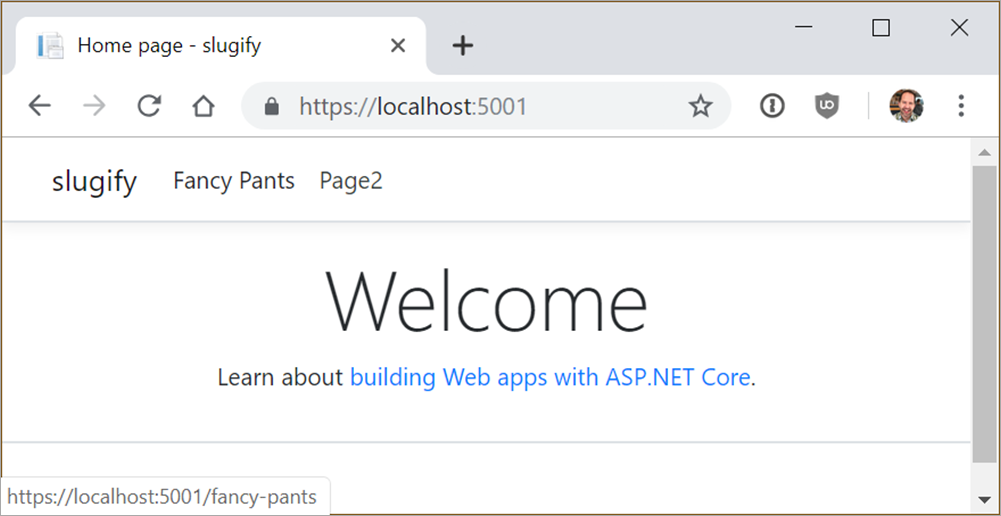
Now when I run my application, I get my routing both coming in (from the client web browser) and going out (generated via Razor pages. Here I’m hovering over the “Fancy Pants” link at the top of the page. Notice that it’s generated /fancy-pants as the URL.

image

So that same code from above that generates anchor tags <a href= gives me the expected new style of URL, and I only need to change it in one location.

There is also a new service called LinkGenerator that’s a singleton you can call outside the context of an HTTP call (without an HttpContext) in order to generate a URL string.

return _linkGenerator.GetPathByAction(
     httpContext,
     controller: "Home",
     action: "Index",
     values: new { id=42 });

This can be useful if you are generating URLs outside of Razor or in some Middleware. There’s a lot more little subtle improvements in ASP.NET Core 2.2, but this was the one that I will find the most useful in the near term.


Sponsor: Check out the latest JetBrains Rider with built-in spell checking, enhanced debugger, Docker support, full C# 7.3 support, publishing to IIS and more advanced Unity support.


© 2018 Scott Hanselman. All rights reserved.


from Scott Hanselman’s Blog http://feeds.hanselman.com/~/576834952/0/scotthanselman~ASPNET-Core-Parameter-Transformers-for-clean-URL-generation-and-slugs-in-Razor-Pages-or-MVC.aspx

Cisco CCNA Wireless Certification Exam Questions From PrepAway – Build Your Career of Successful Network Engineer

Cisco Corporation offers a scope of products and conveys coordinated solutions to create interface networks around the world. The organization’s exchanging items offer different types of availability to end clients, workstations, Internet Protocol (IP) telephones, wireless access points, and Servers and furthermore work aggregators on Wireless Local Area Network (WLAN).

Cisco CCNA Wireless Certification Exam Questions From PrepAway - Build Your Career of Successful Network Engineer

Image Source

Description

Cisco is a renowned vendor for different certifications tailored to approve the abilities of IT experts in the tech business. Among them is Cisco Wireless Network Associate certification acquired by completing the “Implementing Cisco Wireless Network Fundamentals (WiFUND)” course and Cisco 200-355 exam. CCNA Wireless certification is designed for people who have system administration foundational skills and basically need to find out about wireless systems, especially Cisco Wireless Systems.

All through the whole course, candidates get from top to bottom comprehension of systems administration field, using wireless routers alongside with switches and their different configurations. Basically, the exam is set to approve an individual’s grip of Wireless Topologies, Wireless RF Essentials, Wireless Models and a prologue to Wireless Security.

The cost of Cisco exam is $300. The candidates need to complete 60-70 multiple choice questions that test one’s insight into the usage of Wi-Fi in Cisco Systems. Each candidate is required to take a time that does not exceed 90 minutes to complete the exam. The exam incorporates design, support, and constrained investigating. Therefore, keeping in mind the end goal to be qualified for 200-355 exam, applicants need a working comprehension of essential systems administration (VLANs, IP addresses, standard subnetting and basic routing). Moreover, candidates need fundamental information of LAN ideas with a specific end goal to comprehend the ideas created in the Wireless educational programs. Subsequently, any CCENT, CNNA R&S or CCIE accreditation is required so as to get CCNA Wireless credential. For more detailed information about the certification exam follow the link: https://learningnetwork.cisco.com/community/certifications/wireless_ccna/wifund/exam-topics.

Preparation resources for exam 200-355

Cisco exams are quite intensive. The time that a candidate takes during the preparation varies, as it depends on the understanding ability which differs from one individual to another. However, the end result for anyone should be to successfully pass the exam. A portion of the suggested assets for CCNA Wireless 200-355 exam includes:

  1. Exam Dumps

The valid 200-355 exam questions cover the objectives of the exam. The practice exam is not only meant to help the candidates to understand the correct answer but also to know the reason why the other answers were incorrect. The best-sampled exam dumps that meet the required standards can be found on a number of website on the internet. Among the most popular websites are Prepaway.biz, and ExamCollection. The materials are offered in .vce, .ete, pdf formats. All the exam materials are up-to-date and verified by IT experts.

  1. Video training course

The CCNA Wireless 200-355 Complete Video Course is an exceptional video product that contains a progression of short instructional recordings that shows the way toward planning, reviewing, sending, arranging, and investigating Cisco Wi-Fi systems. The recordings cover the full scope of subjects that the candidates need to comprehend. The main concern is to ensure that the candidates are able to deal with a wireless system and effectively develop Cisco wireless solutions. Consequently, the best video courses can be accessed at ExamSnap or PrepAway websites.

  1. CCNA Wireless Certification Guide

This certification guide focuses on the objectives of the Cisco WIFUND 200-355 exam. It offers candidates an organized test-preparation routine through the use of proven techniques. The cert guide is regarded as the best due to its level of assessment features, comprehensive design scenarios and challenging review questions. This official study guide is important as it helps the candidates to grasp the concepts that will enable them to ace the exam at the first attempt. Some of the topics of the CCNA WIFUND exam covered include Antenna Theory, Cisco Wireless Architectures, and Wireless AP Coverage Planning. The Premium Edition incorporates the DVD content from the printed book, in a downloadable arrangement. Candidates are able to purchase this official study guide from Amazon website. To get the official guidebook for your exam preparation, click here: https://www.amazon.com/Wireless-200-355-Official-Guide-Certification/dp/1587144573.

Why Cisco CCNA Wireless Certification is Popular

CCNA Wireless certification is an associate-level certification. In spite of this fact, it draws in numerous advantages to the certification holders. To begin with, it demonstrates an individual’s technical skills, increasing the professional’s credibility – individuals who have acquired CCNA certification have better prospects of involving stable occupation in the reputed IT organizations.

The certification is an ideal indicator of expertise in working with advanced systems that have less than 100 nodes, thus approves an individual capacity to operate in both small and medium measured organizations that utilize less extensive networks. More precisely, CCNA Wireless certification shows that the professionals have the profound knowledge in handling networked systems.

Furthermore, it is a requirement for getting a more elevated amount Cisco certification – professionals who are passionate in acquiring a higher level in the Cisco Career certification hierarchy need to get CCNA certification first. The Cisco Certifications are formed in such a way that one forms a bridge for another.

In addition, people who have been awarded CCNA Wireless certification have demonstrated great aptitudes and involvement in installing, operating, and configuring WAN, LAN, and dial access services.

CCNA Wireless credential proves one as a solid, proficient network engineer. By completing the certification process not only provides validation but also trains the experts in numerous levels and areas regarding the ability to work with both routed and switched networks.

In conclusion, choosing Cisco 200-355 exam will strongly affect your networking knowledge. Whether you are starting out or shifting careers, technology advances day after day including those of businesses and governments. Passing the exam is the only way to show that you are qualified enough to get a more viable position. Much of the time, it is even obligatory to have a CCNA certification with a specific end goal to apply for networking positions.

The post Cisco CCNA Wireless Certification Exam Questions From PrepAway – Build Your Career of Successful Network Engineer appeared first on The Crazy Programmer.

from The Crazy Programmer https://www.thecrazyprogrammer.com/2018/10/cisco-ccna-wireless-certification-exam-questions-from-prepaway.html

Dependabot for .NET Core dependency tracking in GitHub

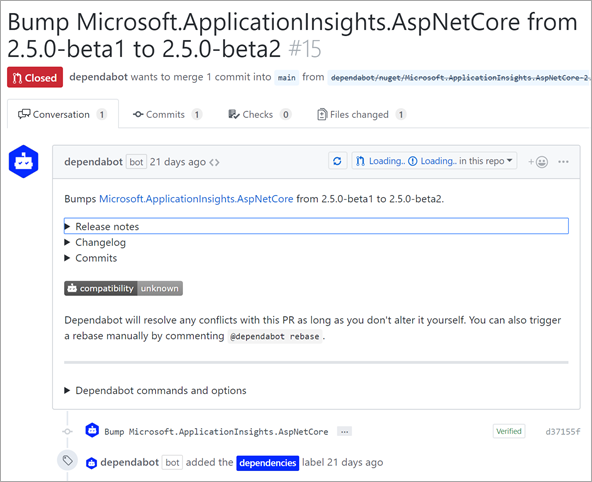
Bump Microsoft.ApplicationInsights.AspNetCore from 2.5.0-beta1 to 2.5.0-beta2I’ve been exploring automated dependency tracking lately. I usually use my podcast’s ASP.NET Core website that I host on Github as a guinea pig. I tried Nukeeper and the dotnet outdated global tool – both of which are fantastic and worth exploring.
This week I’m trying Dependbot. I have no relationship with this company. Public repos and personal account repos are free and their pricing is very clear and organization accounts start at just $15 with a free trial.

I’m really impressed with how clever Dependabot is. It’s almost like a person in its behavior. Yes, I realize that’s kind of the point, but it’s no less surprising to see. A well-written bot is a joy to behold.

For example, here is a PR (Pull Request) where Dependbot says “Bumps Microsoft.ApplicationInsights.AspNetCore from 2.5.0-beta1 to 2.5.0-beta2.”

Basic stuff, right? But that’s not all.

It not only does the basics where it noticed that a version bump occurred in a NuGet package, but it also copied the release notes from that NuGet package’s release on GitHub! It included links to what was fixed between versions, links to the change logs, AND a complete linked commit list. I mean, that’s just lovely.

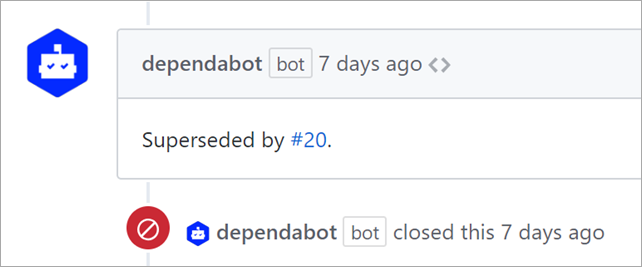
A few days later, Dependabot went and closed the PR because the dependancy had updated (I was slow) then it commented telling me this PR was superseded by another.

Superseded by #20

Dependabot, like any good bot, also includes commands you can send to it via “Chats” in GitHub PR comments. You can tell it to use specific labels, control milestones. You can also control behavior in the Dependabot Dashboard and have it automerge things like minor versions, or just lock things down to security-only updates.

All in all, it’s a very smart bot that supports basically all the languages. .NET support is in Beta, but I haven’t had any issues with it. You should definitely check it out. And let me tell you, once you’ve got everything automated you’ll wonder how you ever managed before.


Sponsor: Check out the latest JetBrains Rider with built-in spell checking, enhanced debugger, Docker support, full C# 7.3 support, publishing to IIS and more advanced Unity support.


© 2018 Scott Hanselman. All rights reserved.


from Scott Hanselman’s Blog http://feeds.hanselman.com/~/576069664/0/scotthanselman~Dependabot-for-NET-Core-dependency-tracking-in-GitHub.aspx

7 Critical Tips to Learn Programming Faster

Programming is a skill that more and more people have been learning over the past few years. In addition to the hundreds of thousands of Americans who work as computer programmers in the USA, there are thousands and thousands more who program for fun or in their spare time.

However, learning this skill can sometimes feel like an uphill battle with a lot to learn and think about. In an effort to help you out, we have decided to craft an article all about providing you with some tips to help you learn programming faster.

7 Critical Tips to Learn Programming Faster

Image Source

Consider Which Language You Will Learn

Before even learning to program, you need to choose which programming language you will learn. Now, there is no rule about only having to learn a single language, but when you are just starting, there are some that are easier to learn and might make a better option to start with, such as Python and Java.

If you start with a very complex and tough-to-learn language, it may deter you from continuing and getting somewhere with programming. Of course, the language you will learn will also depend on what you want to use the code for, but you can’t discount how important it is to start with something you can handle.

Practice, Practice and More Practice

You can read all the books you want and watch all the videos you can, but in order to get better at programming, you have to actually get down and practice. The quicker you actually start playing around with the code and practicing, the better. It might be frustrating and hard right off the bat, but the more you practice the better you will get.

Also, practice is an ongoing thing that you should continue doing even after you have learned to program. If you go a long time without programming, you could lose the skills, which is never a good thing. Because of this, you should spend some time keeping fresh and practicing frequently.

Learn the Fundamentals First

While you might want to dive into the advanced concepts and material right away, you need to dip your toes in before diving in the deep end. No matter how simple or easy the fundamentals might seem, it is important to learn them first. If not, you might find yourself scratching your head once you do reach those more advanced steps. The better you understand the basics, the easier the more advanced concepts will be to grasp.

Play Games and Work Through Tutorials

When you are just sitting down and coding for hours on end, it can get a bit monotonous. It may not keep you engaged, and some people might have troubles keeping it up. If that sounds like you, then you might want to either play some games or work through tutorials.

There are several simple and basic coding-related games out there that are not only fun but can also help you learn. Also, there are thousands of tutorials for every different programming language under the sun, which can all help you learn without it being too dull.

Be Sure to Log

While you might not think about it, logging is one of the most important tools any programmer or developer will have. Logging is all about getting more data about what your code is doing, which can help with debugging and programming itself. It is also helpful in managing complex programming.

Of course, if you are going to log, you will need some log management to keep things well managed. Check out this link to learn more about log management: Configuring centralized logging from Python apps · Papertrail log management

Don’t Be Scared to Seek Out Help

While most coding work is done alone, that doesn’t mean you need to learn alone. The internet is full of literally thousands of different resources that can help you learn about coding. Whether this is posting a question on a subreddit, participating in a forum discussion or even personally reaching out to a programmer you know.

Some people hate asking for help, but the quicker you get over that fear, the quicker you will be able to learn to code and program effectively. Many people are eager to help out newcomers, so you should easily be able to find help and answers to your questions.

Take Some Breaks and Don’t Burn Yourself Out

Take Some Breaks and Don’t Burn Yourself Out

Image Source

When working on code and trying to learn how to program better, you can often be sitting down at a desk or computer for hours and hours at a time. As you could imagine, this can be terrible for your body and it is recommended that you get up and take some breaks.

In addition to that, it is easy to get discouraged or “stuck” when trying to learn or fix a problem. Sometimes, all it takes is a few minutes of clarity and stretching to get you back on track. This could save you a lot of time and energy in the long run, as well.

In conclusion, we hope that this article has been able to help you learn a few more tips and tricks to increase how quickly you are able to learn to program. Of course, these tips aren’t guaranteed to turn you into the fastest coder ever, but they definitely should help.

The post 7 Critical Tips to Learn Programming Faster appeared first on The Crazy Programmer.

from The Crazy Programmer https://www.thecrazyprogrammer.com/2018/10/7-critical-tips-to-learn-programming-faster.html

Real world ASP.NET Core Performance Tips from a Real customer

When the engineers on the ASP.NET/.NET Core team talk to real customers about actual production problems they have, interesting stuff comes up. I’ve tried to capture a real customer interaction here without giving away their name or details.

The team recently had the opportunity to help a large customer of .NET investigate performance issues they’ve been having with a newly-ported ASP.NET Core 2.1 app when under load. The customer’s developers are experienced with ASP.NET on Windows but in this case they needed help getting started with performance investigations with ASP.NET Core in Linux containers.

As with many performance investigations, there were a variety of issues contributing to the slowdowns, but the largest contributors were time spent garbage collecting (due to unnecessary large object allocations) and blocking calls that could be made asynchronous.

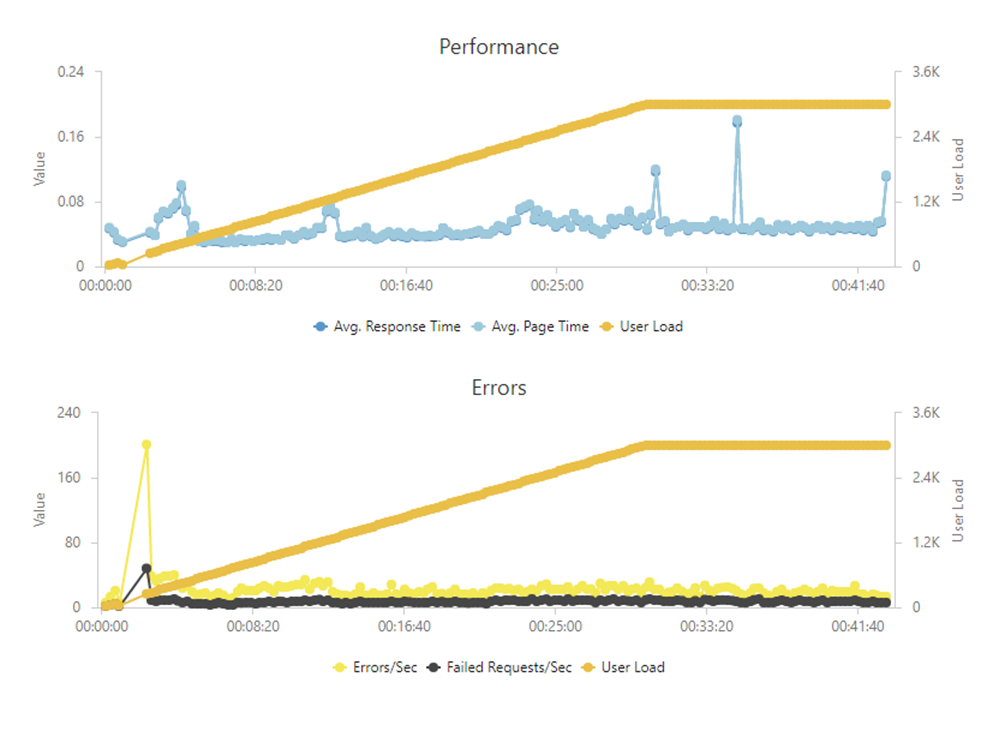
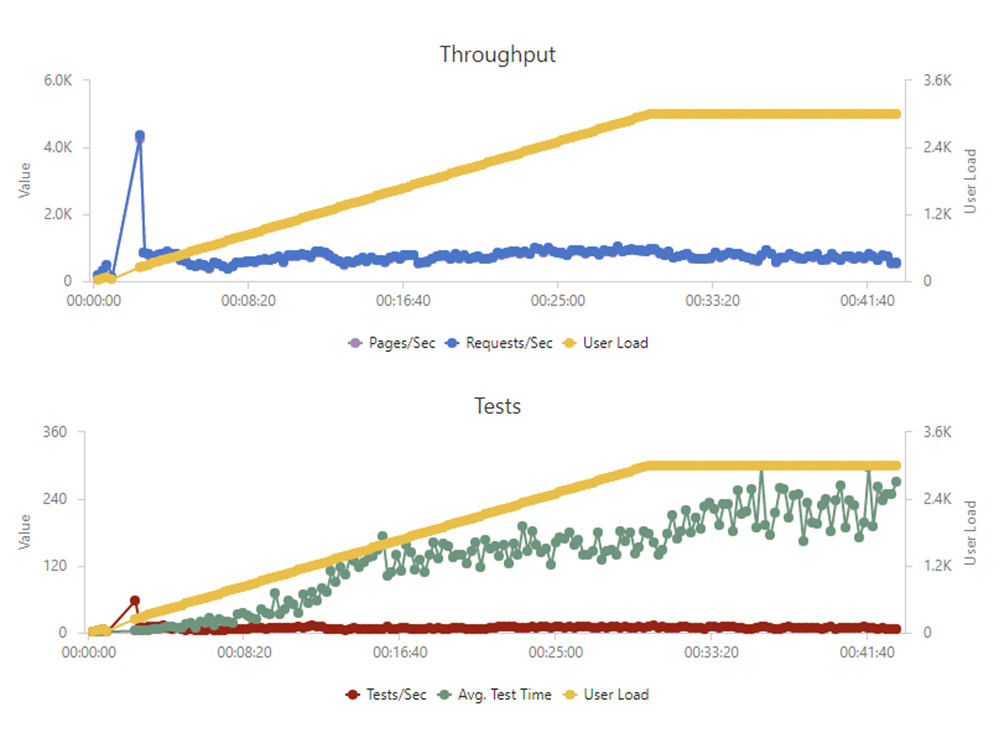
After resolving the technical and architectural issues detailed below, the customer’s Web API went from only being able to handle several hundred concurrent users during load testing to being able to easily handle 3,000 and they are now running the new ASP.NET Core version of their backend web API in production.

Problem Statement

The customer recently migrated their .NET Framework 4.x ASP.NET-based backend Web API to ASP.NET Core 2.1. The migration was broad in scope and included a variety of tech changes.

Their previous version Web API (We’ll call it version 1) ran as an ASP.NET application (targeting .NET Framework 4.7.1) under IIS on Windows Server and used SQL Server databases (via Entity Framework) to persist data. The new (2.0) version of the application runs as an ASP.NET Core 2.1 app in Linux Docker containers with PostgreSQL backend databases (via Entity Framework Core). They used Nginx to load balance between multiple containers on a server and HAProxy load balancers between their two main servers. The Docker containers are managed manually or via Ansible integration for CI/CD (using Bamboo).

Although the new Web API worked well functionally, load tests began failing with only a few hundred concurrent users. Based on current user load and projected growth, they wanted the web API to support at least 2,000 concurrent users. Load testing was done using Visual Studio Team Services load tests running a combination of web tests mimicking users logging in, doing the stuff of their business, activating tasks in their application, as well as pings that the Mobile App’s client makes regularly to check for backend connectivity. This customer also uses New Relic for application telemetry and, until recently, New Relic agents did not work with .NET Core 2.1. Because of this, there was unfortunately no app diagnostic information to help pinpoint sources of slowdowns.

Lessons Learned

Cross-Platform Investigations

One of the most interesting takeaways for me was not the specific performance issues encountered but, instead, the challenges this customer had working in a Linux environment. The team’s developers are experienced with ASP.NET on Windows and comfortable debugging in Visual Studio. Despite this, the move to Linux containers has been challenging for them.

Because the engineers were unfamiliar with Linux, they hired a consultant to help deploy their Docker containers on Linux servers. This model worked to get the site deployed and running, but became a problem when the main backend began exhibiting performance issues. The performance problems only manifested themselves under a fairly heavy load, such that they could not be reproduced on a dev machine. Up until this investigation, the developers had never debugged on Linux or inside of a Docker container except when launching in a local container from Visual Studio with F5. They had no idea how to even begin diagnosing issues that only reproduced in their staging or production environments. Similarly, their dev-ops consultant was knowledgeable about Linux infrastructure but not familiar with application debugging or profiling tools like Visual Studio.

The ASP.NET team has some documentation on using PerfCollect and PerfView to gather cross-platform diagnostics, but the customer’s devs did not manage to find these docs until they were pointed out. Once an ASP.NET Core team engineer spent a morning showing them how to use PerfCollect, LLDB, and other cross-platform debugging and performance profiling tools, they were able to make some serious headway debugging on their own. We want to make sure everyone can debug .NET Core on Linux with LLDB/SOS or remotely with Visual Studioas

The ASP.NET Core team now believes they need more documentation on how to diagnose issues in non-Windows environments (including Docker) and the documentation that already exists needs to be more discoverable. Important topics to make discoverable include PerfCollect, PerfView, debugging on Linux using LLDB and SOS, and possibly remote debugging with Visual Studio over SSH.

Issues in Web API Code

Once we gathered diagnostics, most of the perf issues ended up being common problems in the customer’s code. 

  1. The largest contributor to the app’s slowdown was frequent Generation 2 (Gen 2) GCs (Garbage Collections) which were happening because a commonly-used code path was downloading a lot of images (product images), converting those bytes into a base64 strings, responding to the client with those strings, and then discarding the byte[] and string. The images were fairly large (>100 KB), so every time one was downloaded, a large byte[] and string had to be allocated. Because many of the images were shared between multiple clients, we solved the issue by caching the base64 strings for a short period of time (using IMemoryCache).
  2. HttpClient Pooling with HttpClientFactory
    1. When calling out to Web APIs there was a pattern of creating new HttpClient instances rather than using IHttpClientFactory to pool the clients.
    2. Despite implementing IDisposable, it is not a best practice to dispose HttpClient instances as soon as they’re out of scope as they will leave their socket connection in a TIME_WAIT state for some time after being disposed. Instead, HttpClient instances should be re-used.
  3. Additional investigation showed that much of the application’s time was spent querying PostgresSQL for data (as is common). There were several underlying issues here.
    1. Database queries were being made in a blocking way instead of being asynchronous. We helped address the most common call-sites and pointed the customer at the AsyncUsageAnalyzer to identify other async cleanup that could help.
    2. Database connection pooling was not enabled. It is enabled by default for SQL Server, but not for PostgreSQL.
      1. We re-enabled database connection pooling. It was necessary to have different pooling settings for the common database (used by all requests) and the individual shard databases which are used less frequently. While the common database needs a large pool, the shard connection pools need to be small to avoid having too many open, idle connections.
    3. The Web API had a fairly ‘chatty’ interface with the database and made a lot of small queries. We re-worked this interface to make fewer calls (by querying more data at once or by caching for short periods of time).
  4. There was also some impact from having other background worker containers on the web API’s servers consuming large amounts of CPU. This led to a ‘noisy neighbor’ problem where the web API containers didn’t have enough CPU time for their work. We showed the customer how to address this with Docker resource constraints.

Wrap Up

As shown in the graph below, at the end of our performance tuning, their backend was easily able to handle 3,000 concurrent users and they are now using their ASP.NET Core solution in production. The performance issues they saw overlapped a lot with those we’ve seen from other customers (especially the need for caching and for async calls), but proved to be extra challenging for the developers to diagnose due to the lack of familiarity with Linux and Docker environments.

Performance and Errors Charts look good, up and to the right

Throughput and Tests Charts look good, up and to the right

Some key areas of focus uncovered by this investigation were:

  • Being mindful of memory allocations to minimize GC pause times

  • Keeping long-running calls non-blocking/asynchronous

  • Minimizing calls to external resources (such as other web services or the database) with caching and grouping of requests

Hope you find this useful! Big thanks to Mike Rousos from the ASP.NET Core team for his work and analysis!


Sponsor: Check out the latest JetBrains Rider with built-in spell checking, enhanced debugger, Docker support, full C# 7.3 support, publishing to IIS and more advanced Unity support.


© 2018 Scott Hanselman. All rights reserved.


from Scott Hanselman’s Blog http://feeds.hanselman.com/~/575095434/0/scotthanselman~Real-world-ASPNET-Core-Performance-Tips-from-a-Real-customer.aspx

Design a site like this with WordPress.com
Get started